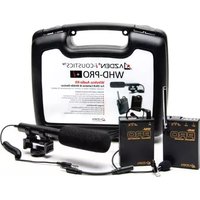
WHD-PRO + I - Microphone Azden - Free user manual and instructions
Find the device manual for free WHD-PRO + I Azden in PDF.


| Brand | Azden |
| Model | WHD-PRO + I |
| Product Type | Wireless Microphone Kit |
| Frequency Band | VHF, 169.445 MHz (F1) and 170.245 MHz (F2) |
| Modulation | FM |
| Receiver Dimensions | 86 x 60 x 21.5 mm |
| Receiver Weight | 128 g (including battery) |
| Shotgun Mic Dimensions | 18.2 mm dia x 177 mm length |
| Shotgun Mic Weight | 52 g (without battery), 98 g (with battery) |
| Power Source (Receiver & Transmitter) | 1 x 9V battery each (not included) |
| Power Source (Shotgun Mic) | 1 x AAA battery (not included) |
| Battery Life | Up to 10 hours continuous use |
| Included Accessories | WR-PRO Receiver, WM-PRO Transmitter, EX-503 Lavalier Mic, SGM-990 Shotgun Mic, HX-i Smartphone Cable |
| Lavalier Mic Type | Electric Condenser (EX-503) |
| Shotgun Mic Type | Super Cardioid Electret Condenser (SGM-990) |
| Frequency Response (Shotgun) | 100 Hz – 20 kHz |
| Sensitivity (Shotgun) | -40 dB (1 kHz, 1V/Pa) |
| Output Impedance (Shotgun) | LONG: 1.7 kΩ, SHORT: 760 Ω |
| Signal-to-Noise Ratio (Shotgun) | >60 dB |
| Max SPL (Shotgun) | 100 dB |
| Reception Sensitivity (Receiver) | 2 μV at S/N 40 dB |
| Power Consumption (Receiver) | 25 mA |
| Warranty | 2-year limited warranty |
| Usage | For cameras, smartphones, and tablets |
Frequently Asked Questions - WHD-PRO + I Azden
User questions about WHD-PRO + I Azden
0 question about this device. Answer the ones you know or ask your own.
Ask a new question about this device
Download the instructions for your Microphone in PDF format for free! Find your manual WHD-PRO + I - Azden and take your electronic device back in hand. On this page are published all the documents necessary for the use of your device. WHD-PRO + I by Azden.
USER MANUAL WHD-PRO + I Azden
- Do not store or use the products in high heat or humidity.
- Do not use near a broadcast station, airport or plane. You must change the frequencies if you are interfering with other transmitters.
- The system will work continuously for 10 hours on one set of batteries. If sound quality is poor, change batteries.
- Remove batteries when the system is not in use.
Thank you for purchasing the AZDEN WHD-PRO Audio Kit. The following contents are included in your kit:
1 x WR-PRO VHF Receiver
1 x WM-PRO VHF Belt-Pack Transmitter
1 x EX-503 Lavalier Microphone
1 x SGM-990 Directional Microphone
1 x HX-i Smartphone Connector Cable
The PRO systems operate in the low-interference VHF band and have 2 switchable frequencies, 169.445 (F1) and 170.245 (F2). You should select the quieter frequency for use.
The systems conforms to Part 90 of the FCC rules. You should contact the FCC office for filing forms.
WR-PRO RECEIVER
1. Loading Battery
Open the battery compartment lid by sliding it down and raising the lid. Insert a 9-volt battery into the battery compartment with the correct polarity. Directions are on the inside of the battery compartment. Do not force the battery compartment lid to close. If it does not close easily, turn the battery around and try again.
2. Power/Frequency Selector Switch
This slide switch is used to turn the unit on and off as well as to select a frequency. When not using the WR-PRO, make sure that the switch is turned to OFF.
3. Signal Indicator
This LED has 2 functions: When you first turn the Power/Frequency Selector Switch of the Receiver on, but if the Transmitter is not on, the LED will show red indicating that the battery is good. If both the Transmitter and the Receiver are on and they are on the same frequency, the Receiver LED will show green and the Transmitter LED will show red.
4. Shoe Mount
The Receiver comes with an attached shoe mount for mounting to a camera. You can also attach the Receiver with the enclosed loop and hook fastener. The shoe mount can be easily removed from the Receiver by unscrewing the Phillips head screw in the center of the shoe mount.
5. Output Plug
Connect the plug from the Receiver into the camera's "STEREO EXT. MIC" jack.
6. Telescopic Antenna
Fully extend the antenna for the best reception.
7. Earphone Jack
Plug an earphone (not included) into the jack to monitor the sound you are recording.
WM-PRO TRANSMITTER
1. Loading Battery
Insert (1) 9-volt battery into the battery compartment. Be careful not to force the battery compartment lid closed.
2. Microphone
Plug the EX-503 (lavalier mic). Extend the cord as much as possible since it doubles as the transmitter's antenna.
3. Power/Frequency Selector Switch
This switch is used to turn the unit on and off as well as to select a frequency.
4. Mounting
The Transmitter can be attached to a belt using the clip provided or placed in a pocket.
SGM-990 SHOTGUN MICROPHONE
1. Battery
Unscrew lower half of the microphone by turning the case counterclockwise. Insert one AAA Alkaline battery into the case making sure polarity is correct. Close the case by turning it clockwise. DO NOT OVER-TIGHTEN or you may strip the threads.
2. Shock-Mount Holder
The SGM-990 is supplied with a shock-mount holder. Snap the rear portion of the microphone into the holder. To secure the holder to a camera shoe, slide the holder into the camera shoe and tighten the thumbwheel by turning it clockwise.
3. Windscreen
Slide the windscreen over the front end of the microphone and cover all the vents on the barrel.
4. 3.5mm Stereo Output Mini-Plug
Insert the plug into your camera's "STEREO EXT. MIC" jack.
5. Power Switch
Turn the power switch to "ON" for normal operation. When not in use, turn the microphone to "OFF" to avoid draining the battery.
6. Long/Short Pattern Switch
Slide the switch upward (or toward the front of the microphone) to turn on the LONG setting to enable the Super-cardioid pickup pattern for further distances or slide it back to SHORT for a directional omni-style pickup pattern.
HX-i ADAPTER CABLE
- To use the HX-i cable with your smartphone or tablet, insert the TRRS (4-pin male) end of the cable into your smartphone or tablet.
- If you are using the wireless microphone system, insert the STEREO (3-pin) end of the WR-PRO receiver's output cable into the HX-i
- If you are using the SGM-990, insert the STEREO (3-pin) end of the output cable into the HX-i.
SPECIFICATIONS
SGM-990 SHOTGUN MICROPHONE
TYPE: Super Cardioid Electret Condenser
SENSITIVITY: -40dB (at 1kHz 1V/Pa)
FREQUENCY RESPONSE: 100Hz—20kHz
OUTPUT IMPEDANCE: LONG: 1.7kΩ
SHORT: 760Ω
POWER SOURCE: DC1.5V AAA size battery
MAX SPL: 100dB
SIGNAL NOISE RATIO: More than 60dB
DIMENSIONS: 18.2mm× 177mm
WEIGHT: 52g (not including the battery)
POLAR PATTERN

WEIGHT (including battery): 98g
MICROPHONE: Electric Condenser (EX-503)
WR-PRO RECEIVER
RECEPTION FREQUENCY: F1—169.445MHz
F2-170.245MHz
Double Superheterrodyne System
RECEPTION SENSITIVITY: 2μV at S/N 40dB
BATTERY: 9V x 1 (not included)
POWER CONSUMPTION: 25mA
MONITOR OUTPUT: Voltage: 1V
(Load: 30Ω, Modfreq: 1KHz, Dev: ±7KHz)
MICROPHONE OUTPUT: Voltage: 8mV
(Load: 10KΩ, Modfreq: 1KHz, Dev: ±7KHz, Impedance: 300Ω)
DIMENSIONS: 86(h) X 60(w) X 21.5(d)mm
WEIGHT: 128g (including battery)
TWO YEAR LIMITED WARRANTY
AZDEN CORPORATION warrants to the first consumer purchaser that the product purchased is free from defects in material and workmanship. AZDEN's sole obligation under this warranty shall be to provide, without charge, repair or replacement (at AZDEN's sole discretion), within two years from the date of purchase. The cost to ship a failed product to and from AZDEN or its dealers shall not be covered by this warranty. A dated receipt acts to establish the date of purchase and no registration is necessary to receive warranty service
This warranty is the sole and exclusive express warranty given with respect to the product and all other express warranties are hereby excluded. Neither AZDEN nor the dealer who sells the product is responsible for indirect, incidental, or consequential damages.
This warranty does not extend to any defect, malfunction, or failure caused by misuse, abuse, accident, or defective associated equipment for which it was not intended. Please read instructions carefully.
- WR-PRO RECEIVER
- Loading Battery
- Power/Frequency Selector Switch
- Signal Indicator
- Shoe Mount
- Output Plug
- Telescopic Antenna
- Earphone Jack
- WM-PRO TRANSMITTER
- Microphone
- Power/Frequency Selector Switch
- Mounting
- SGM-990 SHOTGUN MICROPHONE
- Battery
- Shock-Mount Holder
- Windscreen
- 3.5mm Stereo Output Mini-Plug
- Power Switch
- Long/Short Pattern Switch
- HX-i ADAPTER CABLE
- SPECIFICATIONS
- TWO YEAR LIMITED WARRANTY
Brand : Azden
Model : WHD-PRO + I
Category : Microphone