
SPA5250B - Loudspeaker PHILIPS - Free user manual and instructions
Find the device manual for free SPA5250B PHILIPS in PDF.


| Product Type | Speaker System |
| Model | SPA5250B |
| Brand | Philips |
| Speaker Configuration | 2.1 Channel (2 satellites + subwoofer) |
| Dimensions (Satellite) | Approx. 8 x 15 x 10 cm |
| Dimensions (Subwoofer) | Approx. 20 x 25 x 20 cm |
| Weight (total) | Approx. 2.5 kg |
| Power Source | AC 100-240V via power adapter |
| Audio Input | 3.5mm stereo jack |
| Controls | Volume knob, power button |
| Frequency Response | 50 Hz - 20 kHz |
| Power Output | RMS: 10W total |
| Cable Length (satellite) | Approx. 1.5 m |
| Compatibility | PC, laptop, smartphone, tablet |
| Cleaning Instructions | Wipe with a soft, dry cloth. Do not use liquid cleaners. |
| Safety Precautions | Keep away from water and heat sources. Unplug during storms. |
| Repairability | Non-user serviceable. Contact Philips support for repairs. |
Frequently Asked Questions - SPA5250B PHILIPS
User questions about SPA5250B PHILIPS
0 question about this device. Answer the ones you know or ask your own.
Ask a new question about this device
Download the instructions for your Loudspeaker in PDF format for free! Find your manual SPA5250B - PHILIPS and take your electronic device back in hand. On this page are published all the documents necessary for the use of your device. SPA5250B by PHILIPS.
USER MANUAL SPA5250B PHILIPS
natural_image
Black Philips 3D audio amplifier with multiple speakers and a digital display (no visible text or symbols)User manual
Register your product and get support at www.philips.com/welcome
General information
Safety instructions
Please read carefully the safety mark on the back side

This mark is intended to alert the user from the non isolated dangerous voltage within the product that may be of sufficient magnitude to constitute a risk of electric shock to persons.

This mark is intended to alert the user for important operating and servicing instruction.
Warnings
- Avoid sustained periods on high-volume use, and do not turn the volume to maximum level while using high output signal, such as Mobile Phone or DVD, etc., as this will cause distortion and may damage the loudspeaker cones.
- Please switch off the system from the wall socket, when not in use.
- Do not open the cover or back panel to avoid electrical shock or any other accidents. No user-serviceable parts are inside.
- Only for indoor use.
- Plug the system to the AC outlet with the right voltage marked on the back panel of the Subwoofer.
- The MAINS plug is used as the disconnect device, the disconnect device shall remain readily operable.
Accessories
- The product shall not be exposed to dripping or splashing and that no objects filled with liquids, such as vases, shall be placed on the product.
- Batteries shall not be exposed to excessive heat such as sunshine, fire or the like.
- Attention should be drawn to the environmental aspects of battery disposal.
Care and safety information
Avoid high temperatures, moisture, water and dust
- Apparatus should not be exposed to dripping or splashing of liquid.
- Do not place any source of danger on the Subwoofer, and satellite (e.g. liquid filled objects lighted candles).
- Do not install near heat sources.
Do not block any ventilation opening
- Place the apparatus in a location with adequate ventilation to prevent internal heat build up. Allow at least 10cm (4 inches) of free space all around the apparatus for adequate ventilation.
- At high volume the back cover of Subwoofer becomes hot. Do not touch it.
Care of the cabinet
- Use a soft cloth slightly moistened to clean the cabinet. Do not use a solution containing alcohol, spirits, ammonia or abrasives.
| Item | 2RCA to 2RCA cable | Remote control | User manual | FM Antenna cable | 3.5mm stereo cable to 2RCA |
| Quantity | 31111 |
Connections
Subwoofer Back panel

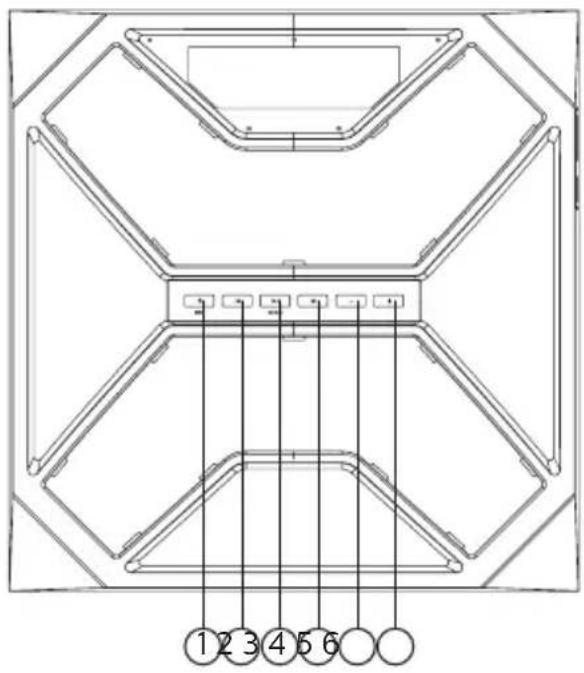
Front panel operation
- ⏻ SRC
4.
2.
-
-
-
▶II SCAN
-
+
* AVAILABLE IF CONNECTED
1. ⏻ SRC
Press to turn on speaker, long press into stand-by. Change the input mode – AUH for Audio in, bt for Bluetooth, dUd for DVD, USb for USB*, Sd for SD*, 87.5 for FM by short press.
2.
Play previous song in USB*, SD* & BT mode or go to previous preset station in FM mode.
3. ▶|| SCAN
Long-press to auto store (scan) stations in FM mode and short-press can play or pause a played song alternately in USB*, SD*, and BT mode.
4.
Play next song in USB*, SD*, & BT mode or go to next preset station in FM mode.
5. -
Long-press volume down and short press decrease each step by 0.1MHz in FM mode only. Short-press volume down step by step and long press volume down, when in all modes except FM mode.
6. +
Long-press volume up and short press increase each step by 0.1MHz in FM mode only. Short-press volume up step by step and long press volume up, when in all modes except FM mode.
Remote controls
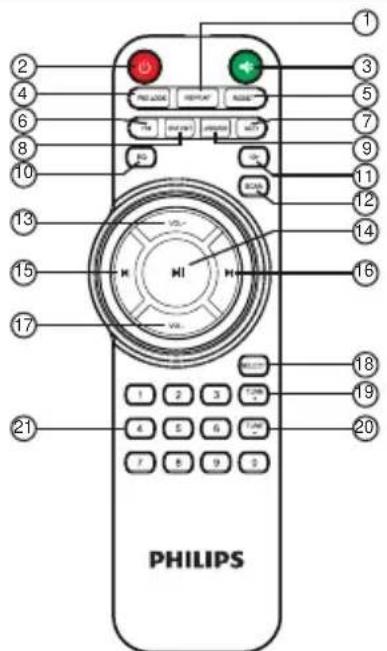
| 1.REPEAT | 12.SCAN |
| 2.ST-BY | 13.VOL+ |
| 3.MUTE | 14.PLAY/PAUSE |
| 4.PRO-LOGIC | 15.PREVIOUS |
| 5.RESET | 16.NEXT |
| 6.FM | 17.VOL- |
| 7.AUD | 18.SELECT |
| 8.DVD/BT | 19.TUNE+ |
| 9.USB/BT | 20.TUNE- |
| 10.EQ | 21.0~9 |
| 11.10+ |
* AVAILABLE IF CONNECTED
1.REPEAT----To put system into REPEAT mode in USB/SD mode only.
2. ⏻ ----Turn on/Stand-by the speaker.
3. ----Press "MUTE" to activate or deactivate mute, display blinks, when at MUTE mode.
4.PRO-LOGIC----Enable or disable the function of the PRO-LOGIC. In case of USB/SD/FM/BT, you can switch the output from 2.1 to 5.1 and in case of DVD mode, it selects between prologic off (real 5.1) and prologic on(for surround sound).
5. RESET----Reset all user settings.
6.FM----Press "FM" to enter 106.4 for FM radio.
7.AUD----Press "AUD" to enter audio input.
8. DVD/BT----Press "DVD/BT" to enter DVD input, and then short-press to switch to "bt" for Bluetooth.
9. USB/SD----Press "USB/SD" to enter USB input, and then short-press to switch to SD input.
10.EQ----Different equalizer mode "POP, ROCK, JAZZ, CLASSIC, COUNTRY" can be selected in USB/SD mode only.
11.10+ ----To select and play the music track present after the 10 tracks.
12. SCAN----Long press "SCAN", it will enter into automatic search and automatic save channel in FM mode.
13.VOL+----Volume up.
14. ▶I----Play or pause the music by pressing "▶" at USB*/SD*/BT mode.
15. ▶ ----Play the previous song by pressing " ▶" at USB*/SD*/BT mode.
Choose previous channel by pressing "◀" at FM mode.
16. ▶ ----Play the next song by pressing “▶” at USB*/SD*/BT mode.
Choose next channel by pressing “▶” at FM mode.
17.VOL- ----Volume down.
18. SELECT----Press"SELECT" key can switch to different channels [FL(front speakers) / SL(surround speakers) / CE(Centre speaker) / SU(subwoofer)]. At the same time, press"VOL+/-" to increase or decrease every channel's volume. The number of numeral tube will change accordingly.
19. TUNE+ ----Press "TUNE+" each time to search channel step by step(each step 0.1 MHz). Long press "TUNE+", it will search next channel and play the channel automatically.
20.TUNE- ----Press"TUNE-"each time to search channel step by step(each step(-) 0.1 MHz). Long press "TUNE-", it will search previous channel and play the channel automatically.
21.0-9----Numeric keys, with the help of these keys you select song or track in USB, and in FM, you can key in station frequency, i.e. for 92.7 key in 92.7.
Playing the speakers and subwoofer
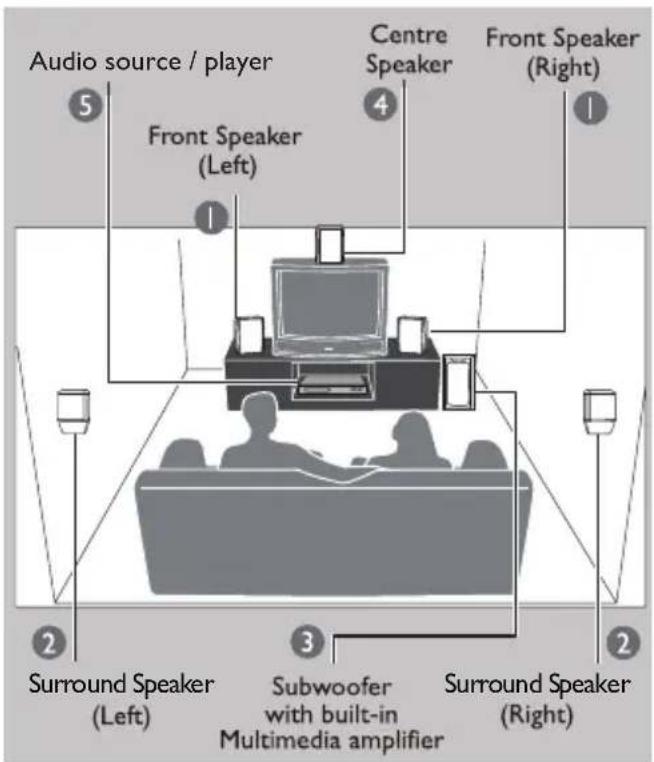
System positioning :
The subwoofer is recommended to be put on the floor to get a better acoustic effect.
For best possible surround sound, all the speakers (except subwoofer) should be placed at the same distance from the listening position.
Place the front left and right speakers at equal distances from the TV and at an angle of approximately 45 degrees (horizontal) from the listening position.
Place the centre speaker above the TV so that the centre channel's sound is localised.
Place the surround speakers at normal listening, ear level facing each other or mounted on the wall.
Helpful Hint:
- To avoid magnetic interference, do not position the speakers, too close to your TV.
Bluetooth Operating Instruction
- Press SRC key from front panel or remote "DVD/BT" key to go to Bluetooth;
- When selected the Bluetooth mode, in display, "bt" will start blinking and hear an audio tone which indicate in Bluetooth pairing mode.
- For pairing with mobile phone or other Bluetooth devices, search the device named "Philips SPA5250B" and pair it. Once paired, "bt" stops blinking and an audio tone will come up.
- Press and hold "▶" for continuous 3 seconds from remote in order to force disconnect the Bluetooth.
Note: While using Bluetooth, if external call comes, then speaker system goes in mute mode in order to protect privacy of mobile phone user. Operation resumes once the call is disconnected.
Troubleshooting
Warning -
Under no circumstances should you try to repair the system yourself, as this will invalidate the warranty. Do not open the system as there is a risk of electric shock. If a fault occurs, first check the points listed below before taking the system for repair. If you are unable to remedy the problem by following hints mentioned in below table, Consult your dealer or PHILIPS APSC for help.
| Problem Solution | |
| 1. No power. | Check if the AC power cord is properly inserted into the AC mains socket. |
| 2. No sound or distorted sound. | Adjust the volume / select the correct source to choose the equipment that you want to hear through the system. |
| 3. The remote control does not function properly. | Reduce the distance between the remote control and the system. Replace the batteries with new ones / Point the remote control directly towards the IR sensor (located on front panel of the subwoofer) / Check that the batteries are loaded correctly / Switch off the system for 30 seconds and then restart. |
| 4. Low hum or buzz sound. | Place the product as far away as possible from electrical devices that may be causing interference / Check power supply voltage and consult electrician. |
| 5. The content of the USB / SD flash drive cannot be read. | The USB / SD flash drive format is not compatible with the system. Drive is formatted with a different file system which is not supported by this unit (e.g. NTFS). |
| 6. Slow operation of the USB / SD flash drive / cannot detect USB / SD flash drive. | Big memory size USB / SD flash drive will take longer time to read and play. / Take out USB / SD drive and insert it again properly. |
| 7. FM not properly tuned. Match with local frequency. | |
| 8. FM reception not good. | While listening radio turn off TV / DVD or other radiation source. |
| 9. BT not working. Reduce the distance or device is not paired. |
In case these measures do not work contact the nearest PHILIPS service center or call at customer care numbers.
Warranty
This Philips 5.1 multimedia speakers system is warranted against any defect due to defective materials or workmanship for 12 months from the date of purchase, should a defect develop during the period of warranty, Gibson Innovations India Private Limited undertake to repair the apparatus FREE OF CHARGE through the dealer from whom it has been purchased or at any of the Philips Authorised Service Centres.
The warranty is not valid in case :
- Proof of purchase is not accompanied with this warranty card.
- The warranty card is not completed immediately after purchase.
- The apparatus is not used according to this manual.
- Defects are caused by improper or reckless use.
- Any repairs are done by persons other than Philips Authorised service centre.
- Any modifications or alteration of any nature are made in the apparatus.
- The serial number is tampered with.
- Defects due to causes beyond control like lightning, abnormal voltage, acts of God or while in transit to the purchaser's residence.
All consumables and parts susceptible to normal wear and tear are not covered under warranty.
Week/S.No.: ____ Bill No. ____
Date of purchase ____
Dealer's name: ____
Dealers stamp:
Customer's name and address: ____
Model No.:
Dealer's signature:
Gibson Innovations India Private Limited 4th Floor, Block-1, Vatika Business Park, Sector 49, Sohna Road, Gurgaon-122018, Haryana, India
Product specifications\*
| Total system power 150W RMS | |
| Satellite speaker power 19Wx5 RMS | |
| Subwoofer power 55W RMS | |
| Separation >40 dB | |
| SNR >60 dB | |
| Audio input socket RCA | |
| Audio output socket RCA | |
| Power consumption | 120W |
| Subwoofer speaker 1 Way | |
| Drive size 8 inches | |
| Impedance 8 Ohm | |
| Frequency range 2 0Hz - 150Hz | |
| Dimension (mm) W x H x D | 316 x 322 x 436 |
| Net Weight 10.9 kg | |
| Satellite speaker power | 1 Way, 5 Speakers |
| Drive size | SAT 3 inchesCEN 4 inches |
| Impedance | 4 Ohm |
| Frequency range | 150Hz - 20KHz |
| Product Dimension (mm) W x H x D | SAT 130 x 223 x 128CEN 316 x 130 x 128 |
| Net Weight | SAT 1.18 kgCEN 1.19 kg |
| BT version | V4.0 |
| BT range | Up to 10 meter(freespace) |
| USB class support | UMS (USB mass storage class) |
| USB capacity | Up to 16GB |
| USB playability | MP3 format file |
*Specification subject to change without prior notice. Measured under specific conditions.
The Philips trademark and Philips shield emblem are registered trademarks of koninklijke Philips N.V. used under license.
This product has been manufactured by and sold under the responsibility of Gibson Innovations India Private Ltd. and Gibson Innovations India Private Ltd. is the warrantor in relation to this product.

Question?
Contact
Philips
Always there to help you
Visit us at www.india.philips.com
Contact at 1860 180 1111, 1800 102 2929
Or customercare.india@philips.com
- User manual
- General information
- Safety instructions
- Warnings
- Accessories
- Care and safety information
- Do not block any ventilation opening
- Care of the cabinet
- Connections
- Front panel operation
- ⏻ SRC
- 2.
- ▶|| SCAN
- 4.
- -
- +
- Remote controls
- Playing the speakers and subwoofer
- System positioning :
- Helpful Hint:
- Bluetooth Operating Instruction
- Troubleshooting
- Warning -
- Warranty
- The warranty is not valid in case :
- Product specifications\*
Brand : PHILIPS
Model : SPA5250B
Category : Loudspeaker