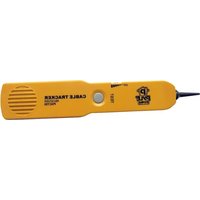
PHCT55 - Cables for Computers and Peripherals Pyle - Free user manual and instructions
Find the device manual for free PHCT55 Pyle in PDF.


| Product Type | HDMI Cable |
| Brand | Pyle |
| Model | PHCT55 |
| Connector Type | HDMI Male to HDMI Male |
| Length | 6 feet (1.8 meters) |
| Supported Resolution | Up to 4K@60Hz |
| Bandwidth | 18 Gbps |
| HDCP Support | Yes |
| Audio Return Channel (ARC) | Yes |
| Ethernet Channel | Yes |
| Material | Gold-plated connectors, braided nylon jacket |
| Color | Black |
| Weight | 0.15 lbs (68 grams) |
| Dimensions (Cable Diameter) | 0.2 inches |
| Compatibility | HDMI-enabled devices |
| Warranty | 1 Year Limited |
| Package Contents | 1x Pyle PHCT55 HDMI Cable |
Frequently Asked Questions - PHCT55 Pyle
User questions about PHCT55 Pyle
0 question about this device. Answer the ones you know or ask your own.
Ask a new question about this device
Download the instructions for your Cables for Computers and Peripherals in PDF format for free! Find your manual PHCT55 - Pyle and take your electronic device back in hand. On this page are published all the documents necessary for the use of your device. PHCT55 by Pyle.
USER MANUAL PHCT55 Pyle
This Cable Tracker is designed to identify and trace wires or cables within a group without damaging the insulation. For telephone line, it can identify some states in the line. Owning this instrument, it is more convenient to install, debug, and maintain telephone line, There are a Sender and a Receiver included in the Cable Tracker.
FUNCTIONS
- Judge continuity of the cables or wires.
- Track the cables or wires, and diagnose the break point.
-
Receive the tone signal on the cables or wires (telephone line).
-
Identify the state in the working telephone line (clear, ring, busy)
- Send a single solid tone or dual alternating tone to the object cables or wires.
STRUCTURE
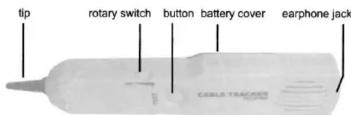
Receiver

- Use the Sender ( switch to "CONT")
Connect the test leads to the object pair, use "CONT"
postion. The bright green of "CONT" indicates the
continuity.(line resistance not exceeding 10kΩ.)
- Use the Sender (switch to "TONE")
a. Connect the test leads to a pair of cables, touch Receiver to the cables. If the two cables give larger and same tones, it means both of them have continuity. Otherwise the cable which gives lower tone doesn't have continuity.
b. Connect one test lead to one cable among a group of cables, connect another test lead and the other cables to earth ground. Touch the tip of Receiver to another end of the cable mentioned above.
Reception of tone means that the cable has continuity. (see figure)

NOTE
Don't connect to any active AC or DC circuit for measuring continuity.
TRACK CABLE OR WIRES
USE SENDER (SWITCH TO "TONE") AND RECEIVER Connect the test leads to the pair, or attach one test lead to ground and another test lead to either side of the line. Move the Receiver close to and along the pair (or the line). Reception of the tone indicates the track.
NOTE
Do not connect to any active circuit in this mode
IDENTIFY THE STATE OF WORKING TELEPHONE LINE
USE SENDER ( SWITCH TO " OFF " )
- Identify TIP&RING:
Connect the red test lead to the side of one line and the black test lead to the side of another line.
a. "CONT" indicator light is "green" when you connect the red test lead to the Ring (-) side.
b. "CONT" indicator light is "red" when you connect the red test lead to the TIP (+) side. - Identify CLEAR, RINGING, BUSY state on the working telephone line:
Connect the red test lead to the RING side, black test lead to the TIP side, or connect RJ11 into the RJ11 socket on telephone.
a. "CONT" indicator light is "green", indicates a CLEAR line. If "CONT" indicator light is "red", it means the polarities were reversed.
b. "CONT" indicator does not glow or glow faintly, indicates a BUSY line.
c. "CONT" indicator light brightly flickering "YELLOW", indicates a RINGING line. (Switch to "CONT" will terminate the call on the line)
BATTERY REPLACEMENT
- Sender Battery replacement:
Remove the screw on the back case, remove the back case, replace the exhausted battery with a new one of 9V(6F22). Rejoin the back case and install the screw. - Receiver Battery replacement:
Remove the screw on the battery compartment, remove the battery cover, replace the exhausted battery with a new one of 9V(6F22). Rejoin the cover and install the screw.
NOTE
- If you don't use the Cable Tracker, set the switches to "OFF". If you don't use the Cable Tracker for a long time, take out all the batteries.
- Keep away from moisture.
- Do not use Cable Tracker under high voltage environment.
- Always follow this users manual. Otherwise it may cause the damage to the tester or personal injury.
DISPOSAL OF THIS ARTICLE
Dear Customer, Please help avoiding refuse
Please help avoiding refuse. If you at some point intend to dispose of this article, then please keep in mind that many of its components consist of valuable materials, which can be recycled. Please do not discharge it in the garbage bin, but check with your local council for recycling facilities in your area.

PYLE®
www.PyleAudio.com
Brand : Pyle
Model : PHCT55
Category : Cables for Computers and Peripherals