
V-2952 - Audio tuner Valcom - Free user manual and instructions
Find the device manual for free V-2952 Valcom in PDF.


| Product Type | Audio Tuner |
| Brand | Valcom |
| Model | V-2952 |
| Dimensions (W x H x D) | 483 x 45 x 250 mm (19" rack mount, 1U) |
| Weight | 2.5 kg |
| Power Supply | 100-240 V AC, 50/60 Hz, 15 W |
| Frequency Range | FM: 87.5-108 MHz; AM: 520-1710 kHz |
| Preset Memory | 30 presets (FM/AM) |
| Tuning System | Digital PLL synthesized |
| Output Level | Variable line out (RCA), 0-1 V RMS |
| Audio Output | Stereo, unbalanced RCA jacks |
| Antenna Inputs | FM: 75 ohm (F-type); AM: Loop antenna (included) |
| Display | LCD with frequency and preset info |
| Control Interface | Front panel buttons and IR remote control |
| Signal-to-Noise Ratio | >70 dB (FM stereo) |
| Total Harmonic Distortion | <0.5% (FM) |
| Frequency Response | 20 Hz - 15 kHz (FM) |
| Operating Temperature | 0°C to 40°C |
| Cleaning | Wipe with a soft, dry cloth. Do not use liquids or cleaners. |
| Safety | Do not expose to moisture or extreme temperatures. Unplug during storms. |
| Spare Parts & Reparability | Contact Valcom support for genuine parts. Unit is not user-serviceable. |
| General Information | Includes rack mount ears, AM loop antenna, remote control, and manual. |
Frequently Asked Questions - V-2952 Valcom
User questions about V-2952 Valcom
0 question about this device. Answer the ones you know or ask your own.
Ask a new question about this device
Download the instructions for your Audio tuner in PDF format for free! Find your manual V-2952 - Valcom and take your electronic device back in hand. On this page are published all the documents necessary for the use of your device. V-2952 by Valcom.
USER MANUAL V-2952 Valcom
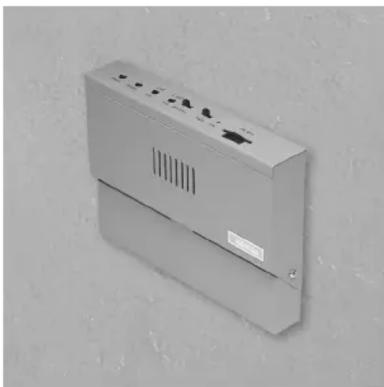
The V-2952 FM Tuner may be used to provide a music source for both background music for a paging system and music-on-hold for a telephone system.
These instructions contain the specifications and information necessary to install, operate, and maintain the FM Tuner.
SPECIFICATIONS
Applications
• Valcom Paging Systems
- Stand Alone Background Music Systems
- Music-On-Hold
Features
- Two individual outputs each with volume control a) Output 1: .5 watt b) Output 2: Line level
- Separate bass and treble tone controls
• Frequency locked loop tuning system
• External antenna provided
- Internal speaker for monitoring
- On/Off switch
• Power on indicator
- Powered by -24 Vdc or -12 Vdc
- Power jack for use with receptacle mount power supply
- Wall or shelf mount
- Local/Distant Signal reception switch
Options
- -12 Vdc power supply available (VP-412A)
Capacity
- V-2952 will drive one 8 Ohm or six 45 Ohm speakers from the .5 watt output.
• V-2952 will drive up to 150 Valcom one-way amplified speakers from the line output.
Dimensions/Weight
• 6.19" H x 8.25" W x 1.55" D
(15.72cm H x 20.96cm W x 3.94cm D)
• 1.3 lbs (.59kg)
Environment
• Temperature: 10 to 40 Degrees C
• Humidity: 0 to 85% non-precipitating
Performance (Nominal)
• Frequency tuning range: 87.5 MHz to 108.5 MHz
• Power Output: .5 watt (at 8 ohms)
-10 dB (line out)
• S/N Ratio: -50dB
• Distortion: less than 2% @ rated output
Power Requirements
• Voltage: Power Input 1: -24 Vdc
Power Input 2: -12 Vdc
- Current: 250 mA
INSTALLATION
Connecting Arrangement
If a -12 Vdc power adapter is used, begin with Step
- For power connections using a -24Vdc power supply start at Step 2. (Refer to Figure 1)
_ 1. Plug -12 Vdc power adapter into receptacle provided on the V-2952 (Go to Step 4).
_ 2. Connect -24 Vdc "-" from power supply to one 24 Vdc terminal on the V-2952.
_ 3. Connect GND "+" from power supply to the other 24 Vdc terminal on the V-2952.
NOTE: The -24 Vdc inputs are not polarity sensitive.
_ 4. If the V-2952 is being connected to a Valcom page control or amplified paging speakers, connect the Output marked "LINE" to the background music input of the paging system or directly to the dedicated speakers.
_ 5. When the V-2952 is connected to V-9941A, connect the output marked "0.5 W" to the music terminals of the V-9941A.
__ 6. If the V-2952 is connected to a telephone system for music-on-hold, connect the Output marked "0.5 W" to the music-on-hold input of the telephone system.
__ 7. An external antenna is supplied. Install the supplied balun transformer and dipole antenna as shown in Figure 1 or connect a customer supplied antenna with coax cable to the "F" connector.
Setup Procedure
The setup procedure for the V-2952 is as follows (Refer to Figure 2).
_ 1. With the power supply connected, turn power switch "ON."
_ 2. Set EXT/INT switch to "INT."
_ 3. Rotate 0.5 W volume control 1/4 turn clockwise.
_ 4. Adjust tuning knob to desired FM station.
__ 5. Turn EXT/INT switch to "EXT" position and adjust appropriate output volume control to desired levels for background music or music-on-hold. Adjust V-2952 Bass and Treble controls to desired tone of music.
If distortion occurs due to close proximity of a strong local station move the LOCAL/DISTANT switch to the "LOCAL" position. (Refer to Figure 1)
TECHNICAL ASSISTANCE
Assistance in troubleshooting is available from the factory. When calling, you should have a VOM and a test set available and be calling from the job site. Call (540) 427-3900 and ask for Technical Support, or call (540) 427-6000 for Valcom 24-hour Automated Support or visit our website at http://www.valcom.com.
Valcom equipment is not field repairable. Valcom, Inc. maintains service facilities in Roanoke, VA. Should repairs be necessary, attach a tag to the unit clearly stating your company name, address, phone number, contact person, and the nature of the problem. Send the unit to:
Valcom, Inc.
Repair and Return Dept.
5614 Hollins Road
Roanoke, VA 24019-5056
VALCOM LIMITED WARRANTY
Valcom, Inc. warrants its products to be free from defects in materials and workmanship under conditions of normal use and service for a period of one year from the date of shipment. The obligation under this warranty shall be limited to the replacement, repair or refund of any such defective device within the warranty period, provided that:
- inspection by Valcom, Inc. indicates the validity of the claim,
- the defect is not the result of damage, misuse, or negligence after the original shipment,
- the product has not been altered in any way or repaired by others and that factory sealed units are unopened (A service charge plus parts and labor will be applied to units defaced or physically damaged)
- freight charges for the return of products to Valcom are prepaid
- all units 'out of warranty' are subject to a service charge. The service charge will cover minor repairs (Major repairs will be subject to additional charges for parts and labor).
This warranty is in lieu of and excludes all other warranties, expressed or implied, and in no event shall Valcom, Inc. be liable for any anticipated profits, consequential damages, loss of time or other losses incurred by the buyer in connection with the purchase, operation or use of the product.
This warranty specifically excludes damage incurred in shipment. In the event a product is received in damaged condition, the carrier should be notified immediately. Claims for such damage should be filed with the carrier involved in accordance with the F.O.B. point.
Headquarters:
Valcom, Inc.
1111 Industry Avenue
Roanoke, VA 24013
Phone: (540) 427-3900
FAX: (540) 427-3517
In Canada:
CMX Corporation
35 Van Kirk Drive #11 and 12
Brampton, Ontario L7A1A5
Phone: (905) 456-1072
FAX: (905) 456-2269


FIGURE 2
Brand : Valcom
Model : V-2952
Category : Audio tuner