
RJ4511TOOL - Tongs StarTech.com - Free user manual and instructions
Find the device manual for free RJ4511TOOL StarTech.com in PDF.


| Product Type | RJ45 and RJ11 Strip & Crimp Tool |
| Brand | StarTech.com |
| Model | RJ4511TOOL |
| Compatibility | RJ-45 and RJ-11 connectors |
| Main Functions | Cutting, stripping, and crimping cables |
| Color | Black |
| Material | Metal and plastic |
| Safety Lock | Yes, with push-lock mechanism |
| Operation | Manual, squeeze handles |
| Handle Type | Ergonomic, with locking tab |
| Cutter Section | For cutting cable ends |
| Stripper Section | With adjustable backstop for strip length |
| Crimping Section | Modular plug holder for precise crimping |
| Application | Network and telephone cable termination |
| Dimensions | Approximately 20 x 5 x 2 cm |
| Weight | Approximately 200 g |
| Maintenance | Wipe with a dry cloth; keep clean |
| Repairability | Not user-serviceable; replace if damaged |
Frequently Asked Questions - RJ4511TOOL StarTech.com
User questions about RJ4511TOOL StarTech.com
0 question about this device. Answer the ones you know or ask your own.
Ask a new question about this device
Download the instructions for your Tongs in PDF format for free! Find your manual RJ4511TOOL - StarTech.com and take your electronic device back in hand. On this page are published all the documents necessary for the use of your device. RJ4511TOOL by StarTech.com.
USER MANUAL RJ4511TOOL StarTech.com
natural_image
Black wire crimping tool with handle and socket (no text or symbols visible)RJ45 and RJ11 Strip & Crimp Tool
RJ4511TOOL
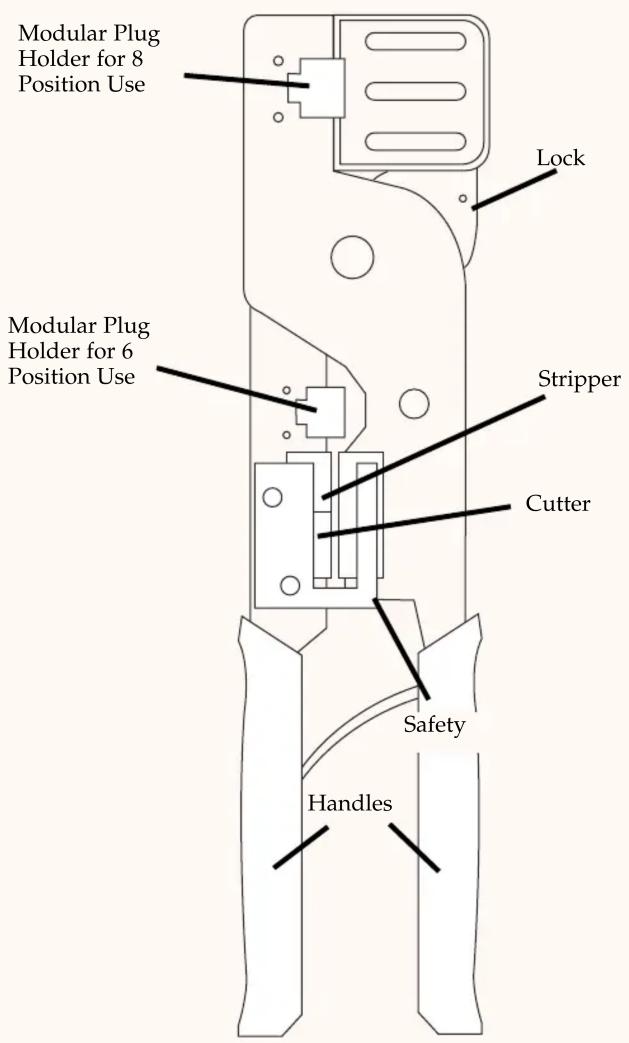
- Hold the RJ4511TOOL with "Safety" side towards you. Insert the cable you wish to cut in the cutter section of the tool. Squeeze handles together to cut the wire.
- Take the newly cut end and place it in the stripper section of the tool. For a longer strip to remove place the end of the cable at the backstop, for a shorter strip place it at the tab. Squeeze handles together and release slightly. Pull off the stripped insulation.
- Insert the cable and outer jack into the appropriate modular plug holder. Squeeze handles firmly. Release and remove the terminated plug.
Openning the Tool: Squeeze hanle firmly. The lock will release. The tool is now ready to be used.
Locking the Tool: Squeeze handles together with one hand. Push the lock in with the other hand and release the handles. The tool is now secured.
StarTech.com

StarTech.com has the tools you need to get any cable job finished, including the DUCTCUTTER, our sharp solution for cutting through, you guessed it, plastic wiring ducts. This StarTech.com tool is specially designed for manipulating RJ-45 and RJ-11 connectors and saves valuable time and effort on any related cable job.
Brand : StarTech.com
Model : RJ4511TOOL
Category : Tongs