
DGPSPS-402 - Mobile Device Charger DREAMGEAR - Free user manual and instructions
Find the device manual for free DGPSPS-402 DREAMGEAR in PDF.


| Product Type | Mobile Device Charger |
| Brand | dreamGEAR |
| Model | DGPSPS-402 |
| Input Voltage | 100–240 V AC, 50/60 Hz |
| Output Voltage | 5 V DC |
| Output Current | 2.1 A (shared) |
| Number of USB Ports | 2 |
| Dimensions (L x W x H) | 2.6 x 1.8 x 1.1 in (6.6 x 4.6 x 2.8 cm) |
| Weight | 1.8 oz (50 g) |
| Cable Length | Not included (use your own USB cable) |
| Color | Black |
| Materials | Fire-retardant ABS plastic |
| Charging Protocol | Standard USB BC 1.2 compatible |
| Overcharge Protection | Yes |
| Short Circuit Protection | Yes |
| Overcurrent Protection | Yes |
| Operating Temperature | 32°F – 104°F (0°C – 40°C) |
| Storage Temperature | -4°F – 140°F (-20°C – 60°C) |
| Certifications | FCC, CE, RoHS |
| Maintenance | Wipe with a dry, soft cloth; do not use liquids or solvents |
| Spare Parts Availability | Not available separately; replace unit if damaged |
| Repairability | Non-repairable (sealed unit) |
| Safety Instructions | Use only with compatible devices; do not expose to water |
Frequently Asked Questions - DGPSPS-402 DREAMGEAR
User questions about DGPSPS-402 DREAMGEAR
0 question about this device. Answer the ones you know or ask your own.
Ask a new question about this device
Download the instructions for your Mobile Device Charger in PDF format for free! Find your manual DGPSPS-402 - DREAMGEAR and take your electronic device back in hand. On this page are published all the documents necessary for the use of your device. DGPSPS-402 by DREAMGEAR.
USER MANUAL DGPSPS-402 DREAMGEAR

natural_image
Three electronic devices: a charging plug, a black cable with USB connectors, and a metallic cylindrical device (no visible text or symbols)dreamCEAR®
www.dreamgear.net
AC Adapter: The AC Adapter is the perfect solution for charging your PSP from a standard wall outlet.
- Plug the USB male end of the Power/Data cable into the USB port on the AC Adapter.
- Connect the AC plug end of the Power/Data cable to the charging port on your PSP.
- Refer to your PSP's original User's Guide for charging times.
Car Charger: The Car Charger can charge your PSP from any car's power source.
- Plug the Car Charger into your car's power source.
- Connect the PSP style AC plug end of the Car Charger into the charging port on your PSP.
- Refer to your PSP's original User's Guide for charging times.


natural_image
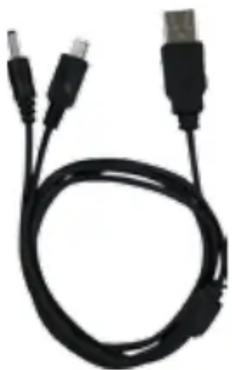
Close-up of a metallic cylindrical device with a black cable, no visible text or symbolsPower/Data Cable: The Power/Data Cable is designed to charge your PSP and transfer data simultaneously.
- Connect the USB male end of the Power/Data Cable to a powered USB port on any computer.
- Connect the mini-USB plug and PSP style AC plug to your PSP.
- Your computer will charge your PSP and allow you to transfer data to your PSP simultaneously.
natural_image
Coiled black cable with two USB connectors (no text or symbols visible)Brand : DREAMGEAR
Model : DGPSPS-402
Category : Mobile Device Charger