
H309 - Headphones CoolBox - Free user manual and instructions
Find the device manual for free H309 CoolBox in PDF.


| Product Type | Headphones |
| Brand | CoolBox |
| Model | H309 |
| Color | Black |
| Type | Over-ear |
| Driver Size | 40 mm |
| Frequency Response | 20 Hz – 20 kHz |
| Impedance | 32 Ohms |
| Sensitivity | 105 dB |
| Maximum Input Power | 30 mW |
| Connectivity | Wireless Bluetooth 5.0 |
| Bluetooth Version | 5.0 |
| Wireless Range | 10 m |
| Battery Type | Rechargeable lithium-ion |
| Battery Capacity | 400 mAh |
| Charging Time | 2 hours |
| Playback Time | 20 hours |
| Standby Time | 200 hours |
| Microphone | Yes, built-in |
| Noise Cancellation | Passive noise isolation |
| Weight | 250 g |
| Dimensions (folded) | 18 x 16 x 8 cm |
| Foldable | Yes |
| Included Accessories | USB charging cable, 3.5 mm audio cable |
| Material | Plastic, leatherette ear pads |
Frequently Asked Questions - H309 CoolBox
User questions about H309 CoolBox
0 question about this device. Answer the ones you know or ask your own.
Ask a new question about this device
Download the instructions for your Headphones in PDF format for free! Find your manual H309 - CoolBox and take your electronic device back in hand. On this page are published all the documents necessary for the use of your device. H309 by CoolBox.
USER MANUAL H309 CoolBox
natural_image
Line drawing of a pair of outdoor headphones with earbuds and charging case (no text or symbols)
Bluetooth®
CoolBox H309 user manual Manual de usuario CoolBox H309
| >100% |
| >100% |
| >100% |
| >100% |
| >100% |
| >100% |
| >100% |
| >100% |
| >100% |
| >100% |
| >100% |
| >100% |
| >100% |
CoolBox H309 user manual
I. Introduction
Thank you for purchasing the CoolBox H309 stereo Headset with Bluetooth® Wireless technology; we encourage you to read this quick installation guide thoroughly to get the most of this innovative wireless headset.
Main features
- Enjoy hands free conversations and a clear signal reception up to 10 meters away from your computer or audio source.
- Compatible with other Bluetooth enabled devices, such as CD, DVD and MP3/4 players, desktop or laptop computers, smart phones, PDAs and iPods.
- Ideal for PC interactive game, internet voice chats and conferencing.
- Wide adjustable headband and leatherette ear pads provide comfortable listening for hours on end.
- Noise cancelling microphone for clear voice chats.
- Li-polymer rechargeable battery.
- Battery status showing on Mobile device, Like IPHONE.
II.Product components
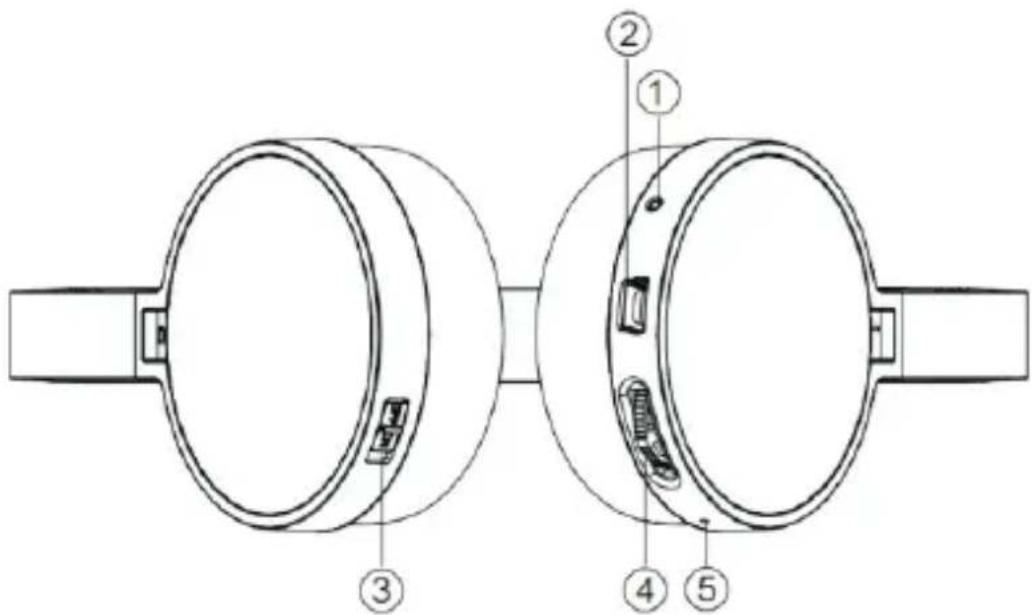
- Microphone
- USB interface for charging
- Power ON/OFF
-
Power ON/OFF (press the button down for long time).
-
Volume up/down (Up switch the button mean volume+;the headset will make a beep if the volume are on full blast; Down switch volume-,the headset will also make a beep if the volume are on min.).
- Previous/Next (press the button up/down for long time)
- Play/pause (When on the music state, press button one time, the headset will be in Pause state; press again, the headset will be in music state.)
5. LED light
Status indicator:
- Alternating red and blue LED indicate headset has entered into the pairing mode and ready to be detectable for the first time.
- Blue LED flashing slowly indicates the device is powered on and /or connected.
- Solid red LED indicates the battery is charging.
III-Basic Operation
Charge your headset
- Use the supplied USB cable to charge the battery directly from your PC.
- Make sure that your CoolBox H309 headset is fully charged before using it for the first time.
- The headset battery has to be initially charged for at least for 4 hours.
- While charging, the LED is solid red. When the battery has reached full capacity, the solid red LED will go off.
Turing your headset on and off
- Press and hold the power button for several seconds to turn on the headset.
- To power off the device, press and hold the power button again for a few seconds.
IV-Advanced operation
Note: Before installing this product, please make sure your computer or laptop has the available built-in Bluetooth feature. If your computer is not Bluetooth-enabled, you must purchase a Bluetooth dongle, preferably version 2.1 or above.
Pairing the headphones with your computer
1) Make sure the headset is on.
2) Activate the Bluetooth program in your computer to begin setup.
3) The "search new device" screen will be displayed.
4) Place both devices not more than one meter away from each other.
5) Press the power button on the headset to turn it on .The blue and red LEDs will start blinking in sequential order. This indicates that the headset has entered into pairing mode.
6) As soon as the system detects the new device in your dialog box, double click the icon representing the headset.
7) The software connection will be established automatically with the remote device.
8) If the pairing is successful, the blue LED will start blinking slowly. If after 60 seconds the pairing process fails, please repeat steps 1 to 7 described above.
9) The headset will go automatically into standby mode after a short period of inactivity.
Pairing the headphones with your phone.
1) Make sure the headset is on.
2) Set your Bluetooth phone to "discover" the wireless headset.
3) Place both devices not more than one meter away from each other.
4) Press the power button on the headset to turn it on. The blue and red LEDs will start blinking fast in sequential order. This indicates that the headset has entered into pairing mode.
5) Follow the phone instructions. Your phone, upon detecting the wireless headset, will ask if you want to pair with it.
6) Accept by pressing "Yes" or "OK" on the phone. If prompted, enter the passkey=000(4 zeros).Your phone will be confirmed when pairing is completed (the wireless connection will be established automatically with the remote device).
7) Repeat step 1 to 6 described above.
8) The headset will go automatically into standby mode after a short period of inactivity.
Using the Bluetooth ^® wireless headset.
-
Answering and ending a call using your mobile phone.
When there is an incoming call, the headset will ring.
Briefly press the power button to answer an incoming call. You may also press the answer button on your cellular phone to receive the call in your headset.
To end a call, simply tap the power button once again. Likewise, you may also end the call directly using your cell phone.
Double-click the power button can activate the voice command feature.(Please refer to your handset manual for more information about using the "voice dial feature").
You can also press the power button for about two seconds to redial the last call. -
Initiating /answering and ending a call on VOIP
To make a call, simply dial the number by using your internet calling application.
When there is an incoming call, press the power button briefly. Music playback pauses temporarily.
To answer an incoming call, press the power button briefly. Music playback pauses temporarily.
To end a call, simply tap the power button once again.
- Music playback.
Adjust volume controls for a comfortable listening Level.
Use selector buttons to play the last or next track.
When listening to music using your mobile phone, playback will resume automatically once the call is ended.
Specifications
Mic.Spec.:
Microphone Unit : Ⓞ 6*1.5mm
Directivity: omnidirectional
S.P.L:-58±2db
Impedance:≤2.2KΩ
Frequency response:20Hz-20,000Hz
Operating Voltage:4.5V
Speaker Spec.
Speaker diameter: Ⓞ 30mm
Impedance:32Ω
S.P.L:116±3dB S.P.L at 1KHZ
Rated capability:40Mw
Frequency response:20Hz-20,000Hz
POWER
Battery type Built-in 360mAh lithium-polymer rechargeable battery
Charging connector type Mini-5-pin USB plug
Run time UP to 8 hours of talk or music playback time
Standby time Up to 90 hours
Charging time Approximately 2 hours
Operating temperature -10°C-45°C
Storage temperature -25°C-60°C
Precautions
Do not drop, hit or shake the device.
Do not disassemble, repair or modify the headset by yourself.
Do not use cleaning products that contain benzene, solvents or alcohol.
Do not expose headset to excessive heat or direct sunlight for long periods of time.
Do not store the device in a place with high humidity or dust.
Do not place heavy objects on top of the headset.
Do not use near a microwave oven or wireless LAN products.
Warning
Adjust headphones sound to the proper volume, loud sound may damage your ears. In the circumstance that will cause dangerous, please don't use the headphone. When you wear headphone, please take care of "L" and "R".
Caution:
We will no longer guarantee the performance or warranty if the user attempts to inspect and modify this product in anyway.

- Bluetooth®
- CoolBox H309 user manual
- Introduction
- Main features
- II.Product components
- LED light
- Status indicator:
- III-Basic Operation
- Charge your headset
- Turing your headset on and off
- IV-Advanced operation
- Pairing the headphones with your computer
- Pairing the headphones with your phone.
- Using the Bluetooth ® wireless headset.
- Specifications
- Mic.Spec.:
- Speaker Spec.
- POWER
- Precautions
- Warning
- Caution:
Brand : CoolBox
Model : H309
Category : Headphones