
Studio 24 USB - Microphone MXL - Free user manual and instructions
Find the device manual for free Studio 24 USB MXL in PDF.


| Product Type | Condenser USB Microphone |
| Brand | MXL |
| Model | Studio 24 USB |
| Dimensions (without shock mount) | Approx. 2.5 x 2.5 x 6.5 inches |
| Weight | Approx. 1.5 lbs (680 g) |
| Power Source | USB bus-powered (5V DC) |
| Polar Pattern | Cardioid |
| Frequency Response | 30 Hz – 20 kHz |
| Sample Rate / Bit Depth | Up to 96 kHz / 24-bit |
| Main Functions | Recording, streaming, podcasting, voice calls |
| Included Accessories | Shock mount, USB cable, carrying case |
| Maintenance & Cleaning | Wipe with dry, lint-free cloth. Avoid solvents. |
| Safety Precautions | Keep away from moisture, magnets, and extreme temperatures. |
| Spare Parts / Repairability | Not user-serviceable. No spare parts available. |
| Compatibility | Windows, macOS, Linux, and most recording software |
Frequently Asked Questions - Studio 24 USB MXL
User questions about Studio 24 USB MXL
0 question about this device. Answer the ones you know or ask your own.
Ask a new question about this device
Download the instructions for your Microphone in PDF format for free! Find your manual Studio 24 USB - MXL and take your electronic device back in hand. On this page are published all the documents necessary for the use of your device. Studio 24 USB by MXL.
USER MANUAL Studio 24 USB MXL
natural_image
Close-up of a white audio recording device with mesh grille and control buttons (no visible text or symbols)
Thank you for purchasing the MXL Studio 24 USB microphone. With 24-bit recording capability, zero latency monitoring and a custom GUI, you'll experience the highest level of sonic detail and the kind of audio quality normally found in expensive, high-end multi-channel computer interfaces.
The Studio 24 USB is simple to set up and plugs directly into the USB port of your PC or Mac computer. It also works with most of today's popular recording software programs, and we've even included free trial Reaper® CD software so you can get started.
Please take a few minutes to familiarize yourself with the features and functions of the Studio 24 USB in order to make the most out of your new purchase.
Begin by unpacking your Studio 24 USB microphone. You should have the following components:
• Studio 24 USB microphone
- Travel case
- Mic stand
- Mic Stand adapter
- USB cable
- Software CD
- Cleaning cloth
If any of these items are missing, contact the retailer where you purchased your Studio 24 USB.
Note: To optimize the performance of the Studio 24 USB with Windows, we recommend downloading and using the free Asio4All driver from www.ASIO4ALL.com]
Handling the Studio 24 USB:
MXL USB mics are a professional quality, cardioid condenser studio microphone designed specifically for recording. The Studio 24 USB microphone uses what is known as a cardioid pickup pattern, which is more sensitive to sound waves arriving at the front of the microphone as opposed to those arriving from the sides or rear.
Studio 24 USB
This microphone is a USB (Universal Serial Bus) device, and interfaces directly with Windows and Macintosh computers without the need for any special drivers. It also carries the added benefit of not requiring an external microphone preamp. However, unlike microphones designed for live performance or dynamic models, this instrument requires careful handling. Hence, you should observe the following:
ALWAYS: handle the microphone carefully, avoiding sudden shocks such as dropping or bumping the microphone into other objects.
ALWAYS: maintain a distance of approximately 4 – 6 inches when speaking or singing into the microphone. You are encouraged to use a pop filter for added protection of the sensitive capsule and to shield the instrument from saliva and sudden bursts of air. For outdoor performances, you would be well advised to use a windscreen as protection for your microphone
NEVER: tap the microphone to check if it's working. The red LED behind the microphone's protective grill will tell you it's on and that the correct side is facing you.
NEVER: blow into the microphone to check if it's working. The red LED behind the microphone's protective grill will tell you it's on and that the correct side is facing you.
By following these few basic handling procedures, you can expect a long and happy relationship with your new microphone.
Correct Positioning and Controls
The red LED should be facing you when you speak or sing into the microphone. If recording instruments, the red LED should be facing the instrument. Maintain a distance of approximately 4 – 6 inches when speaking or singing into the microphone. For instruments, experiment with the distance to find the best results.
Red LED: When the red LED is illuminated, this indicates that the microphone is connected to USB power and functioning correctly.
USB Connection
The square end of the USB cable plugs in here. The microphone is setup to be backwards compatible with USB 1.1 and 2.0. We do not recommend plugging the microphone into a hub, as this could potentially limit the power and audio bandwidth the microphone needs to operate.

natural_image
Studio 24 USB stand with mesh grille and brand logo (MXL) on the cap, no visible text or symbols beyond branding.Gain Control: Use this dial to control the record level of the microphone into the computer. This control changes the analog signal before A/D converter.
Headphone Jack
The 1/8-inch stereo head-phone input accepts most headphones. Maximum headphone volume will vary by manufacturer and model, so care should always be exercised when plugging in.
Connecting the Studio 24 to Your Computer:
The MXL Studio 24 USB will operate with both USB 2.0 (high speed USB) and USB 1.1 data buses. We recommend you connect your microphone directly to the computer's USB port as opposed to using a USB hub. USB hubs have been known to interfere with the performance of various USB devices.
Note: Audio and video recording can be very taxing to a computer's resources. For this reason, you should close any and all running applications that are non-essential.
Please take the following steps to get connected:
- If open, close your audio recording application. You will open it after the MXL Studio 24 USB is connected and operational.
- Connect the corresponding ends of the supplied USB cable to the Studio 24 USB and the computer's USB port.
Software Tips:
For PC Users:
To get started on multi-tracking and overdubbing, we recommend using the free 30-day trial shareware version of Reaper. The software has already been loaded on the included disc or you can download a free trial at http://www.reaper.fm.
For Macintosh Users:
Garage Band is the easiest way to get started if you are using a Macintosh computer. Since it's included on most Macintosh computers, you probably have it installed and ready to go!
- The red LED on the MXL Studio 24 USB will illuminate indicating it is receiving power from the computer.
- To take advantage of the zero latency monitoring connect a pair of headphones to the 1/8" headphone jack on the side of the microphone.
Initial Setup with Windows XP:
- To select the MXL Studio 24 USB microphone as the default audio device, go to the Start Menu and select Control Panel.

- Select Sounds and Audio Devices.
Studio 24 USB

- Click on the Audio tab and select MXL STUDIO 24 USB as the default device for Sound Playback and Sound Recording.

- After making changes to the audio properties click the OK button for these changes to take effect.

Your Windows XP computer is now set up to use the MXL Studio 24 USB with most recording applications. Some applications will require additional settings to be changed within the program. Please see your recording software's manual for proper setup.
For more in advanced controls such as volume, noise gate, monitor mixing, etc go to page xx for installation and user instructions for the Studio Control GUI.
Studio 24 USB
Initial Setup with Windows Vista and Windows 7:
- To select the MXL Studio 24 USB as the default audio device, go to the Start Menu and select Control Panel.
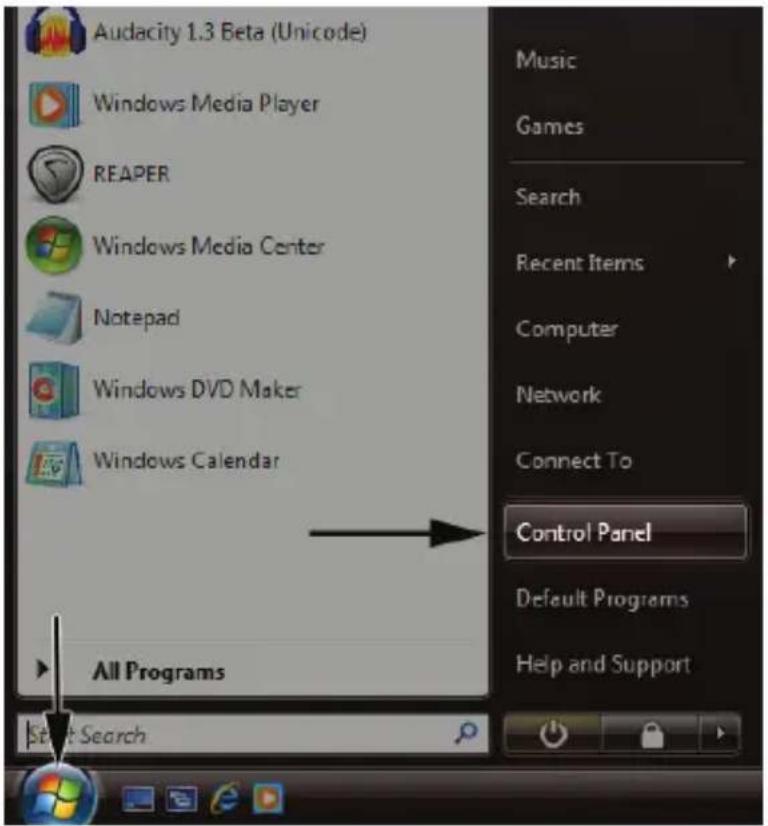
- Double click the Sound icon.

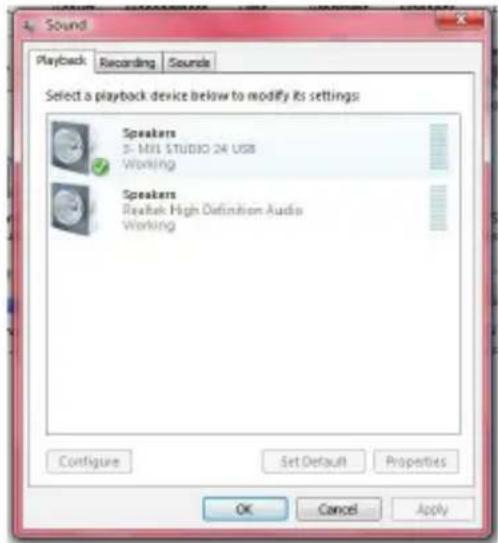
- Select the Playback tab. Highlight the speaker icon labeled as MXL STUDIO 24 USB and click the Set Default button. (Be sure to click on the Apply button for the changes to take effect).
Studio 24 USB
- To make adjustments to the playback sample rate and bit depth double-click on the speaker icon labeled MXL STUDIO 24 USB. Then click on the tab labeled Advanced. From the drop-down menu, you can change the sample rate and bit-depth for audio playback. When you are finished making changes, click the OK button. *Please note that you should verify that these settings match the settings in your recording application.

- To set the MXL Studio 24 USB as the default audio input, select the Recording tab back in the Sound window. Highlight the microphone icon labeled MXL STUDIO 24 USB and click Set Default.
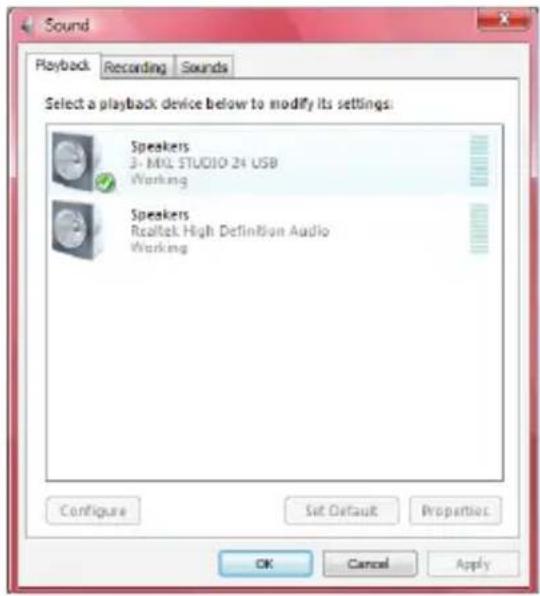
- To make adjustments to the recording sample rate and bit depth double-click on the microphone icon labeled MXL STUDIO 24 USB. Click on the tab labeled Advanced. From the drop-down menu you can change the sample rate and bit-depth for audio recording. *Please note that you should verify that these settings match the settings in your recording application.
Your Windows Vista computer is now set up to use the MXL Studio 24 USB with most recording programs. Some recording applications will require additional settings to be changed within the program. Please see your recording software manual for proper setup.
Studio 24 USB
For more in advanced controls such as volume, noise gate, monitor mixing, etc go to page xx for installation and user instructions for the Studio Control GUI.
Initial setup with Macintosh® OS X:
- To select the MXL Studio 24 USB as the default audio device, click on the Apple icon at the top of the screen then select the System Preferences.

- Double click on the speaker icon labeled Sound.
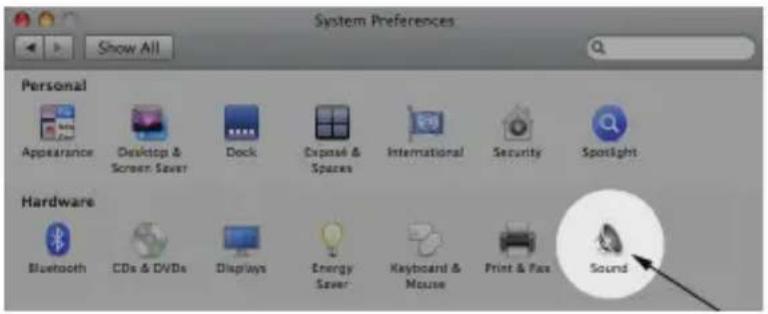
- Click on the Input tab then select the device named MXL STUDIO 24 USB. You will notice there are no input level controls for this device. This is because the analog gain control is found on the side of the MXL Studio 24 USB and further control can be accessed using the Studio Control GUI (See page xx for details on the Studio Control GUI).
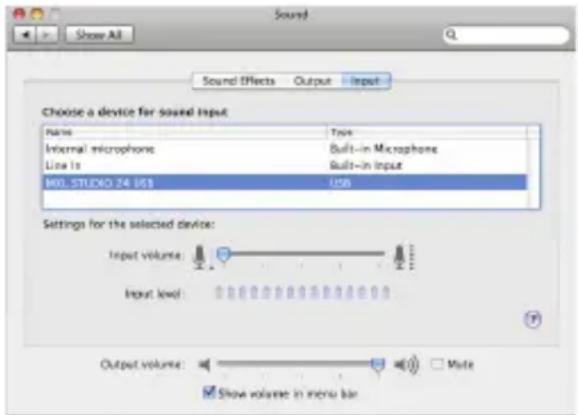
- Next, click on the Output tab and select the device named MXL STUDIO 24 USB. You will notice there are no output volume controls for this device. To make adjustments to the volume and other advanced features use the included Studio Control GUI (See page xx for details on the Studio Control GUI). The output volume can also be adjusted in the recording software you are using.
Studio 24 USB

- Further adjustments to the sample rate and bit-depths can be found in the Audio Midi Setup (Macintosh HD > Applications > Utilities > Audio Midi Setup). You should, however, check the settings in the recording program you are using as they may override or conflict with these settings.

A. By selecting the MXL STUDIO 24 USB as the "Default Input," the MXL STUDIO 24 USB will automatically be selected as the audio input device the next time it is plugged in.
B. By selecting the MXL STUDIO 24 USB as the “Default Output” the MXL Studio 24 USB will automatically be selected as the audio output device the next time it is plugged in. By selecting the MXL STUDIO 24 USB as the “System Output,” the microphone will be used as the output device for any system sounds.
C. Select the MXL STUDIO 24 USB to make adjustments to the sample rate and bit-depth. You will see sections D and E appear in the lower portion of the window.
D. Here you can make adjustments to the sample rate and bit-depth for the input (the microphone signal).
E. Here you can make adjustments to the sample rate and bit-depth for the output (the signal to the headphones).
Your computer is now set up to use the MXL Studio 24 USB. However, after changing these settings you should still check the settings in your recording software. If the sample rate and/or bit-depth in the recording software do not match your hardware, you will most likely hear clicks and pops or the audio will be the wrong pitch.
For more in advanced controls such as volume, noise gate, monitor mixing, etc go to page xx for installation and user instructions for the Studio Control GUI.
Studio 24 USB
Using the Studio Control Graphic User Interface (GUI):
The MXL Studio 24 USB includes a custom GUI that controls the analog functions within the microphone. This feature allows you to fine tune adjustments such as phase, roll-off, noise gate and more. The Studio 24 USB works without the Studio Control GUI; however, the GUI can be a valuable tool for making audio adjustments and experimenting with sound. To install the Studio Control GUI on to your desktop, follow these steps:
Windows XP/Vista:
- Insert the included CD into your computer disc drive
- If the CD does not open automatically go to My Computer and double click the drive containing the MXL CD.
- Open the folder named MXL Studio Control (Windows)
- Double click on the icon named MXL Studio Control Installation.exe
- Follow the instructions on the screen.
Mac OSX:
- Insert the included CD into your computer disc drive
- Double click the CD icon on your desktop to open the CD
-
Open the folder named MXL Studio Control (Mac)
-
Drag the icon named MXL Studio Control to your Applications folder
- Follow the instructions on the screen
Leveler:
The Leveler automatically adjusts the microphone input gain to limit the dynamic range and to prevent clipping. This is accomplished by increasing the gain when the input level drops below a set Min Threshold and decreasing the gain when the input level goes over a set Max Threshold. The effects of the leveler will be heard in the headphone monitoring and will be recorded on the computer.
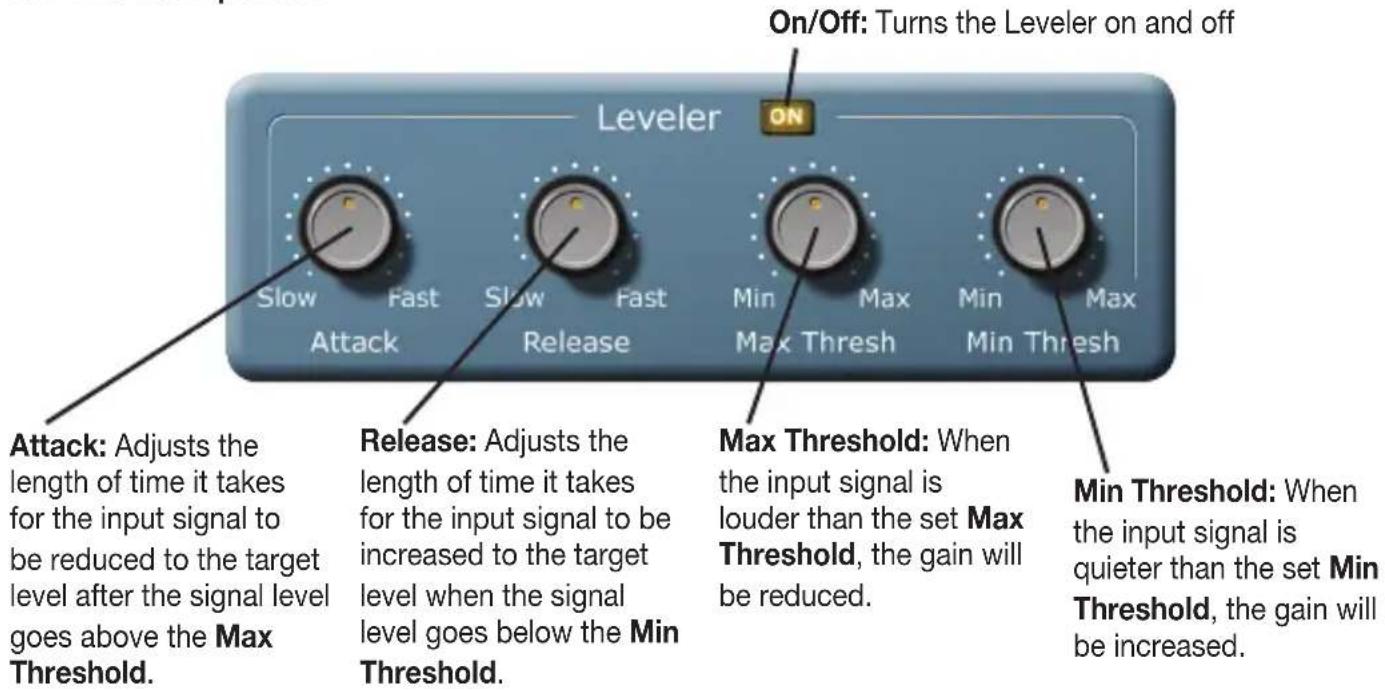
Studio 24 USB
Noise Gate:
The noise gate automatically mutes the microphone input when the signal goes below the set Threshold. When the microphone signal returns above the Threshold the microphone input will be un-muted. The effects of the noise gate will be heard in the headphone monitoring and will be recorded on the computer.
On/Off: Turns the Noise Gate on and off
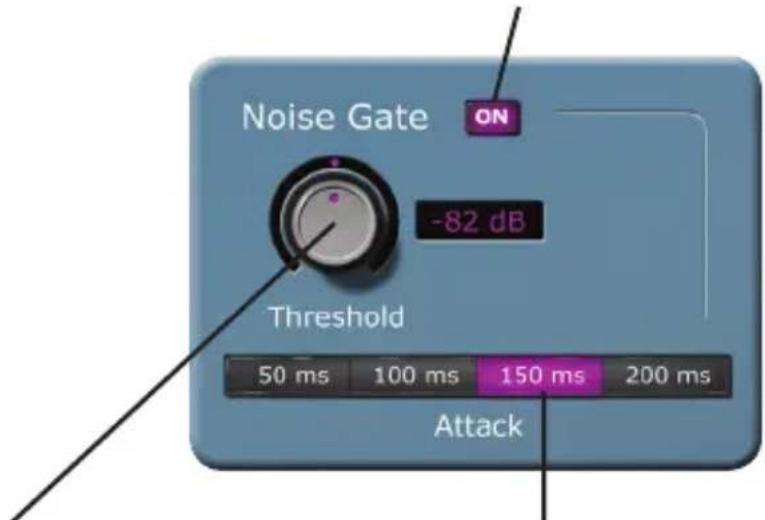
Threshold: Adjust the Threshold from -82dB to -34dB with the current setting displayed in the adjacent window.
Attack: The speed at which the microphone is muted or un-muted when the input signal crosses the Threshold
Input:
All of the changes in this section will effect what you hear in the direct monitoring and the signal recorded on the computer.
Microphone Mute: Mutes the micro-phone input signal
Microphone Gain: Use this in conjunction with the analog control on the side of the microphone to optimize the recording level.
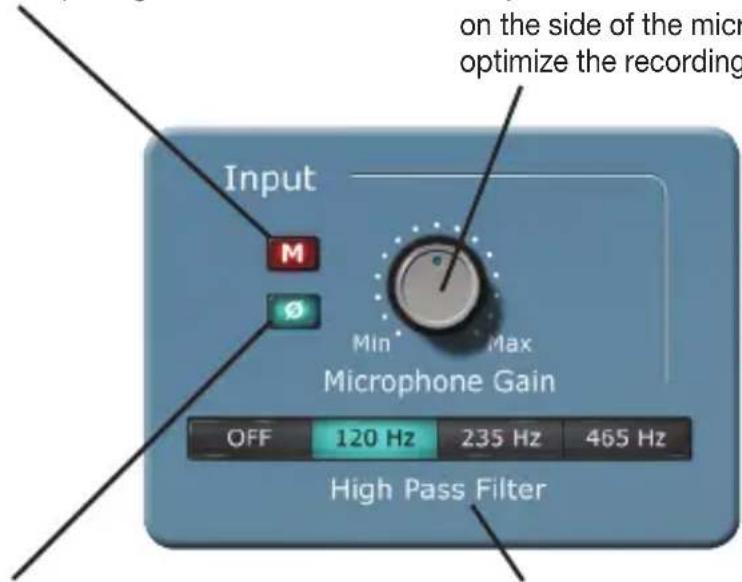
Phase Invert: Inverts the phase of the microphone input by 180^
High Pass Filter: Reduces low frequencies with four selectable cut-off frequencies
Studio 24 USB
Output:
This section will affect only the signals going to the headphone jack on the side of the microphone. None of the signals being recorded on the computer will be affected.

Recall Settings:
This section is for saving, loading, and resetting all of the parameters on the Studio Control GUI.
Power: Instead of an X in the corner of the window close the Studio Control GUI with the Power button
Save: After you have setup the perfect monitoring mix and optimized your recording level save the settings for quick and easy recall later.

Load: Resuming a recording session from the day before or have a favorite starting point this is where you recall all your settings. The name of the current settings will display in the window below the Load button.
Reset: When it's time to start fresh go back to the default settings by hitting Reset
General Behavior:
- Knobs: To rotate a knob left-click and drag the mouse up/down.
- Buttons: Just left-click the button once to turn it on/off.
- To move the Studio Control GUI click anywhere on the blue background and drag it to a new location.
- If you see an error message when changing adjusting a setting chances are the microphone is not plugged in.
Testing Your MXL Studio 24 USB
After you have connected your microphone and set up your computer, plug a set of headphones into the 1/8-inch stereo jack located on the side of the Studio 24 USB.
Important Note:
The headphone amplifier can produce very loud sound levels that, when exposed to over a period of time, can cause irreparable hearing damage. Please adjust the headphone level carefully! You should now be able to hear your computer audio playback as well as the live microphone. When you're ready to begin tracking, open your favorite recording software and make sure it's set up for use with the MXL Studio 24 USB according to the software manufacturer recommendations.
With everything set up and your software application running, snap your fingers in front of the grill and look for a signal on your software's input meters. Never “tap” on the grill to test if a signal is present as this could cause peaking if the microphone gain is set too high. With the signal present, simply position the microphone to best capture the performance. Begin testing the sound source with the microphone and watch the software input meters for clipping. Clipping is a form of distortion that occurs when an amplifier is overdriven and is usually represented by a red bar in your software. Clipping should be avoided at all times for a recording free of poor sounding digital distortion. Use the analog gain control knob on the mic to set the input level to best capture the sound source without clipping.
Recording Tips:
While it is important to record at a loud enough volume to hear the performance over any background noise, keep in mind that with multi-track recording, each track will eventually be added together (summed) into a final Left and Right stereo mix. Since this summing increases the level of the final signal, tracks should be recorded with a fair amount of space between your maximum signal level and the 0 dB clipping level (this is called headroom). In addition, this will greatly benefit the use of any effects or other signal processing you wish to add later. If you would like to listen to computer playback while recording or practicing, use the volume control in the Audio Application you are using or the Studio Control GUI in combination with the microphone volume dial on the mic to create a balance between computer playback and the live microphone input.
While there is no right or wrong way to record a performance, you can find our Recording Basics guide at www.mxlmics.com to help you with the basic techniques. Remember, recording is a creative process, so experimentation is the key for the best results. Enjoy!
Studio 24 USB
Windows is a registered trademark of Microsoft Corporation in the United States and other countries.
Warranty:
Marshall Microphones are guaranteed against defects in material and workmanship for three years from date of purchase. Should you encounter any problem with this unit, promptly contact the company you purchased it from for assistance. The original dated sales receipt will be necessary for any warranty claim. Do not send any unit directly to us without prior authorization from our service department! Warranty coverage is limited to repair or replacement (at our option) of the microphone, and does not cover incidental damages due to use of this unit, nor damage caused by accidental misuse of this product.
MXL Microphones
The Professional Audio Division of Marshall Electronics
El Segundo, CA
Phone 310 333-0606 | 800 800-0688
www.mxlmics.com | sales@mxlmics.com

MXL Microphones
The Professional Audio Division of Marshall Electronics
El Segundo, CA
Phone 310 333-0606 | 800 800-0688
www.mxlmics.com | sales@mxlmics.com
- Begin by unpacking your Studio 24 USB microphone. You should have the following components:
- Handling the Studio 24 USB:
- Studio 24 USB
- Correct Positioning and Controls
- USB Connection
- Headphone Jack
- Connecting the Studio 24 to Your Computer:
- Please take the following steps to get connected:
- Software Tips:
- For PC Users:
- For Macintosh Users:
- Initial Setup with Windows XP:
- Initial Setup with Windows Vista and Windows 7:
- Initial setup with Macintosh® OS X:
- Using the Studio Control Graphic User Interface (GUI):
- Windows XP/Vista:
- Mac OSX:
- Leveler:
- Noise Gate:
- Input:
- Output:
- Recall Settings:
- General Behavior:
- Testing Your MXL Studio 24 USB
- Important Note:
- Recording Tips:
- Warranty:
- MXL Microphones
Brand : MXL
Model : Studio 24 USB
Category : Microphone