
RPR1150 - Radio Sunstech - Free user manual and instructions
Find the device manual for free RPR1150 Sunstech in PDF.


| Product Type | Radio |
| Brand | Sunstech |
| Model | RPR1150 |
| Dimensions (W x D x H) | 95 x 155 x 100 mm |
| Power Supply | 4 x AA (UM-3) batteries (not included) or AC 230V ~50Hz |
| Output Power | 2W |
| Frequency Range (FM) | 88-108 MHz |
| Frequency Range (AM) | 540-1600 kHz |
| Speaker | 2.25", 4 ohm, 3W |
| Antenna | Telescopic antenna for FM/AM |
| Audio Inputs | AUX IN (3.5mm stereo jack) |
| Headphone Output | 3.5mm earphone jack |
| Controls | On/Off/Volume knob, Tuning knob, Band selector (FM/AM) |
| Indicators | Power indicator LED |
| Battery Type | 4 x AA (alkaline recommended) |
| Warranty | 2 years (conditions apply) |
| Safety Certifications | CE marked, conforms to EU safety and EMC standards |
| Cleaning | Soft dry cloth only; no solvents, alcohol, or sprays |
| Disposal | Separate collection for WEEE; do not dispose with household waste |
Frequently Asked Questions - RPR1150 Sunstech
User questions about RPR1150 Sunstech
0 question about this device. Answer the ones you know or ask your own.
Ask a new question about this device
Download the instructions for your Radio in PDF format for free! Find your manual RPR1150 - Sunstech and take your electronic device back in hand. On this page are published all the documents necessary for the use of your device. RPR1150 by Sunstech.
USER MANUAL RPR1150 Sunstech
EXPOSE THIS APPLIANCE TO WATER OR MOISTURE. DO NOT REMOVE COVER (OR BACK). NO USER SERVICEABLE PARTS INSIDE. REFER SERVICING TO QUALIFIED SERVICE PERSONNEL.
SERVICE MUST BE CARRIED OUT BY QUALIFIED PERSONNEL ONLY, OR THE WARRANTY IS UNVALID.


The lightening flash with arrowhead symbol, within an equilateral triangle, is intended to alert the user to the presence of non-insulated dangerous voltage within the product. This may be of sufficient magnitude to constitute a risk of electric shock to persons.

The exclamation point within an equilateral triangle is intended to alert user to the presence of important operating procedures and maintenance (service) instructions in the literature accompanying the appliance.
GENERAL PRECAUTIONS:
- Read through this instruction manual before installation and use.
- Do not touch the power plug with wet hand.
- Switch off the main power when the unit is not in use. (Disconnect the power plug from the power outlet when you do not intend to use the unit for a longer period of time.)
- Do not open the cover or touch any of the components inside the unit, only for qualified technicians.
- Do not expose the unit to direct sunlight or nearby objects that radiate heat to avoid damage to the unit.
- Do not place the unit in moist and humid environments.
- Please ensure the ventilation holes are not covered to avoid overheating and malfunction.
- Clean the product with soft dry cloth only, do not apply any kind of thinner, alcohol or sprays.
- The apparatus shall not be exposed to dripping or splashing, nor should any objects filled with liquids, such as vases, be placed on the apparatus.

This mark is applied to show the equipment conforms to European safety and electromagnetic compatibility standards.
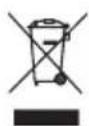
This symbol on the product or in the instructions means that your electrical and electronic equipment should be disposed at the end of its life separately from your household waste. There are separate collection systems for recycling in the EU.
For more information, please contact the local authority or your retailer where you purchased the product.
Specification
- POWER: 4 x AA (UM-3) batteries (not included) or External: AC 230V
- OUTPUT POWER: 2W
- FRENQUENCY RANGE: FM 88-108MHz
AM 540-1600KHz - SPEAKER: 2.25"4ohm3W
- DIMENSION: 95 x 155 x 100 mm
The product:
- TUNING KNOB
- POWER INDICATION
- SPEAKER
- FM/AM BAND SELECTION
- ON/OFF/VOLUME KNOB
- TELESCOPIC ANTENNA
- BATTERY COMPARTMENT
- EARPHONE JACK
- AUX IN SOCKET
- AC PLUG


AC 230V OPERATION
To operate the set on main power, connect the plug end into a 230V AC50 Hz electric source.
The internal battery circuit is automatically disconnected.
Battery operation
- Open the battery cover on the back of the appliance.
- Insert 4 AA batteries with the correct polarity as shown by the markings inside the compartent.
- Alkaline batteries are recommended.
- Replace the battery cover.
Note: Check your batteries regularly.Old or discharged batteries must bereplaced to avoid acid leaking that maydamage your unit. If the unit is not tobe used for a long time, remove thebatteries from their compartment.
Radio
- Switch FM/AM knob to choose the band.
- Turn on the ON/OFF/VOLUME knob until you hear a click to start.
- Turn the VOLUME knob clockwise until you hear an audible signal and adjust the volume to the desired volume.
- Turn the TUNING knob to select desired station. Use the telescopic antenna to get the best reception by changing its length and angle.
Earphone
The appliance has 3.5mm jack for earphone.
AUX IN
Connect the external audio device with a 3.5mm stereo jack plug to the AUX IN socket. You will hear the sound from the speaker. When plug into the AUX IN socket, radio function will cut off automatically.
Warranty conditions
- The warranty of this product is for 2 years since the purchase date.
- The warranty will exclude breakdowns caused by bad use of the product, wrong installation or installation in not desirable places for a proper maintenance of the product, rips, updates of the products that are not the supplied by the brand, pieces wore away for its use or for not domestic or inappropriate use. Also are excluded breakdowns caused for manipulations of the products by people or companies alien to our company.
- For any request regarding the warranty terms, the purchase receipt must be attached.
sunstech 2
Brand : Sunstech
Model : RPR1150
Category : Radio