
SPA2345 - Loudspeaker PHILIPS - Free user manual and instructions
Find the device manual for free SPA2345 PHILIPS in PDF.


| Product Type | 2.1 Multimedia Speaker System |
| Brand | Philips |
| Model | SPA2345 |
| Power Input | 220V AC, 50Hz, 300mA |
| Audio Input | 3.5mm stereo jack |
| USB Playback | Yes, supports MP3 files, USB up to 32GB, not NTFS |
| Volume Control | Rotary knob with power on/off |
| Bass Control | Rotary knob |
| LED Indicator | Green LED when powered on |
| Connectivity | Wired (speaker cable, audio cable, power cord) |
| Playback Control | Previous/Next (◀◀/▶▶), Pause/Resume (▶II), Source switch (hold ▶II) |
| Safety Features | Do not expose to dripping/splashing; unplug during storms; use only specified attachments |
| Care Instructions | Clean with dry cloth; avoid liquids; do not place naked flames on product |
| Operating Conditions | Altitude ≤2000m, non-tropical regions |
| Disposal | Do not dispose with household waste; follow local recycling regulations |
| Spare Parts & Repairability | No user-serviceable parts; contact qualified personnel for repair |
| Warranty Support | Register at www.philips.com/welcome; support at www.philips.com/support |
| Included Accessories | Speakers, audio cable, power cord (assumed) |
Frequently Asked Questions - SPA2345 PHILIPS
User questions about SPA2345 PHILIPS
0 question about this device. Answer the ones you know or ask your own.
Ask a new question about this device
Download the instructions for your Loudspeaker in PDF format for free! Find your manual SPA2345 - PHILIPS and take your electronic device back in hand. On this page are published all the documents necessary for the use of your device. SPA2345 by PHILIPS.
USER MANUAL SPA2345 PHILIPS
Register your product and get support at
www.philips.com/welcome
SPA2345/93

natural_image
Three black Philips speakers with adjustable speaker sizes, displayed against a white background (no text or symbols visible on the devices themselves)User manual
PHILIPS
Contents
1 Important 4
Safety 4
Notice 4
2 Your multimedia speaker 5
3 Installation 6
Play from USB 6
4 Product information 7
5 Troubleshooting 8
1 Important
Safety
Important safety instructions
• Read and follow all these instructions.
- The product shall not be exposed to dripping or splashing and no objects filled with liquids, such as vases, shall be placed on the product.
• To completely disconnect the power input, the mains plug of the product shall be disconnected from the mains.
- The mains plug of the product should not be obstructed or should be easily accessed during intended use.
• No naked flame sources, such as lighted candles, shall be placed on the products.
- Keep this product away from direct sunlight, naked flames or other heat sources.
- Unplug the product from the power outlet during lightening storms or when unused for long periods of time.
- When you disconnect the power cord, always pull the plug instead of the cable.
• Only use attachments/accessories specified by the manufacturer.
• Make sure that you always have easy access to the power cord, plug, or adaptor to disconnect this product from the power.

Warning
- Never remove the casing of this product.
●Never place this product on other electrical equipment.
- Use this product in the areas of an altitude of no more than 2000 meters only.

• Use this product in the non-tropical regions only. .

Notice
Any changes or modifications made to this device that are not expressly approved by Philips Consumer Lifestyle may void the user's authority to operate the equipment.
Disposal of your old product
Your product is designed and manufactured with high quality materials and components, which can be recycled and reused.

When this crossed-out wheeled bin symbol is attached to a product it means that the product is covered by the European Directive 2002/96/EC. Please inform yourself about the local separate collection system for electrical and electronic products.
Please act according to your local rules and do not dispose of your old products with your normal household waste.
Correct disposal of your old product helps to prevent potential negative consequences for the environment and human health.
2 Your multimedia speaker
Congratulations on your purchase and welcome to Philips!
To fully benefit from the support that Philips offers, register your product at www.philips.com/welcome.
3 Installation
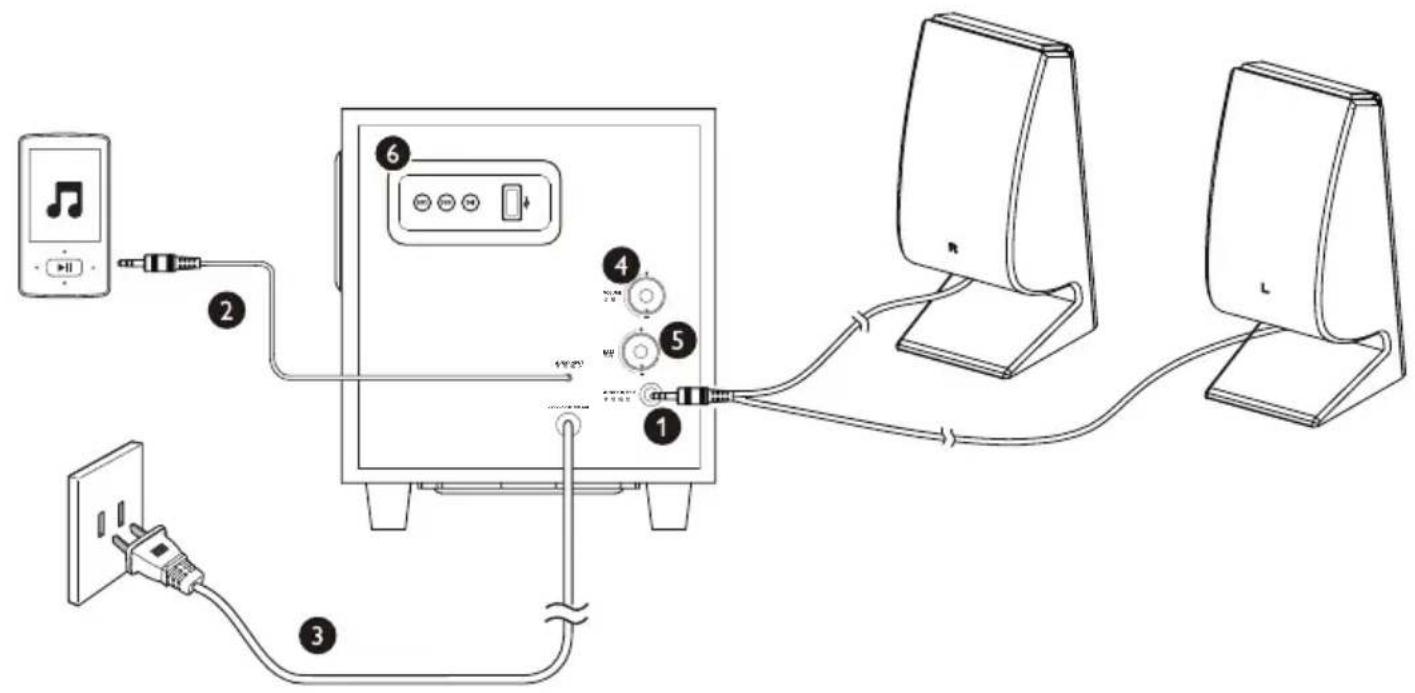
1 Insert the speaker plug into audio output socket ( ①).
2 Connect the audio input plug to the audio output socket of your computer (②).
3 Connect the AC plug to AC power socket ( ③).
4 Rotate the volume knob clockwise to switch on the multimedia speakers ( ④ → Green LED is on.
5 Adjust the volume by the volume knob or by the computer application.
6 Rotate the bass knob to adjust the bass (⑤).
7 After use, switch off the speakers and unplug.
Play from USB

Note
•USB device with NTFS system is not supported.
•MP3 files are supported only.
- Only USB device with capacity no more than 32GB is supported.
Insert the USB device into the USB socket (⑥).
- To skip to the previous/next track, press ◀◀ or ▶▶
• To pause or resume, press ▶II
• To switch audio source, press and hold ▶II.
4 Product information
AC power
Model SPA2345
Input 220\~50Hz, 300mA
5 Troubleshooting
To keep the warranty valid, never try to repair the system yourself.
If you encounter problems when using the product, check the following points before requesting service. If the problem remains unsolved, register your product and get support at www.philips.com/support.
• Make sure that the speakers are correctly installed.
• Make sure the LED lights up.

Specifications are subject to change without notice
All rights reserved.
SPA2345_93_UM_V1.0

Brand : PHILIPS
Model : SPA2345
Category : Loudspeaker