
KR.MD - Mouse Kraun - Free user manual and instructions
Find the device manual for free KR.MD Kraun in PDF.


| Product Type | Wired Optical Mouse |
| Brand | Kraun |
| Model | KR.MD |
| Connection Type | USB (Wired) |
| Number of Buttons | 3 (Left, Right, Scroll Wheel) |
| Tracking Technology | Optical |
| Resolution (DPI) | 1000 DPI |
| Cable Length | 1.5 meters (approx.) |
| Dimensions (L x W x H) | 12 x 6 x 3 cm |
| Weight | 95 g |
| Power Supply | USB Bus-Powered |
| Compatible Operating Systems | Windows, macOS, Linux |
| Plug and Play | Yes (no driver required) |
| Maintenance | Clean with a slightly damp cloth; avoid liquids |
| Safety Instructions | Keep away from water and heat sources |
| Spare Parts & Repairability | Not user-serviceable; consult authorized service |
| Warranty | 1 year (check local terms) |
| Package Contents | Mouse, User Manual |
Frequently Asked Questions - KR.MD Kraun
User questions about KR.MD Kraun
0 question about this device. Answer the ones you know or ask your own.
Ask a new question about this device
Download the instructions for your Mouse in PDF format for free! Find your manual KR.MD - Kraun and take your electronic device back in hand. On this page are published all the documents necessary for the use of your device. KR.MD by Kraun.
USER MANUAL KR.MD Kraun
Manuale_Mouse.FH11 Mon May 26 11:38:51 2008
Pagina 1

KRAUN
KRAUN

LA TECNOLOGIA CHE RISPETTA L'AMBIENTE

Avvertenza
The manufacturer is under no circumstances liable for any unauthorised modifications made to the product by the user or any other parties which may compromise its conformity and safety.
Guida Rapida Quick Guide
Cod. KR.ME
KR.MD
KR.MG
KR.EN
KR.ET
www.Kraun.itwww.Kra
Manuale_Mouse.FH11 Mon May 26 11:38:51 2008
Pagina 2

KRAUN
KRAUN
Quick GuideGuid
Congratulations on your purchase of this high performance product from KRAUN. With proper care it will provide many years of service. At the end of its service life, please dispose of it in accordance with applicable environmental protection laws and practices.
CONTROLS
Your mouse has control elements as indicated in the following diagram;
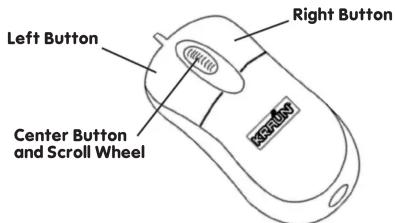
INSTALLATION
On most systems no installation is required, other then plugging the mouse cord into the appropriate socket on your PC (PS/2 or USB). You may, however, modify mouse behaviour by accessing the Mouse control functions and making adjustments to settings such as double-click speed, pointer travel speed and the like through the control panel of your system.
OPERATION
Normally the Left button selects or deselects an option, or, when double-clicked, causes a selection to be executed. The Right button is normally used to open sub-menus or menus related to the application you are currently running. The middle or center button usually serves application specific purposes, while the scroll wheel performs vertical scrolling of a page or screen where applicable. Many programs allow the center and right buttons to perform user configurable functions. Please refer to the respective instructions for your application software.
CARE AND MAINTENANCE
Please clean the mouse as required with a damp cloth to remove dust and dirt that may have accumulated. Make sure that the optical sensor opening at the bottom is always clean to ensure proper function of your mouse.r system.
COMPATIBILITY
- Microsoft® Windows®, all current versions
- Linux, all favours
- Mac® OS, tutte le versioni correnti
www.Kraun.itwww.Kra


Brand : Kraun
Model : KR.MD
Category : Mouse