
TXR774 - Video projector OPTOMA - Free user manual and instructions
Find the device manual for free TXR774 OPTOMA in PDF.


| Product Type | Video Projector |
| Brand | Optoma |
| Model | TXR774 |
| Display Technology | DLP |
| Native Resolution | 800 x 600 (SVGA) |
| Brightness | 3000 ANSI Lumens |
| Contrast Ratio | 20000:1 |
| Lamp Life | Up to 5000 hours (Normal mode) / 6000 hours (Eco mode) |
| Projection Distance | 1.0 m to 12.0 m |
| Image Size (Diagonal) | 0.76 m to 7.62 m (30 in to 300 in) |
| Keystone Correction | ±40° Vertical |
| Inputs | VGA x 1, Composite Video x 1, S-Video x 1, Audio x 1 |
| Outputs | VGA x 1 (Monitor Out), Audio x 1 |
| Speaker | 2 W Mono |
| Dimensions (W x D x H) | 286 x 192 x 97 mm (11.3 x 7.6 x 3.8 in) |
| Weight | 2.4 kg (5.3 lb) |
| Power Consumption | 225 W (Normal mode) / < 1 W (Standby) |
| Power Supply | AC 100-240 V, 50/60 Hz |
| Cleaning | Clean the lens with a soft, lint-free cloth. Vacuum the air filter regularly. |
| Safety | Do not look directly at the lens. Keep away from heat and moisture. |
| Spare Parts & Repairability | Lamp module, air filter are replaceable. Contact Optoma service for repairs. |
| General Information | Ceiling mountable, supports 3D (DLP-Link). |
Frequently Asked Questions - TXR774 OPTOMA
User questions about TXR774 OPTOMA
0 question about this device. Answer the ones you know or ask your own.
Ask a new question about this device
Download the instructions for your Video projector in PDF format for free! Find your manual TXR774 - OPTOMA and take your electronic device back in hand. On this page are published all the documents necessary for the use of your device. TXR774 by OPTOMA.
USER MANUAL TXR774 OPTOMA
Table of Contents .... 1
Usage Notice....2
Safety Information 2
Precautions....4
Eye Safety Warnings....6
Introduction 7
Package Overview 8
Product Overview....9
Main Unit 9
Control Panel....10
Rear View....11
Remote Control....12
Connecting the Projector....13
Connect to Computer / Notebook....13
Installation.... 13
Connect to Video Sources....14
Powering On / Off the Projector 15
Powering On the Projector 15
Powering Off the Projector....16
Warning Indicator....16
Adjusting the Projected Image....17
Adjusting the Projector's Height 17
Adjusting the Zoom / Focus (0.7 XGA Series)....18
Adjusting Projection Image Size....18
Adjusting the Zoom / Focus (0.55" XGA Series)....19
Adjusting Projection Image Size....19
Adjusting the Zoom / Focus (0.65 WXGA Series)....20
Adjusting Projection Image Size....20
User Controls....21
Control Panel & Remote Control....21
On-screen Display Menus....24
How to operate....24
Menu Tree 25
Image 26
Display....31
Setup 33
Options 43
LAN RJ45 (RJ45 models only)....48
Appendices 51
Troubleshooting....51
Image Problems....51
Intermission Problems ....53
Projector Status Indication....54
Remote Control Problems ....55
Audio Problems ....55
Replacing the Lamp....56
Cleaning the Projector....57
Compatibility Modes....58
RS232 Commands 60
RS232 Protocol Function List....61
Ceiling Installation....64
Optoma Global Offices....65
Regulation & Safety notices....67
Operation conditions....68
Safety Information
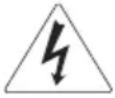 | The lightning flash with arrow head within an equilateral triangle is intended to alert the user to the presence of uninsulated “dangerous voltage” within the product’s enclosure that may be of sufficient magnitude to constitute a risk of electric shock to persons. |
 | The exclamation point within an equilateral triangle is intended to alert the user to the presence of import operating and maintenance (servicing) instructions in the literature accompanying the appliance. |
WARNING: TO REDUCE THE RISK OF FIRE OR ELECTRIC SHOCK, DO NOT EXPOSE THE PROJECTOR TO RAIN OR MOISTURE. DANGEROUS HIGH VOLTAGES ARE PRESENT INSIDE THE ENCLOSURE. DO NOT OPEN THE CABINET.
REFER SERVICING TO QUALIFIED PERSONNEL ONLY.
Class B emissions limits
This Class B digital apparatus meets all requirements of the Canadian Interference-Causing Equipment Regulations.
Important Safety Instruction
- Read these instructions -before using this projector.
- Keep these instructions -for future reference.
- Follow all instructions.
- Install in accordance with the manufacturer's instructions :
A. Do not block any ventilation openings. To ensure reliable operation of the projector and to protect it from overheating, put the projector in a position and location that will not interfere with its proper ventilation. For example, do not place the projector on a bed, sofa, carpet, or similar surface that may block the ventilation openings. Do not put it in an enclosure, such as a bookcase or a cabinet that may keep air from flowing through its ventilation openings.
B. Do not use this projector near water or moisture. To reduce the risk of fire or electric shock, do not expose the projector to rain or moisture.
C. Do not install near any heat sources, such as radiators, heaters, stoves or other apparatus (including amplifiers) that produce heat.
-
Clean only with a dry cloth.
-
Only use attachments/accessories specified by the manufacturer.
-
Refer all servicing to qualified service personnel. Servicing is required when the projector has been damaged in any way, such as:
☐ Power supply cord or plug is damaged.
☐ Liquids have spilled or objects have fallen into the apparatus.
☐ The projector has been exposed to rain or moisture, does not operate normally, or has been dropped.
Do not attempt to service this projector yourself. Opening or removing covers may expose you to dangerous voltages or other hazards. Please call Optoma to be referred to an authorized service center near you.
-
Do not let objects or liquids enter the projector as they may touch dangerous voltage points or short-out parts that could result in a fire or electric shock.
-
See projector enclosure for safety related markings.
- The projector should not be adjusted or repaired by anyone except properly qualified service personnel.
Precautions

Please follow all warnings, precautions and maintenance as recommended in this user's guide.
Warning - Do not look into the projector's lens when the lamp is on. The bright light may damage your eyes.
Warning - To reduce the risk of fire or electric shock, do not expose this projector to rain or moisture.
Warning - Please do not open or disassemble the projector as this may cause electric shock.
Warning - When replacing the lamp, please allow unit to cool down, and follow all replacement instructions. See page 56.
Warning - This projector will detect the life of the lamp itself. Please be sure to change the lamp when it shows warning messages.
Warning - Use the "Lamp Reset" function from the on-screen display "Options | Lamp Settings" menu after replacing the lamp module (see page 47).
Warning - When switching the projector off, please ensure the cooling cycle has been completed before disconnecting the power. Allow 90 seconds for the projector to cool down.
Warning - Do not use the lens cap when projector is in operation.
Warning - When the lamp is approaching the end of its life, the message “Lamp is approaching the end of its useful life” displays on the screen. Please contact your local reseller or service center to change the lamp as soon as possible.
Warning - To reduce the risk of injury to the eyes, do not look directly into the laser beam on the remote control and do not point the laser beam into anyone's eyes. This remote control is equipped with a Class II laser that emits radiation.

When the lamp reaches the end of its life, the projector will not turn back on until the lamp module has been replaced. To replace the lamp, follow the procedures listed under "Replacing the Lamp" section on page 56.
Do:
- Turn off the product before cleaning.
Use a soft cloth moistened with a mild detergent to clean the display housing. - Disconnect the power plug from the AC outlet if the product is not being used for a long period of time.
Don't:
Do not block the ventilation slots and openings on the unit.
Do not use abrasive cleaners, waxes or solvents to clean the unit.
Do not use under the following conditions:
- In extremely hot, cold or humid environments. Ensure that the ambient room temperature is within 5-40 °C and relative humidity is 10-85% (max.), non-condensing.
- In areas susceptible to excessive dust and dirt.
- Near any appliance that generates a strong magnetic field.
- In direct sunlight.
Eye Safety Warnings
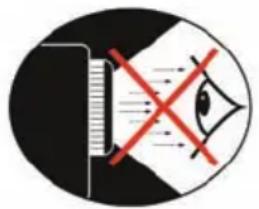
Avoid staring directly into the projector's beam of light at all times.
Minimize standing facing into the beam. Keep your back to the beam as much as possible.
Using a stick or laser pointer is recommended to avoid the need for the presenter to enter the beam.
■ Ensure that projectors are located out of the line of sight from the screen to the audience; this ensures that, when presenters look at the audience, they do not also have to stare at the projector lamp. The best way to achieve this is by ceiling-mounting the projector rather than placing it on floor or table top.
When projector is used in a classroom, adequately supervise students when they are asked to point out something on the screen.
In order to minimize the lamp power needed, use room blinds to reduce ambient light levels.
Product Features
This product is a single chip 0.55"/0.7" XGA series and 0.65" WXGA series DLP® projector. Outstanding features include:
Texas Instruments Single chip DLP® Technology
◆ Computer Compatibility:
Apple Macintosh, iMac, and VESA Standards: UXGA, SXGA+, SXGA, WXGA, WUXGA, XGA, SVGA, VGA
◆ Video Compatibility:
■ NTSC, NTSC4.43
■ PAL/PAL-M/PAL-N/SECAM
■ SDTV and EDTV compatible
■ HDTV compatible (720p, 1080i, 1080p)
- Auto source detection with user definable settings
◆ Fully featured IR remote control with laser pointer and mouse control
◆ User friendly multilingual On Screen Menu
◆ Advanced digital keystone correction and high quality full screen image re-scaling
◆ User friendly control panel
One built-in speaker with 3 Watt amplifier
◆ Macintosh and PC compatible
Brand : OPTOMA
Model : TXR774
Category : Video projector