
D42EMA - Monitor HYUNDAI - Free user manual and instructions
Find the device manual for free D42EMA HYUNDAI in PDF.


Pick your language and provide your email: we'll send you a specifically translated version.
| Product Type | Monitor |
| Brand | Hyundai |
| Model | D42EMA |
| Display Diagonal | 42 inches |
| Panel Technology | WLED (White LED backlight) |
| Panel Model | AUO P420HW03-V0 |
| Chassis Material | Aluminum |
| Chassis Color | Black |
| Wall Mount Compatible | Yes |
| Mounting Standard | VESA 400x400 mm (M6 screws) |
| Mounting Screw Size | M6 |
| Number of Mounting Points | 4 |
| Packing Dimensions (W x D x H) | 1212 x 198 x 781 mm |
| Weight (approx.) | 15 kg (without packaging) |
| Power Supply | AC 100-240V, 50/60 Hz |
| Power Consumption (typical) | <100 W |
| Resolution | 1920 x 1080 (Full HD) |
| Brightness (typical) | 350 cd/m² |
| Contrast Ratio (typical) | 3000:1 |
| Response Time (typical) | 8 ms |
| Viewing Angle (typical) | 178° / 178° |
| Connectivity (typical) | HDMI, VGA, DVI |
| Usage | Commercial display, digital signage |
| Cleaning | Use a soft, dry cloth; avoid abrasive cleaners |
Frequently Asked Questions - D42EMA HYUNDAI
How do I mount the monitor on a wall?
The monitor supports VESA 400x400 mm mounting. Use four M6 screws (not included) and a compatible wall mount bracket. Ensure the wall can support the monitor's weight.
What is the recommended resolution?
The native resolution is 1920 x 1080 (Full HD). For best image quality, set your source device to output at this resolution.
How should I clean the screen?
Use a soft, lint-free cloth slightly dampened with water or a mild screen cleaner. Do not spray directly; wipe gently. Avoid abrasive materials.
What should I do if the monitor has no power?
Check that the power cord is securely connected to both the monitor and a working outlet. Try a different outlet. If still no power, contact customer support.
Can the monitor be used outdoors?
The monitor is designed for indoor use only. Exposure to moisture, extreme temperatures, or direct sunlight may damage it.
What inputs does the monitor have?
Typical inputs include HDMI, VGA, and DVI. Exact ports may vary; refer to the product label or manual.
Is there a built-in speaker?
This model does not have built-in speakers. Use external speakers or connect audio via the audio output port if available.
How do I adjust the display settings?
Use the on-screen display (OSD) menu controlled by buttons on the monitor. Navigate to adjust brightness, contrast, and other parameters.
What is the power consumption?
Typical power consumption is less than 100 watts. Actual consumption may vary with settings and usage.
Where can I find spare parts or service?
Contact Hyundai customer service or an authorized service center. Use only genuine parts for repairs to maintain safety and performance.
User questions about D42EMA HYUNDAI
0 question about this device. Answer the ones you know or ask your own.
Ask a new question about this device
No questions yet. Be the first to ask one.
Download the instructions for your Monitor in PDF format for free! Find your manual D42EMA - HYUNDAI and take your electronic device back in hand. On this page are published all the documents necessary for the use of your device. D42EMA by HYUNDAI.
USER MANUAL D42EMA HYUNDAI
| REV. NO | REV. HISTORY | LTR | ECO NO | DATE | APPR'L | |
| DWG | PART | |||||
| 00 | 00 | INITIAL RELEASE | - | - | - | - |

natural_image
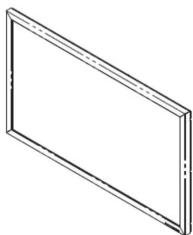
Simple line drawing of a rectangular frame with no text or symbols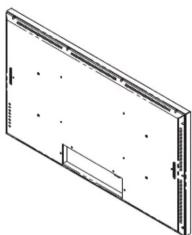
natural_image
Isometric line drawing of a rectangular panel with mounting holes and a small rectangular cutout (no text or symbols)
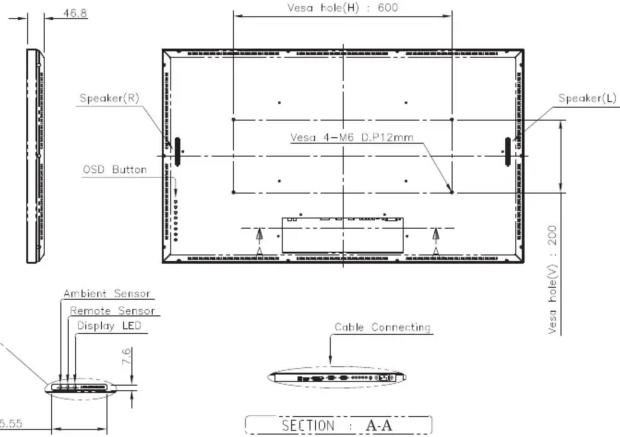
NOTES.
- LCD Panel: 42" WLED PANEL (AUO, P420HW03-V0)
- Weight : T.B.D Kg
- Material : AL
- Color : Black
- Wall mount (Option) : ODD-420MSW-GBC52 (M6 Screw 4Ea)
- Packing Size : (W)1,212 * (D)198 * (H)781
| DRAWN | PLANNED | CHECKED | APPROVED | UNLESS OTHERWISE SPECIFIEDALL DIMENSION ARE DI MILLIMETERS | ANGLE3×4 | TITLE:D42EMA(WLED)EXTERIOR VIEW | UNIT:0.06 |
| R.H.JANG | S.H.JANG | - | Y.T.KM | TOLERANCES ARE:LINEAR X = 0.12 X = 0.10 XX = 0.05 ANGLES = -0.17RADU UNLESS NOTED: R.6.3 | SCALE:1/10 | TYPE:ASSY | |
| *12.04.06 | *12.04.06 | *12.04.06 | *12.04.06 | ||||
| ●HYUNDAI | MODEL_NAME (CODE):D42EMA | CUSTOMER:HDOT | DWG REV00 | DWG(PART) NO.D42EMA_001 | |||
| FILE NAME:LAYOUT_D42EMA_192021.DWG | SHT NO:1/1 | ||||||

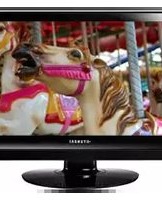

Table of contents
Click a title to access it
Manual assistant
Powered by Anthropic
Waiting for your message
Product information
Brand : HYUNDAI
Model : D42EMA
Category : Monitor