
GV-RX29T512VH-B - Video card GIGABYTE - Free user manual and instructions
Find the device manual for free GV-RX29T512VH-B GIGABYTE in PDF.


| Product Type | Graphics Card |
| Brand | Gigabyte |
| Model | GV-RX29T512VH-B |
| GPU | ATI Radeon HD 2900 XT |
| Memory | 512 MB GDDR3 |
| Memory Interface | 512-bit |
| Core Clock | 740 MHz |
| Memory Clock | 1650 MHz |
| DVI Outputs | 2 x DVI-I |
| TV-Out | 7-pin HDTV |
| Maximum Resolution | 2560 x 1600 (digital) |
| Power Connectors | 1 x 6-pin + 1 x 8-pin PCIe |
| Recommended Power Supply | 600 W |
| Cooling | Dual-slot fan heatsink |
| Dimensions | 267 x 111 x 38 mm |
| Weight | 650 g |
| API Support | DirectX 10, OpenGL 3.2 |
| Maintenance | Clean with compressed air periodically; avoid liquid cleaners. |
| Safety | Handle with antistatic precautions; ensure proper installation in compatible slot. |
| Spare Parts | Not user-replaceable; contact support for repairs. |
| General Information | High-performance graphics card for gaming and multimedia. |
Frequently Asked Questions - GV-RX29T512VH-B GIGABYTE
User questions about GV-RX29T512VH-B GIGABYTE
0 question about this device. Answer the ones you know or ask your own.
Ask a new question about this device
Download the instructions for your Video card in PDF format for free! Find your manual GV-RX29T512VH-B - GIGABYTE and take your electronic device back in hand. On this page are published all the documents necessary for the use of your device. GV-RX29T512VH-B by GIGABYTE.
USER MANUAL GV-RX29T512VH-B GIGABYTE
AMD® Graphics Accelerator
User's Manual
Rev. 104
Copyright
© 2012 GIGABYTE TECHNOLOGY CO., LTD
Copyright by GIGA-BYTE TECHNOLOGY CO., LTD. ("GBT"). No part of this manual may be reproduced or transmitted in any form without the expressed, written permission of GBT.
Trademarks
Third-party brands and names are the properties of their respective owners.
Notice
Please do not remove any labels on this graphics card. Doing so may void the warranty of this card.
Due to rapid change in technology, some of the specifications might be out of date before publication of this this manual. The author assumes no responsibility for any errors or omissions that may appear in this document nor does the author make a commitment to update the information contained herein.
Rovi Product Notice:
This product incorporates copyright protection technology that is protected by U.S. patents and other intellectual property rights. Use of this copyright protection technology must be authorized by Rovi Corporation, and is intended for home and other limited viewing uses only unless otherwise authorized by Rovi Corporation. Reverse engineering or disassembly is prohibited.
Table of Contents
- Introduction....3
1.1. Minimum System Requirements ....3
- Hardware Installation....4
2.1. Hardware Installation 4
2.1.1. AMD Crossfire 5
- Software Installation....7
3.1. Driver and Utility Installation 7
3.1.1. Driver Installation....7
3.1.2. GIGABYTE OC Guru II....9
3.2. Taskbar Icon 19
3.3. Display Properties Pages 21
-
AMD Eyefinity ....36
-
Appendix....37
1. Introduction
1.1. Minimum System Requirements
- Hardware
- Intel®Pentium®4 / CoreTM 2 or AMD Athlon™ / Phenom™
- 1 GB or more of system memory for best performance
- Optical drive for software installation (CD-ROM or DVD-ROM drive)
- Operating System
- Windows ® 8
- Windows ® 7
- Windows®Vista
- Windows®XP with Service Pack 2 (SP2)
- Windows ® XP Professional x64 Edition
2.2. Hardware Installation
Step 1.
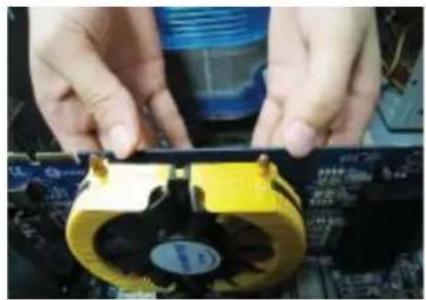
Locate the PCI Express x16 slot. If necessary, remove the metal cover from this slot; then align your graphics card with the PCI Express x16 slot, and press it in firmly until the card is fully seated.

Make sure that the gold edge connector of the graphics card is securely inserted.
natural_image
Close-up of hands assembling a yellow CPU fan on a motherboard (no visible text or symbols)Step 2.
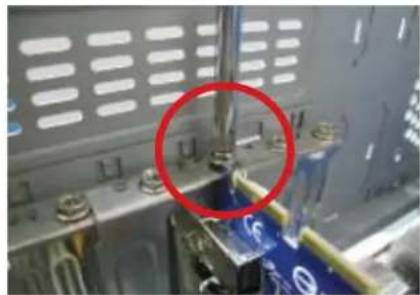
Replace the screw to fasten the card in place, and replace the computer cover.
natural_image
Close-up of electronic components with red and black connectors (no visible text or symbols)
natural_image
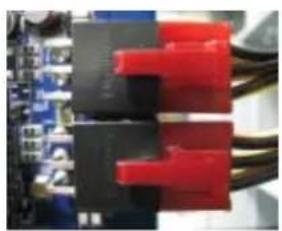
Close-up of a mechanical assembly with a red circle highlighting a component (no visible text or symbols)After installation, remember to connect the power cable to your graphics card, or the system will not boot. Do not touch the card when it's operating to prevent system instability.
Step 3.
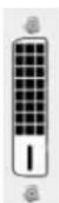
Plug the display cable into your card; then turn on the computer and monitor. To connect a flat panel display to your graphics card, use the DVI-I connector. To connect an HDMI monitor to your graphics card, use the HDMI connector. To connect a DisplayPort monitor to your graphics card, use the DisplayPort connector.

To Flat Panel Display To Flat Panel Display To HDMI Monitor


To Mini HDMI Monitor
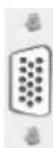
To D-sub Monitor

To Mini DisplayPort Monitor

To Mini DisplayPort Monitor
You are now ready to proceed with the installation of the graphics card driver. Please refer to next chapter for detailed instructions.
2.1.1. How to enable the AMD CrossFireX™ technology?
- CrossFireX™ Configuration
If you are planning on using this graphics card as part of a CrossFireX system, the following is required:
- A CrossFireX certified motherboard with two PCI Express x16 slots and correct chipset driver
- One or two CrossFire bridge interconnect cables
Step 1:
Install two CrossFireX graphics cards of the same chipset on a CrossFireX-supported motherboard and connect the graphics cards via two CrossFire bridge interconnect cables (Figure 1). Then users can enable the CrossFireX technology through the graphics card driver.

Figure 1
Step 2:
After installing graphics card driver in operating system, when an AMD CrossFireX configuration is detected for the first time by the AMD Catalyst display driver, AMD CrossFireX support is automatically enabled, and the best possible GPU combination is selected based on the hardware configuration.
If AMD CrossFireX is not enabled, access the AMD Catalyst Control Center (please refer to Page 14). From the AMD Catalyst Control Center, enter the CrossFire menu and assure to select the Enable CrossFireX™ check box (Figure 2).

Figure 2
AMD Graphics Accelerator support HDMI output which can handle both audio and video signals. However, audio output from the onboard audio controller or the external sound card will be disabled when HDMI output is activated.
If no need for HDMI output function, set the onboard audio controller or the external sound card to be the default Sound Playback device to obtain audio output from your system.

Expansion cards contain very delicate Integrated Circuit (IC) chips. To protect them against damage from static electricity, you should follow some precautions whenever you work on your computer.
- Turn off your computer and unplug power supply.
- Use a grounded wrist strap before handling computer components. If you do not have one, touch both of your hands to a safely grounded object or to a metal object, such as the power supply case.
- Place components on a grounded antistatic pad or on the bag that came with the components whenever the components are separated from the system.
The card contains sensitive electric components, which can be easily damaged by static electricity, so the card should be left in its original packing until it is installed. Unpacking and installation should be done on a grounded anti-static mat. The operator should be wearing an anti-static wristband, grounded at the same point as the anti-static mat.
Inspect the card carton for obvious damage. Shipping and handling may cause damage to your card. Be sure there are no shipping and handling damages on the card before proceeding.
DO NOT APPLY POWER TO YOUR SYSTEM IF THE GRAPHICS CARD IS DAMAGED.
In order to ensure that your graphics card can work correctly, please use official GIGABYTE BIOS only. Using non-official GIGABYTE BIOS might cause problem(s) on the graphics card.
3. Software Installation
Notice the following guidelines before installing the drivers:
- First make sure your system has installed DirectX 9 or later version.
- Make sure your system has installed the appropriate motherboard drivers
(for the motherboard drivers, please contact the motherboard manufacturer.)
Notice : The photos in this manual are for reference only and may not match what you exactly see on your screen
3.1. Driver and Utility Installation
3.1.1. Driver Installation
After installing the operating system, insert the driver disk into your optical drive. The driver Autorun screen is automatically displayed which looks like that shown in the screen shot below. (If the driver Autorun screen does not appear automatically, go to My Computer, double-click the optical drive and execute the setup.exe program.)

Step 1:
Click the Install Display Driver item.

Step 3:
Click the Install button.
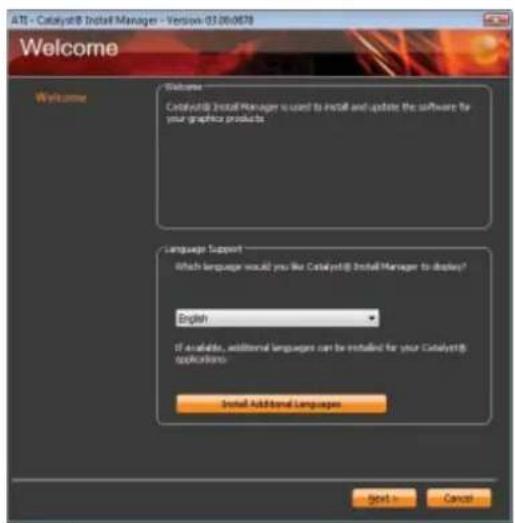
Step 2:
Select the displayed language and then click Next.

For software MPEG support in Windows XP, you must install DirectX first. Users who run Windows XP with Service Pack 2 or above do not need to install DirectX separately.
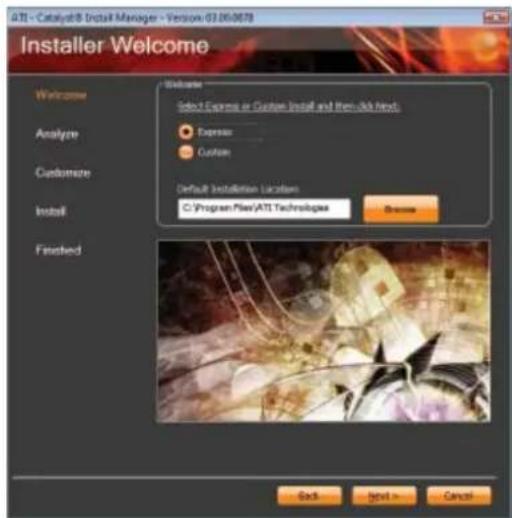
Setp 4: Click the Express or Custom icon and then click Next.

Step 5: Click the Accept button.

The system is installing the components. Step 6:
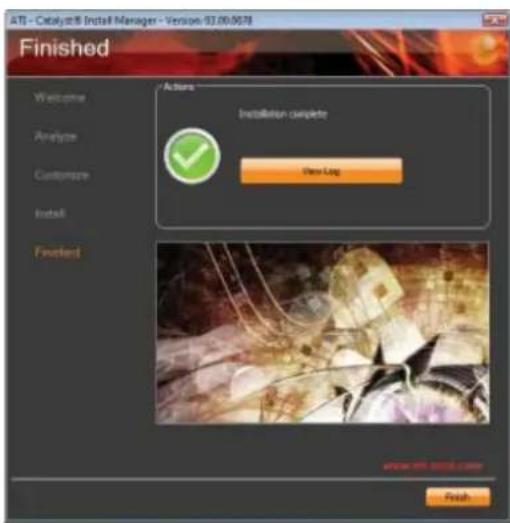
Click the Finish button to restart the computer. Then the driver installation is completed.
3.1.2. GIGABYTE OC Guru II
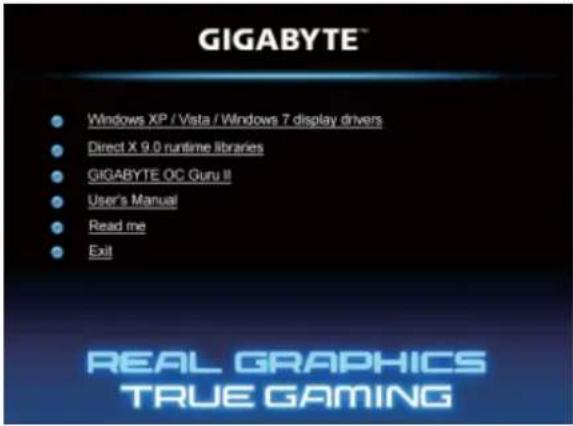
Step 1:
Click the GIGABYTE OC Guru II item.

Choose the language for the installation and click the OK button.
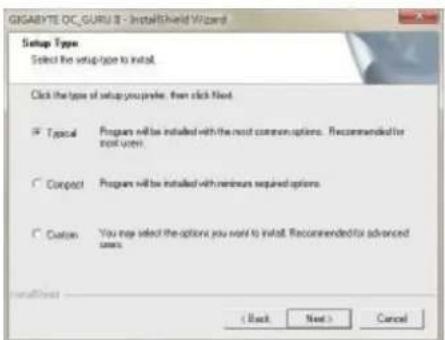
Step 3:
Choose the Typical and click the Next button

The system is installing the components.

Step 4:
Click the Finish button. Then the installation of the GIGABYTE OC Guru II is completed.
OC GURU II: Profi les
Users have 5 Profiles, 1/2/3/4/5, to set different profiles. By clicking 1/2/3/4/5, users can switch around these profiles
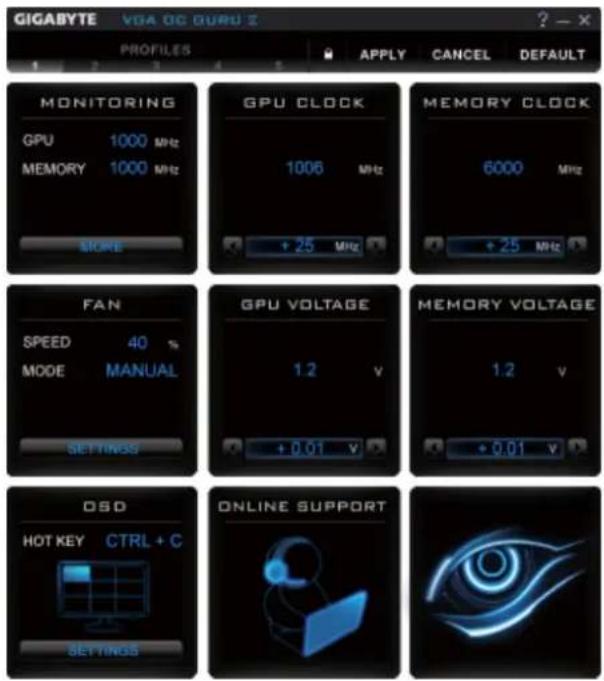
This page indicates where users can set up MONITORING、GPU CLOCK、MEMORY CLOCK、FAN、GPU VOLTAGE、MEMORY VOLTAGE、OSD、ONLINE SUPPORT.

Function: When it's locked, GPU CLOCK / MEMORY CLOCK / GPU VOLTAGE / MEMORY VOLTAGE can not be changed.

Function: When it's unlocked, GPU CLOCK / MEMORY CLOCK / GPU VOLTAGE / MEMORY VOLTAGE can be adjusted.

Function: Apply to what has just been setup.

Function: Return to the previous applied setup.

Function: Restore the default setup.
MONITORING:

Show real time GPU Clock/MEMORY Clock

Click MORE to MONITORING PANEL
MONITORING PANEL:


Function: Monitoring Panel Settings.
Function: Start recording.
Function: Stop recording.
Monitoring panel settings:


Function: Show the chosen items on the MONITORING PANEL.
RECORD

C:\Program Files\GIGABYTE\GIGABYTE OC_GURU II\GvTem
Function: Set up a folder to save the recorded files.

Function: Return to MONITORING Page.
SAVE
Function: Save the settings.
DEFAULT
Function: Restore the default setup.
GPU CLOCK:


When changing DEFAULT CLOCK,

represents PLUS and

represents MINUS.

Show GPU OFFSET, users can enter numbers directly to change GPU OFFSET.
MEMORY CLOCK:
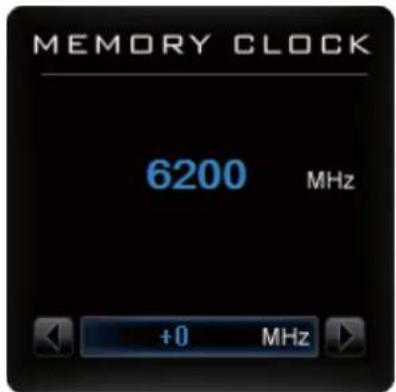
MEMORY CLOCK is the combination of DEFAULT CLOCK and OFFSET.

When changing MEMORY CLOCK,

represents PLUS and

represents MINUS.

Show MEMORY OFFSET, users can enter numbers directly to change MEMORY OFFSET.
FAN
SPEED: show real time fan speed, it will show 0% if using a passive graphics card.
MODE: show Auto mode or Manual mode, users can set up in SETTINGS
SETTINGS:

line
| Time (s) | Manual Fan Speed (%) | Auto Fan Speed (%) | | :--- | :--- | :--- | | 30 | 42 | - | | 40 | 52 | - | | 50 | 62 | - | | 60 | 81 | - | | 70 | 81 | - | | 80 | 81 | - |
AUTO
AUTO mode, fans will be controlled automatically.

MANUAL
MANUAL mode, users can adjust fan behavior by adjusting the blue point on the fan graph.

Return to PROFILES page.
GPU VOLTAGE
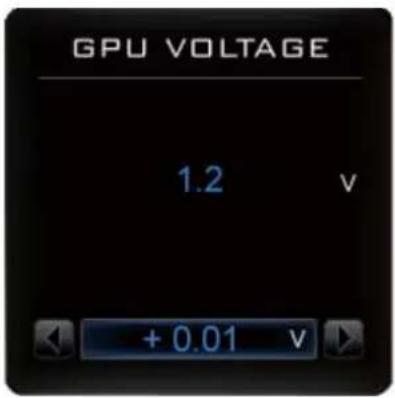
Show and set up GPU VOLTAGE

When changing GPU VOLTAGE,

represents PLUS and

represents MINUS.

Users can enter numbers directly to change GPU VOLTAGE.
MEMORY VOLTAGE

Show and set up MEMORY VOLTAGE
When changing MEMORY VOLTAGE,

represents PLUS and

represents MINUS.

Show OSD HOT KEY and OSD location

Click SETTINGS to OSD settings
OSD settings:


Function: Return to SETTINGS Page.

Function: Set up where OSD will show during games through clicking on one of the 9 squares.

Function: Setup a shortcut key for SOFTWARE On-Screen Display (OSD).

Function: Setup shortcut keys and a folder to save screenshots.
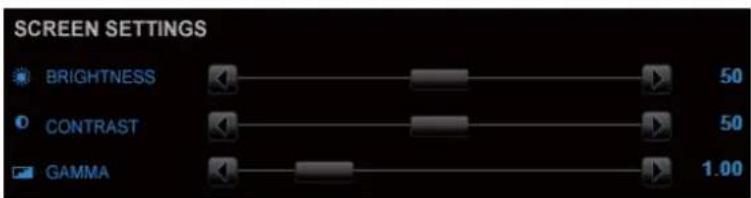
The settings can be adjusted by clicking on


or by dragging the scrollbar.
ONLINE SUPPORT

Click to enter ONLINE SUPPORT
ONLINE SUPPORT:

1. Update BIOS:
The BIOS version of your VGA is shown in the page. By clicking the item while you are connected to the internet, the software detects if there is an updated BIOS version available. You can download the updated BIOS version and it installs automatically.
2.Update Driver

The DRIVER version of your VGA is shown in the page. By clicking the item while you are connected to the internet, the software detects if there is an updated DRIVER version available. You can download the updated DRIVER version and it installs automatically.
3. Update OC GURU

The OC GURU version of your VGA is shown in the page.
By clicking the item while you are connected to the internet, the software detects if there is an updated OC GURU version available. You can download the updated OC GURU version and it installs automatically.
4.PRODUCT INFO

natural_image
Blue information icon inside a circle on black background (no text or symbols)When you are connected to the internet, clicking the item will link to the official GIGABYTE product page.
5. CONTECT US

natural_image
Blue neon-style email envelope icon with @ symbol on black background (no text or symbols)When you are connected to the internet, clicking the item will link to the official GIGABYTE CONTECT US page.
6.FAQ

natural_image
Blue illuminated document icon with a question mark, no text or symbols presentWhen you are connected to the internet, clicking the item will link to the official GIGABYTE product FAQ page.
3.2. Taskbar Icon
After installation of the display driver, you will find an ATI ATI icon in the notification area. Right-click the icon to enter the ATI Catalyst Control Center. The ATI Catalyst Control Center is used to configure all your graphics card settings.
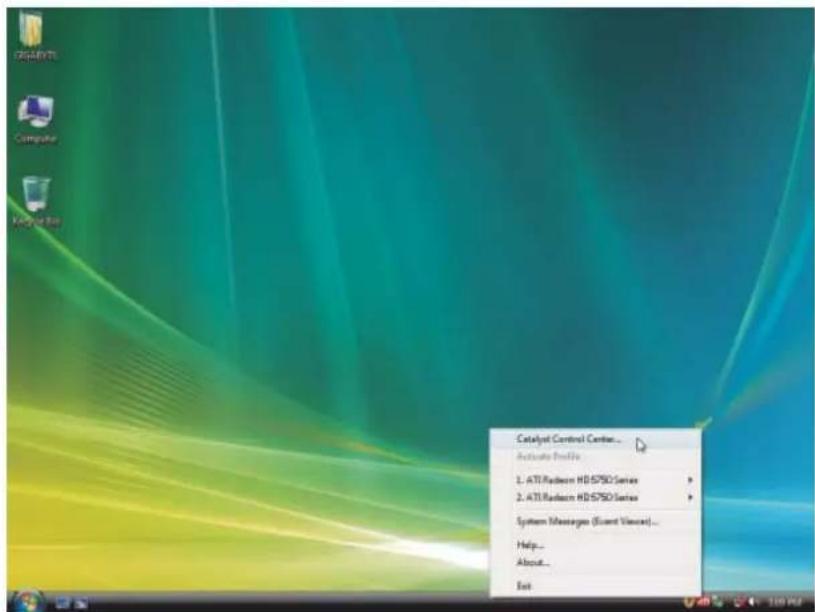
Right-click the ATI icon to enter the ATI Catalyst Control Center.

Or you can right-click on the desktop and select Catalyst(TM) Control Center.
Configuring Audio Output
Configure the default audio output device based upon your needs.
Step 1:
Go to Start > Control Panel > Hardware and Sound > Manage audio devices.

Figure 1

Figure 2
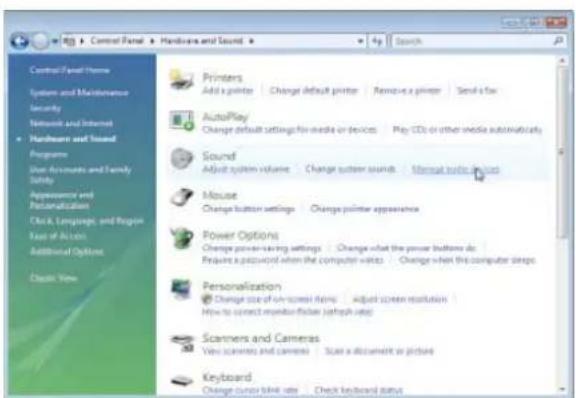
Figure 3
Step 2:
In the Manage audio devices dialog box, click the Playback tab.
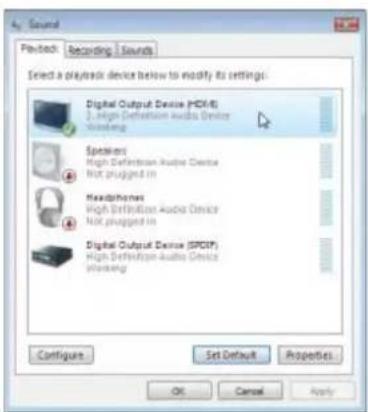
Using the picture to the left as the example, to set HDMI audio to be the default Sound Playback device, select Digital Output Device (HDMI). Otherwise, select Digital Output Device (SPDIF), which is the onboard audio controller.
3.3. Display Properties Pages
Display Settings (Resolutions and Color Quality for Windows)
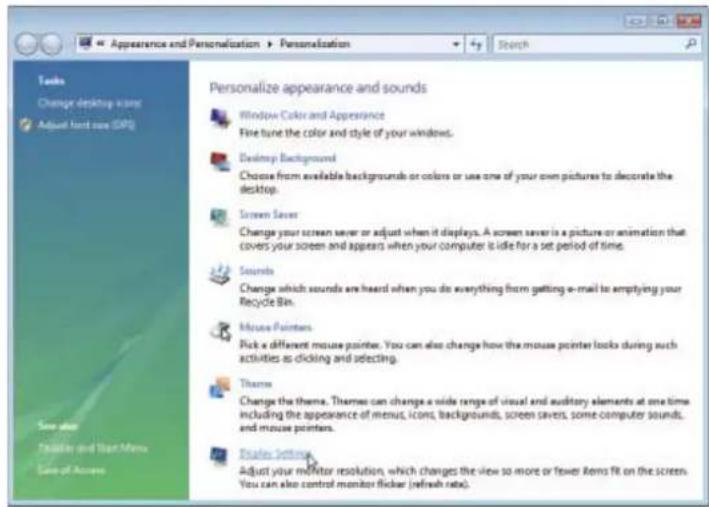
To access Display Settings page, right-click on desktop and select Personalize, then the Personalization windows will show up. Select Display Settings to adjust the screen resolution and color quality settings.

AMD Catalyst® Control Center Basic View :
The Basic View is the default view when AMD Catalyst Control Center is launched for the first time. This interface provides access to the basic settings and advanced features of your AMD graphics products. You can switch between Basic View and Advanced View at any time.
![Catalyst™ Control Center - Basic Welcome to the ATI Catalyst™ Control Center What would you like to use? ✓ Basic [Easy Setup Wizards and Quick Settings] Provides both step-by-step-assistance and Quick Settings for changing your display setup, and then comment tasks. ✓ Advanced Allows your configuration all of the many available settings of your ATI graphics product. ✓ Don't show the page again You can choose between "Basic" [Easy and Quick] or "Advanced" at any free. Click Next to continue Get Next >](/content/2026/05/1066558/images/47ef8c0d231f9634fba073a94ef502ce4a8298cb87db7359cdd607bb9c893153.jpg)
To access more settings in Basic View, click Basic, and then click Next.
Easy Setup Wizards:
Choose a wizard from the central list and click Go for step-by-step assistance.
■ Avivo Video Converter
This wizard assists you to convert videos from one file format to another.

Step 1:
Select Avivo Video Converter, then click Go.

Step 2:
Select the video file to be converted.

Step 3:
In the Output Folder area, select the destination folder where the new file will be located. Click Next.
Step 4:
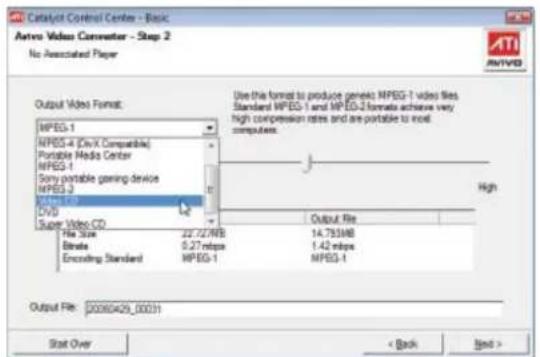
In the Output Video Format list, select a file format for the new file. If you wish to change the name of the new file, enter the new name in the Output File area. Finally, click Next to start file conversion.

The video file has been successfully converted.

■ Setup my display configuration
This wizard allows you to configure display setting for desktop viewing.

■ HydraVision Configuration Settings
This wizard will take you to set up the HydraVision Confi guration based on your own preference.
Quick Settings:
The Quick Settings page provides access to three main settings.
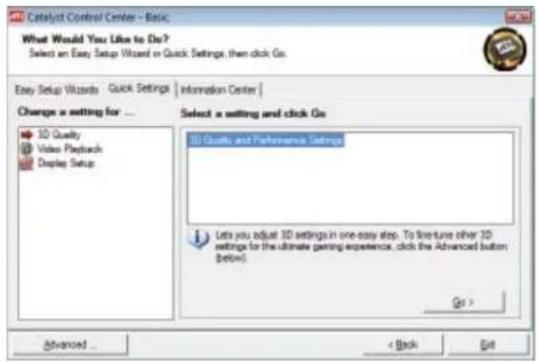
■ 3D Quality
3D Performance and Quality Settings allows your 3D games and applications to get faster performance and better quality with a more balanced setting.
■ Video Playback
Use this option to optimize video playback in different room environment or to select how video playback appears on the second display.
■ Display Setup
This option allows you to configure your desktop, including changing desktop resolution and desktop mode, setting up extended desktop (requires more than one display), and rotating desktop image to match new display orientation.
Information Center:
The Information Center page in Basic and Advanced View provides hardware and software information about the installed graphics card.

■ Graphics Software
Provides software information including driver version, CATALYST version, Direct 3D version and so on.
■ Graphics Hardware
Provides hardware information including graphics chipset, BIOS version, memory size, core clock and so on.
AMD Catalyst Control Center Advanced View
The Advanced page allows you to configure all of the many available settings of your ATI graphics card.
View Properties:
The CATALYST Control Center dashboard supports three types of views.

Hotkeys Properties:
The Hotkeys Manager allows you to create shortcut key combinations to quickly perform tasks such as changing a graphics setting or opening an application. A Hotkey is a combination of a modifier key or keys, such as Ctrl, Alt, or Shift, and any letter from the alphabet.

Profi les Properties:
You can use profiles to create customized environments for your desktop, video, and 3D applications. Define and save your own personal video settings that can be quickly activated manually, through a Hotkey, or by file association.
![Catalog® Created Center View - Settings - Profiles - Preferences - Help Graphics Settings | HydroCAD Welcome Information Center Displays Manager Display Options Monaco Properties D 3D Color Video Video Converter VRU Recover ATI Overdrive™ Basis... Profiles Manager Create or Edit a Profile Enter to select a profile name: Profile description Browse Browse Composition | Acquisition | Applications This profile is listed: all Catalog® Created Center settings: the following settings: AMD Procedon HD 6000 series [1.35] Access Status | Available | Close | Help](/content/2026/05/1066558/images/99d2b2290ad8ff02fe2f3841fb71c8f807a852f0e40b41de48b345ec6412ab77.jpg)
Note:
A profile applies to a specific graphics card. If there is more than one graphics card installed in your computer, you need to select the appropriate card before creating, loading, or activating a Profile.
Preferences Properties:
The Preferences page helps to restore defaults, change skins, and update the Catalyst Control Center. The Catalyst Control Center Preferences page contains the following options:

■ Always on Top
■ Hide Tooltips
■ Hide Splash Screen
■ Enable System Tray Menu
■ Select a Language ...
■ Restore Factory Defaults ...
Help Properties:
The Catalyst Control Center Help feature allows you to access the comprehensive online help, register your product, or generate a problem report should you require technical support.
The Catalyst Control Center Help feature offers the following options:
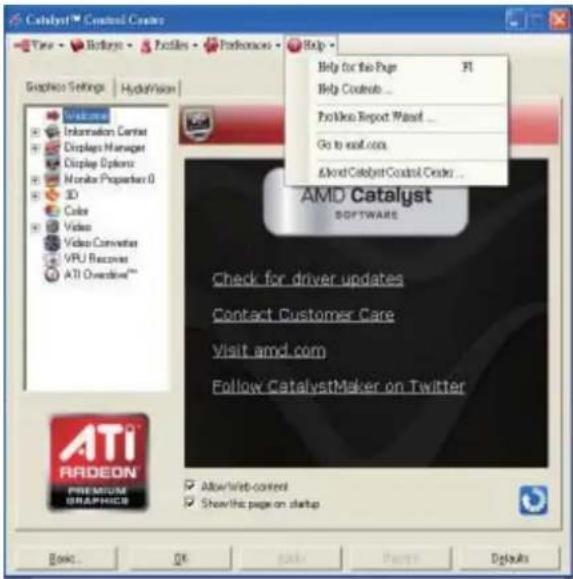
■ Help for this Page
■ Help Contents ...
■ Go to AMD.com
■ About Catalyst Control Center ...
Displays Manager:
Displays Manager is the central location for configuring your display devices and arranging your desktop. Use Displays Manager to change your display setup and arrange your desktop in a multi-monitor environment.

Note:
The stretch vertically and horizontally options are not supported on systems running Windows Vista.
Display Options:
The Display Options aspect gives you additional control to optimize performance of OpenGL and Direct 3D applications. Choose one of the Display Detection Option to prevent screen flicker when detecting a display.
![Catalyst™ Control Center View - Editors - Profiles - References - Help - Graphics Settings | Hydrovision | Welcome Information Center Display Manager Dialysis Database Monitor Properties 0 3D Color Video Video Converter VPU Features ATI Overwire™ Display Options Graphics Adapter: 1 AMD Radeon-HD 6600 series [L395] Display Detection Option Select how Catalyst™ Control Center will detect display devices: □ Detect whenever Catalyst™ Control Center is opened ○ Use manual detection only (It must click the Detect Display button) 3D Pushwith Rate Override It's default, some full screen applications operate at a refresh rate of 60Hz, instead of the desktop refresh rate. To resolve this, select the desired refresh rate override. Disabled Display Management Options For displays of limited resolution capabilities: Only allow pointing on limited resolution displays Basic... OK Apply... Details](/content/2026/05/1066558/images/ef8f95e1ea93549892ac07a8ee426758d9c294e12c22af36d84aee50b6ac7950.jpg)
Note:
On systems Windows XP, this page will show up the 3D Refresh Rate Override item. Use 3D Refresh Rate Override to set a refresh rate of your choice when a full-screen application or game has a default refresh rate that is lower than optimal.
Monitor Properties 1:
![Catalyst Control Centre View - Refresh - Profiles - Exchange - Help - Graphics Settings | Hydration | Welcome Information Center Displays Manager Display Options Monitor Properties 0 Attributes Adjustments HD TV Support Color Color Video Video Converes VPU Resources ATI Overhead™ Monitor Properties Graphics Adapter 1.AND Radeon HD 6600 series [L365] Monitor Information Display Data Channel (DTC) Supported Display/Net: L365 Maximum reported resolution: 1,280x769 Maximum reported refresh rate: 75 Hz Monitor Attributes Use Extended Display/Identification Data (EADC) or divers defaults Maximum resolution: Maximum refresh rate: Athens: 75 Hz Basic... OK Cancel Edit View Help](/content/2026/05/1066558/images/02dc9dadbaed9f42dad4bf8cff3b38612be0df3f2cff427ab90ba782fa66bea4.jpg)
■ Attributes
Monitor Attributes provides information about the attached monitor. You can also enable Extended Display Identification Data (EDID). EDID uses the information provided by the attached monitor to determine the limits for the resolution and refresh rate.
![Catalyst™ Control Center View - Ecllects - Protels - Encoders - Befa Graphics Settings | HydroVision Welcome Information Centre Display Manager Display/Optors Monitor Properties D Attitudes Superven HDTV Support Color 3D Color Video Video Converter VPU Processor ATI Devechro® Monitor Properties Graphics Adapter: LAMD Radeon-HD 6600 series [ L265 ] Screen Position and Size: Click the box and move it, or use the arrows to adjust position or size SYNDOMINATION Horizontal Vertical Composite type Basic OK Cancel Defaults](/content/2026/05/1066558/images/89b09eb4d6520b5668d3f83fc6c09c7c459106a3608438677d9259e258021106.jpg)
■ Adjustments
Use Monitor Adjustments to resize and reposition the computer desktop on your monitor's display screen. You can also adjust the horizontal and vertical sync or enable composite sync.
![Catalyst™ Control Center View - Redlary - Profiles - Performance - Help Graphics Settings | Hydrovision Monitor Properties Graphic Adapler: T-AMO Radeon-HD 6600 series [L365] Color Connection Hue: Reset 30 30 0 Saturation 0 200 100 Adjustments Brightness Reset -100 100 0 Contract 0 200 100 Color Temperature Control Use Extended Display Identification Data (EIDX) Temperature: Reset 4000K 1000K 650K Basic OK Cancel Defaults](/content/2026/05/1066558/images/c7a995a4a99b67681a9fecba71de2851c8aba106e59e8b4b3b33b54b46b8f341.jpg)
Avivo™ Colo
Use AVIv6Color for AMD graphics cards that support per-display color settings. Independently set the hue, saturation, and temperature for each attached and enabled display.
3D:


![Catalyst™ Control Custer View • Downloads • Profiles • Performers • Help Graphics Settings | HydroVision Anti-Aliasing Mode Graphics Adapter: TAHD Radeon-HD 6400 series [L352] 3D Provider Anti-Aliasing Mode Performance Quality Multiexample AA Base... OK Apply Cancel Defaults](/content/2026/05/1066558/images/1b54e6f91fbeaea3df729b3f34e899a2c0c714d87b5cea5a1e794021aff557aa.jpg)
■ Standard Settings
The Standard Settings page provides access to a universal slider control where you can simultaneously adjust all of the standard 3D settings for any type of 3D application. The slider enables you to adjust for overall system performance, overall 3D image quality, or a balance between the two.
This page is useful when you are not aware of which type of 3D settings your application uses, or when you want to use an overall adjustment control that rapidly configures your application.
Anti-Aliasing
Anti-Aliasing (AA) is a rendering technique designed to remove jagged edges, shimmering, and pixelation problems that are common in rendered 3D images. Rather than determining the color to display for each pixel by sampling a single location at the pixel's center, anti-aliasing samples multiple locations within each pixel and blends the results together to produce the final color.
Anti-Aliasing can be set to favor either system processing performance or image quality, or the application can decide:
- Setting for performance is best used when the 3D image is animated and smooth motion is the most important consideration.
- Setting for quality is best used when highly detailed and realistic 3D objects is the most important consideration.
- If you are unsure of how to configure anti-aliasing, use the Use application settings option. Your display will automatically adjust to the application's requirements.
■ Adaptive Anti-Aliasing
Adaptive anti-aliasing is a technique that applies a combination of multi-sampling (MSAA) and super-sampling (SSAA) on 3D objects to improve edge smoothness and fine detail. This feature renders 3D objects containing transparencies more realistic, providing exceptional levels of image quality while maintaining performance.
![Catalyst™ Control Center Plays - Robeye - ProSite - Performance - Help Graphics Settings | HydroAction Anisotropic Filtering Graphics Adopter: T-AMO-Radron-HD 6600 series [L362] 3D Filter Anisotropic Filtering Use application settings ATI RARDEON PREMIUM GRAPHICS Basic OK Cancel Default Defaults](/content/2026/05/1066558/images/4afbe982846e8413c0cc9e8d95f9ff9bf191e2121dd3e72de22b9224b73a848a.jpg)
![Catalyst™ Control Center View - Redesigns - Profile - Redesigns - Help - Graphics Settings | Hydrovision Welcome Information Center Display Manager Display Options Monitor Properties D 3D Standard Settings Anti-Aktoring Mode Anisotropic Filtering AI Realtek Color Video Video Converter VPU Filter ATI OverdriveTM* All Settings Graphics Adapter: T AMD Radeon HD 6600 series [ L350 ] Anti-Aktoring Use application settings Morphological Filtering Filter Standard Samples Anisotropic Filtering Use application settings Catalyst™ AI. Texture Filtering Quality Quality External OK Cancel Defaults](/content/2026/05/1066558/images/0592e43df8199b7576087a0da7bc0e9eb7957b7d3913304b6daacc49e9bacca6.jpg)
Color:
Adjust the overall richness of color by using the Gamma control. To adjust the overall brightness use the Brightness control, and the overall contrast use the Contrast control.
![Catalyst™ Control Creator View - Rollouts - Profile - Fidroons - Help Graphics Settings | Hydrovision Welcome Information Center Display Manager Display Options Monitor Properties D 3D Video Video Converter VPU Receiver ATI Overdrive™ Color Graphics Adapter: T-AMO Radion-HD 6600 series [L362] Color Adjustments Color correction curve: Set color correction for: Desktop All Channels Gamma Reset 0.5 — 3.5 100 % Click to change image. Brightness: -100 — 100 0 % Contrast: 6 — 200 100 % OK Cancel Default ATI® RADEON® PREMIUMA GRAPHICS](/content/2026/05/1066558/images/4d5d38a0d05e94ce9bfb6507e8087d2f33ee8e235d0be5091a4e90a8f71de073.jpg)
■ Anisotropic Filtering
Anisotropic Filtering is a technique that preserves detail on surfaces that have three-dimensional perspective and fade away into the background. It works best when used in conjunction with Mipmapping.
Anisotropic Filtering can be set to favor either an increase in system processing performance or improved image quality:
- Setting for performance is best used with applications that display objects with smooth, simple surfaces, like those seen in CAD applications.
- Setting for quality is best used with applications that display highly detailed scenes, backgrounds, and textured objects, like those seen in 3D games.
- If you are unsure how to configure anisotropic filtering, use the Use application settings option. Your display will automatically adjust to the application's requirements.
■ All Settings
The All Settings page combines all of the principal 3D features onto a single page, without any preview window, allowing for quick access and adjustment. This page is useful when it is not necessary to preview the adjusted settings because the effect is already known or understood.
Avivo™ Video:
![Catalyst™ Control Center View - Rodeys - Protels - Refraeus - Help Graphics Settings | HydroVision Welcome Information Center Display Manager Display Options Monitor Properties D 3D Color Video Basic Color Advanced Color Basic Quality Theater Mode ATI Settings Video Converter VPU Features ATI Outdoor™ Presets Graphics Adapter: TAMD Radeon HD 6.600 series [1,265] Video Presets Presets To quickly adjust your video setting, choose one of the video presets. Use Application Settings Video Preset Basic... OK Apply Preview Defaults](/content/2026/05/1066558/images/0061c4fb8a39da8019cc675864729e55c325951c9f1f9f8eb75ea584f12c1e80.jpg)
Presets
To quickly adjust your video settings choose one of the video presets.
Note:
These settings will only affect applications with video overlay support.
![Catalyst™ Control Center View - Redkaya - Postoris - Fathesom - Help Graphics Settings | HydroAction Basic Color Graphics Adapters: T-AHID Radeon-HD 6600 series [1,365] Video Preview Basic Color Baseline Baseline Baseline Baseline ATI RADEON PROMPTUS GRAPHICS Use application settings Basic... OK Cancel Default](/content/2026/05/1066558/images/e1d109e9e6e5fda82439e4191a64e07942b2ef52c313fdb2bd2b093ada245df7.jpg)
Basic Color
Use the Avivo Color: Basic option to manually set Gamma, Brightness, Contrast, Saturation, and Tint for video playback.
Note:
Certain video formats do not support these adjustments. These settings will only affect applications with video overlay support.
![Catalyst™ Catalyst Center View - Redlans - ProGris - Performers - Help - Graphics Settings | Hydrovision Advanced Color Graphics Adapter: T AMD Radeon-HD 6600 series [L365] Video Preview Advanced Color Video Gamma Beginner White Dynamic Range Welcome Information Center Display Manager Display Options Monitor Properties D 3D Color Video Create Basic Color Properties Basic Quality Transformer Mode All Settings Video Converter VPU Filterer ATI Desimble™ ATI® Radeon® PREMIUM GRAPHICS Browse... OK Cancel Help](/content/2026/05/1066558/images/8fc3482c383e1b1f9f8a47e68a2fad764ab653599073ce787c57f934ed004f51.jpg)
■ Advanced Color
Use the Advanced Color page to fine tune the color of standard definition video (720x480) to make the color more or less vibrant and to remove excess red from skin tones. You can preview your changes before applying them.
Note:
This page is only for Windows Vista.
![Catalyst™ Control Center View - Rodeon - ProBox - Performance - Help - Graphics Settings | HydroAction Basic Quality Graphics Adapter: TAMD Rodeon-HD 6600 series [L360] Video Preview Basic Quality: Use automatic driving Select the following steps: Pull down detection Welcome Information Center Display Manager Display Options Monitor Properties D 3D Color Video Present Basic Color Advanced Color Image Style Transfer Mode Alt Settings Video Converter VPU Preference ATI Overdrive™ ATI® RODEON® PREMIUM GRAPHICS Basic... OK Apply Cancel Default](/content/2026/05/1066558/images/dded1fb1a1869406ea6cd1d5e4ffd0de0dd3b309f862416df876bb3571011ddd.jpg)
■ Basic Quality
You can control the deinterlacing settings by checking the Use automatic deinterlacing item. The bar determines how the two interlaced video fields are converted into a non-interlaced form. Note:
These settings will only affect applications with video overlay support.
![Catalyst™ Control Center View - Rodeys - Profiles - Ferrones - Help - Graphics Settings | HydroVision Welcome Information Center Display Manager Display Options Monitor Properties D 3D Color Video Private Basic Color Advanced Colors Basic Quality Power UP AI Settings Video Converter VPU Computer ATI Devlndive** Theater Mode Graphics Adapter: T AMD Radeon HD 6000 series [1,365] Single Display Mode Theater Mode requires Dual Display To select another audio, click Display Manager Main Display Selected Theme H. ARDEON software Second Display Primary H. ARDEON Settings Test the power output is to: Make the power up video Scale to all screen ATI ARDEON PREMIUM GRAPHICS OK Apply Signed Defaults](/content/2026/05/1066558/images/53cc577112fdf2433b9dc2c4ecf06be3e69a7a7bb9ecdf68753ef64c55fc37bb.jpg)
■ Theater Mode
Use Theater Mode to change the way you view streaming video.
Note:
• These settings will only affect applications with video overlay support. Extended Desktop Mode is not supported on systems running Windows Vista.
- This item will be available when you connect two monitors.
![Catalyst™ Control Center View - Redesigns - Postoris - RediTunes - Redg - Graphics Settings | HydroVision All Settings Graphics Adapter: T-AMO Radeon-HD 6600 series [L305] Basic Color Beginner Endzone Compact Text Use application settings Advanced Color Video Gamma RediTunes ATI RADEON PREMIUM GRAPHICS Basic... OK Cancel Change Defaults](/content/2026/05/1066558/images/0ce1adde7e9fab904c1b8478cfca4e6b7f4a79636150c45b05ae1dd79c438b55.jpg)
■ All Settings
The All Settings page combines all of the principal Video features onto a single page, without any preview window, allowing quick access and adjustment. This page is useful when it is not necessary to preview the adjusted settings because the effect is already known or understood. Note:
These settings will only affect applications with video overlay support.
AMD Overdrive:
Use Overdrive to maximize your viewing experience by dynamically and safely overclocking the graphics processor and memory. Use the Automated clock configuration utility to obtain the ATI recommended speeds for the graphics processor clock and video memory clock. Alternatively, manually set these speeds to meet your specific requirements. Finally, Overdrive can be configured to run when the computer is booted or only when running 3D applications.

Note:
If your computer cannot restart after setting a higher clock speed, press and hold the
CrossFireX TM :
CrossFireX delivers exceptional performance on a single display by combining the processing power of two or more Graphics Processing Units (GPUs).
![ATI Catalyst™ Created Counter View - Rollouts - Professional - Preferences - Help - Graphics Settings | HydroVision | Welcome Information Center Display Manager Display Options Monitor Properties 0 3D Color Actions™ Video ATI Overdrive™ CrossFireX™ Configure Diagnosis CrossFireX™ Graphics Adapter: 1. ATI Radeon HD 6600 Series [ GD-1904BP ] CrossFireX™ delivers exceptional performance on a single display by combining the processing power of two or more Graphics Processing Units (GPUa). Configure CrossFireX™ Enable CrossFireX™ Identify GPU Your system is not functioning at optimal performance. Please go to the Diagnosis page for a more detailed analysis. Basic... OK Apply Show Defaults](/content/2026/05/1066558/images/cd4b72b782c7b303d3160c7707b96a282744091e2afb27879da7057fa2d30a6f.jpg)
- Configure
When an ATI CrossFireX configuration is detected for the first time by the ATI Catalyst display driver, ATI CrossFireX support is automatically enabled. If ATI CrossFireX is not enabled, select the Enable CrossFireX™ check box.
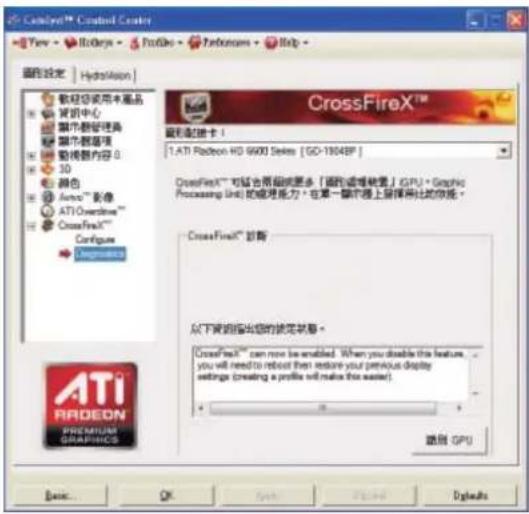
Use this page to determine whether your ATI CrossFireX configurations are configured properly and functioning optimally. You can also use the page to view performance issues and suggested solutions specific to a particular configuration. Note:
This page is only for ATI CrossFireX configuration.
AMD Eyefi nity setting:

Select Create Eyefinity Display Group

■ Select Display (3 x 1)
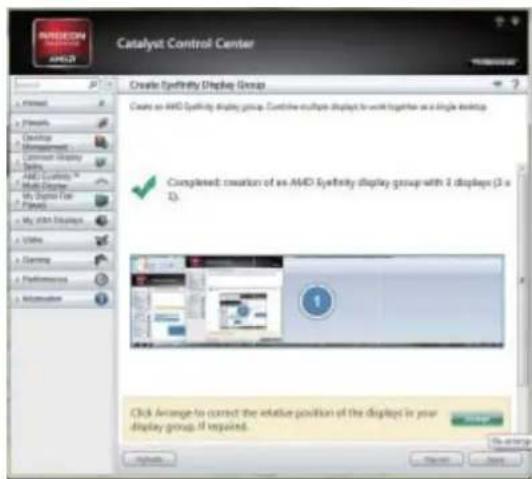
■ Arrange the order of your displays then the setting is completed
4. Troubleshooting Tips
The following troubleshooting tips may help if you experience problems. Contact your dealer or GIGABYTE for more advanced troubleshooting information.
- Check that the card is seated properly in the PCI Express x16 slot.
■ Ensure that the display cable is securely fastened to the card's display connector.
■ Make sure that the monitor and computer are plugged in and receiving power.
■ If necessary, disable any built-in graphics capabilities on your motherboard. For more information, consult your computer's manual or manufacturer.
(NOTE: Some manufacturers do not allow the built-in graphics to be disabled or to become the secondary display.)
■ Make sure you selected the appropriate display device and graphics card when you install the graphics driver.
■ Restart your computer.
Press
After getting into Safe Mode, in Device Manager check whether the driver for the graphics card is correct.
■ For more assistance, use the Troubleshooting Guide located in the Windows Help or contact your computer manufacturer.

If necessary, adjust your monitor's setting using monitor's adjust panel to make the screen look focused, crisp, and sharp. (Please refer to the monitor's manual.)
5.1. Regulatory Statements
Regulatory Notices
This document must not be copied without our written permission, and the contents there of must not be imparted to a third party nor be used for any unauthorized purpose. Contravention will be prosecuted. We believe that the information contained herein was accurate in all respects at the time of printing. GIGABYTE cannot, however, assume any responsibility for errors or omissions in this text. Also note that the information in this document is subject to change without notice and should not be construed as a commitment by GIGA-BYTE.
Our Commitment to Preserving the Environment
In addition to high-efficiency performance, all GIGABYTE motherboards fulfill European Union regulations for RoHS (Restriction of Certain Hazardous Substances in Electrical and Electronic Equipment) and WEEE (Waste Electrical and Electronic Equipment) environmental directives, as well as most major worldwide safety requirements. To prevent releases of harmful substances into the environment and to maximize the use of our natural resources, GIGABYTE provides the following information on how you can responsibly recycle or reuse most of the materials in your "end of life" product.
Restriction of Hazardous Substances (RoHS) Directive Statement
GIGABYTE products have not intended to add and safe from hazardous substances (Cd, Pb, Hg, Cr+6, PBDE and PBB). The parts and components have been carefully selected to meet RoHS requirement. Moreover, we at GIGABYTE are continuing our efforts to develop products that do not use internationally banned toxic chemicals.
Waste Electrical & Electronic Equipment (WEEE) Directive Statement
GIGABYTE will fulfill the national laws as interpreted from the 2002/96/EC WEEE (Waste Electrical and Electronic Equipment) directive. The WEEE Directive specifies the treatment, collection, recycling and disposal of electric and electronic devices and their components. Under the Directive, used equipment must be marked, collected separately, and disposed of properly.
WEEE Symbol Statement

The symbol shown below is on the product or on its packaging, which indicates that this product must not be disposed of with other waste. Instead, the device should be taken to the waste collection centers for activation of the treatment, collection, recycling and disposal procedure. The separate collection and recycling of your waste equipment at the time of disposal will help to conserve natural resources and ensure that it is recycled in a manner that protects human
health and the environment. For more information about where you can drop off your waste equipment for recycling, please contact your local government office, your household waste disposal service or where you purchased the product for details of environmentally safe recycling.
- When your electrical or electronic equipment is no longer useful to you, "take it back" to your local or regional waste collection administration for recycling.
If you need further assistance in recycling, reusing in your "end of life" product, you may contact us at the Customer Care number listed in your product's user's manual and we will be glad to help you with your effort.
Finally, we suggest that you practice other environmentally friendly actions by understanding and using the energy-saving features of this product (where applicable), recycling the inner and outer packaging (including shipping containers) this product was delivered in, and by disposing of or recycling used batteries properly. With your help, we can reduce the amount of natural resources needed to produce electrical and electronic equipment, minimize the use of landfills for the disposal of "end of life" products, and generally improve our quality of life by ensuring that potentially hazardous substances are not released into the environment and are disposed of properly.
China Restriction of Hazardous Substances Table
The following table is supplied in compliance with China's Restriction of Hazardous Substances (China RoHS) requirements:

Management Methods on Control of Pollution from Electronic Information Products
(China RoHS Declaration)
- AMD® Graphics Accelerator
- Copyright
- Trademarks
- Notice
- Rovi Product Notice:
- Table of Contents
- Introduction
- Minimum System Requirements
- - Hardware
- - Operating System
- Hardware Installation
- Step 1.
- Step 2.
- Step 3.
- How to enable the AMD CrossFireX™ technology?
- - CrossFireX™ Configuration
- Software Installation
- Driver and Utility Installation
- Driver Installation
- GIGABYTE OC Guru II
- OC GURU II: Profi les
- RECORD
- SAVE
- DEFAULT
- FAN
- AUTO
- MANUAL
- OSD settings:
- ONLINE SUPPORT
- ONLINE SUPPORT:
- Update BIOS:
- 2.Update Driver
- Update OC GURU
- 4.PRODUCT INFO
- CONTECT US
- 6.FAQ
- Taskbar Icon
- Configuring Audio Output
- Display Properties Pages
- Display Settings (Resolutions and Color Quality for Windows)
- AMD Catalyst® Control Center Basic View :
- Easy Setup Wizards:
- ■ Avivo Video Converter
- ■ Setup my display configuration
- ■ HydraVision Configuration Settings
- Quick Settings:
- ■ 3D Quality
- ■ Video Playback
- ■ Display Setup
- Information Center:
- ■ Graphics Software
- ■ Graphics Hardware
- AMD Catalyst Control Center Advanced View
- View Properties:
- Hotkeys Properties:
- Profi les Properties:
- Preferences Properties:
- Help Properties:
- Displays Manager:
- Note:
- Display Options:
- Monitor Properties 1:
- ■ Attributes
- ■ Adjustments
- Avivo™ Colo
- 3D:
- ■ Standard Settings
- Anti-Aliasing
- ■ Adaptive Anti-Aliasing
- Color:
- ■ Anisotropic Filtering
- ■ All Settings
- Avivo™ Video:
- Presets
- Basic Color
- ■ Advanced Color
- ■ Basic Quality
- ■ Theater Mode
- AMD Overdrive:
- CrossFireX TM :
- - Configure
- AMD Eyefi nity setting:
- Troubleshooting Tips
- Regulatory Statements
- Regulatory Notices
- Our Commitment to Preserving the Environment
- Restriction of Hazardous Substances (RoHS) Directive Statement
- Waste Electrical & Electronic Equipment (WEEE) Directive Statement
- WEEE Symbol Statement
- China Restriction of Hazardous Substances Table
Brand : GIGABYTE
Model : GV-RX29T512VH-B
Category : Video card