
MMS171W - Loudspeaker PHILIPS - Free user manual and instructions
Find the device manual for free MMS171W PHILIPS in PDF.


| Product Type | Multimedia Speaker System (2.1) |
| Brand | Philips |
| Model | MMS171W |
| Total Power Output | 26.4W |
| RMS Power Output (per channel) | 5.0V ± 2.6W RMS (THD 10%) |
| Frequency Response | 3Hz – 20kHz |
| Driver Units | Woofer: 5" (subwoofer), Satellite: 3.5" magnetic shield |
| Input Sensitivity | 680mA |
| Signal-to-Noise Ratio | >40dB |
| Harmonic Distortion | 0.2% at 1W, 1kHz |
| Channel Separation | >40dB |
| Audio Input | 3.5mm stereo jack |
| Audio Output | RCA jack |
| Power Supply | AC 110V-120V, 60Hz |
| Subwoofer Dimensions (W x H x D) | 170 x 220 x 270 mm |
| Satellite Speaker Dimensions (W x H x D) | 100 x 153 x 100 mm |
| Packaging Dimensions (W x H x D) | 322 x 287 x 340 mm |
| Weight (estimated) | 5 kg |
| Key Features | Dynamic Bass Boost, Cable Volume Control, Wooden Subwoofer, Magnetic Shielding, Low Distortion |
| Placement | Satellites 70 cm apart, subwoofer on floor near PC |
| Safety | Do not expose to water; avoid maximum volume to prevent distortion |
Frequently Asked Questions - MMS171W PHILIPS
User questions about MMS171W PHILIPS
0 question about this device. Answer the ones you know or ask your own.
Ask a new question about this device
Download the instructions for your Loudspeaker in PDF format for free! Find your manual MMS171W - PHILIPS and take your electronic device back in hand. On this page are published all the documents necessary for the use of your device. MMS171W by PHILIPS.
USER MANUAL MMS171W PHILIPS
MMS171 Multimedia Speaker System
User Guide

Website:www.philips.com/pcstuff
Caution:
Characteristic and specification
Thank you for using Philips products. To assure the best working condition of the product and to prevent damage, please read this guide before use.


Caution: Dangerous voltage.
Note: Important information

Characteristic
Fit for music, games, movies and internet:
Pure timbre, good dynamic response;
Wooden subwoofer+2 satellite speakers;
Deep bass, clean treble;
Dynamic bass boost technology;
Minimize distortion for high output
Dynamie base heart
With cable control to use more freely;
Specification:
Total electric power 26.4W
Power output 5.5W x 2 + 8W RMS (THD 10%)
frequency response 35Hz-20KHz
Input sensitivity 680mV
Harmonic Distortion: 0.3% 1W 1KHz
S/N: >65dB
'Separate:
Driver unit: woofer 5"
satellite speaker 2.6" magnetic shield
Audio Input port: 3.5mm stereo jack
Audio output port: RCA jack
Power supply: AC110V-120V\~60Hz
Production size: (LXWXH)
Amplifier: 270x170x220 mm
Speaker: 100x88x153 mm
packaging size: (LXWXH) 332X207X340
Placement and use
Safety items:

natural_image
Line drawing of a simple office desk setup with monitor, speakers, and equipment (no text or symbols)Speaker placement
MMS171 multimedia system includes 2 pieces (left and right) of satellite speakers and 1 unit of subwoofer. Put the satellite speakers on both sides of the monitor, keep their distance at approximately 70cm apart. Put the subwoofer on the floor near to PC. Adjust distance and angle for better sound effect.
Use
- Minimize the volume knob on the cable control and minimize the bass knob on the side
subwoofer.
2.Switch on the power.
3.Play music and adjust the knob for your comfortable volume level.
Note:
* Do not frequently maximize volume to prevent distortion and impact on drivers and
electronics.

Parts
Installation
Front view

Back view


natural_image
Pure electrical circuit lines without any symbols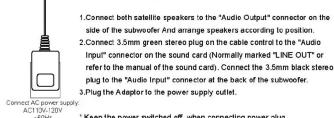
* Keep the power switched off when connecting power plug.
Brand : PHILIPS
Model : MMS171W
Category : Loudspeaker