
SAC5070-800CR - Mobile Device Charger MOTOROLA - Free user manual and instructions
Find the device manual for free SAC5070-800CR MOTOROLA in PDF.


| Product Type | Mobile device charger |
| Brand | Motorola |
| Model | SAC5070-800CR |
| Input Voltage | 100-240V AC, 50/60Hz |
| Output Voltage/Current | 5V/3A, 9V/2A, 12V/1.5A |
| Output Power | 18W |
| Connector Type | USB-C |
| Charging Standard | TurboPower 18W |
| Dimensions | 60 x 60 x 30 mm |
| Weight | 80 g |
| Material | Plastic |
| Color | White |
| Protection | Overcurrent, overvoltage, short circuit, overheat |
| Safety Certifications | CE, FCC, RoHS |
| Operating Temperature | 0°C to 40°C |
| Storage Temperature | -20°C to 70°C |
| Maintenance | Wipe with a dry cloth |
| Repairability | Not user-serviceable |
Frequently Asked Questions - SAC5070-800CR MOTOROLA
User questions about SAC5070-800CR MOTOROLA
0 question about this device. Answer the ones you know or ask your own.
Ask a new question about this device
Download the instructions for your Mobile Device Charger in PDF format for free! Find your manual SAC5070-800CR - MOTOROLA and take your electronic device back in hand. On this page are published all the documents necessary for the use of your device. SAC5070-800CR by MOTOROLA.
USER MANUAL SAC5070-800CR MOTOROLA
SAC5070 8-Bay Battery Charger
Quick Reference Guide

natural_image
Exterior view of a black plastic enclosure with multiple compartments and internal components (no text or symbols visible)© 2009 MOTOROLA, INC. All rights reserved.
Motorola reserves the right to make changes to any product to improve reliability, function, or design.
Motorola does not assume any product liability arising out of, or in connection with, the application or use of any product, circuit, or application described herein.
No license is granted, either expressly or by implication, estoppel, or otherwise under any patent right or patent, covering or relating to any combination, system, apparatus, machine, material, method, or process in which Motorola products might be used. An implied license exists only for equipment, circuits, and subsystems contained in Motorola products.
MOTOROLA and the Stylized M Logo are registered trademarks of Motorola, Inc. Other product names mentioned in this manual may be trademarks or registered trademarks of their respective companies and are hereby acknowledged.
Motorola, Inc.
One Motorola Plaza
Holtsville, N.Y. 11742-1300
www.motorola.com/enterprisemobility.
Warranty
For the complete Motorola hardware product warranty statement, go to: www.motorola.com/enterprisemobility/warranty.
Patents
This product is covered by one or more patents. For patent information go to: www.motorola.com/enterprisemobility/patents.
Introduction
The SAC5070 8-Bay Battery Charger is an accessory for the RS507 Hands-free Imager and provides a quick way to recharge the Lithium-ion batteries that provide power for the RS507 Hands-Free Imager. One charger can hold up to eight batteries at a time.
The 8-Bay Battery Charger supports both standard and extended capacity batteries. The Charger may only be used indoors.
About this Guide
This guide provides basic information on the following topics:
• Parts of the Charger on page 4
• Installation on page 5
- Inserting the Imager Battery in the Charger on page 7
- Battery Age Test on page 8
- Maintaining the Charger on page 9
- Troubleshooting on page 10
• Regulatory Information on page 10
• Wall mount template on page 17
Unpacking the Charger
After opening the shipping box, inspect the contents. You should have received the following:
| Model | Description | 8-Bay Battery Charger | Power supply | AC Line Cord | Quick Start Guide |
| SAC5070-800CR | USA model | X | X | X | |
| SAC5070-801CR International model | X | X | * | X | |
* For AC line cord, contact the Motorola representative in your country.
Inspect the equipment for damage. If you are missing any equipment or if you find any damaged equipment, contact Motorola Enterprise Mobility Support immediately.
Parts of the Charger
Charger Front
RS507 Imager Rest Compartment
Batteries Age Test Button
Charge Status LED


Installation
Tabletop / Shelf Set Up
To set the Charger on a tabletop or shelf:
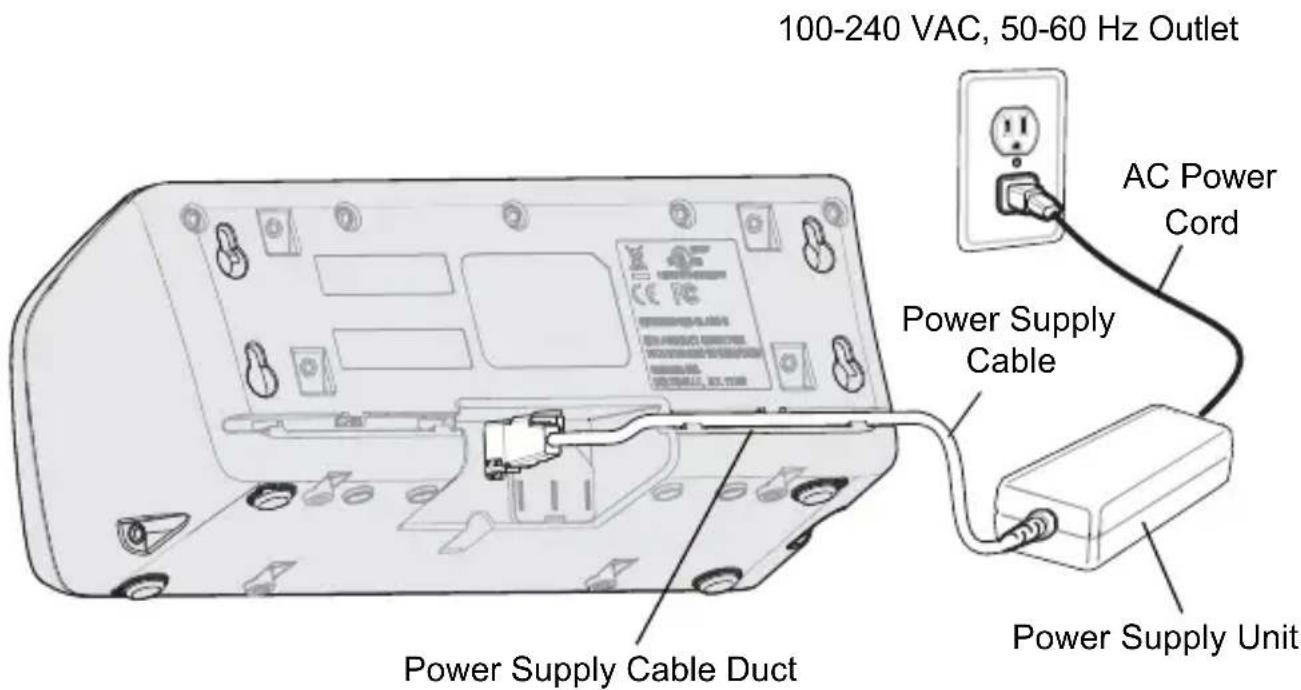
- Place the Charger and the Power Supply Unit on a tabletop or shelf. NOTE When required, use the screw inserts at the back and base to secure the Charger to the tabletop or shelf surface (See Figure on page 4).
- Connect the Power Supply Cable to the power connector on the back of the Charger.
- Use the Power Supply Cable Duct, on the back of the Charger, to route the Power Supply Cable to the left or right side of the Charger.
- Connect the AC plug of the AC Power Cord to a standard electrical outlet.
Wall Mount
WARNING! For safe mounting, it is essential to use wall anchors appropriate to the wall type (i.e. plaster, drywall, concrete, etc.). Mount to wood studs whenever possible.
To mount the Charger on a wall:
-
Use the wall mount template drawing on page 17 to mark the screw location on the wall.
-
Use four screws to mount the Charger to a wall. Ensure to use additional wall mounting hardware, as needed, for safe mounting according to the wall type.
- Connect the power supply cable to the power connector on the back of the Charger (See Figure on page 5).
- Use the Power Supply Cable Duct, on the back of the Charger, to route the Power Supply Cable to the left or right side of the Charger.
- Place the Power Supply Unit on a shelf or tabletop.
- Connect the AC plug of the AC Power Cord to a standard electrical outlet.

Inserting the Imager Battery in the Charger
The Charger supports both standard and extended capacity batteries.

Charge the Battery
CAUTION Only Lithium-ion batteries that have been designed for use with the RS507 Hands-free Imager can be recharged by the Charger. Do not attempt to recharge other types of rechargeable batteries or any type of batteries. Doing so could destroy those batteries and damage the Charger.
NOTE Batteries should be charged within the +32°F (0°C) and +104°F (+40°C) ambient temperature range.
To charge the battery(s):
-
Insert the battery(s) into the 8-Bay Battery Charger so that the contacts of the battery are first to enter, facing down, gently. DO NOT USE EXCESSIVE FORCE.
-
The 8-Bay Battery Charger starts to charge automatically. On each bay, the flashing amber Charge Status LED (See Figure on page 4) indicates the charge status.
A full charge of a depleted battery takes up to four hours. The Charge Status LED lights solid amber when the battery is fully charged.
Battery Age Test
The battery age test checks the battery capacity when fully charged. A worn-out battery is considered to have less than 80% of its nominal capacity. The battery test is simultaneously performed for all batteries inserted into the charger. It is recommended to perform battery age testing once a month. The age test may take up to 16 hours.
NOTE A battery removed during test and re-inserted is excluded from the test but continues normal charging.
To test the battery(s):
- Insert one or more batteries into Charging Bay(s).
- Press and hold the Test Button for approximately 3 seconds until the Charge Status LED of each active bay flashes green.
- Refer to the table below when the indication of the Charge Status LED changes.
Charge Status LED
The Charge Status LEDs show the charge status of each Charging Bay:
| LED Indication Status | |
| Flashing amber Charging in progress. | |
| Solid amber Charging is completed. | |
| Flashing green Battery age testing in progress. | |
| Flashing red/green Defective battery or error in charging; re-insert the battery into the bay. | |
| Solid green Battery age test and charge are completed. Battery is good | |
| Solid red Battery age test and charge are completed. Battery capacity is marginal. | |
| Flashing red Battery age test and charge are completed. Battery is worn out. |
Maintaining the Charger
The Charger is well constructed and durable; however, it is a precision electronic device and must be treated as such.
Follow the procedures in this section to ensure reliable service.
Operating Conditions for the Charger
The Charger is designed to operate in environments that are normally free of dust, dirt, and moisture. It can be operated at temperatures between +32°F (0°C) and +104°F (+40°C).
Handling the Charger
- Do not attempt to open the Charger. No user-serviceable parts are inside.
- Charge only Lithium-ion batteries that have been designed for use in a RS507 Hans-free Imager. Do not attempt to recharge other types of rechargeable batteries or any type of primary batteries.
- Do not place objects other than RS507 Hans-free Imager batteries inside the Charger.
- Protect the Charger from excessive heat, cold, moisture, and harsh, dirty environments.
- Do not leave the Charger where moisture will condense on it.
Cleaning.

CAUTION Do not pour, spray, or spill any liquid on the Charger.
The gold plated battery contacts do not tarnish or oxidize. No maintenance should be needed. If the contacts need to be cleaned:
- Remove power from the Charger.
- Wet the tip of a cotton swab with isopropyl alcohol and squeeze the excess alcohol from the swab.
- Wipe the metal contacts with the damp swab.
Troubleshooting
The Power LED does not light
- Make sure the Power plug of Power Supply Unit is plugged into a wall outlet and the connector on the end of the Power Supply Cable is snapped in the Charger's power connector.
- Plug the Power plug of Power Supply Unit into another outlet.
- Replace Power Supply Unit.
- Contact service representative.
The battery takes too long to recharge
- Ensure that room/battery temperatures are within charging range +32 °F to +104 °F (0 °C to +40 °C)
- Clean the contacts on the battery.
- Try another battery to make sure the Charger functions properly. (If the charge time is more than 4 hours the Charge Status LED flashes red/green).
- Contact service representative.
LED flashes Red/Green
- Remove and re-insert the battery into the charging bay.
- Check for dirt on battery charging contacts and/or charging bay contacts.
- Replace battery with a new one.
- Call service representative.
Regulatory Information
This device is approved under the Enterprise Mobility business of Motorola, Inc. ("Motorola").
This guide applies to Model Number SAC5070.
All Motorola devices are designed to be compliant with rules and regulations in locations they are sold and will be labeled as required.
All Motorola devices are designed to be compliant with rules and regulations in locations they are sold and will be labeled as required.
Local language translations are available at the following web site: www.motorola.com/enterprisemobility/support.

CAUTION Any changes or modifications to Motorola equipment, not expressly approved by Motorola, could void the user's authority to operate the equipment. For use only with Motorola approved and UL Listed mobile computers. Motorola approved and UL Listed accessories and/or Motorola approved and UL Listed/Recognized batteries. Do NOT attempt to charge damp/wet mobile computers or batteries. All components must be dry before connecting to an external power source.
Charger Labeling
Regulatory InformationCharg

Power Supply
Use only a Motorola approved power supply output rated at 12 VDC and minimum 4.17 A. The power supply shall be listed to UL/CSA 60950-1; and certified to IEC60950-1 and EN60950-1 with SELV outputs. Use of alternative power supply will invalidate any approval given to this device and may be dangerous.
Taiwan - Recycling

「廢電池請回收」
EPA (Environmental Protection Administration) requires dry battery producing or importing firms in accordance with Article 15 of the Waste Disposal Act are required to indicate the recycling marks on the batteries used in sales, giveaway or promotion. Contact a qualified Taiwanese recycler for proper battery disposal.
Battery Information
Motorola rechargeable batteries are designed and constructed to the highest standards within the industry.
However, there are limitations to how long a battery can operate or be stored before needing replacement. Many factors affect the actual life cycle of a battery, such as heat, cold, harsh environmental conditions and severe drops.
When batteries are stored over six (6) months, some irreversible deterioration in overall battery quality may occur. Store batteries at half of full charge in a dry, cool place, removed from the equipment to prevent loss of capacity, rusting of metallic parts and electrolyte leakage. When storing batteries for one year or longer, the charge level should be verified at least once a year and charged to half of full charge.
Replace the battery when a significant loss of run time is detected.
Standard warranty period for all Motorola batteries is 3 months, regardless if the battery was purchased separately or included as part of the mobile computer or bar code scanner. For more information on Motorola batteries, please visit: http://mysymbolcare.symbol.com/battery/batbasics1.html
Battery Safety Guidelines
- The area in which the units are charged should be clear of debris and combustible materials or chemicals. Particular care should be taken where the device is charged in a non commercial environment.
- Follow battery usage, storage, and charging guidelines found in the user's guide.
- Improper battery use may result in a fire, explosion, or other hazard.
- To charge the mobile device battery, the battery and charger temperatures must be between +32 °F and +104 °F (0 °C and +40 °C)
- Do not use incompatible batteries and chargers. Use of an incompatible battery or charger may present a risk of fire, explosion, leakage, or other hazard. If you have any questions about the compatibility of a battery or a charger, contact Motorola Enterprise Mobility support.
- Do not disassemble or open, crush, bend or deform, puncture, or shred.
- Severe impact from dropping any battery-operated device on a hard surface could cause the battery to overheat.
- Do not short circuit a battery or allow metallic or conductive objects to contact the battery terminals.
- Do not modify or remanufacture, attempt to insert foreign objects into the battery, immerse or expose to water or other liquids, or expose to fire, explosion, or other hazard.
- Do not leave or store the equipment in or near areas that might get very hot, such as in a parked vehicle or near a radiator or other heat source. Do not place battery into a microwave oven or dryer.
- Battery usage by children should be supervised.
- Please follow local regulations to promptly dispose of used re-chargeable batteries.
- Do not dispose of batteries in fire.
- Seek medical advice immediately if a battery has been swallowed.
- In the event of a battery leak, do not allow the liquid to come in contact with the skin or eyes. If contact has been made, wash the affected area with large amounts of water and seek medical advice.
- If you suspect damage to your equipment or battery, contact Motorola Enterprise Mobility support to arrange for inspection.
Radio Frequency Interference Requirements-FCC

Tested to comply
with FCC Standards
FOR HOME OR OFFICE USE
Note: This equipment has been tested and found to comply with the limits for a Class B digital device, pursuant to Part 15 of the FCC rules. These limits are designed to provide reasonable protection against harmful interference in a
residential installation. This equipment generates, uses and can radiate radio frequency energy and, if not installed and used in accordance with the instructions, may cause harmful interference to radio communications. However there is no guarantee that interference will not occur in a particular installation. If this equipment does cause harmful interference to radio or television reception, which can be determined by turning the equipment off and on, the user is encouraged to try to correct the interference by one or more of the following measures:
- Reorient or relocate the receiving antenna
- Increase the separation between the equipment and receiver
- Connect the equipment into an outlet on a circuit different from that to which the receiver is connected
- Consult the dealer or an experienced radio/TV technician for help.
Radio Frequency Interference Requirements - Canada
This Class B digital apparatus complies with Canadian ICES-003.
CE Marking and European Economic Area (EEA)
Statement of Compliance
Motorola hereby declares that this device is in compliance with all the applicable Directives, 2004/108/EC and 2006/95/EC. A Declaration of Conformity may be obtained from www.motorola.com/enterprisemobility/doc.
Japan (VCCI) - Voluntary Control Council for Interference
Class B ITE
This is a Class B product based on the standard of the Voluntary Control Council for Interference from Information Technology Equipment (VCCI). If this is used near a radio or television receiver in a domestic environment, it may cause radio interference. Install and use the equipment according to the instruction manual.
Korea Warning Statement for Class B ITE
| Class | User's Guide |
| B class | As this equipment has obtained EMC registration for household use, it can be used in any area including residential areas. |

Waste Electrical and Electronic Equipment (WEEE)
English: For EU Customers: All products at the end of their life must be returned to Motorola for recycling. For information on how to return product, please go to: www.motorola.com/recycling/weee.
If you have a problem using the equipment, contact your facility's Technical or Systems Support. If there is a problem with the equipment, they will contact the Motorola Enterprise Mobility Support at:
www.motorola.com/enterprisemobility/support.
For the latest version of this guide go to:
www.motorola.com/enterprisemobility/manuals.

MOTOROLA
Motorola, Inc.
One Motorola Plaza
Holtsville, New York 11742, USA
1-800-927-9626
http://www.motorola.com
MOTOROLA and the Stylized M Logo and Symbol and the Symbol logo are registered in the U.S. Patent and Trademark Office. All other product or service names are the property of their registered owners. © Motorola, Inc. 2009
72-115989-01 Revision B - October 2009
- SAC5070 8-Bay Battery Charger
- Warranty
- Patents
- Introduction
- About this Guide
- Unpacking the Charger
- Parts of the Charger
- Charger Front
- Installation
- Tabletop / Shelf Set Up
- Wall Mount
- Inserting the Imager Battery in the Charger
- Charge the Battery
- Battery Age Test
- Charge Status LED
- Maintaining the Charger
- Operating Conditions for the Charger
- Handling the Charger
- Cleaning.
- Troubleshooting
- Regulatory Information
- Charger Labeling
- Power Supply
- Taiwan - Recycling
- Battery Information
- Battery Safety Guidelines
- Radio Frequency Interference Requirements-FCC
- Radio Frequency Interference Requirements - Canada
- CE Marking and European Economic Area (EEA)
- Statement of Compliance
- Japan (VCCI) - Voluntary Control Council for Interference
- Korea Warning Statement for Class B ITE
- Waste Electrical and Electronic Equipment (WEEE)
- MOTOROLA
Brand : MOTOROLA
Model : SAC5070-800CR
Category : Mobile Device Charger