
SI07B - Wi-Fi module NEC - Free user manual and instructions
Find the device manual for free SI07B NEC in PDF.


| Product Type | WiFi Module |
| Brand | NEC |
| Model | SI07B |
| Compatibility | NEC Interactive Large Format Displays (LFD) |
| Installation Method | Insert into dedicated slot on LFD |
| Operating Temperature | 0°C to 40°C |
| Operating Humidity | 10% to 90% RH |
| Power Supply | Powered by host LFD via slot |
| Wireless Standards | Wi-Fi (IEEE 802.11 b/g/n likely) |
| Water Resistance | Not waterproof; keep dry |
| Maintenance | Keep away from dust and moisture; do not disassemble |
| Safety Warnings | Avoid heat sources; keep out of reach of children |
| Disposal | Recycle as electronic waste per local regulations |
| Intellectual Property | Patented hardware and software; no unauthorized reproduction |
| Manual Information | Pictures are for reference only; subject to actual product |
| User Interface | Controlled via LFD settings menu |
| LED Indicators | Not specified |
Frequently Asked Questions - SI07B NEC
User questions about SI07B NEC
0 question about this device. Answer the ones you know or ask your own.
Ask a new question about this device
Download the instructions for your Wi-Fi module in PDF format for free! Find your manual SI07B - NEC and take your electronic device back in hand. On this page are published all the documents necessary for the use of your device. SI07B by NEC.
USER MANUAL SI07B NEC
WiFi Module User Manual
Note: All the pictures in this manual are for reference only, subject to our available products.
◆ Safety Warning
Before using and operating this device, please read thoroughly and comply with the following precautions in order to prevent accidents or inaccurate operations.
★ Placement
DO NOT charge or use the device in dusty or wet conditions, to prevent internal circuit failure.
Keep the device away from heat sources such as an electric heater. Normal operating temperature is 0-40°C, normal operating humidity is 10%-90%RH.
★ Children Safety
The product and accessories may contain some small-part. Please place them beyond the reach of children in avoidance of swallowing danger.
★ Water Precaution
The product is not waterproof, please keep it dry.
★ Maintenance
When the equipment is damaged, please do not disassemble it for repair without permission, please call customer service to report for repair.
Please contact professional service personnel for maintenance services.
DO NOT insert any sharp or pointed object into the device.
Prevent the device from falls and collisions with other objects, which may cause damages.
◆ Statement
Intellectual property right statement: The hardware design and software of this product are covered by the patents. Anyone who reproduces this product or the content of the instruction without the authorization of the Company shall assume legal liabilities.
This manual is for reference only, and the actual function of the final product is subject to the actual function of the product received by the customer.
The picture is for reference only, please refer to the actual product. The company reserves the right to improve and change the appearance and design of the product without notice.

This symbol, affixed to the product or its packaging, indicates that the product must not be processed with household waste. It must be brought to an electric and electronic waste collection point for recycling and disposal. By the appropriate disposal of this product you also help in preventing potentially negative consequences for the environment and human health. The recycling of materials helps preserve our natural resources. For further information regarding the recycling of this product, please contact your municipality, local waste disposal center or the store where the product was purchased.
◆ Installation Procedure
Warning: Please make sure the power cord of the Interactive Large Format Display (LFD) is disconnected
before installation
1) Take off the Cover.
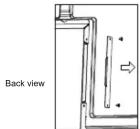
2) Insert the WiFi module fully into the LFD along the direction of the arrow.

3) Complete assembly.

Note: This WiFi module only works for the LFD by plugging it into the above slot.
◆ Function
After completing the installation, turn on the LFD, and the WiFi module will run automatically.
1) Click "Settings" on the screen.
2) Click "Network" and "Wireless LAN", you can turn on/off the Wi-Fi.

Brand : NEC
Model : SI07B
Category : Wi-Fi module