
UC232AF - Cables for Computers and Peripherals ATEN - Free user manual and instructions
Find the device manual for free UC232AF ATEN in PDF.


| Product Type | USB to RS-232 Serial Adapter Cable |
| Brand | ATEN |
| Model | UC232AF |
| Interface | USB 2.0 (Type A male) to RS-232 (DB9 male) |
| Data Transfer Rate | Up to 115.2 kbps |
| Power Supply | Bus-powered via USB |
| Dimensions (approx.) | 60 mm x 20 mm x 10 mm (23.6" x 7.9" x 3.9") |
| Weight (approx.) | 30 g (1.06 oz) |
| Cable Length | Approx. 1 meter (3.3 ft) |
| LED Indicators | Transmit (TX) and Receive (RX) |
| Supported Operating Systems | Windows, Mac OS, Linux |
| Driver Installation | Plug-and-play on most systems; drivers available for legacy OS |
| Serial Port Features | Full modem control signals (DTR, DSR, RTS, CTS, DCD, RI) |
| Compliance | RoHS, CE, FCC |
| Operating Temperature | 0°C to 50°C (32°F to 122°F) |
| Storage Temperature | -20°C to 60°C (-4°F to 140°F) |
| Maintenance | Clean with dry cloth; avoid liquids and direct sunlight |
| Safety Precautions | Do not expose to moisture; disconnect during thunderstorms |
| Spare Parts / Repairability | Not user-serviceable; contact ATEN support for replacement |
Frequently Asked Questions - UC232AF ATEN
User questions about UC232AF ATEN
0 question about this device. Answer the ones you know or ask your own.
Ask a new question about this device
Download the instructions for your Cables for Computers and Peripherals in PDF format for free! Find your manual UC232AF - ATEN and take your electronic device back in hand. On this page are published all the documents necessary for the use of your device. UC232AF by ATEN.
USER MANUAL UC232AF ATEN
USB to RS-232 Adapter
User Manual
Compliance Statements
FEDERAL COMMUNICATIONS COMMISSION INTERFERENCE STATEMENT
This equipment has been tested and found to comply with the limits for a Class B digital service, pursuant to Part 15 of the FCC rules. These limits are designed to provide reasonable protection against harmful interference in a residential installation. Any changes or modifications made to this equipment may void the user's authority to operate this equipment. This equipment generates, uses, and can radiate radio frequency energy. If not installed and used in accordance with the instructions, may cause harmful interference to radio communications. However, there is no guarantee that interference will not occur in a particular installation. If this equipment does cause harmful interference to radio or television reception, which can be determined by turning the equipment off and on, the user is encouraged to try to correct the interference by one or more of the following measures:
♦ Reorient or relocate the receiving antenna.
- Increase the separation between the equipment and receiver.
- Connect the equipment into an outlet on a circuit different from that to which the receiver is connected.
- Consult the dealer or an experienced radio/TV technician for help.
The device complies with Part 15 of the FCC Rules. Operation is subject to the following two conditions: (1) this device may not cause harmful interference, and (2) this device must accept any interference received, including interference that may cause undesired operation.
FCC Caution: Any changes or modifications not expressly approved by the party responsible for compliance could void the user's authority to operate this equipment.

KCC Statement
Industry Canada Statement
This Class B digital apparatus complies with Canadian ICES-003.
CAN ICES-003 (B) / NMB-003 (B)
RoHS
This product is RoHS compliant.
手持式裝置 USB 類產品
| 設備名稱Equipment Name | USB 轉 RS-232 轉換器 | 型號(型式)Type designa-tion (Type) | UC232A / UC232A1 / UC232AF | |||
| 單元 Unit | 限用物質及其化學符號Restricted substances and its chemical symbols | |||||
| 鉛 Lead(Pb) | 汞Mercury(Hg) | 鎘Cadmium(Cd) | 六價鉻Hexavalent chromium( Cr+6 ) | 多溴聯苯Polybrominated biphenyls(PBB) | 多溴二苯醚Polybrominated diphenyl ethers(PBDE) | |
| 電纜線 Cable | - | ○ | ○ | ○ | ○ | ○ |
| 印刷電路部件PCBA | - | ○ | ○ | ○ | ○ | ○ |
| 塑膠/其他部件Plastic / Other parts | ○ | ○ | ○ | ○ | ○ | ○ |
| 金屬部件 Metal parts | - | ○ | ○ | ○ | ○ | ○ |
備考1. “超出0.1wt%”及“超出0.01wt%”係指限用物質之百分比含量超出百分比含量基準值。
Note 1: “Exceeding 0.1 wt %” and “exceeding 0.01 wt %” indicate that the percentage content of the restricted substance exceeds the reference percentage value of presence condition.
備考2. “○”係指該項限用物質之百分比含量未超出百分比含量基準值。
Note 2: “○” indicates that the percentage content of the restricted substance does not exceed the percentage of reference value of presence.
備考3. “一”係指該項限用物質為排除項目。
Note 3: “-” indicates that the restricted substance corresponds to the exemption.
製造商:宏正自動科技股份有限公司
Be sure to register your product at our online support center:
International http://eservice.aten.com
Telephone Support
For telephone support, call this number:
| International 886-2-8692-6959 |
| China 86-400-810-0-810 |
| Japan 81-3-5615-5811 |
| Korea 82-2-467-6789 |
| North America 1-888-999-ATEN ext 4988 |
| 1-949-428-1111 |
User Notice
All information, documentation, and specifications contained in this manual are subject to change without prior notification by the manufacturer. The manufacturer makes no representations or warranties, either expressed or implied, with respect to the contents hereof and specifically disclaims any warranties as to merchantability or fitness for any particular purpose. Any of the manufacturer's software described in this manual is sold or licensed as is. Should the programs prove defective following their purchase, the buyer (and not the manufacturer, its distributor, or its dealer), assumes the entire cost of all necessary servicing, repair and any incidental or consequential damages resulting from any defect in the software.
The manufacturer of this system is not responsible for any radio and/or TV interference caused by unauthorized modifications to this device. It is the responsibility of the user to correct such interference.
The manufacturer is not responsible for any damage incurred in the operation of this system if the correct operational voltage setting was not selected prior to operation. PLEASE VERIFY THAT THE VOLTAGE SETTING IS CORRECT BEFORE USE.
Product Information
For information about all ATEN products and how they can help you connect without limits, visit ATEN on the Web or contact an ATEN Authorized Reseller. Visit ATEN on the Web for a list of locations and telephone numbers:
| International http://www.aten.com | |
| North America http://www.aten-usa.com |
Package Contents
Check to make sure that all the components are in working order. If you encounter any problem, please contact your dealer.
1 UC232A / UC232A1 / UC232AF USB to RS-232 Adapter
1 user instructions
Table of Contents
Compliance Statements ...... ii
User Information v
Online Registration v
Telephone Support .... v
User Notice v
Product Information ......vi
Package Contents ...... vii
Table of Contents ...... viii
About this Manual ix
Conventions ...... x
1. Introduction
Overview....1
Features 2
System Requirements 2
Operating Systems 2
Hardware Overview 3
2. Hardware Setup
Connecting the Unit 5
Windows 2000 Installation 6
Installing the Driver(s) 6
Connecting the UC232A / UC232A1 / UC232AF 8
Uninstalling the Driver(s) 10
Windows Vista/7/8/8.1/10 Installation 11
Installing the Driver(s) 11
Connecting the UC232A / UC232A1 / UC232AF 14
Mac Installation 14
Installing the Software 14
Connecting the UC232A / UC232A1 / UC232AF 14
Linux Installation 15
Installing the Driver(s)....15
Uninstalling the Driver(s) 16
Peripheral Installation 16
Appendix
Safety Instructions 17
General 17
Technical Support 19
International 19
North America 19
Specifications 20
DB-9 Pin Assignments 21
ATEN Warranty Policy 23
About this Manual
This user manual is provided to help you get the most from the UC232A / UC232A1 / UC232AF unit. It covers all aspects of installation, configuration, and operation. An overview of the information found in the manual is provided below.
Chapter 1, Introduction introduces you to the USB to RS-232 Adapter. Its purpose, features, declaration, and panel components are presented and described.
Chapter 2, Hardware Setup describes the steps that are necessary to quickly and safely set up your installation.
Appendix provides a list of safety instructions and precautions, contact information for ATEN technical support, product specifications, and other technical information.
Note:
- Read this manual thoroughly and follow the installation and operation procedures carefully to prevent any damage to the unit or any connected devices.
- This product may be updated with features and functions added, improved or removed since the release of this manual. For an up-to-date user manual, visit http://www.aten.com/global/en/
Conventions
This manual uses the following conventions:
Monospaced Indicates text that you should key in.
[] Indicates keys you should press. For example, [Enter] means to press the Enter key. If keys need to be chorded, they appear together in the same bracket with a plus sign between them: [Ctrl+Alt].
- Numbered lists represent procedures with sequential steps.
◆ Bullet lists provide information, but do not involve sequential steps.
Indicates selecting the option (on a menu or dialog box, for example), that comes next. For example, Start > Run means to open the Start menu, and then select Run.
Indicates critical information.

Overview
Universal Serial Bus (USB) port technology has emerged in response to the proliferation of external peripheral devices (scanners, digital cameras, removable drives, etc.) that are increasingly being connected to the latest generation of computers. It is faster than traditional bus ports and, since it does not require any IRQs, the problem of IRQ conflict is eliminated, which means more peripheral devices can be attached to the system.
The UC232A / UC232A1 / UC232AF USB-to-Serial Adapter provides an external plug-and-play RS-232 serial connection for computers, netbooks, laptops, and handheld computing devices that support the USB specification. It comes with a standard DB-9 male connector for the peripherals to plug into, and an attached USB cable (35 CM for UC232A, 100 CM for UC232A1, and 120 CM for UC232AF) with a type A plug for connecting to the computer's USB port, or to a USB hub.
The UC232A / UC232A1 / UC232AF provides mobile phones, PDAs, digital cameras, modems and ISDN terminal adapters with high quality serial connections at a data transfer rate of up to 921.6 Kbps. It makes the USB interface transparent to the peripherals, allowing them to easily interface with the USB, eliminating the setup hassle found with traditional serial port connections. As a USB specification compliant device, the UC232A / UC232A1 / UC232AF also supports energy-saving suspend and resume operations.
Note: The UC232A / UC232A1 / UC232AF does not support devices, such as serial mice, that require an IRQ number or IO Address.
Features
◆ Supports RS-232 serial interface
- Adopt FTDI chip for enhanced device compatibility (UC232AF only)
♦ Proven performance in anti-electromagnetic interference (anti-EMI) capability for stable transmission performance
◆ Full compliance with USB specifications
◆ Supports automatic handshake mode
♦ COM retention saves the assigned port settings for the device
♦ Up to 921.6 Kbps data transfer rates
- OS Compatibility: Windows, Mac, and Linux
◆ Supports remote wake up and power management
♦ Provides a 96 byte buffer for each upstream and downstream data transfer
- Works with cellular phones, PDAs, digital cameras, modems and ISDN terminal adapters
- A trustworthy connectivity solution recommended and adopted by leading enterprises worldwide
◆ Easy way to install an additional RS-232 port
- No IRQ required
System Requirements
◆ USB Host Controller installed on the system
Operating Systems
Supported operating systems are shown in the table below.
| OS Version | |
| Windows 2000, Vista, 7, 8, 8.1, 10, or above | |
| Mac OS 10 or later | |
| Linux Kernel 2.6.15 or later | |
If your Linux kernel is between v2.6.15 \~ v5.4 and your device has a new chipset version, please update the Linux driver from our product web page. This driver works with 2021 or later chipset version device only.
Use the link below to identify which chipset version your device is.
http://eservice.aten.com/eServiceCx/Common/FAQ/view.do?id=18695
Hardware Overview

natural_image
Diagram of a USB connector with ports and connectors (no text or labels)| No. | Component Description |
| 1 | USB connector Connects to a USB Type-A computer. |
| 2 | serial connector Connects to a serial device. |
| 3 | Connector nuts Connects to a serial device. |
| 4 | power LED Lights to indicate the unit is powered on. |
This Page Intentionally Left Blank
Chapter 2
Hardware Setup
-
Please review the safety information regarding the placement of this device in Safety Instructions, page 17.
-
To prevent damage to your installation from power surges or static electricity. It is important that all connected devices are properly grounded.
Connecting the Unit
Follow the steps below to connect the UC232A / UC232A1 / UC232AF unit.
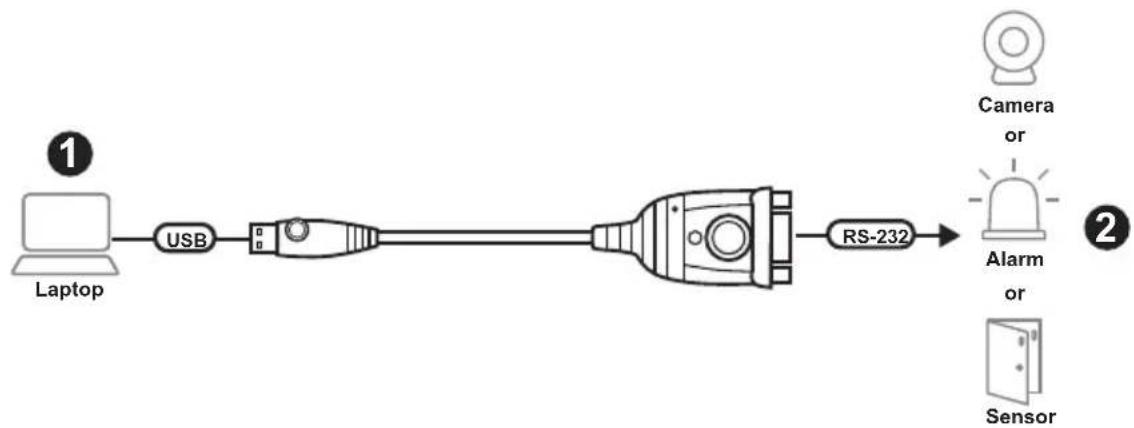
flowchart
graph LR
    A["Laptop"] --> B["USB"]
    B --> C["RS-232"]
    C --> D["Camera or Alarm or Sensor"]
- Connect the USB connector to the computer and allow the driver to install.
Note: If you are using an older computer that doesn't contain the drivers for this device, please go to our website to download the UC232A / UC232A1 / UC232AF drivers and install them before setting up the hardware.
-
Plug the RS-232 connector to a serial device.
-
Power on the serial devices.
Windows 2000 Installation
Installing the Driver(s)
To install the UC232A / UC232A1 / UC232AF drivers, do the following:
Note: The setup is for UC232A in the picture below. The UC232A1 / UC232AF is the same as the UC232A, except that it has a 100 cm and 120 cm cable attached instead of 35 cm.
- Please download the latest software installation package from the UC232A product page at www.aten.com/download (search for UC232A and go to the download tab).
- Execute the file and follow the on-screen instructions to configure detailed software settings.
- Double click UC-232ADriverInstaller.exe.
After a few moments, the following dialog box appears:
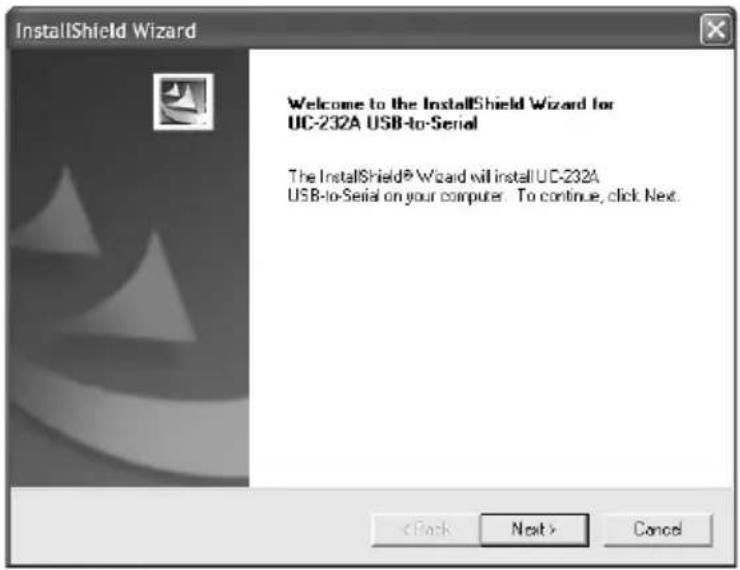
- Click Next to install the drivers.
- Windows displays the following warning:
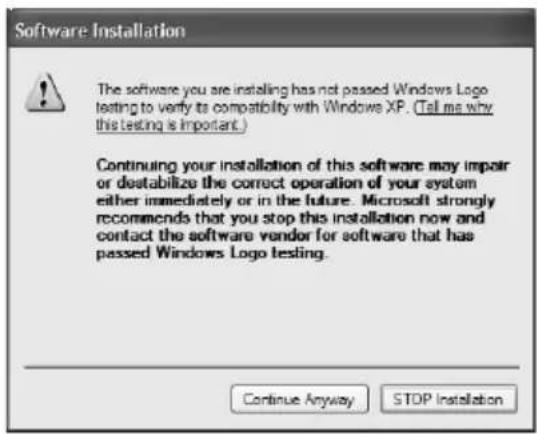
- You can safely ignore this warning. Click Continue Anyway to continue installing the new software. When the installation is complete, the following dialog box appears:
![InstallShield Wizard InstallShield Wizard Complete InstallShield already successfully to installed UC-232A USB-to-Serial drive. Please press [Finish] button to close and out of InstallShield. If you have been plugged cable on PC before run this setup. please unplug and then plug cable again for system detox this device!](/content/2026/05/1065262/images/42bc76316b5326c5918e440acfa5e317a9eed63dc5dce57e2516cdffb8c0d915.jpg)
- Click Finish to close the wizard. You have successfully installed the driver(s).
Connecting the UC232A / UC232A1 / UC232AF
- Connect the UC232A / UC232A1 / UC232AF USB to Serial Adapter to a USB port on your computer. The New Hardware Wizard appears:

- Select No, not this time, and then click Next to continue. The following dialog box appears:

-
Leave the default choice (Install the software automatically). Click Next to continue.
-
Windows displays the following warning:

- You can safely ignore this warning. Click Continue Anyway to continue installing the new hardware. When the installation is complete, the following dialog box appears:

- Click Finish to close the wizard. You have successfully installed the UC232A / UC232A1 / UC232AF.
Uninstalling the Driver(s)
- Insert the installation disk into the CD-ROM drive. The following dialog box appears:

- Select Uninstall the driver, and then click Next. The following dialog box appears:

- Click Finish. You have successfully uninstalled the driver(s).
Windows Vista/7/8/8.1/10 Installation
Installing the Driver(s)
To install the UC232A / UC232A1 / UC232AF drivers, do the following:
Note: The setup is for UC232A in the picture below. The UC232A1 / UC232AF is the same as the UC232A, except that it has a 100 cm and 120 cm cable attached instead of 35 cm.
- Make sure that the Windows language for non-Unicode programs is set to English by checking Regional and Language Options, then Administrative.
- Please download the latest software installation package from the UC232A product page at www.aten.com/download (search for UC232A and go to the download tab).
- Execute the file and follow the on-screen instructions to configure detailed software settings.
- Open the downloaded file and right click on the UC232A_Windows_Setup. Select Run as administrator as shown in the picture below.

- After a few moments, the following dialog box appears. Choose your desired Language and click Next.

- Click Next.

7. Click Install to install the drivers.

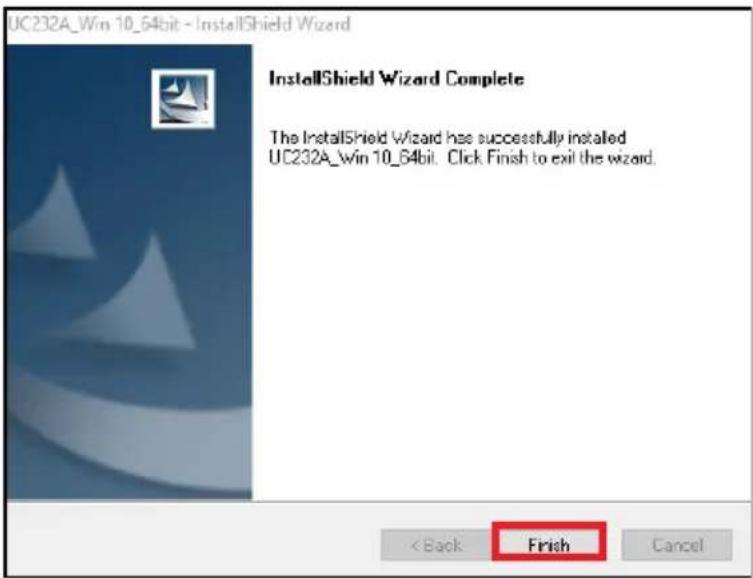
8. When the installation is complete, the following dialog box appears. Click Finish to close the wizard. You have successfully installed the driver(s).
Connecting the UC232A / UC232A1 / UC232AF
- Connect the UC232A / UC232A1 / UC232AF USB-to-Serial Adapter to a USB port in your computer. The following dialog box appears on the bottom right of your PC screen to confirm that the driver has been installed and that your UC232A / UC232A1 / UC232AF is ready to use:

Device is ready
'ATEN USB to Serial Bridge' is set up and ready to go.
Mac Installation
Installing the Software
To install the UC232A / UC232A1 / UC232AF software, do the following:
Note: The setup is for UC232A explained below. The UC232A1 / UC232AF is the same as the UC232A, except that it has a 100 cm and 120 m cable attached instead of 35 cm.
- Please download the latest software installation package from the UC232A product page at www.aten.com/download (search for UC232A and go to the download tab).
- Execute the file and follow the on-screen instructions to configure detailed software settings.
- Open the downloaded folder and copy the Mac OS file to your hard disk.
- Double-click on the file icon to extract the compressed file(s).
- Copy the extracted file(s) to the Hard Disk > System Folder > Extensions folder.
Note: If you are using a non-English language version, copy the files to the corresponding folder for your system.
Connecting the UC232A / UC232A1 / UC232AF
Connect the UC232A / UC232A1 / UC232AF to a USB port on your Mac.
Note: The UC232A / UC232A1 / UC232AF will not function properly unless the software was previously installed.
Linux Installation
Installing the Driver(s)
To install the UC232A / UC232A1 / UC232AF drivers, do the following:
Note: The setup is for UC232A explained below. The UC232A1 is the same as the UC232A and UC232AF, except that it has a 100 cm cable attached instead of 35 cm and 120 cm.
- Please download the latest software installation package from the UC232A product page at www.aten.com/download (search for UC232A and go to the download tab).
- Execute the file and follow the on-screen instructions to configure detailed software settings.
- Open a command line.
- Move to the subdirectory that corresponds to the version of your operating system. (For example, if your operating system is Red Hat 7.3, then move to the Redhat73 subdirectory.)
- Enter the following commands to copy the files in the subdirectory to a directory on your hard disk:
cp pl2303.c /directory_name
cp Makefile /directory_name/makefile
where directory_name is the name of the directory on your hard disk that you are copying the files to.
Note: Be sure to change the capital “M” in “Makefile” to a lowercase “m” when you copy the file to the new directory.
- Move to the directory where you copied the files.
- Enter the following command:
make inst
- Connect the UC232A / UC232A1 / UC232AF to a USB port on your computer.
Note: The UC232A / UC232A1 / UC232AF will not function properly unless the drivers have been previously installed.
Uninstalling the Driver(s)
-
Open a command line.
-
Move to the directory where you installed the driver(s).
-
Enter the following command:
◆ To uninstall the driver:
make uninst
◆ To uninstall all drivers (including the base driver):
make uninstall_all
You have successfully uninstalled the driver(s).
Peripheral Installation
- After you have finished the software installation procedures for your operating system and have connected the UC232A / UC232A1 / UC232AF to your computer, connect the peripheral device to the UC232A / UC232A1 / UC232AF, and then turn the peripheral on.
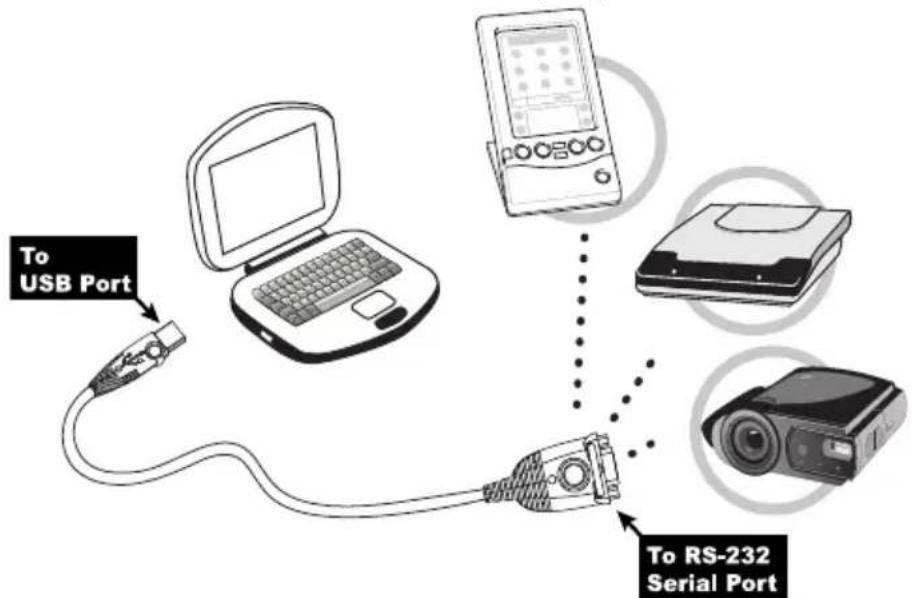
flowchart
graph TD
    A["To USB Port"] --> B["Device with USB port"]
    B --> C["Serial Port"]
    C --> D["Device with RS-232"]
    D --> E["Device with remote"]
- Follow the Installation Wizard's on-screen instructions to complete the installation.
Note: 1. This procedure only occurs the first time you connect the peripheral. If your peripheral was previously connected and configured for the RS-232 (COM) port, after you perform the Adapter Installation and click Finish, the driver will detect it and install it automatically. However, some peripheral devices, such as older PDAs, require that you re-install the software for the peripheral device before it will work properly.
- Under Windows 2000, if you connect a modem, you must specify it as a Standard Modem.
General
- This product is for indoor use only.
- Read all of these instructions. Save them for future reference.
◆ Follow all warnings and instructions marked on the device. - Do not place the device on any unstable surface (cart, stand, table, etc.). If the device falls, serious damage will result.
♦ Do not use the device near water. - Do not place the device near, or over, radiators or heat registers.
- The device cabinet is provided with slots and openings to allow for adequate ventilation. To ensure reliable operation, and to protect against overheating, these openings must never be blocked or covered.
- The device should never be placed on a soft surface (bed, sofa, rug, etc.) as this will block its ventilation openings. Likewise, the device should not be placed in a built-in enclosure unless adequate ventilation has been provided.
- Never spill liquid of any kind on the device.
- Unplug the device from the wall outlet before cleaning. Do not use liquid or aerosol cleaners. Use a damp cloth for cleaning.
- The device should be operated from the type of power source indicated on the marking label. If you are not sure of the type of power available, consult your dealer or local power company.
- To prevent damage to your installation it is important that all devices are properly grounded.
- Do not allow anything to rest on the power cord or cables. Route the power cord and cables so that they cannot be stepped on or tripped over.
- Position system cables and power cables carefully; Be sure that nothing rests on any cables.
- Never push objects of any kind into or through cabinet slots. They may touch dangerous voltage points or short out parts resulting in a risk of fire or electrical shock.
- Do not attempt to service the device yourself. Refer all servicing to qualified service personnel.
- If the following conditions occur, unplug the device from the wall outlet and bring it to qualified service personnel for repair.
- The power cord or plug has become damaged or frayed.
◆ Liquid has been spilled into the device. - The device has been exposed to rain or water.
- The device has been dropped, or the cabinet has been damaged.
- The device exhibits a distinct change in performance, indicating a need for service.
- The device does not operate normally when the operating instructions are followed.
- Only adjust those controls that are covered in the operating instructions. Improper adjustment of other controls may result in damage that will require extensive work by a qualified technician to repair.
- Avoid circuit overloads. Before connecting equipment to a circuit, know the power supply’s limit and never exceed it. Always review the electrical specifications of a circuit to ensure that you are not creating a dangerous condition or that one doesn’t already exist. Circuit overloads can cause a fire and destroy equipment.
Technical Support
International
- For online technical support – including troubleshooting, documentation, and software updates: http://support.aten.com
- For telephone support, see Telephone Support, page v:
North America
| Email Support support@aten-usa.com | ||
| Online Technical Support | Troubleshooting Documentation Software Updates | http://www.aten-usa.com/support |
| Telephone Support 1-888-999-ATEN ext 4988 | 1-949-428-1111 | |
When you contact us, please have the following information ready beforehand:
- Product model number, serial number, and date of purchase
- Your computer configuration, including operating system, revision level, expansion cards, and software
◆ Any error messages displayed at the time the error occurred
- The sequence of operations that led up to the error
◆ Any other information you feel may be of help
Specifications
| Function | UC232A UC232A1 UC232AF | ||
| Connectors USB | Port 1 x USB Type-A Male (White) | ||
| Serial 1 x DB-9 Male (Silver) | |||
| Data Rate Up to 921.6 kbps | |||
| Cable Length 35 cm 1 m 1.2 m | |||
| LED Power (Orange) | |||
| Power Mode Bus Powered | |||
| USB Specification USB Compliant | |||
| Environmental Operating Temperature | 0 - 40°C | ||
| Storage Temperature | -20 - 60°C | ||
| Humidity | 0 - 80% RH, Non-condensing | ||
| Physical Properties | Housing | Plastic | |
| Weight | 0.04 kg(0.09 lb) | 0.06 kg(0.13 lb) | |
| Dimensions(L x W x H) | 6.59 x 3.40 x 1.60 cm(2.59 x 1.34 x 0.63 in) | ||
DB-9 Pin Assignments
| Pin Assignment | |
| 1 | CD |
| 2 RXD | |
| 3 TXD | |
| 4 DTR | |
| 5 GND | |
| 6 DSR | |
| 7 RTS | |
| 8 CTS | |
| 9 | RI |
Thank you for purchasing this ATEN product! It is recommended that you register the product right away at our website: http://eservice.aten.com. This will give you access to useful add-on features, as follows:
◆ View details of all your registered ATEN products in one place
- Read about application tips and supporting information specific to your product
◆ Get fast service and response from our highly skilled engineers
- Receive the latest news and promotions from ATEN, and participate in customer surveys
ATEN warrants this product against flaws in the materials and workmanship during the warranty period which commence on the date of original purchase. The duration, terms, and conditions of the warranty period may vary from country to country. Please visit ATEN's website for more information or contact the ATEN office responsible for providing support in your country/region. Contact details for all ATEN offices are listed in the following table.
| Corporate Headquarters(Original Manufacturer)ATEN International Co., Ltd.Website: http://www.aten.comAddress: 3F., No.125, Sec. 2, Datong Rd.,Sijhih District., New Taipei City 221, Taiwan | U.S.A Subsidiaries (Importer)ATEN Technology Inc.Website: http://www.aten-usa.comAddress: 19641 DaVinci Foothill Ranch,CA 92610, U.S.AATEN New Jersey Inc.Address: 155 Pierce Street, Somerset,NJ 08873, U.S.A |
| Belgium Subsidiary (Importer)ATEN Infotech N.V.Website: http://www.aten.beAddress: Mijnwerkerslaan 34 3550Heusden-Zolder, Belgium | U.K. Subsidiary (Importer)ATEN U.K. LimitedWebsite: http://www.aten.co.ukAddress: 229 Berwick Avenue Slough,SL1 4QT, U.K. |
| Japan Subsidiary (Importer)ATEN Japan Co., Ltd.Website: http://www.atenjapan.jpAddress: ATEN Bldg. 8-4,Minami-senjyu 3-chome,Arakawa-ku, Tokyo 116-0003 Japan | Korea Subsidiary (Importer)ATEN Korea., Ltd.Website: http://www.aten.co.krAddress: B-303, Gabeul Great Valley,60-5, Gasan-dong, Geumcheon-gu,Seoul, Korea; 153-801 |
| China Subsidiary (Importer)ATEN China Co., Ltd.Website: http://www.aten.com.cnAddress: 18/F, Tower A,Horizon International Tower,No.6,Zhichun Road,Haidian District, Beijing,China 100088 | Taiwan Subsidiary (Importer)Atech Peripherals, Inc.Website: http://www.aten.com.twAddress: 6F., No.133, Sec. 2,Datong Rd., Sijhih District., New TaipeiCity 221, Taiwan |
ATEN Warranty Policy
The warranty policy may vary by product category and region of purchase. For details, please visit ATEN's official website, select your purchase counties/regions and then go to the Support Center, or contact your local ATEN sales representative for further assistance.
© Copyright 2025 ATEN® International Co., Ltd.
Released: 2025-01-03
ATEN and the ATEN logo are registered trademarks of ATEN International Co., Ltd. All rights reserved. All other brand names and trademarks are the registered property of their respective owners.


- Compliance Statements
- FEDERAL COMMUNICATIONS COMMISSION INTERFERENCE STATEMENT
- KCC Statement
- Industry Canada Statement
- CAN ICES-003 (B) / NMB-003 (B)
- RoHS
- Telephone Support
- User Notice
- Product Information
- Package Contents
- Table of Contents
- Introduction
- Hardware Setup
- Appendix
- About this Manual
- Note:
- Conventions
- Overview
- Features
- System Requirements
- Operating Systems
- Hardware Overview
- Chapter 2
- Hardware Setup
- Connecting the Unit
- Windows 2000 Installation
- Installing the Driver(s)
- Connecting the UC232A / UC232A1 / UC232AF
- Uninstalling the Driver(s)
- Windows Vista/7/8/8.1/10 Installation
- Click Install to install the drivers.
- When the installation is complete, the following dialog box appears. Click Finish to close the wizard. You have successfully installed the driver(s).
- Mac Installation
- Installing the Software
- Linux Installation
- Peripheral Installation
- General
- Technical Support
- International
- North America
- DB-9 Pin Assignments
- ATEN Warranty Policy
Brand : ATEN
Model : UC232AF
Category : Cables for Computers and Peripherals