AUDIOE-3 - Uncategorized DVDO - Free user manual and instructions
Find the device manual for free AUDIOE-3 DVDO in PDF.


| Product Type | HDMI eARC Audio to Amplifier Adapter |
| Brand | DVDO |
| Model | AUDIOE-3 |
| Dimensions | 95 x 68 x 18 mm |
| Weight | 178 g |
| Power Supply | DC 5V/2A (US/EU standards, CE/FCC/UL certified) |
| Power Consumption | 4.5W (Max) |
| Housing Material | Metal Enclosure |
| Color | Black |
| HDMI Compliance | HDMI 2.1, HDCP 2.3 |
| Video Bandwidth | 48Gbps FRL and 18Gbps TMDS |
| Max Video Resolution | 8K@60Hz 4:2:0 12bit, 4K@120Hz 4:4:4 12bit |
| HDR Support | HDR, HDR10, HDR10+, Dolby Vision, HLG |
| Audio Formats | LPCM 7.1, Dolby TrueHD, Atmos, DTS-HD Master, DTS:X |
| Key Features | eARC support, CEC control, EDID management, audio de-embedding |
| Input Ports | 1 x Source IN (HDMI Type A) |
| Output Ports | 1 x TV(eARC) OUT, 1 x Amp AUDIO OUT (HDMI Type A) |
| Control Port | 1 x SERVICE (USB Type C, for firmware update) |
| ESD Protection | IEC 61000-4-2: ±8kV air-gap, ±4kV contact |
| Operating Temperature | 0°C ~ 40°C |
| Storage Temperature | -20°C ~ 60°C |
| Relative Humidity | 20~90% RH (non-condensing) |
| Package Contents | Adapter, 5V/2A power supply, user manual |
| Maintenance & Cleaning | Wipe with a dry, soft cloth. Disconnect power before cleaning. |
| Safety | Use surge protection device recommended. Do not expose to moisture. |
| Spare Parts & Repairability | Power supply available as spare. No user-serviceable parts inside. Contact support for repairs. |
Frequently Asked Questions - AUDIOE-3 DVDO
User questions about AUDIOE-3 DVDO
0 question about this device. Answer the ones you know or ask your own.
Ask a new question about this device
Download the instructions for your Uncategorized in PDF format for free! Find your manual AUDIOE-3 - DVDO and take your electronic device back in hand. On this page are published all the documents necessary for the use of your device. AUDIOE-3 by DVDO.
USER MANUAL AUDIOE-3 DVDO
DVDO-AudioE-2
8K HDMI Audio Extractor with eARC for AV Receivers
User Manual
Version 1.0
Thank you for purchasing DVDO-AudioE-2
For optimum performance and safety, please read these instructions carefully before connecting, operating or adjusting this product. Please keep this manual for future reference.
Surge protection device recommended
This product contains sensitive electrical components that may be damaged by electrical spikes, surges, electric shock, lighting strikes, etc. Use of surge protection systems is highly recommended in order to protect and extend the life of your equipment.
Table of Contents
- Introduction. 1
- Features.... 1
- Package Contents. 2
- Specifications....2
- Operation Controls and Functions...... 4
- Application Example. 6
1. Introduction
This HDMI eARC Audio to Amplifier Adapter is designed for de-embedding audio signals from an HDMI source or TV with ARC/eARC to output HDMI audio to AV Receiver. It supports data rates up to 48Gbps complying with HDMI 2.1 and HDCP 2.3 requirements. It is compatible with UHDTV 8K@60Hz. It includes several features for ease of integration, such as EDID management and cable equalization. It provides an easy solution for HDMI installations to send audio signals to an old audio amplifier. CEC control from TV to the source and amplifier is also supported.
2. Features
☆ HDCP 2.3 compliant
☆ Support 48Gbps FRL and 18Gbps TMDS video bandwidth, as specified in HDMI 2.1
☆ Support video resolution up to 8K@60Hz 4:2:0 12bit, 4K@120Hz 4:4:4 12bit
☆ Support VRR, ALLM, QMS, QFT, SBTM, as specified in HDMI 2.1
☆ HDR, HDR 10, HDR 10+, Dolby Vision, HLG pass-through
☆ LPCM 7.1CH, Dolby TrueHD, Atmos and DTS-HD Master, DTS:X Audio pass-through
☆ HDMI input audio or TV ARC/eARC audio de-embedded to HDMI audio output
☆ Support CEC control from TV to the source and amplifier
☆ Support CEC volume control from TV to the amplifier sound system
☆ Advanced EDID management
☆ Compact design for easy and flexible installation
3. Package Contents
- 1 × 48Gbps HDMI eARC Audio to Amplifier Adapter
- 1 × 5V/2A Multinational Power Supply
- 1 × User Manual
4. Specifications
| Technical | |
| HDMI Compliance | HDMI 2.1 |
| HDCP Compliance | HDCP 2.3 |
| Video Bandwidth | 48Gbps FRL and 18Gbps TMDS |
| Video Resolution | Up to 8K@60Hz 4:2:0 12bit, 4K@120Hz 4:4:4 12bit |
| Audio Latency | No Latency |
| Video Latency | No Latency |
| Color Depth | 8/10/12bit |
| Color Space | RGB_4:4:4, YCbCr_4:4:4, YCbCr_4:2:2, YCbCr_4:2:0 |
| Audio Formats | HDMI IN/OUT:LPCM, Dolby Digital/Plus/EX, Dolby True HD, Dolby Atmos, DTS, DSD, DTS-EX, DTS-96/24, DTS High Res, DTS-HD Master Audio, DTS:X HDMI AUDIO OUT:LPCM, Dolby Digital/Plus/EX, Dolby True HD, Dolby Atmos, DTS, DSD, DTS-EX, DTS-96/24, DTS High Res, DTS-HD Master Audio, DTS:X |
| HDR | HDR, HDR10, HDR10+, Dolby Vision, HLG |
| ESD Protection | IEC 61000-4-2: ± 8kV (Air-gap discharge) & ± 4kV (Contact discharge) |
| Connection | ||||
| Input | 1 × Source IN [HDMI Type A, 19-pin female] | |||
| Output | 1 × TV(eARC) OUT [HDMI Type A, 19-pin female]1 × Amp AUDIO OUT [HDMI Type A, 19-pin female] | |||
| Control | 1 × SERVICE [USB Type C, Update port] | |||
| Mechanical | ||||
| Housing | Metal Enclosure | |||
| Color | Black | |||
| Dimensions | 95mm [W] × 68mm [D] × 18mm [H] | |||
| Weight | 178g | |||
| Power Supply | Input: AC 100-240V 50/60Hz, Output: DC 5V/2A (US/EU standards, CE/FCC/UL certified) | |||
| Power Consumption | 4.5W (Max) | |||
| Operation Temperature | 0°C ~ 40°C / 32°F ~ 104°F | |||
| Storage Temperatur | -20°C ~ 60°C / -4°F ~ 140°F | |||
| Relative Humidity | 20~90% RH (non-condensing) | |||
| Recommended HDMI Cable | ||||
| Video Resolution | 8K60 | 4K60 | 4K30 | 1080P |
| HDMI Cable Length(HDMI IN / OUT) | 2m/6.6ft ~ 3m/10ft(Ultra HDMI 2.1) | 5m/16ft | 10m/33ft | 15m/49ft |
| The use of “Premium High Speed HDMI” cable is highly recommended. | ||||
5. Operation Controls and Functions
Front Panel
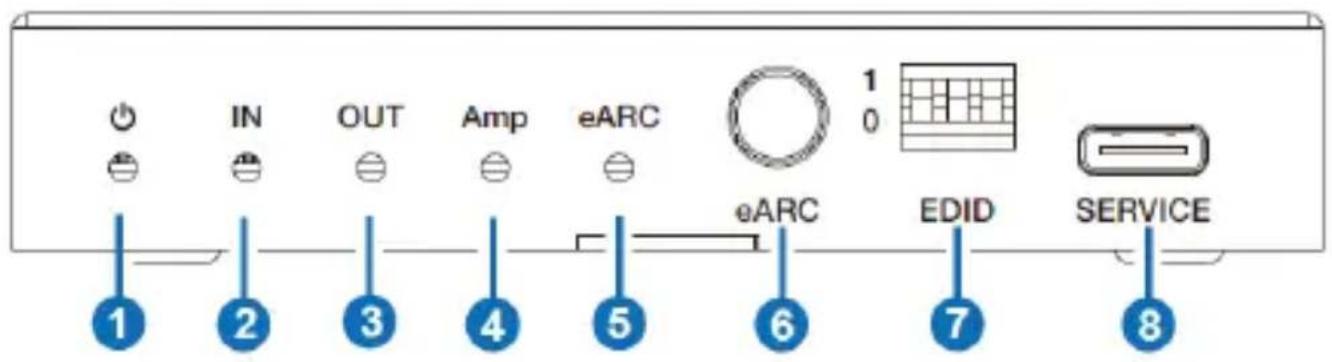
| No. | Name | Function Description |
| 1 | Power LED | When the device is powered on, the red LED will be on. |
| 2 | IN LED | When the input signal is detected, the green LED will be on. |
| 3 | OUT LED | When the OUT port connects to a TV, the green LED will be on. |
| 4 | Amp LED | When the AUDIO OUT port connects to an amplifier, the green LE will be on. |
| 5 | eARC LED | ▪ On: The ARC/eARC function is turned on. CEC communication and ARC/eARC is working properly.▪ Flashing: The ARC/eARC function is turned on.CEC communication and ARC/eARC is not working properly.▪ Off: The ARC/eARC function is turned off. |
| 6 | eARC button | Press this button to enable or disable the eARC function. |
| 7 | EDID DIP switch | Use the DIP switch to set EDID.[DIP]=111: Copy OUT port sink video and audio EDID[DIP]=110: Copy AUDIO OUT port sink video and audio EDID[DIP]=101: FRL12G_8K_HDR, 2.0CH[DIP]=100: FRL12G_8K_HDR, 5.1CH[DIP]=011: FRL12G_8K_HDR, 7.1CH[DIP]=010: FRL10G_8K_HDR, 2.0CH[DIP]=001: FRL10G_8K_HDR, 5.1CH[DIP]=000: FRL10G_8K_HDR, 7.1CH |
| 8 | SERVICE | Firmware update and debug port. |
Rear Panel
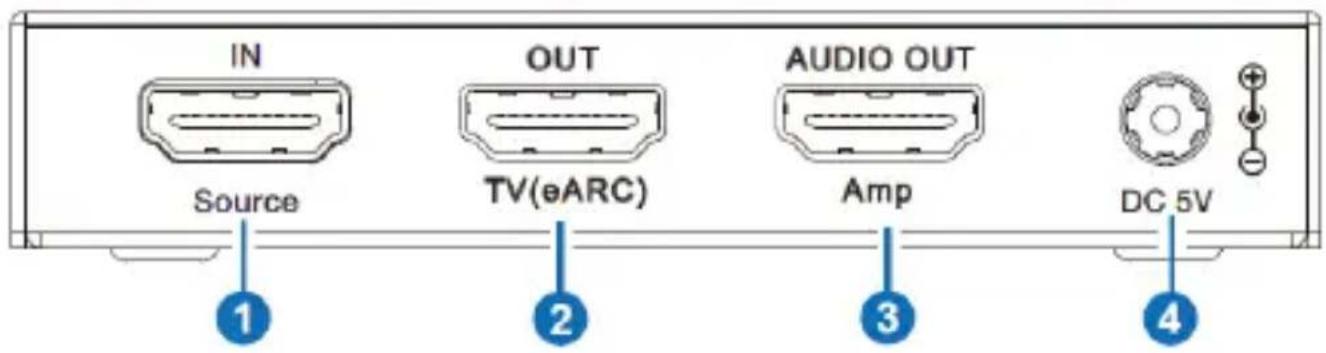
| No. | Name | Function Description |
| 1 | Source IN port | HDMI signal input port, connected to HDMI source device such as DVD, PS5 or 8K computer host with an HDMI cable. |
| 2 | TV(eARC) OUT port | HDMI signal output port, connected to TV (ARC/eARC) with an HDMI cable. It can be used as an ARC/eARC audio channel whe the ARC function is enabled. |
| 3 | Amp AUDIO OUT | HDMI audio output port, connected to an amplifier with an HDMI cable. |
| 4 | DC 5V | DC 5V/2A power input port. |
6. Application Example
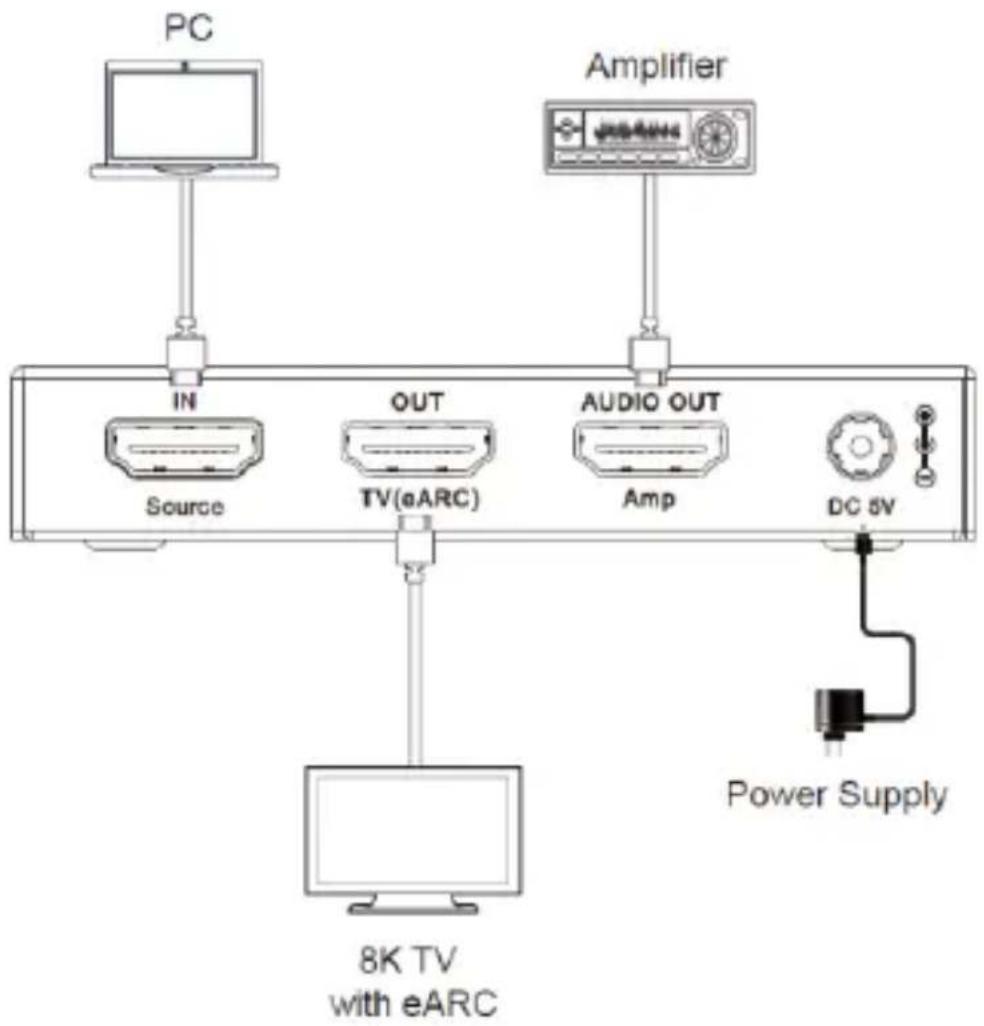
flowchart
graph TD
    PC["PC"] --> IN["IN"]
    IN --> Source["Source"]
    IN --> OUT["OUT"]
    OUT --> TV_eARC["TV(eARC)"]
    TV_eARC --> Amp["Amp"]
    Amp --> Audio_OUT["Audio OUT"]
    Audio_OUT --> DC_6V["DC 6V"]
    DC_6V --> Power_Supply["Power Supply"]
    Power_Supply --> 8K_TV["8K TV with eARC"]
Note: When eARC function is turned on, the audio signal of Amplifier is the audio returned from 8K TV. When eARC function is turned off, the audio signal of Amplifier is from the HDMI input source.

HIGH-DEFINITION MULTIMEDIA INTERFACE
The terms HDMI and HDMI High-Definition Multimedia interface, and the HDMI Logo are trademarks or registered trademarks of HDMI Licensing LLC in the United States and other countries.
DVDO
Follow us


Brand : DVDO
Model : AUDIOE-3
Category : Uncategorized