
SAVGM-GAMBIT - Mouse Savio - Free user manual and instructions
Find the device manual for free SAVGM-GAMBIT Savio in PDF.


| Product Type | Mouse |
| Brand | Savio |
| Model | SAVGM-GAMBIT |
| Connectivity | Wired USB |
| Sensor Type | Optical |
| Maximum DPI | 6400 DPI |
| Number of Buttons | 6 (including scroll wheel) |
| Scroll Wheel | Yes |
| Weight | Approximately 100 g |
| Dimensions (L x W x H) | Approximately 125 x 65 x 40 mm |
| Cable Length | 1.8 m |
| Compatible Operating Systems | Windows, macOS, Linux |
| Power Source | USB powered (no batteries) |
| LED Lighting | RGB (configurable) |
| Cleaning Instructions | Wipe with a soft dry cloth; avoid liquids |
| Storage Conditions | Dry environment, room temperature |
| Safety Precautions | Do not disassemble, keep away from water |
| Spare Parts Availability | Contact Savio support for replacement parts |
| Warranty | 1 year limited warranty |
Frequently Asked Questions - SAVGM-GAMBIT Savio
User questions about SAVGM-GAMBIT Savio
0 question about this device. Answer the ones you know or ask your own.
Ask a new question about this device
Download the instructions for your Mouse in PDF format for free! Find your manual SAVGM-GAMBIT - Savio and take your electronic device back in hand. On this page are published all the documents necessary for the use of your device. SAVGM-GAMBIT by Savio.
USER MANUAL SAVGM-GAMBIT Savio
1. Schemat produktu:
Thank you for choosing our product!

If our product meets your expectations, share your opinion with other people on the portal ceneo.pl, on social media or on the website of the store where you made the purchase. If you want to show off our device on Savio.net.pl FanPage on Facebook, we will be very pleased.

If there is something that we could improve on our products, please write to us at support@savio.net.pl
Thanks to your feedback, we will be able to better adapt the product to your expectations.
Before starting the use of purchased device it is recommended to read the whole manual.
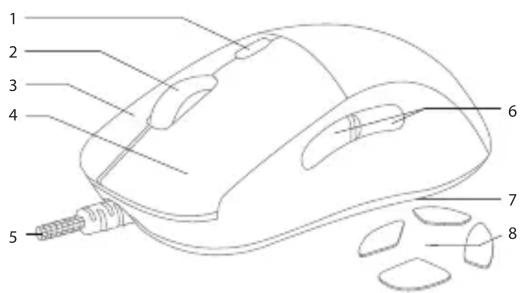
1. Product scheme:
- DPI change button
- Scroll wheel
- Right mouse button
- Left mouse button
- Paracord cable with USB connector
- Side buttons
- LED strip change button
- A set of additional mouse skates
2. The main features of the product:
- Paracord cable
- Teflon mouse skates
- Symmetrical design
- Precise optical sensor
• Gold-plated USB plug - Programmable buttons
3. Package content:
• SAVIO gaming mouse GAMBIT
- Extra set of mouse skates
- User manual
4. Specification:
- Sensor: optical, Pixart PMW 3327
• Switches: Huano Blue Shell (20m) - Paracord cable with USB connector – 1,8m
- Backlight: RGB – 16,8 million colors
• Resolution: 200 – 12000 DPI - Refresh rate: 125 – 1000 Hz
• Maximum Tracking Speed: 220 IPS
• Number of programmable buttons: 7
• Dimensions: 124,8 x 62,9 x 40,5 mm
• Weight: 84 g ± 1 g (with weights) - Mouse skates: PTFE (Teflon)
5. Device installation:
5.1. Connect the mouse to the computer via the USB port and wait for the system to detect and automatically download and install the drivers.
5.2. The device is ready to use.
6. Software installation:
To get full configuration options, download and install the dedicated software from the website www.savio.net.pl/en/download. After downloading, double-click the file icon and follow the instructions. After successful installation, the software icon will be displayed on the system tray. Double clicking on the application icon will open the interface with the settings.
7. DPI change:
To change the DPI value, press the button on the top of the mouse above the scroll. The mouse will signal a successful change of the DPI level by changing the color of the scroll's illumination and the logo located under the mouse housing. DPI levels and backlight colors can be freely configured through the software.
8. Backlight mode change:
In order to quickly change the LED strip illumination effect, press the button on the bottom of the mouse. To take full advantage of the configuration options, use the appropriate options in the software. To turn off the mouse backlight, press and hold the backlight button on the bottom of the mouse for 3 seconds.
9. Safety condition:
- Use as intended.
- Incorrect use may damage the product.
- Do not use the product in a hot, cold, damp or dusty environment.
- The warranty does not cover mechanical damage to the product.
- The product should be used in a dry environment.
- The device should be protected against water and moisture.
Information for customers and contractors and communication regarding complaints:
Pursuant to Article 13 section 1 and 2 of the General Data Protection Regulation (EU) 2016/679 of the European Parliament and of the Council of 27 April 2016 (hereinafter referred to as GDPR), please be advised that Elmak Sp. z o.o., with its registered seat at ul. Morgowa 81; 35-323 Rzeszów becomes the Administrator of your personal data. The Specialist for General Data Protection (SODO) can be contacted in writing to: SODO, Elmak Sp. z o.o., ul. Morgowa 81; 35-323 Rzeszów, via e-mail address: sodo@elmak.pl, and by phone at +48 (17) 854 98 14. Your personal data will be processed in order to perform the contract, in accordance with Article 6(1)(b) of the aforementioned regulation, to the extent resulting from tax laws and financial regulations. Recipients of your personal data include entities authorized by legal regulations to obtain personal data as well as processing entities providing services to Elmak Sp. z o.o. Your personal data will be stored on the basis of Administrator's legitimate interest. You have the right to access your data, and the right to rectify, delete or limit processing of your data. You have the right to lodge a complaint to the supervisory body if you believe that the processing violates the GDPR. The provision of personal data is voluntary, however, a failure to provide such data may result in a refusal to conclude or in termination of a contract. Your personal data will not be subjected to automated decision making, including profiling referred to in Article 22 section 1 and 4 of the GDPR of April 27, 2016.

This symbol indicates that electrical equipment should not be disposed of with other household waste. Used equipment should be sent to a local collection point for this type of waste or to a recycling centre. Please contact your local authorities for information about disposal methods available in your area. Waste electrical equipment may contain dangerous substances (e.g. mercury, lead, cadmium, chromium, phthalates) which can get into air, soil and groundwater when leaking from used appliances. Environmental pollution of these substances leads to their bioaccumulation, causing lesion of disease in living organisms, which would pose a risk to human and animal health or life. Households may contribute to environmental protection by proper waste collection. In such way, dangerous substances from the equipment are neutralized and valuable secondary raw materials are reused for production of new equipment.
Gwarancja:
The warranty covers a period of 24 months. Independent repairs and modifications result in automatic loss of the warranty. Warranty card is available for download on our website: www.savio.net.pl/en/service
DE Das Benutzerhandbuch in Ihrer Sprache finden Sie unter: www.savio.net.pl/en/download
UA Посібник користувача вашою мовою доступний за адресою: www.savio.net.pl/en/download
RO Manualul de utilizare în limba dvs. este disponibil la: www.savio.net.pl/en/download
HU Az Ön nyelvén található felhasználói kézikönyv a következő címen érhető el: www.savio.net.pl/en/download
CZ Uživatelská příručka ve vašem jazyce je k dispozici na adrese: www.savio.net.pl/en/download
SK Používatel'ská príručka vo vašom jazyku je k dispozícii na: www.savio.net.pl/en/download
RU Руководство пользователя на вашем языке доступно поадресу: www.savio.net.pl/en/download
LT Vartotojo kalba jūsų kalba galima rasti: www.savio.net.pl/en/download
SE Användarmanualen på ditt språk finns på: www.savio.net.pl/en/download
HR Korisnički priručnik na vašem jeziku dostupan je na: www.savio.net.pl/en/download
GR Το εγχειρίδιο χρήσης στη γλώσσα σας είναι διαθέσιμο στηδιεύθυνση: www.savio.net.pl/en/download
LV Lietotāja rokasgrāmata jūsu valodā ir pieejama vietnē: www.savio.net.pl/en/download
Brand : Savio
Model : SAVGM-GAMBIT
Category : Mouse