Y10P030-S1 - USB Hub Rocstor - Free user manual and instructions
Find the device manual for free Y10P030-S1 Rocstor in PDF.


| Product Type | USB 3.0 Hub |
| Brand | Rocstor |
| Model | Y10P030-S1 |
| Number of Ports | 4 |
| USB Standard | USB 3.0 (SuperSpeed, 5 Gbps) |
| Backward Compatibility | USB 2.0 and USB 1.1 |
| Power Source | Bus-powered (via USB port) or optional external power adapter |
| Dimensions (L x W x H) | 3.5 x 1.5 x 0.6 inches (approx.) |
| Weight | 1.5 oz (approx.) |
| Cable Length | 6 inches (integrated) |
| LED Indicator | Power and activity LEDs per port |
| Material | ABS plastic casing |
| Operating Systems Supported | Windows, macOS, Linux, Chrome OS |
| Plug and Play | Yes, no driver required |
| Overcurrent Protection | Built-in |
| Warranty | 1 year limited |
| Package Contents | USB hub, user manual |
Frequently Asked Questions - Y10P030-S1 Rocstor
User questions about Y10P030-S1 Rocstor
0 question about this device. Answer the ones you know or ask your own.
Ask a new question about this device
Download the instructions for your USB Hub in PDF format for free! Find your manual Y10P030-S1 - Rocstor and take your electronic device back in hand. On this page are published all the documents necessary for the use of your device. Y10P030-S1 by Rocstor.
USER MANUAL Y10P030-S1 Rocstor
natural_image
White wireless router adapter with USB cable, no visible text or symbols on device bodyUser Manual
USB-C 8-in-1 Dual HDMI Display Portable Dock Multiport Adapter with DP 1.4 Alt Mode - 100W PD
Y10P030-S1
Congratulations
Thank you for purchasing this premium Rocstor product. For optimum performance and safety, please read these instructions carefully before connecting, operating or using this product. Keep this manual for future reference.
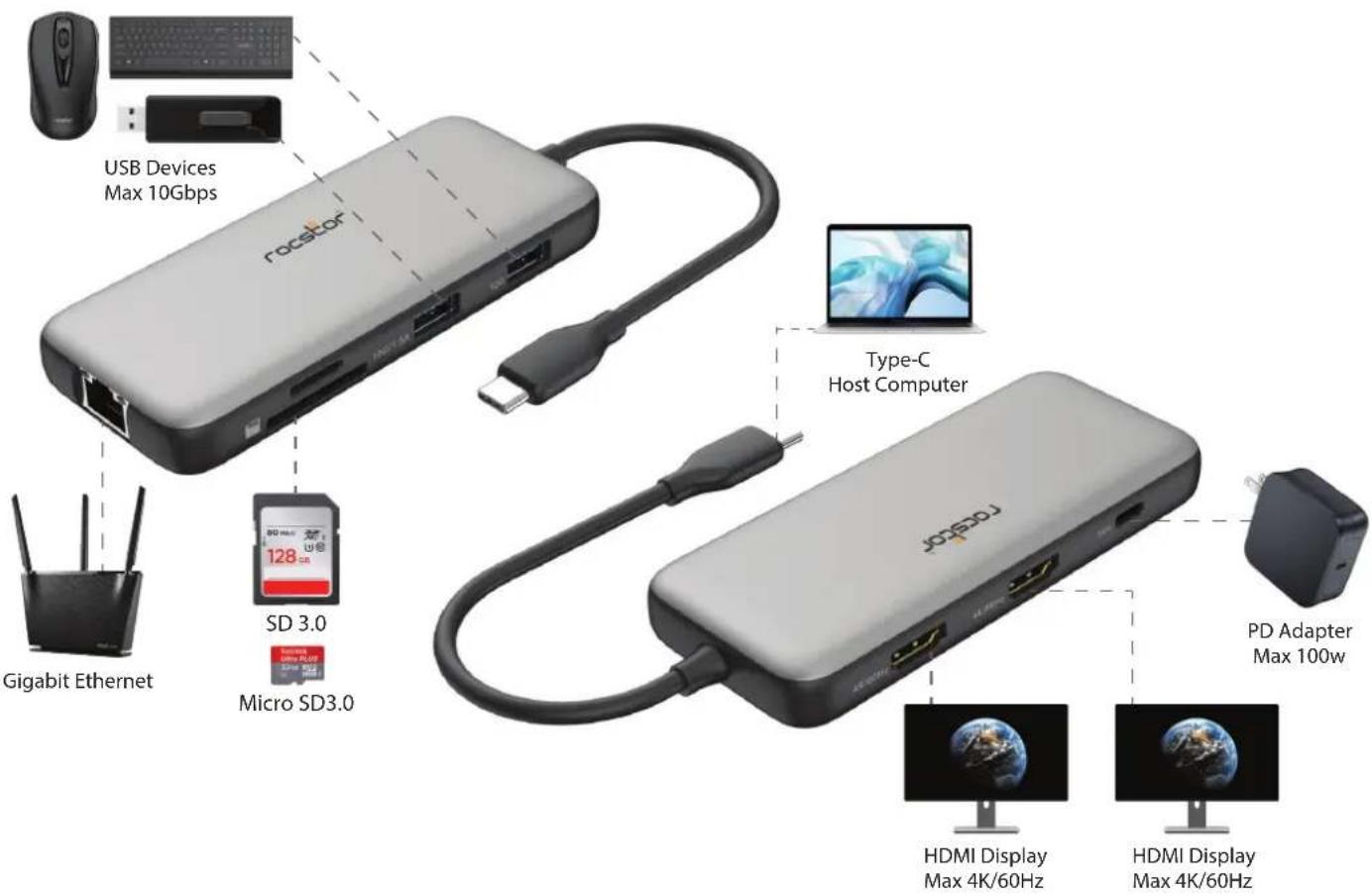
Rocstor introduces the Type-C 7-in-1 Portable Dock, an essential companion featuring an array of ports to enhance connectivity for your devices. With HDMI, DisplayPort, 2 USB-A, Type-C data, Ethernet, and Type-C PD charging female ports, this hub offers a comprehensive solution for extending the capabilities of your Type-C or Thunderbolt host devices, catering to those with a single Type-C port. Powered by advanced DP1.4 Alt mode supported IC technology, our dock delivers unparalleled performance. Experience stunning visual output with HDMI video up to 8K/30Hz and DP video up to 8K/30Hz, while seamlessly transferring data at speeds of up to 5Gbps with USB 3.2 gen1 compatibility. Connectivity is further enhanced with 2 USB-A and Type-C data ports, enabling simultaneous connection of up to 3 USB devices. Stay connected with Gigabit Ethernet, ensuring seamless internet browsing. Additionally, our Type-C PD charging port supports lightning-fast charging up to 100W, providing power when you need it most. Compatible with all DP Alt mode supported Type-C hosts, our portable dock offers unmatched versatility and performance for all your connectivity needs.
Package Contents
Before attempting to use this unit, please check the packaging and make sure the following items are contained in the packaging:
- Main Unit x1
- User Manual
Features
Upstream:
Type-C Male X1 Host Computer

• Supports DP1.4 Alt mode, downward compatible with DP1.2 Alt mode
• Supports USB3.0/2.0 data transmission (transfer speed: Max 10Gbps)
• Supports transmission of DP Alt Mode video up to 4K/60Hz Simultaneously Note: To get max bandwidth, the host should support DP1.4 Alt mode&DSC
Downstream:
HDMI X2

• Supports HDMI max 4K/60Hz per port
• Supports dual 4K/60Hz simultaneously under SST mode
• Supports dual 4K/30Hz simultaneously under MST mode
• Supports 8/10/12 bit color depth output
- Supports output pixel format
RGB/YCbCr4:4:4/YCbCr4:2:2/YCbCr4:2:0
- Supports HDR
- Supports HDCP2.2&HDCP1.4&HDCP1.3
Note: The actual resolution supported is determined by the host and the Display. The product worked on some windows hosts that support DP1.4&DSC can output 4K/60Hz*2 simultaneously with different pictures
USB-A X2

• Max 10Gbps data transmission per port
• Supports max 7.5W(5V/1.5A) downstream charging the port next to SD card slot, another port supports max 900mA downstream charging.
• 2 USB-A port share max 10W(5V/2A)
• Supports short-circuit, over-current, over-voltage protection
RJ45 X1
• Supports Gigabit Ethernet, 10M/100M/1000M
• Supports Wake-On-LAN
• Supports full duplex flow control
- Light indicates the state, no light when no Internet connected, orange light turns on when network connection is established, green light flashes when transmitting data.
SD/Micro SD 3.0 X1
• Supports SD3.0 data transfer up to 104MBps
- Allow 2 card slots to work simultaneously
- TF card slot with self-ejecting mechanism by pressing
Type-C Female X1
(For PD Charging)
• Supports max 100W PD charging
• Supports PD3.0 Fast Role Swap, the connected device will not get disconnected while plugging out PD Adapter
- 15W is dedicated to the functioning of this product, the rest power (max 85W) will be passed to charge for the host
SpecificationIntroduction
Input/Output Connector
Input Type-C Male x1
Output HDMI Female x2
USB-A 10G x2
RJ45 x1
SD/Micro SD 3.0 x1
Type-C Female x1
Warranty
Limited Warranty 3 Years
Physical
Weight 3.7lbs (106g)
Size 4.7x1.9x0.6in (120x50x15.5mm)
Environmental
Operating Temperature 0°C to 40°C (32°F to 104°F)
Operating Humidity 10% to 85% RH (no condensation)
Storage Temperature -10°C to 70°C (14°F to 158°F)
Storage Humidity 5% to 90% RH (no condensation)
Regulatory Approvals
Certifications FCC, CE
Accessory Adapter
User Manual English Version
Support
Technical support is available to all the registered users of Rocstor products.
Technical Support / RMA
Hours: 9:00 am - 5:00 pm PST
Monday to Friday (except holidays)
Tell: +1 (818) 727-7000 (National and international)
Email: support@rocstor.com

Warranty Information
Warranty Information
This product is backed by a (3) three-year warranty. Rocstor warrants its products against defects in materials and workmanship for the periods noted, following the initial date of purchase. During this period, the products may be returned for repair, or replacement with equivalent products at our discretion. The warranty covers parts and labor costs only. Rocstor does not warrant its products from defects or damages arising from misuse, abuse, alteration, or normal wear and tear.
Limitation of Liability
In no event shall the liability of Rocstor, Inc. and Rocstor (or their officers, directors, employees or agents) for any damages (whether direct or indirect, special, punitive, incidental, consequential, or otherwise), loss of profits, loss of business, or any pecuniary loss, arising out of or related to the use of the product exceed the actual price paid for the product. Some states do not allow the exclusion or limitation of incidental or consequential damages. If such laws apply, the limitations or exclusions contained in this statement may not apply to you.
Safety Information:
WARNING:
Please follow these safety instructions. Failure to do so may result damages or injury. It is normal that the device becomes very warm during use.
Please note that:
Continuous contact with warm surfaces for extended time may cause discomfort or injury. In order to reduce the possibility of overheating or heat-related injuries, always allow needed ventilation around the device and use care when handling it. Avoid instances where your skin is in extended contact with the device when plugged into the host computer. It is not recommended to sleep with the device when plugged into a host computer. Avoid placing the device under a pillow, blanket, or your body when connected to a host computer. If you have a medical condition that affects your ability to detect heat against the body, extra care should be used. Never use the device in locations with water, such as a sink, bathtub, or shower stall. Never connect or disconnect the device with wet hands.
©2024 Rocstor, Inc. All rights reserved. Rocstor is registered trademark of Rocstor, Inc. Apple®, the Apple logo, Mac®, MacBook®, MacBook Pro®, MacBook Air®, iPad®, iPad Air®, iPad mini®, iPad Air®, iPhone®, macOS® are registered trademarks of Apple, Inc. Google® and Chromebook™ are registered trademarks of Google, LLC. Microsoft® is registered trademarks of Microsoft corporation. All other product names and logos mentioned herein may be trademarks of their respective companies. Thunderbolt is a trademark of Intel Corporation or its subsidiaries. USB Type-C® and USB-C® are registered trademark of USB Implementers Forum. The terms HDMI, HDMI High-Definition Multimedia Interface, HDMI Trade dress and the HDMI Logos are trademarks or registered trademarks of HDMI Licensing Administrator, Inc. Feature and specification are subject to change without notice. All trademarks and registered trademarks are the property of their respective. All rights reserved.
- User Manual
- USB-C 8-in-1 Dual HDMI Display Portable Dock Multiport Adapter with DP 1.4 Alt Mode - 100W PD
- Congratulations
- Package Contents
- Features
- Upstream:
- Type-C Male X1 Host Computer
- Downstream:
- HDMI X2
- USB-A X2
- RJ45 X1
- SD/Micro SD 3.0 X1
- Type-C Female X1
- (For PD Charging)
- SpecificationIntroduction
- Input/Output Connector
- Warranty
- Physical
- Environmental
- Regulatory Approvals
- Accessory Adapter
- Support
- Warranty Information
- Limitation of Liability
- Safety Information:
- WARNING:
- Please note that:
Brand : Rocstor
Model : Y10P030-S1
Category : USB Hub