
MC-USB - Controller Kopul - Free user manual and instructions
Find the device manual for free MC-USB Kopul in PDF.


| Product Type | USB Controller |
| Brand | Kopul |
| Model | MC-USB |
| Connectivity | USB 2.0 (Type-A to Type-B) |
| Dimensions | 100mm x 60mm x 20mm |
| Weight | 200g |
| Power Supply | USB bus-powered (5V, 500mA) |
| Number of Buttons | 8 |
| Number of Knobs | 4 |
| LED Indicators | Yes |
| Cable Length | 1.5m |
| Compatibility | Windows, macOS, Linux |
| Main Functions | Transport control, volume, parametric control |
| Housing Material | Plastic |
| Color | Black |
| Operating Temperature | 0°C to 40°C |
| Storage Temperature | -20°C to 60°C |
| Certifications | CE, FCC, RoHS |
| Warranty | 1 year |
| Maintenance | Wipe with dry cloth; avoid liquids |
| Safety | Use only with compatible devices; do not force controls |
| Spare Parts & Repairability | Not user-serviceable; contact support |
| General Information | Designed for studio and live performance control |
Frequently Asked Questions - MC-USB Kopul
User questions about MC-USB Kopul
0 question about this device. Answer the ones you know or ask your own.
Ask a new question about this device
Download the instructions for your Controller in PDF format for free! Find your manual MC-USB - Kopul and take your electronic device back in hand. On this page are published all the documents necessary for the use of your device. MC-USB by Kopul.
USER MANUAL MC-USB Kopul
Compact USB Volume Controller
USER MANUAL

natural_image
Abstract black and white geometric logo resembling a stylized flower or leaf (no text or symbols)kopul®
MC-USB

natural_image
Abstract black and white geometric shape with curved and angular forms (no text or symbols)Thank you for choosing Kopul.
The Kopul MC-USB is a convenient desktop accessory that controls the volume of your computer, laptop, or mobile device. It attaches to the host device with the included USB-C cable and is ready to go without any setup or extra drivers.
The controller puts a temporary volume control display in the upper left corner of your screen. It provides you with playback and volume controls that allow you to play, pause, skip, or mute audio without leaving your app.
Precautions
- Please read and follow these instructions, and keep this manual in a safe place.
- Exposure to high sound levels can cause permanent hearing loss. Avoid listening at high volumes for extended periods of time.
- Keep this product away from water and any flammable gases or liquids.
- Clean this product with only a soft, dry cloth.
- All images are for illustrative purposes only.
Contents
- Compact USB Volume Controller
- USB cable
Connecting the MC-USB
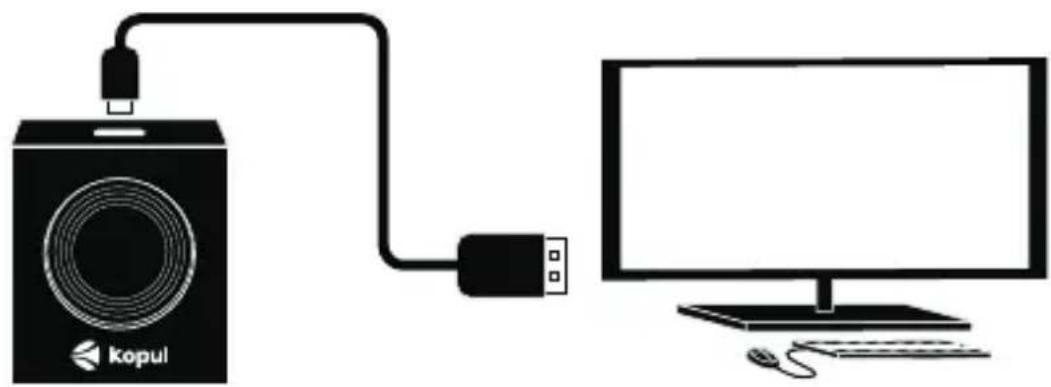
Attach the included USB cable to the USB-C port on the controller, and to an available USB-A port on your computer.
natural_image
Diagram showing a Kopul audio device connected to a computer monitor (no text or symbols present)If your computer has only a USB-C port available, use a USB-A to USB-C adapter.
Operating the MC-USB
Turn the knob to adjust the volume. The control display will appear onscreen.
Press the knob to mute your device's audio.
Note: Muting the volume does not pause the audio. The audio continues to play while the sound is muted.
Press the knob again to unmute.
Press down and turn the knob left or right to select the next or previous track.
The Control Display
The control display appears onscreen when you turn the volume knob. The display disappears after 4 seconds of inactivity.
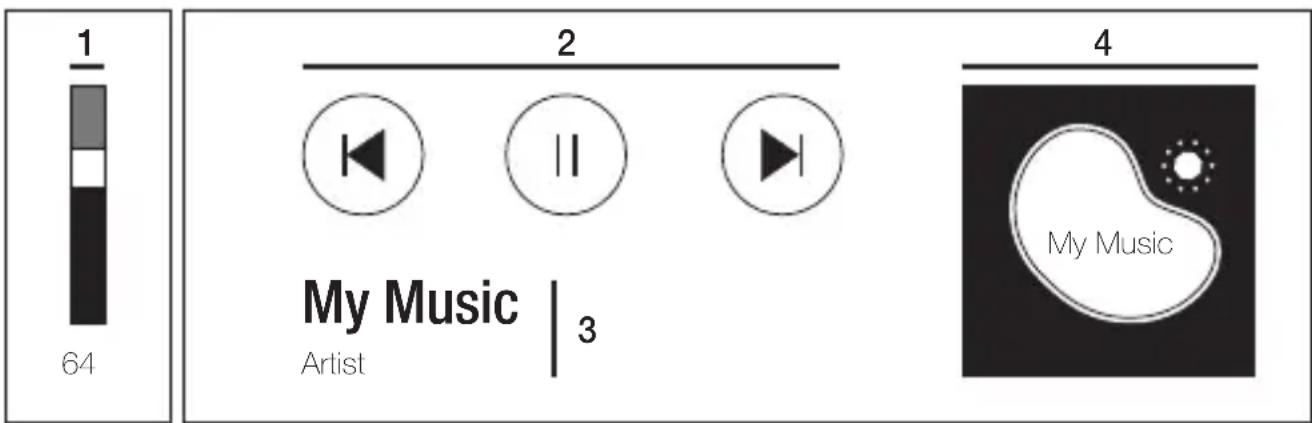
1. Volume level
Volume is adjusted from the controller or by clicking and dragging the volume bar with a mouse.
2. Playback controls
Skip back / Play/Pause / Skip forward.
3. Song title and album title
Shows the name of the song and album currently playing. The display changes as you switch audio sources.
4. Album art or audio source graphic
Grabs a screenshot of your audio source.
Night Mode
The ring light illuminates for operating the controller in dim lighting conditions.
Press and hold the knob for 8 seconds, and the ring light will be illuminated.
Press and hold for 8 seconds to turn the ring light off.
Specifications
| Connector | USB Type-C |
| Controls | Volume control, mute/unmute, skip forward,skip back, night mode |
| Onscreen controls | Play, skip, forward, back, pause, mute |
| Compatibility | MacOS, iOS, Windows 10/8/7/Vista/XP, Android |
| Material | Metal |
| Dimensions (W × D × H) | 2.5 × 2.0 × 1.6 in. (65 × 50 × 40 mm) |
| Weight | 5.3 oz. (150 g) |
One-Year Limited Warranty
This Kopul product is warranted to the original purchaser to be free from defects in materials and workmanship under normal consumer use for a period of one (1) year from the original purchase date or thirty (30) days after replacement, whichever occurs later. The warranty provider's responsibility with respect to this limited warranty shall be limited solely to repair or replacement, at the provider's discretion, of any product that fails during normal use of this product in its intended manner and in its intended environment. Inoperability of the product or part(s) shall be determined by the warranty provider. If the product has been discontinued, the warranty provider reserves the right to replace it with a model of equivalent quality and function.
This warranty does not cover damage or defect caused by misuse, neglect, accident, alteration, abuse, improper installation or maintenance. EXCEPT AS PROVIDED HEREIN, THE WARRANTY PROVIDER MAKES NEITHER ANY EXPRESS WARRANTIES NOR ANY IMPLIED WARRANTIES, INCLUDING BUT NOT LIMITED TO ANY IMPLIED WARRANTY OF MERCHANTABILITY OR FITNESS FOR A PARTICULAR PURPOSE. This warranty provides you with specific legal rights, and you may also have additional rights that vary from state to state.
To obtain warranty coverage, contact the Kopul Customer Service Department to obtain a return merchandise authorization (“RMA”) number, and return the defective product to Kopul along with the RMA number and proof of purchase. Shipment of the defective product is at the purchaser’s own risk and expense.
For more information or to arrange service, visit www.kopulcables.com or call Customer Service at 212-594-2353.
Product warranty provided by the Gradus Group. www.gradusgroup.com

KOPUL ^* A Gradus Group Brand
Kopul is a registered trademark of the Gradus Group. © 2024 Gradus Group LLC. All Rights Reserved.
GG1
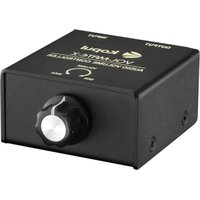
Brand : Kopul
Model : MC-USB
Category : Controller