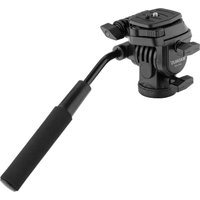
VPH-10P - Tripod Magnus - Free user manual and instructions
Find the device manual for free VPH-10P Magnus in PDF.


| Brand | Magnus |
| Model | VPH-10P |
| Product Type | Tripod |
| Maximum Height | 150 cm (59 in) |
| Minimum Height | 40 cm (15.7 in) |
| Folded Length | 50 cm (19.7 in) |
| Weight | 1.5 kg (3.3 lbs) |
| Load Capacity | 3 kg (6.6 lbs) |
| Material | Aluminum Alloy |
| Leg Sections | 4 |
| Leg Lock Type | Twist Locks |
| Head Type | Ball Head |
| Quick Release Plate | Yes, Arca-Swiss compatible |
| Bubble Level | Yes |
| Spike Feet | Yes (retractable) |
| Carrying Bag Included | Yes |
| Maintenance | Clean with dry cloth; avoid solvents |
| Operating Temperature | -20°C to 50°C (-4°F to 122°F) |
| Warranty | 2 years |
Frequently Asked Questions - VPH-10P Magnus
User questions about VPH-10P Magnus
0 question about this device. Answer the ones you know or ask your own.
Ask a new question about this device
Download the instructions for your Tripod in PDF format for free! Find your manual VPH-10P - Magnus and take your electronic device back in hand. On this page are published all the documents necessary for the use of your device. VPH-10P by Magnus.
USER MANUAL VPH-10P Magnus
MAGNUS®
Video Tripod Head
Thank you for choosing Magnus.
The Magnus VPH-10P three-way pan and tilt head is a compact, lightweight, and durable head that's ideal for photographers and videographers on the go. In addition to adjustable pan and tilt for video production, the VPH-10P features vertical camera positioning between landscape and portrait orientation for still photography. The fluid cartridge drag system has adjustable pan and tilt controls that assure steady and smooth panning and tilting for both rapid and slow camera moves.
Box Contents
• VPH-10P Two-Way Pan & Tilt Head
• 3/8-16 to 1/4-20 reducer bushing
- Quick-release plate
Key Features

Image is for illustration purposes only
Attaching the VPH-10P to Your Tripod
1 The VPH-10P has a 3/8-16 tripod mount.
To mount the head to a tripod with a 1/4-20 stud, use the included reducer
bushing. Screw the bushing into the tripod mount before you attach it to the tripod.

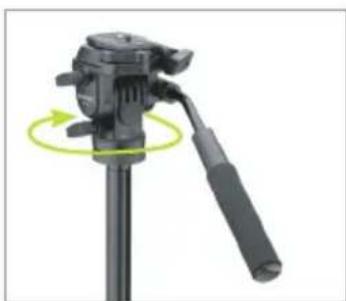
2 Attach the head to the tripod by screwing it into the tripod's mounting stud. If you're using a very small tripod, you may find it easier to hold the VPH-10P steady and screw on the tripod.
natural_image
Close-up of a black tripod-mounted camera with a green circular motion indicator (no text or symbols)Mounting Your Camera on the VPH-10P
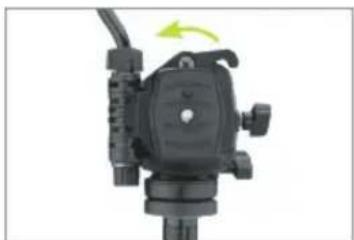
1 To unlock the quick-release plate, push the quick-release lever away from the quick-release plate, and slide the plate out of the quick-release mechanism.
natural_image
Close-up of a black mechanical device with a green arrow indicating rotation (no text or symbols visible)
natural_image
Close-up of hands adjusting a black camera module with a yellow arrow pointing to the component (no text or symbols visible)2 Use the thumbscrew on the quick-release plate to attach it to your camera. Make sure the thumbscrew is flush against the bottom of the plate.

natural_image
Hand holding a small black object next to a digital camera module (no visible text or symbols)
natural_image
Close-up of a camera module with a green circular adjustment knob and control buttons (no visible text or symbols)3 Replace the plate (with the camera) into the VPH-10P.
Be sure to position the plate so the lens faces away from the grip handle.

natural_image
Close-up of a hand adjusting a black DSLR camera lens (no visible text or symbols)The quick-release pate (VT-QRP20) is available separately. Attach a quick-release plate to all of your cameras in order to rapidly and easily swap them during a shoot.
Using the VPH-10P
There are three controls that adjust your camera's position and orientation and lock it into place.
1 The pan-lock knob controls the panning movement of the camera. Turn clockwise to tighten, and counterclockwise to loosen the tension.

natural_image
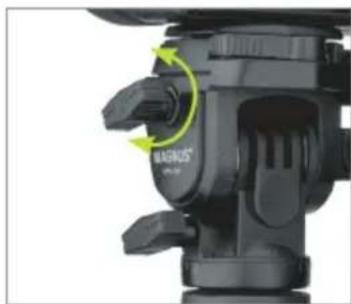
Close-up of a black MAGNUS camera module with green motion arrows indicating rotation (no text or symbols on the device itself)2 The tilt lock knob controls the tilting movement. Turning it clockwise tightens the tension until it locks completely. Turning counterclockwise loosens it for greater freedom of motion.
natural_image
Close-up of a black camera module with green directional arrows indicating motion or movement (no text or symbols)3 The vertical lock quickly changes your camera's orientation from landscape to portrait. Turn the lock counterclockwise to loosen the horizontal lock and change orientation.

natural_image
Close-up of a camera lens assembly with green circular arrows indicating motion (no text or symbols visible)Turn it clockwise to tighten and lock in your camera's orientation.
4 For tightening or adjusting the pan handle, use the knob on the front of the VPH-10P. Rotate counterclockwise to loosen and adjust, and clockwise to tighten.

natural_image
Close-up of a black camera tripod with a green arrow indicating rotation (no text or symbols visible)Unmounting Your Camera from the VPH-10P
1 Push the quick-release lever away from the quick-release plate, and hold it in that position. Lift up the edge of the quick release plate, and slide it out of the quick-release mechanism.
2 Loosen the thumbscrew on the bottom of the plate, and remove your camera.

natural_image
Close-up of a hand adjusting a black DSLR camera's grip panel, showing a green arrow indicating the left side (no text or symbols visible)Specifications
- Dimensions (H × W × D): 4.2 × 4.3 × 3.3 in.
(10.7 × 10.8 × 8.3 cm)
• Weight: 1.1 lb. (504 g)
• Max. Load: 6.6 lb. (3 kg) - Mount: 3/8-16 tripod mount 1/4-20 reducer bushing
ONE-YEAR LIMITED WARRANTY
This Magnus product is warranted to the original purchaser to be free from defects in materials and workmanship under normal consumer use for a period of one (1) year from the original purchase date or thirty (30) days after replacement, whichever occurs later. The warranty provider's responsibility with respect to this limited warranty shall be limited solely to repair or replacement, at the provider's discretion, of any product that fails during normal use of this product in its intended manner and in its intended environment. Inoperability of the product or part(s) shall be determined by the warranty provider. If the product has been discontinued, the warranty provider reserves the right to replace it with a model of equivalent quality and function.
This warranty does not cover damage or defect caused by misuse, neglect, accident, alteration, abuse, improper installation or maintenance. EXCEPT AS PROVIDED HEREIN, THE WARRANTY PROVIDER MAKES NEITHER ANY EXPRESS WARRANTIES NOR ANY IMPLIED WARRANTIES, INCLUDING BUT NOT LIMITED TO ANY IMPLIED WARRANTY OF MERCHANTABILITY OR FITNESS FOR A PARTICULAR PURPOSE. This warranty provides you with specific legal rights, and you may also have additional rights that vary from state to state.
To obtain warranty coverage, contact the Magnus Customer Service Department to obtain a return merchandise authorization ("RMA") number, and return the defective product to Magnus along with the RMA number and proof of purchase. Shipment of the defective product is at the purchaser's own risk and expense.
For more information or to arrange service, visit magnustripods.com or call Customer Service at 212-594-2353.

MAGNUS®
A Gradus Group Brand
Product warranty provided by the Gradus Group.
www.gradusgroup.com
Magnus is a registered trademark of the Gradus Group.
© 2018 Gradus Group LLC. All rights reserved.
Brand : Magnus
Model : VPH-10P
Category : Tripod