
100X Ultrazoom Binoculars - Binoculars Sharper Image - Free user manual and instructions
Find the device manual for free 100X Ultrazoom Binoculars Sharper Image in PDF.


| Product Type | Binoculars |
| Brand | Sharper Image |
| Model | 100X Ultrazoom Binoculars |
| Magnification | 100x |
| Objective Lens Diameter | 50 mm |
| Field of View | 315 ft at 1000 yds |
| Eye Relief | 15 mm |
| Dimensions (L x W x H) | 200 x 150 x 70 mm |
| Weight | 750 g |
| Power Source | 2 x AA batteries (not included) |
| Focus System | Center focus wheel |
| Zoom Control | Zoom lever on central hinge |
| Prism Type | Porro prism |
| Lens Coating | Fully multi-coated |
| Waterproof/Fogproof | Yes |
| Tripod Adapter | Compatible (adapter not included) |
| Care Instructions | Clean lenses with a soft, dry cloth; store in a dry place; avoid direct sunlight |
| Safety Precautions | Never look directly at the sun through the binoculars; keep away from children |
| Included Accessories | Neck strap, carrying case, lens caps, cleaning cloth |
| Spare Parts Available | Lens caps, eyepiece covers, neck strap |
| Repairability | Contact Sharper Image customer support for service |
Frequently Asked Questions - 100X Ultrazoom Binoculars Sharper Image
User questions about 100X Ultrazoom Binoculars Sharper Image
0 question about this device. Answer the ones you know or ask your own.
Ask a new question about this device
Download the instructions for your Binoculars in PDF format for free! Find your manual 100X Ultrazoom Binoculars - Sharper Image and take your electronic device back in hand. On this page are published all the documents necessary for the use of your device. 100X Ultrazoom Binoculars by Sharper Image.
USER MANUAL 100X Ultrazoom Binoculars Sharper Image
Thank you for purchasing the Sharper Image 100X Ultrazoom Binoculars. Please take a moment to read this User's Guide and store it for future reference.
FEATURES
· High power: Zooms from 10X to 100X
- Superior clarity
• Military-grade construction
- Nonslip hand grips
- Rubber, fold-down eyecups
· Lightweight — only 2.6 lbs
- Ideal for sports, concerts, birding and other outdoor adventures
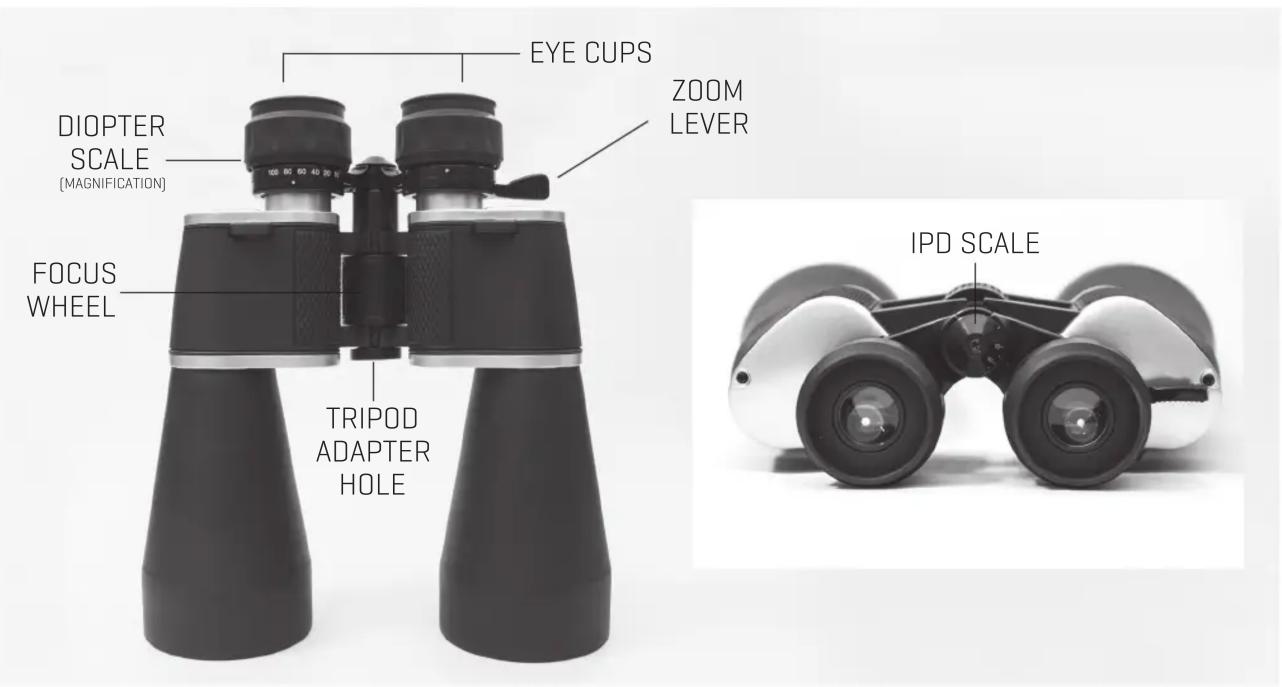
- Tripod adapter hole [under plastic cap] Note: Tripod adapter bracket not included
PARTS IDENTIFICATION
WHAT IS IPD?
The interpupillary distance [IPD] is the distance between the centers of the left and right eye pupil. If the interpupillary distance of the binoculars does not match your eyes, you may see shadowing or two distinct images. To find your correct IPD, adjust the position of the binocular barrels until you see one image. This will also reduce shadowing. Once you have found the ideal IPD, look at the scale for future reference. For subsequent uses, you can save time by using the IPD scale to set the IPD without looking into the binoculars.
USING YOUR BINOCULARS
IPD ADJUSTMENT: Set the interpupillary distance [IPD] by grasping the body and bending it until you can see one circle of view. The setting for your eyes will be indicated on the IPD scale. Note the scale setting for future use.
How to focus the 100X Ultrazoom Binoculars
- Hold the binoculars up to your eyes.
- With the left eye open and the right eye closed, use the Center Focus Wheel to adjust the focus.
- When the image is clear, open both eyes. If the object is NOTclear, you will need to adjust the Diopter setting.
- Hold the binoculars back up to your eyes.
- Close left eye and keep the right eye open.
- Adjust the Diopter setting until the object comes into fine focus.
- Now, open both eyes. Leave the Diopter setting alone.
- Adjust the Center Focus Wheel as needed to view different objects during the day.
EYEGLASS WEARERS: If you wear corrective lenses, set the diopter ring at "0.".
CARE AND MAINTENANCE
- Keep the included lens covers on the lenses when binoculars are not in use
- When wiping the lenses, use the included lens cloth or a soft, lint-free cloth
- To remove any remaining dirt or smudges, add one or two drops of isopropyl alcohol to the cloth
- Store your binoculars in a moisture-free area
IMPORTANT NOTE: Never attempt to clean your binoculars internally or try to take them apart.
CAUTION!
Viewing the sun can cause permanent eye damage. Do not view the sun with these binoculars, or even with the naked eye.
WARRANTY / CUSTOMER SERVICE
Sharper Image branded items purchased from SharperImage.com include a 1-year limited replacement warranty. If you have any questions not covered in this guide, please call our Customer Service department at 1 [877] 210-3449. Customer Service agents are available Monday through Friday, 9:00 a.m. to 6:00 p.m. ET.
SHARPER IMAGE®
The SHARPER IMAGE® name and logo are registered trademarks.
@Sharper Image. All Rights Reserved.
Brand : Sharper Image
Model : 100X Ultrazoom Binoculars
Category : Binoculars