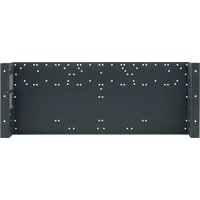
RK-UT1 - Accessoire pour équipement audiovisuel Kramer - Free user manual and instructions
Find the device manual for free RK-UT1 Kramer in PDF.


| Product Type | Rack Mount Kit |
| Model | RK-UT1 |
| Brand | Kramer |
| Compatibility | Universal, fits most 19-inch rack equipment |
| Rack Units | 1U |
| Material | Cold-rolled steel |
| Finish | Black powder coat |
| Dimensions (W x D x H) | 19 x 6.5 x 1.75 in (483 x 165 x 44 mm) |
| Weight | 1.1 lb (0.5 kg) |
| Included Accessories | Mounting screws and cage nuts |
| Installation | Simple screw-mount installation |
| Maintenance | Wipe with dry cloth; avoid solvents |
| Safety Certifications | CE, RoHS |
| Warranty | Limited lifetime warranty |
| Repairability | No user-serviceable parts; contact manufacturer |
Frequently Asked Questions - RK-UT1 Kramer
User questions about RK-UT1 Kramer
0 question about this device. Answer the ones you know or ask your own.
Ask a new question about this device
Download the instructions for your Accessoire pour équipement audiovisuel in PDF format for free! Find your manual RK-UT1 - Kramer and take your electronic device back in hand. On this page are published all the documents necessary for the use of your device. RK-UT1 by Kramer.
USER MANUAL RK-UT1 Kramer

Scan for full manual
RK-UT1 Quick Start Guide
This guide helps you install and use your RK-UT1 for the first time.
Go to www.kramerav.com/downloads/RK-UT1 to download the latest user manual and check if firmware upgrades are available.
Step 1: Check what's in the box
RK-UT1 Under the Table Enclosure
6 wood mounting screws
1 Quick start guide
20 M3x5 screws
Step 2: Get to know your RK-UT1
Mount any of the following combinations of Kramer 1U products (1/2-19" 1U units, 1/4-19" 1U units, 1/8-19" 1U units and separately, up to two 6.5"-1U units) in the RK-UT1 rack adapter. If empty spaces remain, you can close them with blank panels (optional).
1U device combinations

other
| Category | Value | |---|---| | 1/2 | 1/2 | | 1/2 | 1/4 | | 1/2 | 1/8 | | 1/2 | 1/8 | | 1/4 | 1/4 | | 1/4 | 1/4 | | 1/4 | 1/8 | | 1/4 | 1/4 | | 1/4 | 1/4 | | 1/8 | 1/8 | | 1/8 | 1/8 | | 1/8 | 1/8 | | 1/8 | 1/8 | | 6.5" | 6.5" | The chart displays a single numerical value for '19'' and '100' on the left side, with additional values for '1U' shown as boxes above the bars.Step 3: Mount devices onto the RK-UT1
The RK-UT1 underside TOOL mounting area includes a set of screw holes that are suitable for any combination of units.

natural_image
Isometric line drawing of a rectangular electronic device with mounting brackets and internal slots (no text or symbols)To mount a unit on the RK-UT1:
- Place the first unit on the rack (for example, the Kramer PA-120Z).
- While holding the PA-120Z in place, flip over the RK-UT1.
- Attach the appropriate number of M3x5 screws (supplied) through the holes on the RK-UT1 to the underside of the PA-120Z.
- Repeat steps 1 to 3 for all additional devices.
To install the RK-UT1 underneath a table:
- Place the unit on the underside of a table and mark the correct location (of the table mounting screw holes).
- Insert the six M4.2X18 wood screws (supplied) into the six rim screw holes (three on each side) and tighten them to attach the RK-UT1 to the table.
If your Kramer device does not have screw holes on its underside, mount it via the screw holes on the sides of the RK-UT1.
To mount a blank panel (optional) to cover any empty rack spaces:
- Place the blank panel in place.
- Insert two M3x5 screws through the holes on the RK-UT1 that fit the holes on the blank panel (optional, not supplied).

natural_image
Technical line drawing of an electronic device chassis with mounting holes and wiring (no text or symbols)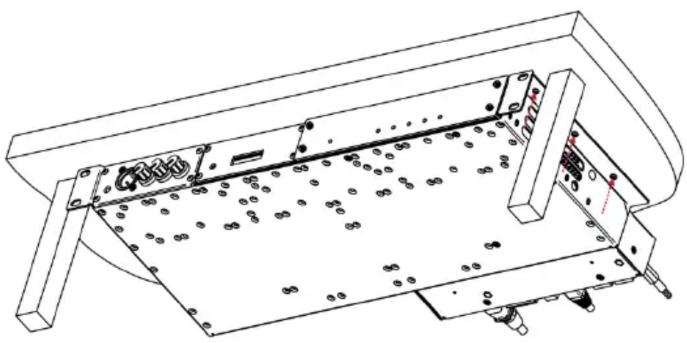
natural_image
Technical line drawing of a mechanical assembly with no visible text or symbols
natural_image
Technical line drawing of a mechanical assembly with mounting brackets and internal components (no text or symbols)Technical Specifications
| Environmental Conditions | Temperature Range | -40° to +70°C (-40° to 158°F) |
| Humidity | 10% to 90%, RHL non-condensing | |
| Regulatory Compliance | Safety | CE |
| Environmental | RoHs, WEEE | |
| Enclosure | Type | Aluminum |
| General | Net Dimensions | 19-inch (W), 7-inch (D) 1U (H) |
| Shipping Dimensions (W, D, H) | 49.5cm x 20.2cm x 5cm(19.5" x 7.95" x 1.97") | |
| Net Weight | 2.18kg (4.8lbs) | |
| Shipping Weight | 2.88kg (6.35lbs) approx. | |
| Accessories | Included | 20 M3x5 screws, 6 M4.2X18 wood screws |
| Specifications are subject to change without notice at www.kramerav.com | ||
Brand : Kramer
Model : RK-UT1
Category : Accessoire pour équipement audiovisuel