eGlass Station - Monitor HoverCam - Free user manual and instructions
Find the device manual for free eGlass Station HoverCam in PDF.


| Product Type | Interactive Monitor |
| Brand | HoverCam |
| Model | eGlass Station |
| Display Size | 65 inches (165 cm diagonal) |
| Resolution | 4K UHD (3840 x 2160) |
| Touch Technology | Infrared touch, 20 touch points |
| Dimensions (with stand) | 1500 x 900 x 600 mm |
| Weight | 45 kg |
| Power Supply | AC 100-240V, 50/60 Hz |
| Power Consumption | 200W (typical) |
| Connectivity | HDMI, VGA, USB (touch), USB-A, USB-C, Audio Out, RJ45 |
| Built-in Speakers | 2 x 15W |
| Operating System | Android 8.0 (embedded) |
| Accessories Included | Remote control, stylus (2 pcs), power cable, USB cable, mounting brackets |
| Maintenance | Clean the screen with a soft, dry microfiber cloth. Do not use harsh chemicals. |
| Safety Precautions | Install on a sturdy wall or stand. Keep away from liquids. Do not block ventilation. |
| Spare Parts | Contact HoverCam customer support for replacement stylus, remote, or power adapter. |
| Repairability | Serviceable by authorized technicians. Do not attempt to disassemble the panel. |
| Warranty | 3 years limited warranty |
| Package Contents | Monitor, stand, stylus (2), remote control, power cable, USB cable, user manual |
Frequently Asked Questions - eGlass Station HoverCam
User questions about eGlass Station HoverCam
0 question about this device. Answer the ones you know or ask your own.
Ask a new question about this device
Download the instructions for your Monitor in PDF format for free! Find your manual eGlass Station - HoverCam and take your electronic device back in hand. On this page are published all the documents necessary for the use of your device. eGlass Station by HoverCam.
USER MANUAL eGlass Station HoverCam
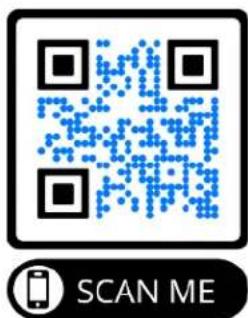
This is a user manual for the eGlass Station Podium ONLY. For the full eGlass Lightboard user manual, instructional videos, software downloads, and further training and support, visit the eGlass Academy by scanning this QR Code with your phone, or by visiting https://www.eglass.io/support
What's in the Box

1 Podium Surface
2 Pillar
3 Wheel Base
4 Foot Pedal
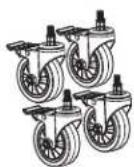
5 Wheels (4x)
6 M5 Hex Screw (10x)
7 10mm M5 Hex Bolt (4x)
8 15mm M5 Hex Bolt (4x)
9 M5 Thumbscrews (12x)
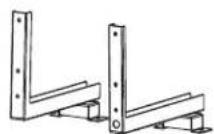
10 35" eGlass Brackets
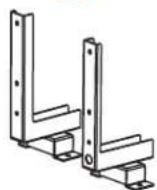
11 50" eGlass Brackets
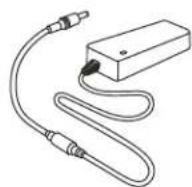
12 Power Adapter
13 Power Cord
14 eGlass Power Cable
15 Pen Holder
16 M5 Hex Driver
17 3mm Allen Key
18 Wheel Wrench
1
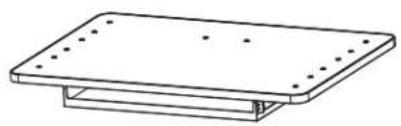
natural_image
Simple line drawing of a rectangular plate with mounting holes and a base (no text or symbols)2
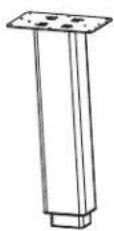
3
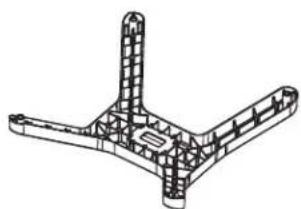
natural_image
Technical line drawing of a mechanical structure with four symmetrical components (no text or symbols)4
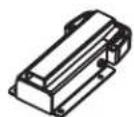
5
6

7

8

9

10
Or
11
12
13
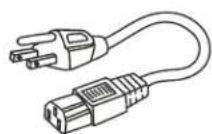
14
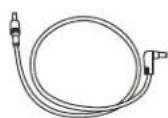
15
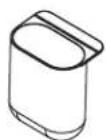
16

17
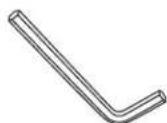
18

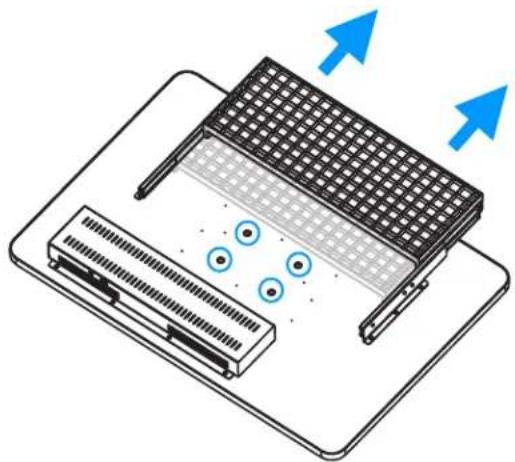
Assembling Podium
Step 1:
Place the Podium Surface upside-down on a flat surface, and pull out the mouse and keyboard tray to expose the mounting holes.
Step 2:
Align the Pillar with the recessed holes in the Podium Surface, and use the M5 Hex Driver and 10x M5 Hex Screws (pointed tip) to fasten them together.
Step 2:
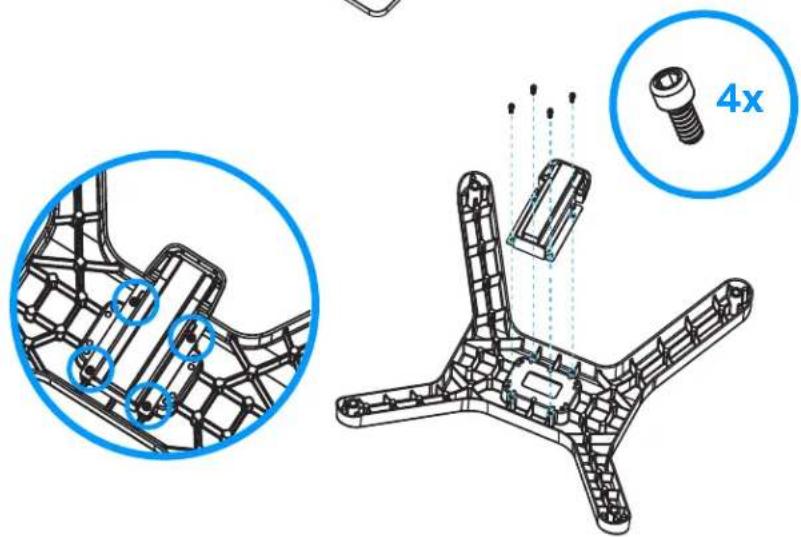
Use the M5 Hex Driver to secure the Foot Pedal to the underside of the Wheel Base with the shorter 10mm M5 Hex Bolts (4x)
natural_image
Diagram of a device with heat exchanger and ventilation slots, showing airflow direction (no text or symbols)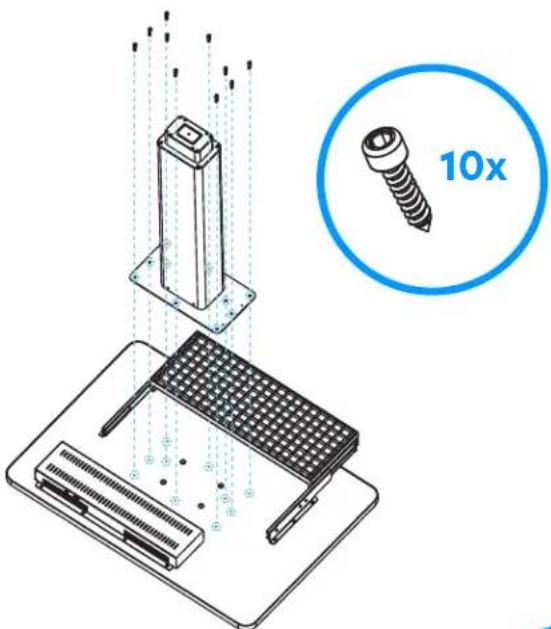
Step 3:
Use the Wheel Wrench to tighten the 4x Wheels to the Wheel Base
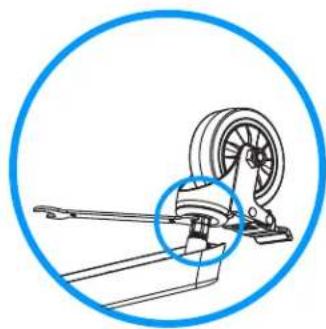
natural_image
Technical line drawing of a mechanical device with a blue circular annotation highlighting a component (no text or symbols present)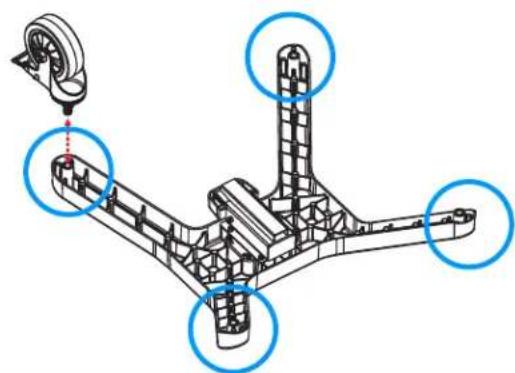
natural_image
Technical diagram of a mechanical assembly with highlighted components (no text or symbols)Step 4:
Use the M5 Hex Driver and the 4x longer 15mm M5 Hex Bolts to fasten the Wheel Base to the Pillar.
Important: Make sure you install the wheel base so that its height-adjustment Foot Pedal is on the same side as the pullout mouse and keyboard tray.
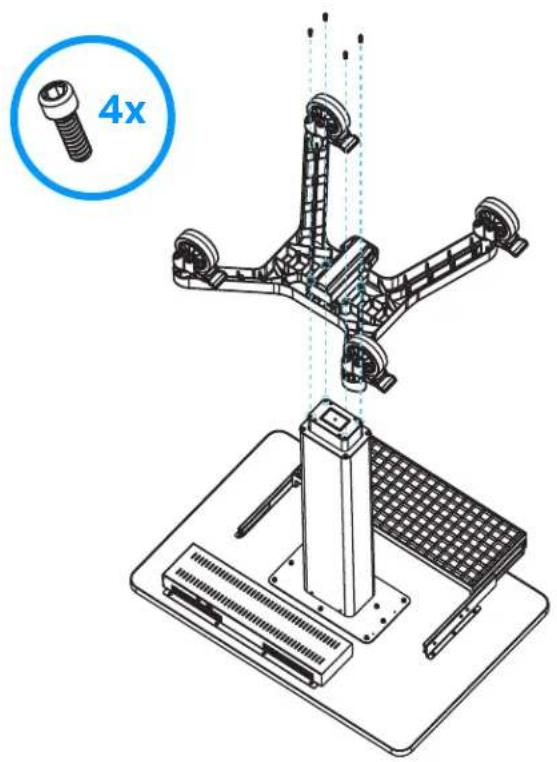
Step 5:
Flip the assembled podium right-side up.
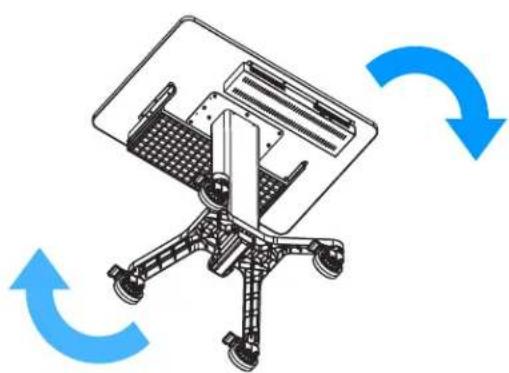
natural_image
Diagram of an office chair with blue circular arrows indicating rotational or bidirectional motion (no text or symbols)Step 1:
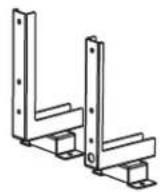
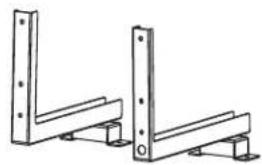
First, select the Mounting Brackets based on the size of the eGlass being mounted.
35" Mounting Brackets
50" Mounting Brackets
natural_image
Technical line drawing of two L-shaped metal structural components with mounting feet (no text or symbols)Step 2:
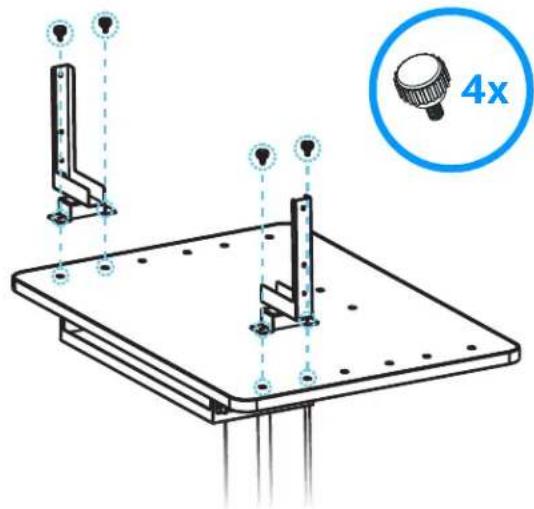
Position the Mounting Brackets in the desired location on the Podium Surface.
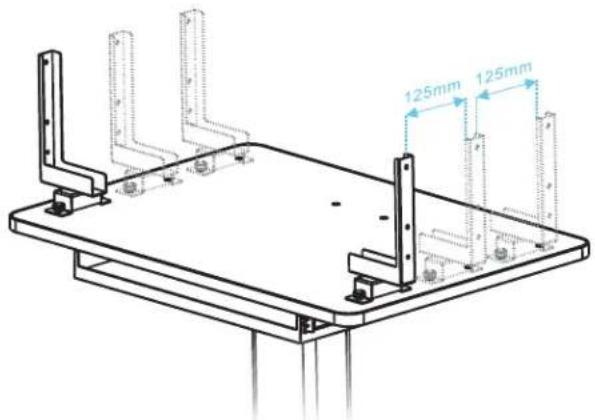
A Note About Mounting Positions:
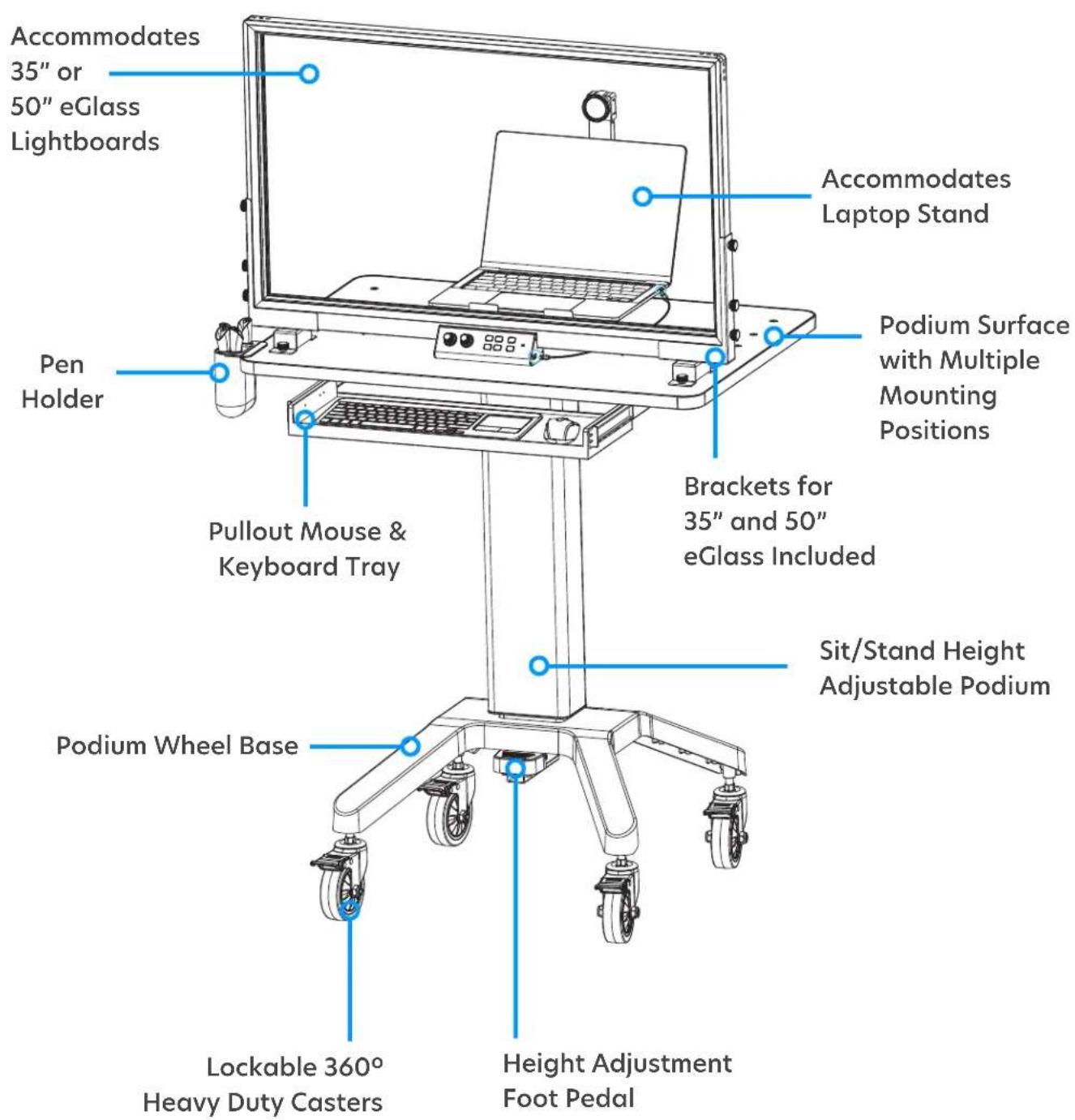
There are five positions the mounting brackets can be secured in to position the glass surface closure or further away from the user. Please consider where you would like to station your laptop before selecting a position.
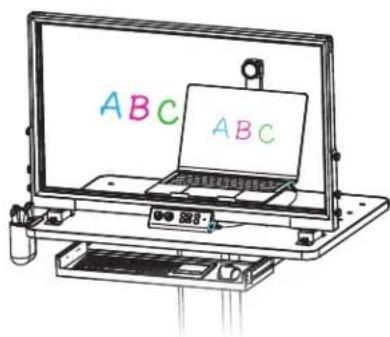
We recommend positioning the eGlass in the forward position (closest to the user and closest to the keyboard tray) in order to make room for the laptop behind the glass. This position also minimizes the distance that the camera arm protrudes from the podium surface.
Forward Position
Laptop Behind Glass (Recommended)
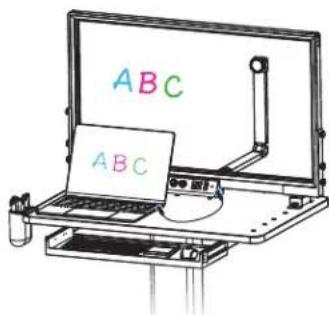
Rear Position
Laptop In Front Of Glass
Step 3:
Use 4x M5 Thumbscrews to secure the Mounting Brackets in the desired location on the Podium Surface.
Step 4:
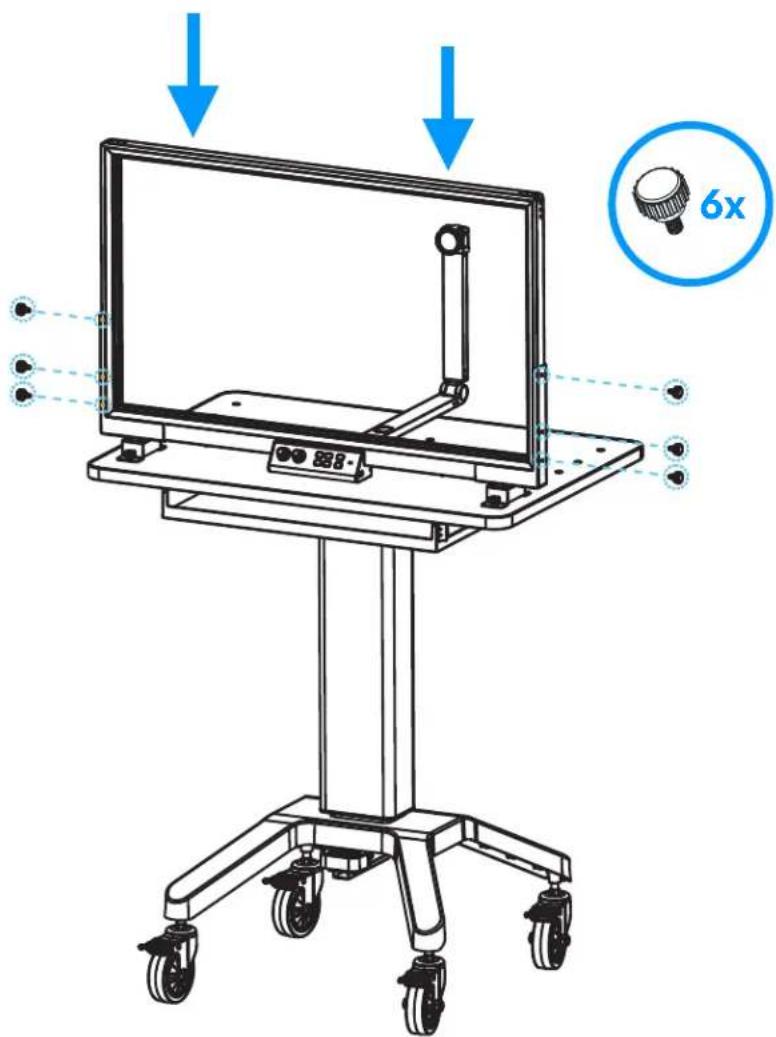
Carefully lower the eGlass frame into the Mounting Brackets, and use 6x M5 Thumbscrews to secure the eGlass frame.
Connecting and Powering-On
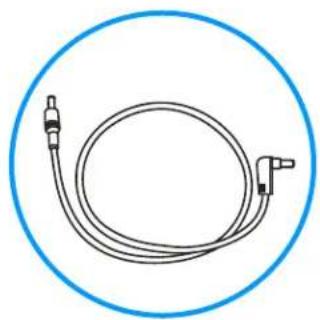
eGlass Station has a built-in battery to power the eGlass Lightboard. Connect one end of the eGlass Power Cable to the power input on the left side of the eGlass lightboard, and the other end into the 24V 5A power-outlet located on the left underside of the Podium Surface.
natural_image
Simple line drawing of a coiled cable or hose with two connectors, enclosed in a blue circular border (no text or symbols)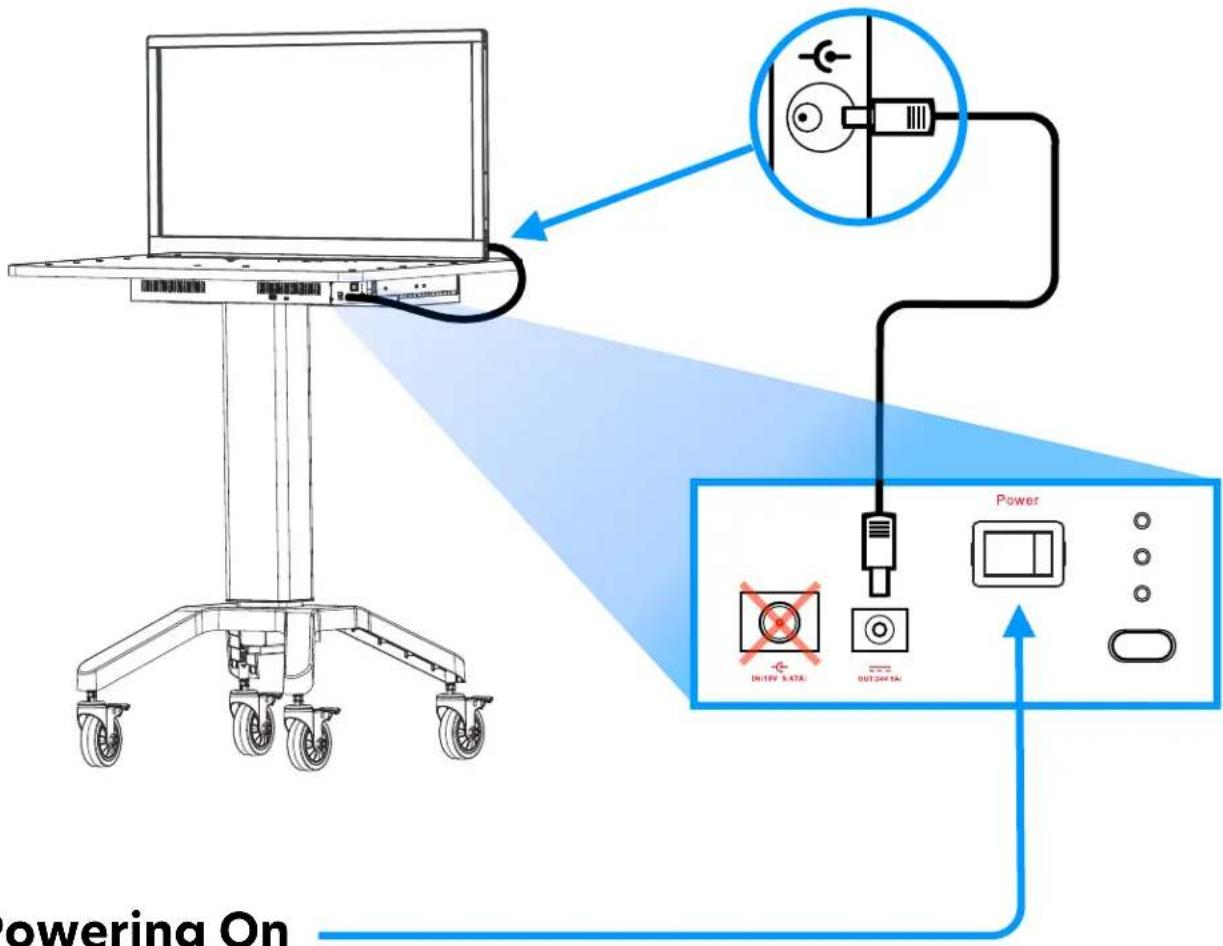
Powering On
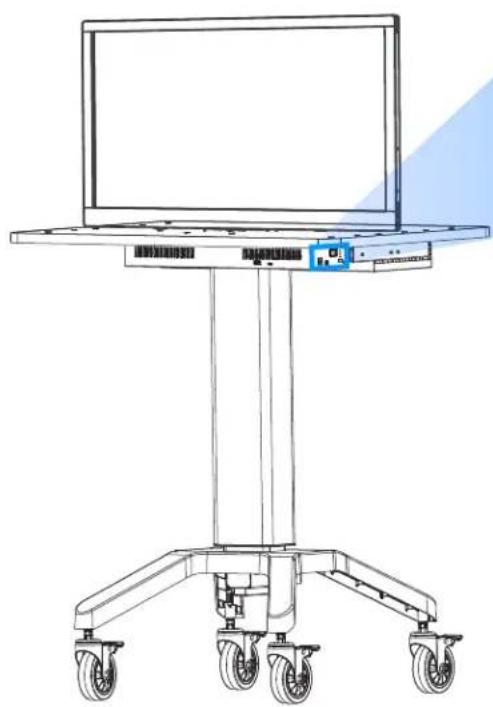
To power on (and off) the eGlass Station battery, activate the Power Switch located on the left underside of the Podium Surface.
The eGlass Station battery must be charged routinely.
To charge the station, first connect the Power Cord to the Power Adapter, and then connect the Power Adapter to the 19V 9.47A power-in located on the left underside of the Podium Surface.
Finally, connect the 3-prong Type A Power Cord into a 110V wall outlet to charge the station. Charging takes about 6 hours.
Battery life may vary depending on the brightness setting of the eGlass lights, and if a laptop or other accessories are being charged (see next page):
35" eGlass: \~3 - 7 hours 50" eGlass: \~2 - 6 hours
Charging time: 6 hours
natural_image
Line drawing of a medical or laboratory stand with wheels and a monitor, no text or symbols present
natural_image
Icon of a double electrical outlet inside a circle (no text or symbols)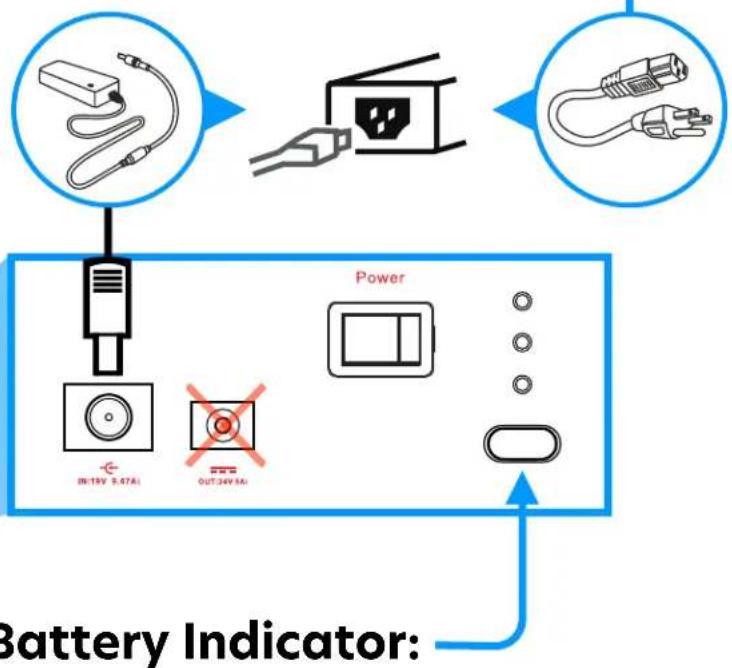
View the current battery level by pressing the battery indicator button:
3 lights: 75% - 100% remaining
2 lights: 50% - 75% remaining
1 light: 25% - 50% remaining
1 light (flashing): less than 25% remaining
Powering Laptop and Accessories
When the podium is powered-on, it's battery can also power or charge compatible USB devices (like a USB-C laptop) by connecting the devices to either the 100W USB-C port or 30W USB-A port located on the backside of the Podium Surface. Please note that the podium's battery life will decrease as more devices are connected and drawing power from the battery.
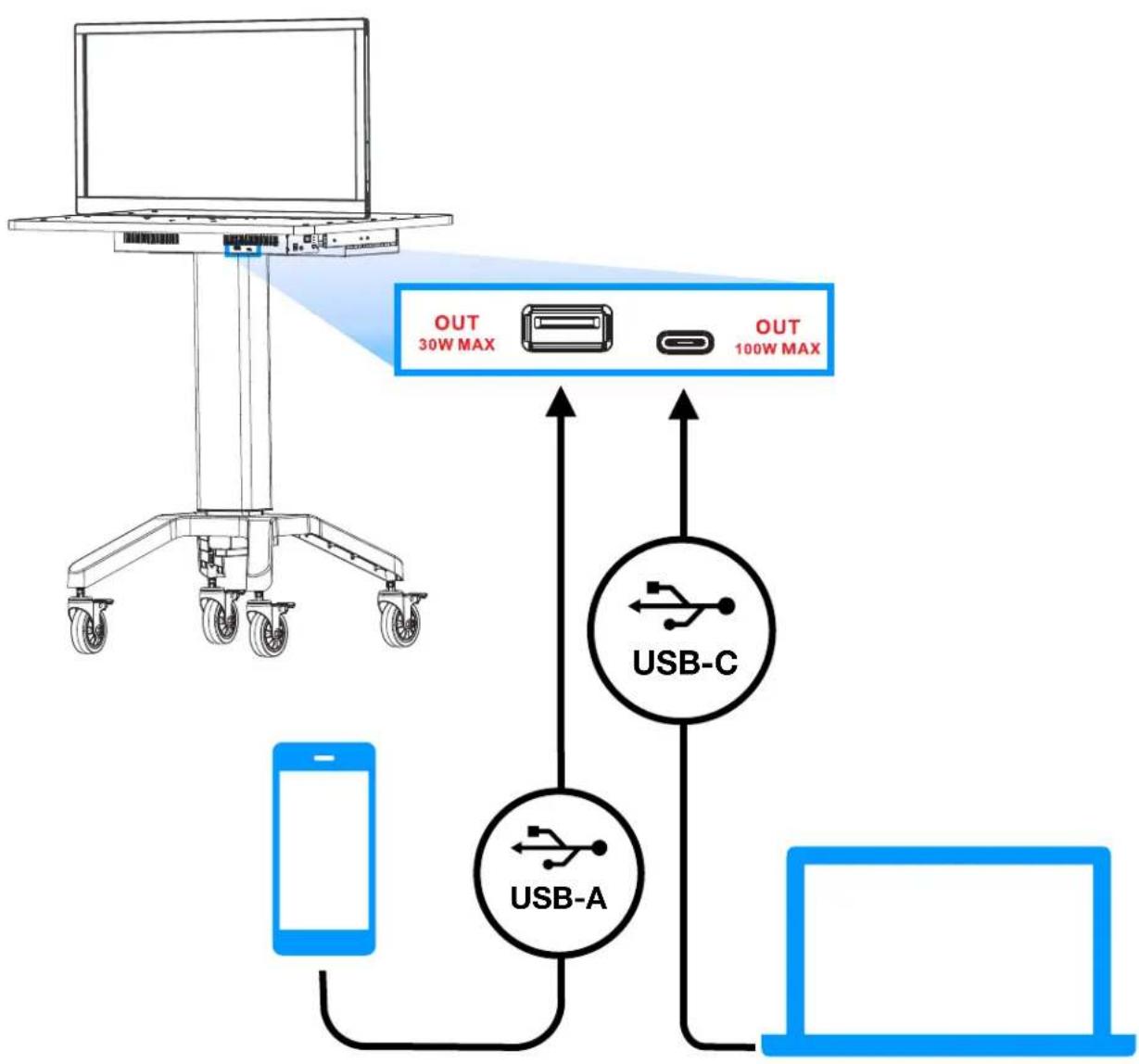
flowchart
graph TD
    A["Laptop"] -->|OUT 30W MAX| B["USB-A"]
    A -->|OUT 100W MAX| C["USB-C"]
    B --> D["Laptop"]
    C --> D
    style A fill:#f9f,stroke:#333
    style B fill:#ccf,stroke:#333
    style C fill:#cfc,stroke:#333
    style D fill:#fcc,stroke:#333
eGlass Station also has space for the adjustable Laptop Stand that is included with every eGlass lightboard.
We highly recommend using the laptop stand to hold your laptop behind the glass, and above the camera arm, so that your laptop screen sits just below the camera lens. This ensures that you always have a good view of your laptop screen when teaching, and when you do look at your laptop screen, you're still looking towards the eGlass camera (which simulates eye-contact). However, you will need to connect a Wireless Keyboard and Mouse (not included) to be able to control your laptop while it is behind the glass.
If your laptop stand needs to overhang beyond the eGlass Station Podium Surface, there are two holes tapped for M5 Thumbscrews that will secure the stand down so that it can support the unbalanced weight of a laptop without falling over.
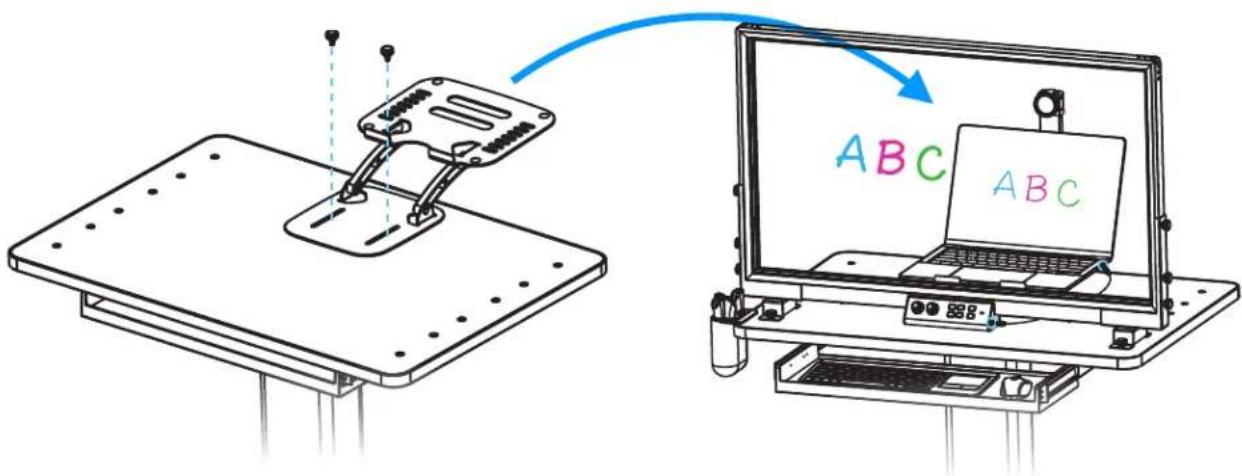
Note: If your laptop stand does not have slots for the M5 Thumbscrews to fit through, please contact support@eglass.io
eGlass Station is height-adjustable, accommodating both sitting or standing use. To adjust the height, press down on the Height-Adjustment Foot Pedal and pull or push the podium up or down to the desired height, then release the foot pedal.
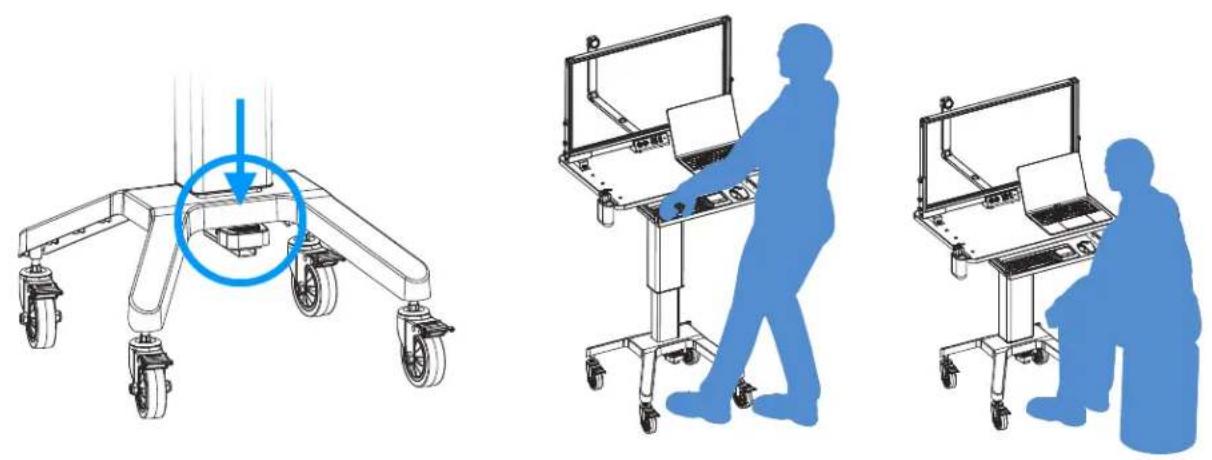
Lowest Position:
39 Inches
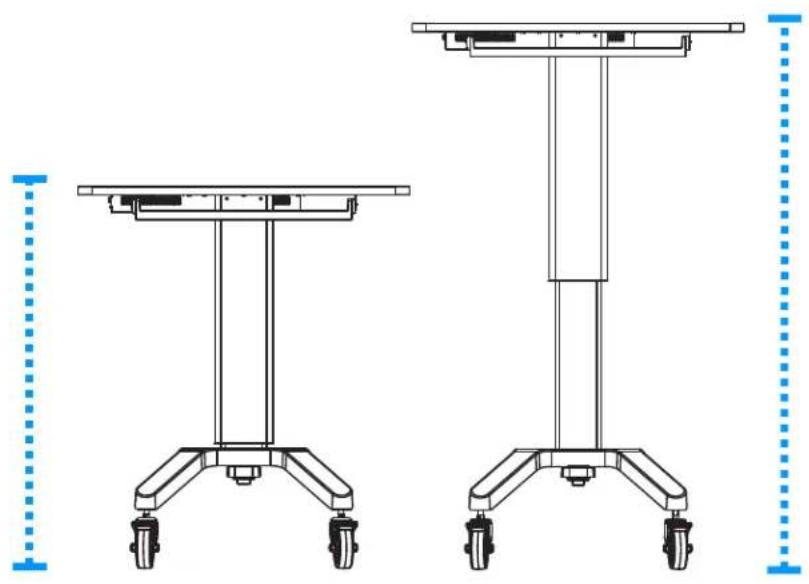
Highest Position:
55 Inches
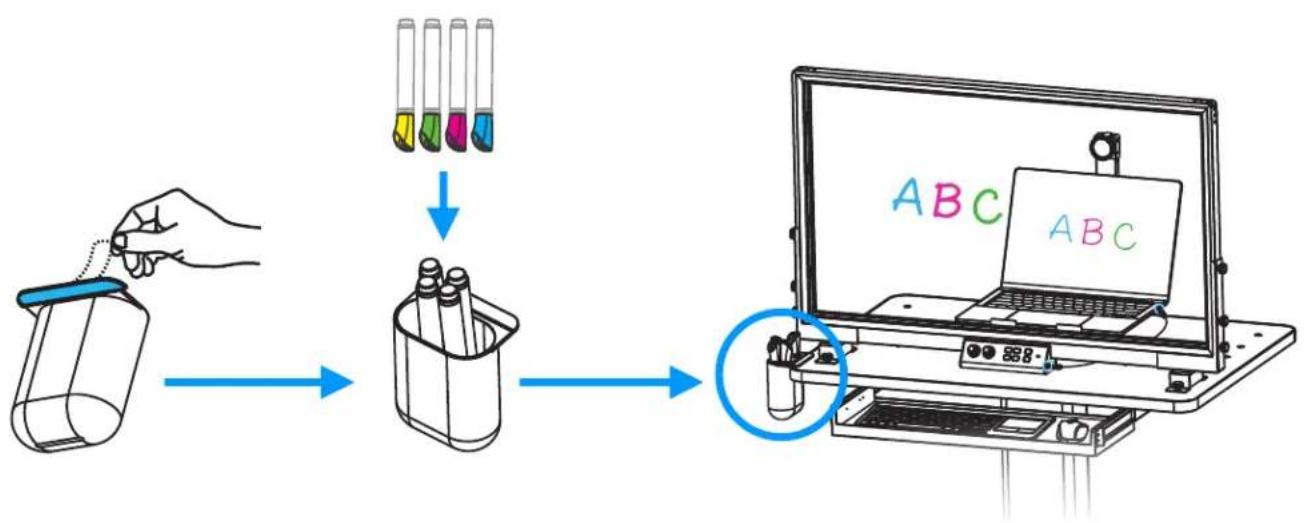
A Pen Holder is also included, and can be mounted on any edge of the podium surface by removing the adhesive backing and pressing the adhesive side of the pen holder on any edge of the Podium Surface, except for the edge in front of the Pullout Keyboard and Mouse Tray.
flowchart
graph TD
    A["Hand holding jar"] --> B["Tube with test tubes"]
    B --> C["Tube with test tubes"]
    C --> D["Laptop with ABC color test tube"]
We recommend storing your dry erase pens upside-down so that the tips are always saturated with ink.
eGLASS SPECIFICATIONS
| Model | 35" eGlass Station | 50" eGlass Station |
| What's in the Box | 35" eGlass Lighthboard with accessories, height-adjustable podium with battery, eGlass mounting brackets, assembly hardware and tools, power adapter, power cable, eGlass power supply, pen holder. | 50" eGlass Lighthboard with accessories, height-adjustable podium with battery, eGlass mounting brackets, assembly hardware and tools, power adapter, power cable, eGlass power supply, pen holder. |
| Glass Specifications | High strength 6mm scratch resistant tempered glass | |
| Control Interface | eGlass Station Battery Power On/Off, eGlass Lighthboard on/off, Bottom Instructor Light On/Off, Instructor lights (-/-), Glass Lights (+/-), Record Video, Pause Recording, Stop Recording, Capture Snapshot, Camera Exposure (+/-) | |
| Instructor Lights Brightness | Min: 6,000 lumens, Max: 12,000 lumens | Min: 9,000 lumens, Max: 15,000 lumens |
| Illumination | Adjustable External LED's for Instructor Illumination. Adjustable Internal Glass LED's for Ink Illumination | |
| Microphone | Built-In 94 dB-SPL@1k Hz Built-In Microphone, with Noise Reduction | |
| BATTERY | ||
| Capacity | 18,000mAh 14.8V 3.6A | |
| Battery Life | 3~7 Hours (based on light intensity and accessories power draw) | 2~6 Hours (based on light intensity and accessories power draw) |
| Charging Time | 6 Hours | |
| Power Adapter | Input: 100-240v AC 50-60Hz 2A, Output: 24v/5A | |
| I/O | ||
| eGlass Station I/O | Power Adapter Input (19V 9.47A), eGlass Power Output (24V 5A), 100 W Type-C Power Output, 30W Type-A Output | |
| eGlass Lightboard I/O | USB 3.0 Type A, DC in 24V; 3.5A (Max) | USB 3.0 Type A, DC in 24V; 3.5A (Max) |
| SOFTWARE | ||
| eGlassFusion PC/Mac | Live Video Streaming, Image Capture, Video Recording, Media Insertion with Background Removal, & Other Tools | |
| HoverCam for Chrome* | Live Video Streaming, Image Capture, Video Recording | |
| Website Download | www.eglass.io/support | |
| Compatible OS | Microsoft Windows 10, Mac OS Catalina and above, Chromebook OS 80++ | |
| System Requirements | CPU 1.6 GHz , 2.0 GHz Recommended, RAM 1 GB Minimum, 2 GB or More Recommended | |
| CAMERA | ||
| Camera Sensor | 8 MP BSI CMOS 1/3.2" | |
| Live Video Resolution | 1920x1080@30fps** • 1280x720@30fps | |
| Recording Resolution | 1920x1080@30fps** • 1280x720@30fps | |
| Polarizing Filter | Optional Filter and Adapter Included (To Eliminate Reflection of Laptop Screen) | |
| Image Resolution | 3280 x 2464 | |
| Video Recording Format | Windows: MP4, WMV • Mac: MP4 • Chrume: WEBM | |
| Image Format | Windows: JPEG, PNG, BMP, TIF, GIF, PDF • Mac: PNG • Chrome: JPG | |
| Zoom | 4X Digital Zoom | |
| Field of View | F/NO = 2.6, FOV = 88.16° | |
| PHYSICAL SPECIFICATIONS | ||
| Writing Surface Size | 30.50" l x 17.50" h (diagonal) | 43.59" l x 24.52" h (diagonal) |
| Camera Arm Length and Height | 19.33" l x 12.09" h | 27.11" l x 15.77" h |
| Podium Dimensions (LxW) | 31.5" l x 21.65" w | |
| Podium Height | 38.39" Lowest - 54.53" Highest (Measured From Floor To Podium Surface) | |
| Operating Temperature | -20°C - 65°C | |
| Certifications | CK, FCC, ROHS | |
Power Cords, Power Adapters, Extension Cables, Outlets
WARNING:
Use only the power cords and power adapters supplied by the product manufacturer. The power cords shall be safety approved. Never wrap a power cord around a power adapter or other object. Doing so can stress the cord in ways that can cause the cord to fray, crack, or crimp. This can present a safety hazard. Always route power cords so that they will not be walked on, tripped over, or pinched by objects.
Protect power cords and power adapters from liquids. For instance, do not leave your power cord or power adapter near sinks, tubs, toilets, or on floors that are cleaned with liquid cleansers. Liquids can cause a short circuit, particularly if the power cord or power adapter has been stressed by misuse. Liquids also can cause gradual corrosion of power cord terminals and/or the connector terminals on a power adapter, which can eventually result in overheating.
Ensure that all power cord connectors are securely and completely plugged into receptacles. Do not use any power adapter that shows corrosion at the ac input pins or shows signs of overheating (such as deformed plastic) at the AC input pins or anywhere on the power adapter. Do not use any power cords where the electrical contacts on either end show signs of corrosion or overheating or where the power cord appears to have been damaged in any way.
To prevent possible overheating, do not cover power adapters with clothing or other objects when the power adapter is plugged into an electrical outlet.
Ensure that extension cords, surge protectors, uninterruptible power supplies, and power strips that you use are rated to handle the electrical requirements of the product. Never overload these devices. If power strips are used, the load should not exceed the power strip input rating. Consult an electrician for more information if you have questions about power loads, power requirements, and input ratings. If a receptacle (power outlet) that you intend to use with your device appears to be damaged or corroded, do not use the outlet until it is replaced by a qualified electrician. Do not bend or modify the plug. If the plug is damaged, contact the manufacturer to obtain a replacement.
Do not share an electrical outlet with other home or commercial appliances that draw large amounts of electricity; otherwise, unstable voltage might damage your device, data, or attached devices.
Some products are equipped with a three-pronged plug. This plug fits only into a grounded electrical outlet. This is a safety feature. Do not defeat this safety feature by trying to insert it into a non-grounded outlet. If you cannot insert the plug into the outlet, contact an electrician for an approved outlet adapter or to replace the outlet with one that enables this safety feature. Never overload an electrical outlet. The overall system load should not exceed 80 percent of the branch circuit rating. Consult an electrician for more information if you have questions about power loads and branch circuit ratings.
Be sure that the power outlet you are using is properly wired, easily accessible, and located close to the equipment. Do not fully extend power cords in a way that will stress the cords. Be sure that the power outlet provides the correct voltage and current for the product you are installing.
Battery Warning
WARNING:
Do not attempt to remove or replace the built-in rechargeable battery. Replacement of the battery must be done by a eGlass-authorized repair technician, or by direction from eGlass Technical Support.
Only recharge the battery strictly according to instructions included in the product documentation. Batteries supplied by eGlass for use with your product have been tested for compatibility and
Battery abuse or mishandling can cause overheat, liquid leakage, or an explosion. To avoid possible injury, do the following: Do not open, dissemble, or service any battery. Do not crush or puncture the battery. Do not short-circuit the battery, or expose it to water or other liquids. Keep the battery away from children. Stop using the battery if it is damaged, or if you notice any discharge or the buildup of foreign materials on the battery leads. Store the rechargeable batteries or products containing the rechargeable batteries at room temperature, charged to approximately 30 to 50% of capacity. We recommend that the batteries be charged about once per week to prevent over-discharge. Do not put the battery in trash that is disposed of in landfills. When disposing of the battery, comply with local ordinances or regulations.
Heat and Product Ventilation
WARNING:
The podium battery, lights, ac power adapters, and many accessories can generate heat when turned on and when batteries are charging. Always follow these basic precautions:
When your podium is turned on or the battery is charging, some parts may become hot. Avoid keeping any part of your body in contact with a hot section for any extended length of time. Extended contact with your body, even through clothing, could cause discomfort or even a skin burn. Periodically take breaks from using the podium by lifting your hands from the device; and be careful not to use the device for any extended length of time.
Do not operate your podium or charge the battery near flammable materials or in explosive environments.
Ventilation slots, fans and/or heat sinks are provided with the product for safety, comfort, and reliable operation.
These features might inadvertently become blocked by placing the product on a bed, sofa, carpet, or other flexible surface. Never block, cover, or disable these features.
When the ac power adapter is connected to an electrical outlet and your device, it generates heat. Do not place the adapter in contact with any part of your body while using it. Never use the ac power adapter to warm your body. Extended contact with your body, even through clothing, may cause a skin burn.
For your safety, always follow these basic precautions with your device: Regularly inspect the outside of the device for dust accumulation.
- Remove dust from vents and any perforations. More frequent cleanings might be required for devices in dusty or high-traffic areas.
- Do not restrict or block any ventilation openings.
- Do not place your device in contact with furniture or other textiles, as this might increase the risk of overheating.
- Airflow temperatures into the device should not exceed 35^ (95°F).
Electrical Current Safety Information
WARNING:
Electric current from power, telephone, and communication cables is hazardous.
To avoid a shock hazard:
- Do not use your product during a lightning storm.
- Do not connect or disconnect any cables or perform installation, maintenance, or reconfiguration of this product during an electrical storm.
- Connect all power cords to a properly wired and grounded electrical outlet.
- Connect to properly wired outlets any equipment that will be attached to this product.
- Whenever possible, use one hand only to connect or disconnect signal cables.
- Never turn on any equipment when there is evidence of fire, water, or structural damage.
- Do not use your device until all internal parts enclosures are fastened into place. Never use the device when internal parts and circuits are exposed.
Chocking Hazard and Plastic Bag Notice
DANGER: Product contains small parts. Keep away from children under three years.
DANGER: Plastic bags can be dangerous. Keep plastic bags away from babies and children to avoid danger of suffocation.
Glass Parts Notice
CAUTION: Some parts of your product are made of glass. This glass could break if the product is dropped on a hard surface or receives a substantial impact. If glass breaks, be careful not to cut yourself. Stop using your product until the glass is replaced by trained service personnel.
eGlass may not offer the products, services, or features discussed in this document in all countries. Consult your local eGlass representative for information on the products and services currently available in your area. Any reference to a eGlass product, program, or service is not intended to state or imply that only that eGlass product, program, or service may be used. Any functionally equivalent product, program, or service that does not infringe any eGlass intellectual property right may be used instead. However, it is the user's responsibility to evaluate and verify the operation of any other product, program, or service.
eGlass may have patents or pending patent programs covering subject matter described in this document. The furnishing of this document does not give you any license to these patents. You can send license inquiries, in writing, to:
Pathway Innovations & Technologies, D.B.A. eGlass
6780 Paradise Rd.
Las Vegas, NV 89119
Attention: Pathway Innovations, Inc. Legal
eGlass PROVIDES THIS PUBLICATION "AS IS" WITHOUT WARRANTY OF ANY KIND, EITHER EXPRESS OR IMPLIED, INCLUDING, BUT NOT LIMITED TO, THE IMPLIED WARRANTIES OF NON-INFRINGEMENT, MERCHANTABILITY OR FITNESS FOR A PARTICULAR PURPOSE. Some jurisdictions do not allow disclaimer of express or implied warranties in certain transactions, therefore, this statement may not apply to you.
This information could include technical inaccuracies or typographical errors. Changes are periodically made to the information herein; these changes will be incorporated in new editions of the publication. eGlass may make improvements and/or changes in the product(s) and/or the application(s) described in this publication at any time without notice.
The products described in this document are not intended for use in implantation or other life support applications where malfunction may result in injury or death to persons. The information contained in this document does not affect or change eGlass product specifications or warranties. Nothing in this document shall operate as an express or implied license or indemnity under the intellectual property rights of eGlass or third parties. All information contained in this document was obtained in specific environments and is presented as an illustration. The result obtained in other operating environments may vary.
eGlass may use or distribute any of the information you supply in any way it believes appropriate without incurring any obligation to you.
Any references in this publication to non-eGlass websites are provided for convenience only and do not in any manner serve as an endorsement of those websites. The materials at those websites are not part of the materials for this eGlass product, and use of those websites is at your own risk.
Any performance data contained herein was determined in a controlled environment. Therefore, the result obtained in other operating environments may vary significantly. Some measurements may have been made on development-level systems and there is no guarantee that these measurements will be the same on generally available systems.
Furthermore, some measurements may have been estimated through extrapolation. Actual results may vary. Users of this document should verify the applicable data for their specific environment.
© Copyright Pathway Innovations, Inc. D.B.A. eGlass 2023
This document is copyrighted by Pathway Innovations, Inc. and Pathway may update this document at any time without notice. To obtain the most up-to-date documentation for your eGlass products, go to: www.eGlass.io/support
For a five (5) year period from product purchase date by the end user, Pathway Innovations, Inc. will repair or supply a new replacement, at no cost, for eGlass parts and included accessories determined by company to be damaged and defective, including accidental damage. Within the warranty period, the Manufacturer will cover all parts and labor costs.
Exclusions:
- Standard wear and tear, without resulting loss in functionality.
- Purposeful damage
• Damage caused by misuse - Lost or stolen parts / accessories
• eGlass Station battery
The eGlass Station Battery is covered for factory defects a period of two (2) years from product purchase date by the end user. The two-year warranty does not cover standard battery depreciation.
If you have a damaged or defective unit and you'd like to file a warranty claim, please submit a support ticket at:
https://eglass.io/support-ticket
eGlass
Support
For the eGlass Lightboard User Guide, as well as detailed software instructions, downloads and videos, visit the eGlass Academy by scanning the QR Code with your phone, or by visiting https://www.eglass.io/support
If you are having issues with your eGlass or eGlass Station, please submit a support ticket at:
https://eglass.io/support-ticket
You can also reach support directly at:
+1 (866) 201-2056
or email at:
support@eglass.io
The eGlass support is available from Monday through Friday from 8 AM to 5 PM Pacific time.
Pathway/®
PATHWAY INNOVATIONS, INC.
THE MAKERS OF eGLASS & HOVERCAM
www.eglass.io
© Copyright 2023 eGlass®. All rights reserved. eGlass® is a registered trademark of Pathway Innovations, Inc. This content is subject to change without notice. Depicted product appearance, features and specifications may vary in the final product(s). eGlass® shall not be liable for technical or editorial errors or omissions contained herein. eGlass® disclaims all responsibility and liability for the distribution of and/or reliance on this user manual.
The following granted or pending patents have been filed by Pathway Innovations, Inc. (D.B.A. eGlass) with the United States Patent and Trademark Office (USPTO): US8508751, US10586307, US10402940, US16/784654, US29/756006, US17/079345, US29/768320
- What's in the Box
- Assembling Podium
- Step 1:
- Step 2:
- Step 3:
- Step 4:
- Step 5:
- A Note About Mounting Positions:
- Connecting and Powering-On
- Powering On
- Powering Laptop and Accessories
- Power Cords, Power Adapters, Extension Cables, Outlets
- WARNING:
- Battery Warning
- Heat and Product Ventilation
- Electrical Current Safety Information
- Chocking Hazard and Plastic Bag Notice
- Glass Parts Notice
- Exclusions:
- Support
- Pathway/®
Brand : HoverCam
Model : eGlass Station
Category : Monitor