
SM-EDP - Émulateur vidéo Smart-AVI - Free user manual and instructions
Find the device manual for free SM-EDP Smart-AVI in PDF.


| Type | DisplayPort Extender / Splitter |
| Model | SM-EDP |
| Brand | Smart-AVI |
| Dimensions (W x D x H) | 120 mm x 80 mm x 25 mm |
| Weight | 0.3 kg |
| Power Supply | DC 5V / 2A (included) |
| Power Consumption | 5W max |
| Video Input | DisplayPort 1.2 |
| Video Output | DisplayPort 1.2 (up to 4K@30Hz) |
| Maximum Transmission Distance | Up to 100 meters (via CAT6 cable) |
| Supported Resolutions | 1920x1080@60Hz, 3840x2160@30Hz |
| Operating Temperature | 0°C to 50°C |
| Storage Temperature | -20°C to 60°C |
| Humidity | 20% to 90% RH (non-condensing) |
| Mounting | Desktop or wall-mountable (brackets included) |
| Maintenance | Wipe with a dry cloth; avoid liquids |
| Safety | CE, FCC certified; use only provided power adapter |
| Spare Parts | Power adapter and mounting brackets available |
| Repairability | Designed for professional repair only; no user-serviceable parts |
Frequently Asked Questions - SM-EDP Smart-AVI
User questions about SM-EDP Smart-AVI
0 question about this device. Answer the ones you know or ask your own.
Ask a new question about this device
Download the instructions for your Émulateur vidéo in PDF format for free! Find your manual SM-EDP - Smart-AVI and take your electronic device back in hand. On this page are published all the documents necessary for the use of your device. SM-EDP by Smart-AVI.
USER MANUAL SM-EDP Smart-AVI
| VIDEO | |
| Format DisplayPort 1.1 and 1.2 | |
| Maximum Pixel Clock 275 MHz | |
| Input Interface Display Port (male) | |
| Output Interface Display Port (female) | |
| Resolution Up to 3840 x 2160 @ 30 Hz | |
| DDC via AUX | |
| Input Equalization Automatic | |
| Input Cable Length Up to 15 ft. | |
| Output Cable Length Up to 15 ft. | |
| OTHER | |
| Dimensions 2.8" x 1" x .33" | |
| Weight .7 oz | |
| Approvals UL, CE, ROHS Compliant | |
| Operating Temp. +32 to +104°F (0 to +40°C) | |
| Humidity 20% to 80% (non condensing) | |
| Storage Temp. | -4 to 140°F (-20 to +60°C) |
| Storage Humidity | Up to 95% (No Condensation) |
| Compliance EMC | FCC (Class A), CE (Class A), ICES-003 |
| Environmental Compliance | RoHS2 (CE) |
| Support Warranty | 1-year |
WHAT'S IN THE BOX
| PART NO. | Q-TY | DESCRIPTION |
| SM-EDP-S 1 | DP EDID Emulator.Includes: [SM-EDP] | |
| Quick Start Guide | 1 |
NOTICE
The information contained in this document is subject to change without notice. SmartAVI makes no warranty of any kind with regard to this material, including but not limited to, implied warranties of merchantability and fitness for particular purpose. SmartAVI will not be liable for errors contained herein or for incidental or consequential damages in connection with the furnishing, performance or use of this material.
No part of this document may be photocopied, reproduced, or translated into another language without prior written consent from SmartAVI Technologies, Inc.

800.AVI.2131, 702.800.0005
2455 W Cheyenne Ave, Suite 112
North Las Vegas, NV 89032
Smart-AM
SMART AUDIO VIDEO INNOVATION
SM-EDP
DisplayPort EDID Emulator

natural_image
Black USB device with gold contacts and ports, no visible text or symbols on bodyDESIGNED TO EMULATE AND
STORE THE EDID OF A VIDEO
DISPLAY
Quick Start Guide
SmartAVI.com
OVERVIEW
The SM-EDP EDID Emulator is designed to help overcome EDID related issues that occur when using ProAV devices and KVM Switches, Extenders, and splitters.
FEATURES
- Designed to emulate and store the EDID of a video display
• DisplayPort 1.1 / 1.2 Compliant
• Supports HDTV resolution up to 4Kx2K@60Hz
• Supports Learning and Emulation mode - Slide switch designed to select Default (EDID) or Emulation (COPY)
• LEDs indicator built-in to easily identify the EDID mode - Include default resolution at 1080p
- Powered from DisplayPort source device without self-power required

TAA Compliant
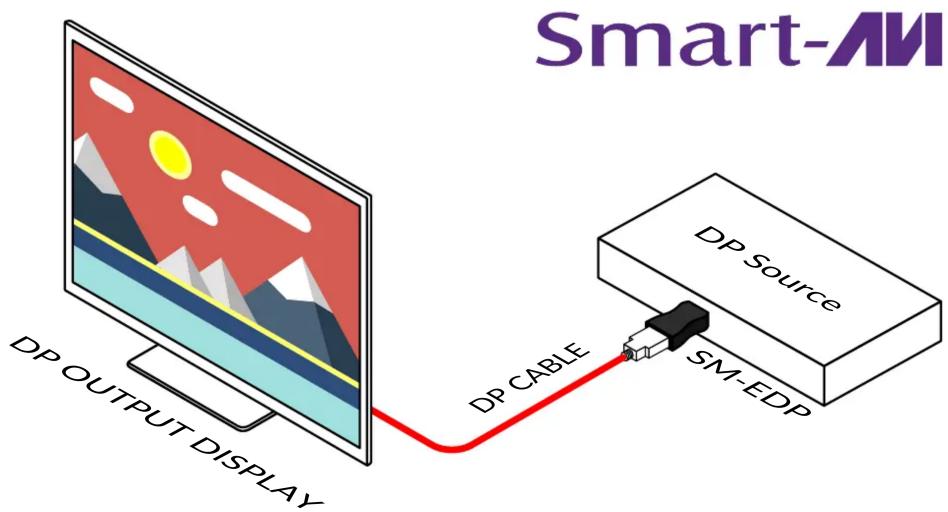
APPLICATION DIAGRAM
Learning step:
- First to have DP emulator plug connects PC/NB or DP source, then DP receptacle connects DP cable to display device.
- Unplug with DP cable from emulator, then LED (blue) will flash.
- Plug DP cable to DP emulator within 10 seconds, it will be on learning mode.
- The Green and Blue LED solid light on simultaneously which means learning DP EDID is successful.
Note:
- If the DP emulator EDID needs to return to default EDID (1080p). The learning step 3 DP cable plug in DP emulator over 10 seconds or not plug in DP cable, the DP emulator learning will be failed and LEDs turn off. The DP emulator needs unplug/plug.
- If DP emulator doesn't need in learning mode, it is a must to unplug DP emulator from PC/NB or DP source at the same time.
Brand : Smart-AVI
Model : SM-EDP
Category : Émulateur vidéo