
NETGEAR-AXM - Composant informatique réseau Atlona - Free user manual and instructions
Find the device manual for free NETGEAR-AXM Atlona in PDF.


| Product Type | 10 Gigabit Ethernet SFP+ Module |
| Model | NETGEAR AXM761 |
| Standards | IEEE 802.3ae 10GBase-SR |
| Wavelength | 850 nm |
| Dimensions (H x W x D) | 0.46 x 0.53 x 2.19 inches (11.9 x 13.7 x 65.7 mm) |
| Weight | 17.1 g |
| Operating Temperature | 32 – 158 °F (0 – 70 °C) |
| Storage Temperature | 32 – 185 °F (0 – 85 °C) |
| Relative Humidity (Operating) | 85% @ 25 °C |
| Connector Type | LC duplex |
| Cable Type | Multimode fiber (MMF), 50/125 μm or 62.5/125 μm |
| Maximum Distance (50/125 μm MMF) | 2 – 300 m |
| Maximum Distance (62.5/125 μm MMF) | 2 – 33 m |
| Power Consumption | < 1.0 W |
| MTBF | 4,960,536 hours (589 years) |
| Safety Certification | UL 185D, CSA 22.2 No. 95D |
| Environmental Compliance | RoHS |
| Compatible Switches | NETGEAR managed switches with SFP+ slots |
| Hot Pluggable | Yes, can be inserted or removed while switch is operational |
Frequently Asked Questions - NETGEAR-AXM Atlona
User questions about NETGEAR-AXM Atlona
0 question about this device. Answer the ones you know or ask your own.
Ask a new question about this device
Download the instructions for your Composant informatique réseau in PDF format for free! Find your manual NETGEAR-AXM - Atlona and take your electronic device back in hand. On this page are published all the documents necessary for the use of your device. NETGEAR-AXM by Atlona.
USER MANUAL NETGEAR-AXM Atlona
AXM761_IG_10July09.fm Page 1 Friday, July 10, 2009 2:36 PM
NETGEAR®
Installation Guide
ProSafe 10 Gigabit Ethernet SFP+ Module AXM761
Install Your Optical Module
The 10 Gigabit small form-factor pluggable (SFP+) module provides a full-duplex 10G bps each direction for Ethernet operation on NETGEAR managed switches.
The switch will automatically detect the AXM761, so you can simply plug it into an available module slot.
The module can be inserted or removed while the switch is operational.

natural_image
Technical line drawing of an AXM761 connector (no text or symbols on the diagram itself)Installing a AXM761 Module
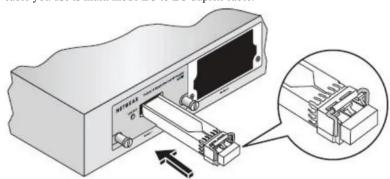
Insert the module firmly into the slot that supports the SFP+ interface. Make sure the optical cable you use is multi mode LC to LC duplex cable.
natural_image
Diagram of a device with an attached cable and connector, showing internal components and a magnified inset (no text or symbols)Removing a AXM761 Module
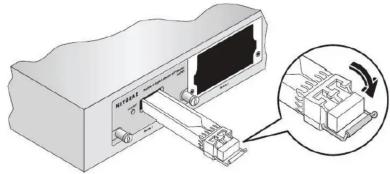
Release the module latch by pulling down the handle bar across the module, and pull the module out of the module slot.
natural_image
Illustration of a computer monitor with an attached drive and a magnified inset showing a device with a cable (no text or symbols)| Technical Specifications | |
| Standards IEEE 802.3ae 10GBase-SR | |
| Wavelength 850nm | |
| Dimensions (HxWxD) 0.46" x 0.53" x 2.19" | (11.9 mm x 13.7 mm x 55.7 mm) |
| Weight 17.1g | |
| Operating Temperature 32 -158°F (0 - 70°C) | |
| Storage Temperature 32 -185°F (0 - 85°C) | |
| Operative relative humidity 85% @ (25°C) | |
| Operating Distance 2 - 300 m for 50/125 um MMF | 2 - 33 m for 62.5/125 um MMF |
| Connectors LC | |
| Power Consumption <1.0w | |
| MTBF 4,986,536 hr (569 years) | |
| Safety Certification UL 1950 CSA 22.2 No. 95D | |
| Environmental Compliance -RoHS | |

AXM761_IG_10July09.fm Page 2 Friday, July 10, 2009 2:36 PM
Technical Support
Thank you for selecting NETGEAR products.
After installing your device, locate the serial number on the label of your product and use it to register your product at http://www.NETGEAR.com/register. Registration is required before you can use our telephone support service. Registration via our web site is strongly recommended.
Go to http://kbserver.netgear.com for product updates and Web support. For Warranty and Regional Customer Support information, see the Warranty Card that came with your product.


Regulatory Compliance
Statement of Conditions
In the interest of improving internal design, operational function, and/or reliability, NETGEAR reserves the right to change the product described in this document without notice. NETGEAR does not assume any liability that may accrue due to the use or application of the product(s) or circuit layout(s) described herein.
Certificate of Manufacture/Importer
It is hereby certified the NETGEAR model AXM761 has been suppressed in accordance with the condition set out in MBPT-AmtsbVfg 243/1991 and vfg 46/1992. The operation of some equipment (for example, test transmitters) in accordance with regulation may, however, be subject to certain restrictions. Please refer to the note in the operating instructions. Federal Office for Telecommunications Approvals has been notified of the placing of this equipment on the market and has been granted the right to test the series for compliance with regulation.
Note: This device has been tested and found to comply with limits for a Class B digital device, pursuant to part 15 of FCC rules. These limits are designed to provide reasonable protection against harmful interference in a commercial installation.
Laser Safety Warning
This is a Class 1 laser product.
Warning: Because invisible laser radiation may be emitted from aperture of the port when no fiber cable is connected, avoid exposure to laser radiation and do not stare into the open aperture.

This symbol was placed in accordance with the European Union Directive 2002/96 on the Waste Electrical and Electronic Equipment (the WEEE Directive). If disposed of within the European Union, this product should be treated and recycled in accordance with the laws of your jurisdiction implementing the WEEE Directive.
© 2009 by NETGEAR, Inc. All rights reserved. NETGEAR and the NETGEAR logo are registered trademarks of NETGEAR, Inc. in the United States and/or other countries. Other brand and product names are trademarks or registered trademarks of their respective holders. Information is subject to change without notice.

201-11710-01
CE
July 2009
Brand : Atlona
Model : NETGEAR-AXM
Category : Composant informatique réseau