
MCM110SC2EU - Power inverter StarTech.com - Free user manual and instructions
Find the device manual for free MCM110SC2EU StarTech.com in PDF.


| Product Type | Media Converter |
| Model | MCM110SC2EU |
| Brand | StarTech.com |
| Fiber Connector | SC Duplex |
| Copper Connector | RJ-45 |
| Data Rate | 10/100/1000 Mbps |
| Fiber Type | Multi-Mode |
| Max Distance (Fiber) | 550 m (at 1 Gbps) |
| Dimensions (W x D x H) | 2.2 x 3.9 x 1.0 in (56 x 99 x 25 mm) |
| Weight | 3.2 oz (90 g) |
| Power Supply | External AC adapter (5V DC, 1A) |
| Power Consumption | 2.5W (max) |
| Operating Temperature | 32°F to 122°F (0°C to 50°C) |
| Humidity | 5% to 90% non-condensing |
| Compliance | IEEE 802.3ab, IEEE 802.3z, CE, RoHS |
| LED Indicators | Power, Link/Act (Copper), Link/Act (Fiber) |
| Maintenance | Clean fiber connectors with lint-free wipes; keep vents clear |
| Safety | Use only supplied power adapter; avoid exposure to liquids |
| Spare Parts | External power adapter (model: MCM110SC2EU-PSU) |
| Repairability | No user-serviceable parts; contact support for repairs |
| Package Contents | Media converter, power adapter, quick start guide |
| Warranty | Lifetime (StarTech.com limited warranty) |
Frequently Asked Questions - MCM110SC2EU StarTech.com
User questions about MCM110SC2EU StarTech.com
0 question about this device. Answer the ones you know or ask your own.
Ask a new question about this device
Download the instructions for your Power inverter in PDF format for free! Find your manual MCM110SC2EU - StarTech.com and take your electronic device back in hand. On this page are published all the documents necessary for the use of your device. MCM110SC2EU by StarTech.com.
USER MANUAL MCM110SC2EU StarTech.com
10/100 Ethernet to 100Base-FX Multi-Mode Fiber Media Converter - 2KM
MCM110SC2 / MCM110SC2GB / MCM110SC2EU MCM110ST2 / MCM110ST2GB / MCM110ST2EU
- Connect the Ethernet cable to the Fiber Media Converter "LAN" port.
- Connect the other end of the Ethernet cable to the router/ switch/computer NIC.
- Connect the fiber cable into the fiber receptacle on the media converter.
- Plug the provided power adapter into the media converter, and into an available AC power outlet.
- Connect the other end of the fiber cable into the router/ switch/computer NIC/another media converter. Remember to reverse the TX and RX leads between the two devices.

*MCM110ST2 shown
DIP Switch Settings
| Switch Function State Status | |||
| SW1 UTP Mode | Auto Auto UTP detection | ||
| Manual Use manual UTP settings | |||
| SW2* UTP Speed | 100 100Mbps link speed | ||
| 10 10Mbps link speed | |||
| SW3* UTP Duplex | Full Full duplex | ||
| Half Half duplex | |||
| SW4 | Link Fault Pass-through | LFP | LFP mode off |
| ON | LFP mode on | ||
*not enabled when SW1 set to 'Auto'
LED Indicators
| LED | Function State | Status | |
| PWR | Power Indicator | ON | Converter has power |
| OFF | Converter has no power | ||
| FX Link/Act | Fiber Link/ Activity | ON | Fiber link OK |
| OFF | No link detected | ||
| Flashing | Receiving data | ||
| FEF | Far End Fault | ON Far end link failure | |
| OFF No failure detected | |||
| 100 | Mode | ON | 100Mbps |
| OFF 10Mbps | |||
| Full Duplex Mode | ON | Full duplex mode | |
| OFF | Half duplex mode | ||
| TX Link/Act | Ethernet Link/ Activity | ON | Ethernet link detected |
| OFF | No link detected | ||
| Flashing | Receiving data | ||
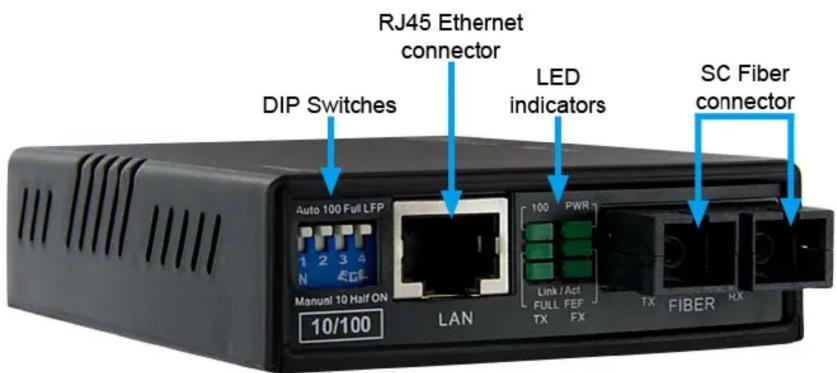
*MCM110SC2 shown
StarTech.com
Hard-to-find made easy®
Specifications
| MCM110SC2 MCM110ST2 | ||
| Connectors | 1 x RJ45 Ethernet2 x SC Fiber1 x power connector | 1 x RJ45 Ethernet2 x ST Fiber1 x power connector |
| LEDs Power, Fiber Link/Activity, Ethernet Link/Activity, 10/100, Full/Half Duplex, FEF | ||
| Fiber Type Multi-Mode (62.5 or 50/125 micron) | ||
| Optical Wavelength 1310nm | ||
| Maximum Distance 2 km | ||
| Transmission Standards IEEE802.3 10BASE-T, IEEE802.3u 100BASE-TX, I00BASE-FX | ||
| Duplex Modes | Full/Half Duplex (Ethernet)Full Duplex (Fiber) | |
| Power Adapter 12VDC, 200mA, center positive, type M plug | ||
| Enclosure Material Plastic | ||
| Operating Temperature 0°C ~ 50°C (32°F ~ 122°F) | ||
| Storage Temperature | -10°C ~ 70°C (14°F ~ 158°F) | |
| Humidity | 10% ~ 90% RH | |
| Dimensions | 95.0mm x 7 | |
| Weight | 90.5 | |
FCC Compliance Statement
This equipment has been tested and found to comply with the limits for a Class B digital device, pursuant to part 15 of the FCC Rules. These limits are designed to provide reasonable protection against harmful interference in a residential installation. This equipment generates, uses and can radiate radio frequency energy and, if not installed and used in accordance with the instructions, may cause harmful interference to radio communications. However, there is no guarantee that interference will not occur in a particular installation. If this equipment does cause harmful interference to radio or television reception, which can be determined by turning the equipment off and on, the user is encouraged to try to correct the interference by one or more of the following measures:
- Reorient or relocate the receiving antenna.
- Increase the separation between the equipment and receiver.
- Connect the equipment into an outlet on a circuit different from that to which the receiver is connected.
- Consult the dealer or an experienced radio/TV technician for help.
Use of Trademarks, Registered Trademarks, and other Protected Names and Symbols
This manual may make reference to trademarks, registered trademarks, and other protected names and/or symbols of third-party companies not related in any way to StarTech.com. Where they occur these references are for illustrative purposes only and do not represent an endorsement of a product or service by StarTech.com, or an endorsement of the product(s) to which this manual applies by the third-party company in question. Regardless of any direct acknowledgement elsewhere in the body of this document, StarTech.com hereby acknowledges that all trademarks, registered trademarks, service marks, and other protected names and/or symbols contained in this manual and related documents are the property of their respective holders.
Technical Support
StarTech.com's lifetime technical support is an integral part of our commitment to provide industry-leading solutions. If you ever need help with your product, visit www.startech.com/support and access our comprehensive selection of online tools, documentation, and downloads.
Warranty Information
This product is backed by a two year warranty.
In addition, StarTech.com warrants its products against defects in materials and workmanship for the periods noted, following the initial date of purchase. During this period, the products may be returned for repair, or replacement with equivalent products at our discretion. The warranty covers parts and labor costs only. StarTech.com does not warrant its products from defects or damages arising from misuse, abuse, alteration, or normal wear and tear.
Limitation of Liability
In no event shall the liability of StarTech.com Ltd. and StarTech.com USA LLP (or their officers, directors, employees or agents) for any damages (whether direct or indirect, special, punitive, incidental, consequential, or otherwise), loss of profits, loss of business, or any pecuniary loss, arising out of or related to the use of the product exceed the actual price paid for the product. Some states do not allow the exclusion or limitation of incidental or consequential damages. If such laws apply, the limitations or exclusions contained in this statement may not apply to you.
Brand : StarTech.com
Model : MCM110SC2EU
Category : Power inverter