BG-C8 - Uncategorized Vello - Free user manual and instructions
Find the device manual for free BG-C8 Vello in PDF.


| Product Type | Battery Grip |
| Brand | Vello |
| Model | BG-C8 |
| Compatibility | Canon EOS 6D DSLR |
| Power Source | Two Canon LP-E6 rechargeable batteries OR six AA batteries (Alkaline, Ni-MH, Lithium, Nickel-Manganese) OR Canon AC Adapter ACK-E6 (sold separately) |
| Battery Holder Capacity | Removable tray for up to 2 LP-E6 or 6 AA batteries |
| Dimensions (H × W × D) | 4.4 × 5.7 × 3.5 in (11.2 × 14.5 × 8.9 cm) |
| Weight | 12.8 oz (363 g) (excluding batteries) |
| Operating Temperature | 32°F to 104°F (0°C to 40°C) |
| Color | Black |
| Material | Durable polycarbonate and metal alloy |
| Controls | Shutter-release button, AF On button, AF Point Selection button, AE Lock/FE Lock button, Main Dial, Power ON/OFF switch |
| Special Functions | Vertical shooting control, DC coupler cord mount for AC adapter |
| Mounting | Tripod socket (1/4") |
| Included Accessories | Battery tray (LP-E6), AA battery holder, contact cap |
| Warranty | 1-year limited warranty |
| Safety | Contact cap for electrical protection, power switch to prevent discharge |
| Maintenance | Clean with a soft, dry cloth; store in a cool, dry place |
| Precautions | Do not disassemble, avoid water, remove batteries when not in use |
Frequently Asked Questions - BG-C8 Vello
User questions about BG-C8 Vello
0 question about this device. Answer the ones you know or ask your own.
Ask a new question about this device
Download the instructions for your Uncategorized in PDF format for free! Find your manual BG-C8 - Vello and take your electronic device back in hand. On this page are published all the documents necessary for the use of your device. BG-C8 by Vello.
USER MANUAL BG-C8 Vello
natural_image
Close-up of a black camera body panel with lens and adjustment knobs, no visible text or symbolsBG-C8
BATTERY GRIP
Designed for the Canon
EOS 6D DSLR Camera

VELLO®
Introduction
Thank you for choosing Vello, and congratulations on your new BG-C8 battery grip purchase. Enjoy the many benefits that a battery grip offers, such as extended shooting time and more control and comfort when shooting in a vertical (portrait) orientation.
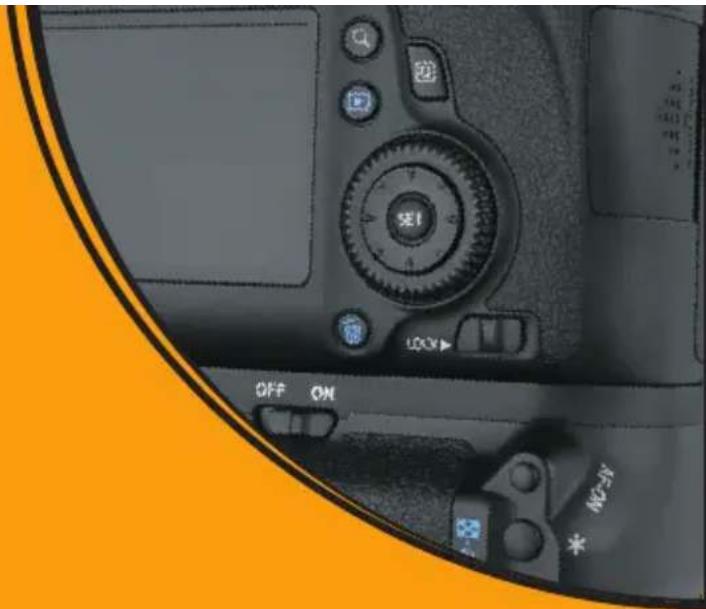
The Vello BG-C8 is compatible with the Canon EOS 6D DSLR camera. The BG-C8 accepts two Canon LP-E6 rechargeable batteries, or six AA batteries (alkaline, Ni-MH, lithium, or nickel-manganese) can be used instead for added convenience. The BG-C8 is equipped with an alternate shutter-release button, AF on button, AF point selection, AE lock/FE lock button, and main dial for shooting in a vertical position.
natural_image
Close-up of a DSLR camera's front face showing control buttons and settings (no readable text or symbols beyond standard labels)Please read through this entire manual before using the BG-C8 battery grip.
Precautions
- The BG-C8 should be used only with compatible devices specified in this manual.
- Use only with batteries and battery holders recommended in this manual.
- Cover the power terminals with the contact cap when the BG-C8 is not in use. This prevents electrical shorts caused by metal objects touching the power terminals.
- When you remove the battery holder from the grip, remove the batteries or place the holder in a container to prevent electrical shorts caused by contact with other metal objects.
-
If you notice smoke, an unusual smell or noise from the battery pack, discontinue use immediately. Remove the batteries and take the device to a Vello authorized reseller.
-
Turn the grip power off when not shooting vertically.
- The battery level may not display properly if batteries are inserted before mounting the grip.
- Remove batteries from the grip when not in use.
- Do not attempt to disassemble.
- Avoid water or extreme humidity and keep in a dry and cool place.
- Keep out of reach of children.
- Images are for illustrative purposes only.
Overview
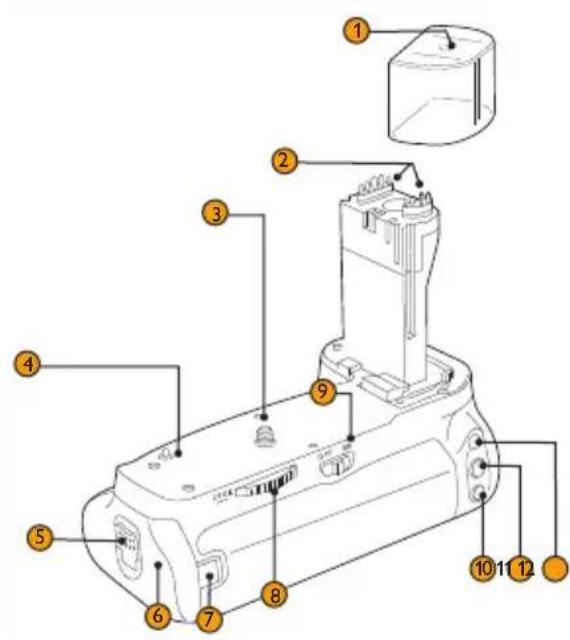
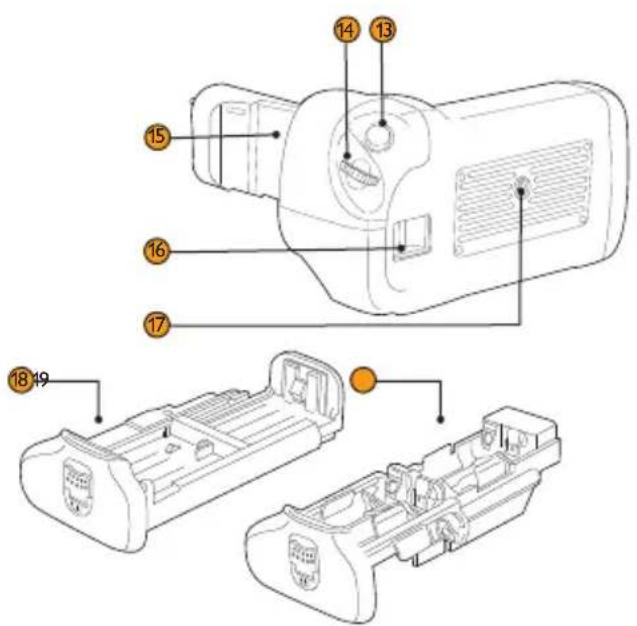
① Contact Cap
Protects grip contacts. Cover the contacts when the grip is not in use.
② Electrical Contacts
Communicates with the camera electronics.
③ Mounting Screw
Aligns with the camera's tripod socket.
④ Guide Pin
Helps align the camera to the grip.
⑤ Battery Tray Lever
Locks and unlocks the battery compartment door.
⑥ Battery Tray Compartment
Houses the battery tray.
⑦ DC Coupler Cord Mount
Groove for use with the Canon AC Power Adapter (ACK-E6).
⑧ Attachment Wheel
Secures the grip to the camera.
⑨ Grip Power ON/OFF
10 AF Point Selection/Magnify Button\*
11 AE Lock / FE Lock / Index / Reduce Button\*
⑫ AF On Button
13 Shutter-Release Button\*
14 Main Dial\*
15 Camera Battery Chamber Cover Holder
Stores the cover when the grip is mounted.
16 Hand Strap Mount
⑰ Tripod Socket
18 Battery Tray
Holds up to two Canon LP-E6 batteries.
19 AA Battery Holder
This second tray holds six AA batteries.
* Performs the same function as on the camera.
Attaching the Grip
natural_image
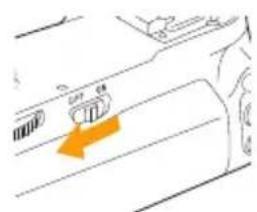
Diagram of a car air vent with a highlighted orange arrow pointing to the vent (no text or symbols present)- Ensure that the power is turned off on the camera and that the power switch is set to OFF on the battery grip.
natural_image
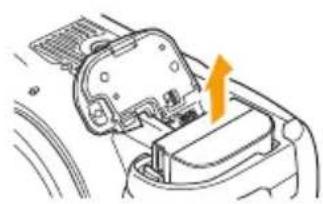
Diagram of a car interior showing a handle and seat with an orange arrow indicating direction (no text or symbols present)- Remove the battery from the camera battery compartment.
natural_image
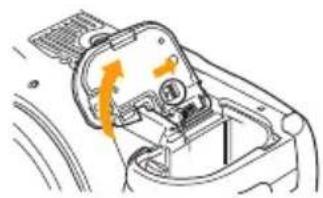
Diagram of a mechanical component with directional arrows indicating motion or force (no text or symbols)- Open the camera battery chamber cover and remove, as indicated above.
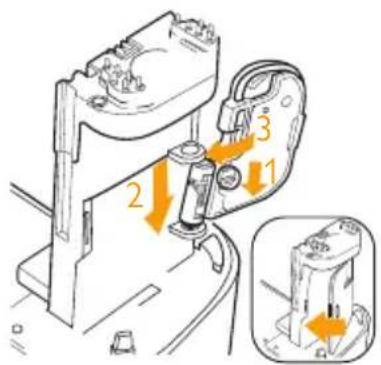
- To prevent loss, place the camera battery chamber cover in the BG-C8 battery chamber holder, as indicated above. Swing the battery chamber cover shut so that it locks into place.
natural_image
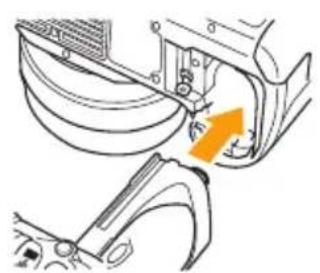
Mechanical assembly diagram showing a bracket with an orange arrow indicating motion direction (no text or symbols)- Remove the protective cap and connect the BG-C8 grip to the camera while aligning the grip's mounting screw with the camera's tripod socket.
natural_image
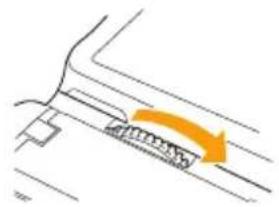
Diagram showing a curved road with an orange arrow indicating direction (no text or symbols)- Rotate the attachment wheel in the direction shown by the arrow until it is firmly tightened.
Turn the camera power off, remove batteries, and replace protective contact cap when removing the grip.
Inserting Batteries
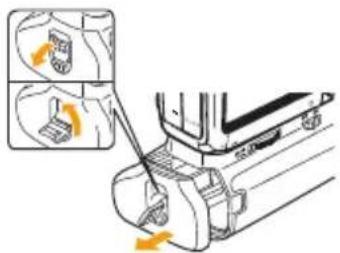
- Ensure that the power is turned off on the camera and grip. Use your fingernail to pry open the battery tray lever so you can rotate and pull it as indicated above and slide the battery tray out of the grip.
natural_image
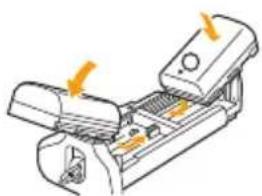
Diagram of a mechanical device with arrows indicating force or movement (no text or symbols present)- Canon LP-E6 Batteries: Insert up to two batteries by placing them in either slot in the battery, ensuring the correct orientation as shown on the tray.
natural_image
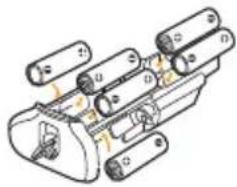
Technical line drawing of a mechanical assembly with multiple cylindrical components and mounting holes (no text or symbols)- AA Batteries: Place six new disposable or freshly recharged AA batteries of the same type in the AA battery holder as shown, while ensuring that they are in the correct orientation.
natural_image
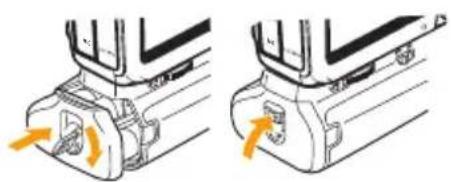
Mechanical assembly diagrams showing two views of a mechanical component with orange arrows indicating motion direction (no text or symbols)- Rotate the battery tray lever counterclockwise and slide the battery tray all the way into the grip. Rotate the lever as indicated above and push it back into place to lock the tray.
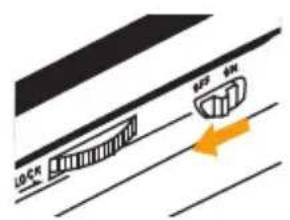
- Switch the grip power to ON and then turn on the camera's power. Check the battery level in the control panel or viewfinder.
natural_image
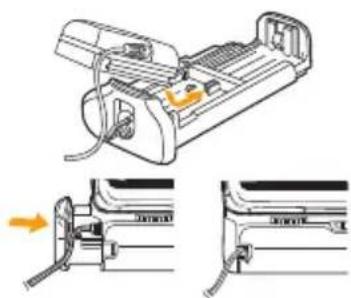
Diagram of a refrigerator with attached doors and a door handle, showing front and side views (no text or symbols)- Household Power Outlet: The Canon ACK-E6 AC Power Adapter Kit (sold separately) can be connected to the grip. Insert the DC coupler through the small groove on the back of the grip. Ensure that the cord doesn't get pinched by the battery holder.
Specifications
| Power Source 1. One or two Canon LP-E6 rechargeable batteries2. Six AA/LR6 Alkaline, NiMH, lithium, or nickel-manganese batteries3. Works with the Canon AC Adapter Kit ACK-E6 (sold separately) |
| Operating Temperature 32°F to 104°F (0°C to 40°C) |
| Dimensions (H × W × D) 4.4 × 5.7 × 3.5 in. (11.2 × 14.5 × 8.9 cm) |
| Weight 12.8 oz. (363 g) excluding battery tray and batteries |
* Approximate measurements.
Specifications and design are subject to change without notice.
AA batteries do not provide as much shooting time as LP-E6 rechargeable batteries. Performance of AA batteries may also be dependent on brand and storage conditions. AA batteries may not function at temperatures below 68^ F ( 20^ C).
This product is not compatible with Duracell ^® brand alkaline batteries.
When the camera's internal GPS is enabled, the camera will continue to draw power from the battery, even when the camera is turned off.
ONE-YEAR LIMITED WARRANTY
This VELLO product is warranted to the original purchaser to be free from defects in materials and workmanship under normal consumer use for a period of one (1) year from the original purchase date or thirty (30) days after replacement, whichever occurs later. The warranty provider's responsibility with respect to this limited warranty shall be limited solely to repair or replacement, at the provider's discretion, of any product that fails during normal use of this product in its intended manner and in its intended environment. Inoperability of the product or part(s) shall be determined by the warranty provider. If the product has been discontinued, the warranty provider reserves the right to replace it with a model of equivalent quality and function.
This warranty does not cover damage or defect caused by misuse, neglect, accident, alteration, abuse, improper installation or maintenance. EXCEPT AS PROVIDED HEREIN, THE WARRANTY PROVIDER MAKES NEITHER ANY EXPRESS WARRANTIES NOR ANY IMPLIED WARRANTIES, INCLUDING BUT NOT LIMITED TO ANY IMPLIED WARRANTY OF MERCHANTABILITY OR FITNESS FOR A PARTICULAR PURPOSE. This warranty provides you with specific legal rights, and you may also have additional rights that vary from state to state.
To obtain warranty coverage, contact the Vello Customer Service Department to obtain a return merchandise authorization (“RMA”) number, and return the defective product to Vello along with the RMA number and proof of purchase. Shipment of the defective product is at the purchaser’s own risk and expense.
For more information or to arrange service, visit www.vellogear.com or call Customer Service at 212-594-2353.
Product warranty provided by the Gradus Group.
www.gradusgroup.com
VELLO is a registered trademark of the Gradus Group. © 2017 Gradus Group LLC. All Rights Reserved.

VELLO
www.vellogear.com

VELLO
A Gradus Group Brand
© Copyright 2017 Gradus Group LLC
All other trademarks are the property of their respective owners
GG5
- BG-C8
- BATTERY GRIP
- Introduction
- Precautions
- Overview
- ① Contact Cap
- ② Electrical Contacts
- ③ Mounting Screw
- ④ Guide Pin
- ⑤ Battery Tray Lever
- ⑥ Battery Tray Compartment
- ⑦ DC Coupler Cord Mount
- ⑧ Attachment Wheel
- ⑨ Grip Power ON/OFF
- AF Point Selection/Magnify Button\*
- AE Lock / FE Lock / Index / Reduce Button\*
- ⑫ AF On Button
- Shutter-Release Button\*
- Main Dial\*
- Camera Battery Chamber Cover Holder
- Hand Strap Mount
- ⑰ Tripod Socket
- Battery Tray
- AA Battery Holder
- Attaching the Grip
- Inserting Batteries
- Specifications
- ONE-YEAR LIMITED WARRANTY
Brand : Vello
Model : BG-C8
Category : Uncategorized