
SB0802AD-DE-B50 - Cables for Computers and Peripherals CyberPower - Free user manual and instructions
Find the device manual for free SB0802AD-DE-B50 CyberPower in PDF.


| Product Type | Power Cord |
| Brand | CyberPower |
| Model | SB0802AD-DE-B50 |
| Connector Type | IEC C13 to C14 |
| Cable Length | 1.8 m (6 ft) |
| Color | Black |
| Voltage Rating | 250 V |
| Current Rating | 10 A |
| Wire Gauge | 18 AWG |
| Jacket Material | PVC |
| Certifications | RoHS, UL, CE |
| Operating Temperature | -20°C to 60°C |
| Strain Relief | Yes, molded |
| Overmold Material | PVC |
| Shielding | Unshielded |
| Package Quantity | 1 |
| Weight | 0.2 kg |
| Dimensions (L x W x H) | 180 x 20 x 20 cm |
| Cleaning | Wipe with dry cloth; disconnect from power |
| Safety | Do not exceed rated voltage/current; avoid bends |
| Warranty | Lifetime |
Frequently Asked Questions - SB0802AD-DE-B50 CyberPower
User questions about SB0802AD-DE-B50 CyberPower
0 question about this device. Answer the ones you know or ask your own.
Ask a new question about this device
Download the instructions for your Cables for Computers and Peripherals in PDF format for free! Find your manual SB0802AD-DE-B50 - CyberPower and take your electronic device back in hand. On this page are published all the documents necessary for the use of your device. SB0802AD-DE-B50 by CyberPower.
USER MANUAL SB0802AD-DE-B50 CyberPower
Reliability. Quality. Value.

User's Manual
Surge Buster
Model Numbers:
SB0502BA-DE SB0602BA-DE SB0702AD-DE SB0802AD-DE
Cord Management Installation:

natural_image
Diagram of a mechanical component with a red arrow indicating direction, no text or symbols present
natural_image
Diagram of a mechanical component with arrows indicating direction (no text or symbols)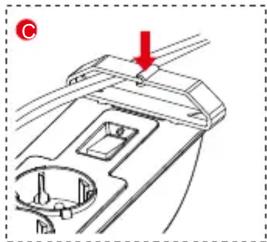
natural_image
Technical diagram of a mechanical component with a red arrow indicating direction (no text or symbols present)K09-0000142-01
Installation:
A. Power Connections
- The surge protector must be plugged into a properly grounded outlet.
- Plug all connected equipment directly into the surge protector.
Note:
DO NOT connect to an ungrounded outlet. DO NOT use with 2-wire extension cords or adapters. This surge protector is designed for indoor use only. Install the surge protector away from heat emitting appliances such as radiators or heat generators. Do not install where excessive moisture is present.
Never install electrical or telephone wiring during a lightning storm.
DO NOT USE FOR MEDICAL, LIFE SUPPORT EQUIPMENT OR OTHER HIGH RISK ACTIVITIES.
B. Phone/Fax/Modem Connections (Select Models) To prevent surge damage to telephone equipment, connect the Phone/Fax/Modem through the surge protector.
If your surge protector has phone jacks:
- Connect the Phone/Fax/Modem line from your wall outlet to the IN jack of the surge protector.
- Connect the phone cord, (not included in this product), into the OUT jack on the surge protector.
- Connect the other end of the phone cord to the Phone/Fax/Modem jack of the device you want to protect.
C. Coax Cable Connections (Select Models)
To protect a TV or DVR from surge damage, connect the coax cable through the surge protector.
If you are using a coax cable and your surge protector is equipped with coax jacks:
- Connect the Cable/Antenna line from your source to the IN jack on the surge protector.
- Connect a coax cable from the OUT jack of the surge protector to the device you want to protect.
D. Mounting the Surge Protector
You can mount the surge protector to a vertical surface with just two screws, (not included), using the eye loops provided at the backside of the Protector.

Caution:
RISK OF ELECTRIC SHOCK – USE ONLY IN DRY LOCATIONS AND ONLY INDOORS.
"DO NOT PLUG INTO ANOTHER SURGE PROTECTOR, POWER STRIP, EXTENSION CORD OR OTHER RELOCATABLE POWER TAP."
This device features an internal protection that will disconnect the surge protective component at the end of its useful life but will maintain power to the load now unprotected.
Power Switch/Indicator
Used as the master on/off switch for outlets. The indicator light is on when power on. When power off, the indicator light is off as well.
Warranty
CyberPower warrants this product to be free from defect in electrical parts or manufacture for two (2) years. If a defect results in product failure during its normal use within the warranty period, please contact your local dealers and/or distributors for warranty services.
CyberPower®
Reliability. Quality. Value.
CyberPower Systems
www.cyberpower.ru
© 2013 CyberPower Systems, Inc.
All rights reserved. All other
trademarks are the property of their respective owners
CyberPower®
Reliability. Quality. Value.

SB0502BA-DE SB0602BA-DE SB0702AD-DE SB0802AD-DE
natural_image
Mechanical component diagram showing a dial indicator and housing with red arrow indicating direction (no text or symbols)
natural_image
Diagram of a mechanical component with two red arrows indicating direction (no text or symbols)
natural_image
Diagram of a mechanical component with a red arrow pointing to a section, no visible text or symbolsУстановка:
A. Соединения
Reliability. Quality. Value.
CyberPower Systems
www.cyberpower.ru
© 2011 CyberPower Systems, Inc.
All rights reserved. All other
trademarks are the property of their respective owners
- Installation:
- Power Connections
- Note:
- Phone/Fax/Modem Connections (Select Models) To prevent surge damage to telephone equipment, connect the Phone/Fax/Modem through the surge protector.
- Coax Cable Connections (Select Models)
- Mounting the Surge Protector
- Caution:
- Power Switch/Indicator
- Warranty
- CyberPower®
- CyberPower Systems
- Установка:
- Соединения
Brand : CyberPower
Model : SB0802AD-DE-B50
Category : Cables for Computers and Peripherals