NF-5330C - Multimeter Noyafa - Free user manual and instructions
Find the device manual for free NF-5330C Noyafa in PDF.


| Product Type | Digital Multimeter |
| Brand | Noyafa |
| Model | NF-5330C |
| Dimensions (approx.) | 140 x 70 x 30 mm |
| Weight (approx.) | 200 g (with battery) |
| Power Supply | 2 x AAA batteries (1.5V) or 9V battery |
| Display | LCD with backlight, 2000 counts |
| AC Voltage Range | 0-600V |
| DC Voltage Range | 0-600V |
| AC Current Range | 0-10A |
| DC Current Range | 0-10A |
| Resistance Range | 0-20MΩ |
| Capacitance Range | 0-100μF |
| Frequency Range | 0-10MHz |
| Diode Test | Yes |
| Continuity Test | Yes (buzzer) |
| Data Hold | Yes |
| Auto-Ranging | Yes |
| Safety Rating | CAT II 600V, double insulation |
| Accessories Included | Test leads, batteries, manual |
| Maintenance | Wipe with dry cloth; remove battery if not used for long |
| Spare Parts Available | Test leads, batteries (standard sizes) |
Frequently Asked Questions - NF-5330C Noyafa
User questions about NF-5330C Noyafa
0 question about this device. Answer the ones you know or ask your own.
Ask a new question about this device
Download the instructions for your Multimeter in PDF format for free! Find your manual NF-5330C - Noyafa and take your electronic device back in hand. On this page are published all the documents necessary for the use of your device. NF-5330C by Noyafa.
USER MANUAL NF-5330C Noyafa
Operation Manual of Pocket Type Intelligent Scanning Digit Multimeter
Index
- Overview....1
- Safety precautions....1
- Characteristics....1
- Operation panel instructions....3
- Technical Specifications....4
- Automatic switch machine....8
- Troubleshooting....8
1. Overview
6000 counts is a pocket type 3 5 / 6-digit pocket type real effective value intelligent scanning digital instrument; the series is triple display: main display, secondary display, analog bar. Except for the display frequency of AC voltage measurement sub display, other function sub display is normal temperature. In the process of using, users can operate continuously. There is no need to turn the dial to select the function. The meter will automatically recognize and measure based on the input AC or DC current/resistance. It has stable performance, high precision, high reliability, clear reading and overload protection. Driven by AAA 1.5V battery, the instrument adopts large screen LCD display and adopts boost power supply. Even at the edge of 2.3V low battery, it can ensure the high brightness of backlight and flashlight. The meter is easy to carry and is very popular among users. This series of instruments can manually switch and measure DC voltage and AC voltage, capacitance, NDV, diode, continuity test, live wire judgment, frequency measurement and true RMS. It is a superior tool and an ideal tool for laboratories, factories, radio enthusiasts and families.
2. Safety Precautions
This series of instruments is designed in accordance with IEC1010 (Safety Standards promulgated by the International Electrotechnical Commission), please read the safety precautions before use.
-
When measuring voltage, please do not input the limit voltage exceeding the effective value of DC 700V or AC 500V;
-
The voltage below 36V of the current file is a safe voltage;
-
When changing functions and ranges, the test pen should leave the test point;
-
Select the proper function and range, beware of wrong operation, although the series of instruments with a full-range protection, but for safety reasons, you still pay more attention;
-
Safety Symbol Description: “△” Exist dangerous voltage, “÷” Ground, “□” Double insulation, “△” Operator must refer to the instruction manual, “○” Low voltage symbol.
3. Characteristics
- General Characteristics
1-1. Display mode: triple display LCD; main display, sub display, analog bar;
1-2. Maximum display: 5999 (3 5/6) bit automatic polarity display;
1-3. Measurement method: double integral A/D conversion;
1-4. Sampling rate: about 3 times per second;
1-5. Over range display: The highest position shows "OL";
1-6.Continuous power operation function;
1-7. Low voltage display: “+ -” symbol appears;
1-8. Working environment: (0\~40)°C, relative humidity<80%;
1-9. Power: AAA 2* 1.5V battery;
1-10. Volume (size): 139 × 68 × 18 mm (L × W × H);
1-11. Weight: about 175g (including 1.5V battery);
1-12. Attachment: One instruction manual, one certificate, one outer packaging box, one pair of test leads, two AAA1.5V batteries.
- Technical characteristics
2-1. Accuracy: ± (a% of reading + least significant digit), to ensure accuracy Ambient temperature: (23 ± 5)^ , relative humidity <75%, calibration guarantee period from the date of manufacture for one year.
2-2. Performance (Note "▲" indicates that the meter has this function)
| Function | |
| DC voltage DCV | ▲ |
| AC voltage ACV | ▲ |
| Resistor / Diode / On-Off Test / Capacit | ▲ |
| Frequency F | ▲ |
| Touch key | ▲ |
| Continuous power operation | ▲ |
| NCV | ▲ |
| Zero line / Fire line test | ▲ |
| Full unit symbol | ▲ |
| Backlight manual/Auto off | ▲ |
| True RMS measurement | ▲ |
| Temperature (°C/°F) | ▲ |
| Flashlight lighting | ▲ |
-
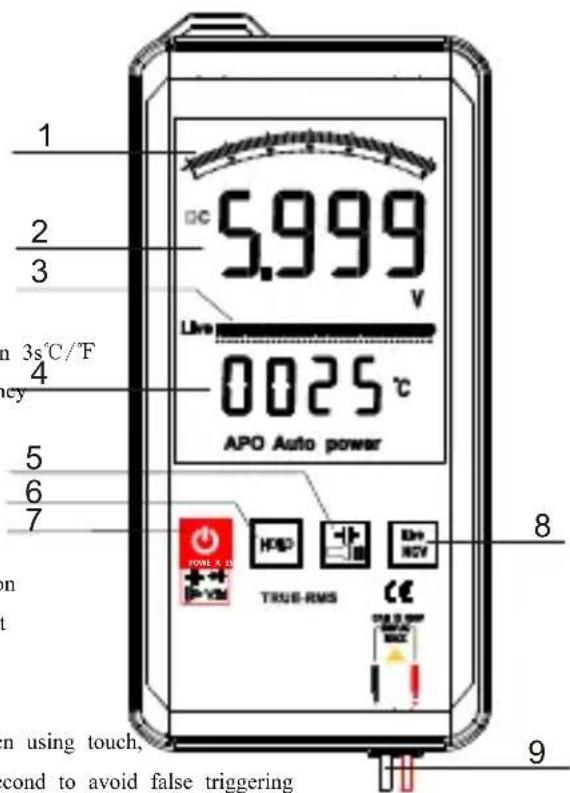
Operation panel instructions
-
Simulation bar;
- LCD display;
- Live wire simulation indication;
- Normal temperature display status;
- Quick selection of capacitor/flashlight key;
- Data lock key;
- Power on and off for more than 3 seconds; short trigger for AC voltage/DC voltage / diode / buzzer / capacitor switching, so as to cycle;
- Electric field measurement (NCV) / neutral wire measurement (LIVE)/more than 3s°C/°F
- The red probe is the input port of voltage, resistance, diode, capacitor, frequency and buzzer; Black is the negative end of the input.
Note:
1) The back light is always on, LCD is highlighted, and the user is constantly on. In use, the instrument will not turn off the power supply; when it stops using, it will automatically Power off; truly intelligent operation without power off, refer to the power off instructions for details.
2) The table adopts touch design for keys, which is more safe and reliable. When using touch, Every time a key is triggered, it is better to have an interval of more than 1 second to avoid false triggering 3) When touch any touch key, the touch key and panel are on, and you can switch the function key.
After 5 seconds, the touch key and panel light are turned off and locked..
5. Technical Specifications
- DC voltage / AC voltage automatic scanning test (DCV / ACV)
| Accuracy Range | 6000counts | Resolution |
| DC/AC6V | ±(0.8%+5) | 0.001V |
| DC/AC60V | 0.01V | |
| DC/AC600V | 0.1V | |
| DC1000/AC750V | ±(0.8%+10) | 1V |
Input impedance: 10MΩ; overload protection: 1000V DC or 750V AC peak.ture Validity Measurement: frequency response 50Hz-1kHz; The specific operations are as follows:
1-1. Long press POWER is greater than 2S, the boot display is automatically scanned state "AUTO".
1-2. The black test lead is negative, the red test lead is positive, and the test lead reliably touches the test point.
1-3. When the voltage measured at the negative end of the black test lead input port and the positive end of the red test lead is greater than 0.8V, regardless of the AC voltage or the DC voltage, the meter will compare the DC component and the AC component, take the larger component signal, and then according to the measured value The size is automatically switched between 6V/60V/600V/1000V, and then the measured value is displayed on the LCD.
Note:
1) The input voltage must not exceed DC1000V or AC750V. If it exceeds, there is danger of damage to the instrument circuit. When high voltage circuit, pay special attention to avoid electric shock;
2) After completing all measurement operations, disconnect the test leads from the circuit under test.
- Resistance (Ω)
| Accuracy Range | 6000counts | Resolution |
| 600 Ω | ± (0.8%+5) | 0.1 Ω |
| 6k Ω | ± (0.8%+3) | 1 Ω |
| 60kΩ | 10 Ω |
6000Counts Pocket Type Intelligent Scanning Digital Multimeter
| 600k Ω | 100 Ω | |
| 6M Ω | 1kΩ | |
| 60M Ω | ± (2.5%+3) | 10k Ω |
Input impedance: 10MΩ; overload protection: 1000V DC or 750V AC peak.
The specific operations are as follows:
2-1. The boot display is in the automatic scan status "AUTO".
2-2. The black test lead is negative, the red test lead is positive, and the test lead reliably touches the test point.
2-3. If the measurement resistance at both ends of the test lead is less than 50 , the buzzer will emit a continuous beep, and fast buzzer measurement is required. Cycle the power button to enter the buzzer for rapid measurement.
There will be a "▶▶" symbol displayed on the LCD, fast buzzer/diode measurement, this function can be automatically switched according to the needs of the measurement.
2-4. If you are measuring the resistance of a closed loop, you must discharge the resistance at both ends of the resistance to be measured. Otherwise, if the voltage in the loop is greater than 0.8V, the meter will mistake it for voltage measurement and enter the electricity measurement mode.
2-5. When measuring the value at the negative end of the black test lead input port and the positive end of the red test lead, the meter will automatically switch between 600 Ω/6k Ω/60k Ω 600k Ω/6M Ω/60M Ω according to the resistance measurement value, and then the measured value will be displayed on the LCD.
Note:
1) When measuring low resistance, the test leads will bring internal resistance. In order to obtain accurate readings, you can record the short circuit value of the test leads first, and subtract the value when the test leads are short circuited from the measurement readings;
- Fast continuity test / diode / capacitor
| Range | display value | test condition |
| “ AUTO” | Diode forward voltage drop | Forward DC current is about 1mA, open circuit voltage is about 3V |
| The buzzer sounds long and the resistance the test is less than ± (20) Ω. | Open circuit voltage is about 0.4V, press "powe for two-speed function switching |
- Capacitance(C)
| Accuracy Range | 6000counts | Resolution |
| 10nF | ±(3.5%+20) | 10pF |
| 100nF | 100pF | |
| 1uF | 1nF | |
| 10uF | 10nF | |
| 100uF | 100nF | |
| 1mF | 1uF | |
| 10mF | 10uF | |
| 60mF | ±(5%+3) | 100uF |
Overload protection: 1000V DC, 750V AC peak.
4-1. The boot display is in the automatic scan status "AUTO".
4-2. The black test lead is negative, the red test lead is positive, and the test lead reliably touches the test point.
4-3. If you need fast continuity test/diode/capacitance measurement, constantly trigger the "power" switch, enter the fast continuity test/diode/capacitance measurement in one cycle, and select the corresponding function measurement according to the measurement requirements. When measuring the capacitance, the measured capacitance The size will automatically select different ranges, and the measured value will be displayed on the LCD. The capacitance measurement range is 10nF/100nF /1uF/10uF/100uF/1mF/10mF/60mF.
Note:
1) When measuring capacitance with 10nF file, there may be residual reading on the screen display value. This number is the distributed capacitance of the test pen. It is an accurate reading and can be subtracted after measurement.
2) When the large capacitance file measures severe leakage or breakdown capacitance, some values will be displayed and unstable; when measuring large capacitance, the reading takes several seconds to stabilize, which is normal when measuring large capacitance;
3) Please fully discharge the capacitor before testing the capacitor capacity, otherwise it will enter the voltage measurement mode.
4) Unit: 1F=1000mF, 1mF=1000uF, 1uF=1000nF, 1nF=1000pF
- NCV measurement;
The operation is as follows:
5-1. Press and hold the "NCV/LIVE" button; enter the EF measurement.
5-2. The front end of the meter has NCV test points. As long as the point is close to the AC voltage, the buzzer will emit different continuations according to the different strength of the signal, and the LCD will also display according to the strength of the signal. Different number of segments.
5-3. Cycle to trigger "NCV/LIVE" key, enter live live live wire measurement, display live character on LCD, close to live wire test point with a red meter, and make reliable contact with the point, the black meter end is suspended, and does not contact any test point; if the test point is live wire, the LCD will display OL, and the buzzer will send continuous sound.
6.Frequency measurement
| Accuracy Range | 6000counts | Resolution |
| 10Hz | ±(0.1%+3) | 0.01Hz |
| 100Hz | 0.1Hz | |
| 1kHz | 1Hz | |
| 10kHz | 10Hz | |
| 100kHz | 100Hz | |
| 1MHz | 1kHz | |
| 10MHz | 10kHz |
Input sensitivity: 1V rms; overload protection: 550V DC or AC peak (no more than 10 seconds)
Frequency measurement
-
trigger power key; switch to frequency measurement function;
-
The black test lead is negative, the red test lead is positive, and the test lead reliably touches the test point;
3 Measurement values will be displayed on the LCD.
Note:
1) When the input exceeds 10Vrms, it can be read, but the error may be larger;
2) In a noisy environment, it is best to use a shielded cable when measuring small signals;
3) When measuring high voltage circuits, special care should be taken to avoid electric shock;
4) It is forbidden to input voltage values exceeding 250V DC or AC peak to avoid damage to the meter.
6. Automatic switch machine
When the instrument is out of service for about 5 minutes, the instrument will automatically power off; to restart the power supply, long press the "power" key for more than 3 seconds, and the LCD will display as "auto scan" AUTO ",
In order to make it more convenient for the user, the design of the machine adds the design of continuous operation and power supply, that is, the user will not automatically shut down the machine during the use process, and can only enter the shutdown state after 5 minutes of stop using,
be careful:
1) In the manual non measurement state, no matter the AC voltage or DC voltage level, because the instrument probe is completely welded at the input end, there will be certain data on the LCD. In the design, we define the manual DC voltage level, the input end has 10 words, the AC voltage level has 100 words, and the capacitance has 100 words. In this state, we default it to no measurement state, 5 minutes It will turn off automatically.
7. Troubleshooting
If your instrument does not work, the following method can help you solve the general problem, if the fault still can not be excluded, please contact the service center or dealer.
| Failure phenomenon | Inspection site and method |
| Not shown | Battery not connected |
| Replace the battery | |
| Low battery symbol | Replace the battery |
| Current is not input | Replace fuse |
| Resistance display error | The test pen is not in contact |
This manual is subject to change without notice;
The contents of this manual are considered correct. If the user finds any errors, omissions, etc., please contact the manufacturer;
The company does not bear the accidents and hazards caused by the user's wrong operation;
The functions described in this manual are not intended to reasons of the product for special purposes.
60000-0128C200813
Brand : Noyafa
Model : NF-5330C
Category : Multimeter