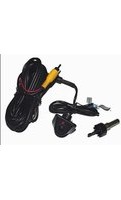
CUL-04 - Security Camera CRUX - Free user manual and instructions
Find the device manual for free CUL-04 CRUX in PDF.


| Product Type | Security Camera |
| Model | CUL-04 |
| Brand | CRUX |
| Dimensions (approx.) | 6.5 x 5.5 x 5.5 cm |
| Weight | 200 g |
| Power Supply | 12V DC adapter (included) |
| Video Resolution | 1080p Full HD |
| Field of View | 120° wide angle |
| Night Vision | Infrared LEDs up to 10m |
| Motion Detection | Yes, with alerts |
| Connectivity | Wired (BNC/analog) |
| Weatherproof Rating | IP65 (outdoor use) |
| Mounting Type | Wall/ceiling bracket included |
| Storage | DVR compatible (not included) |
| Audio | Built-in microphone |
| Main Functions | Video recording, night vision, motion alerts, two-way audio |
| Maintenance & Cleaning | Wipe with dry soft cloth; avoid liquids |
| Safety | Use only provided power adapter; keep away from water ingress |
| Spare Parts & Repairability | Contact CRUX support; no user-serviceable parts |
| General Information | User manual available in PDF format; AI question support online |
Frequently Asked Questions - CUL-04 CRUX
User questions about CUL-04 CRUX
0 question about this device. Answer the ones you know or ask your own.
Ask a new question about this device
Download the instructions for your Security Camera in PDF format for free! Find your manual CUL-04 - CRUX and take your electronic device back in hand. On this page are published all the documents necessary for the use of your device. CUL-04 by CRUX.
USER MANUAL CUL-04 CRUX
INTERFACING SOLUTIONS


flowchart
graph LR
    A["Reverse Camera Interface Backup Camera Input"] --> B["OR"]
    B --> C["To Aftermarket Radio Backup Camera Input"]
    C --> D["Extension Coax Cable"]
    D --> E["Regulator"]
    E --> F["Blue Wire Flip Image Horizontally"]
    F --> G["WHITE Wire Parking Guideline"]
    G --> H["Make sure the arrows line up and push in the connectors well."]
    H --> I["Camera"]
    I --> J["White Wire Parking Guideline"]
    J --> K["Blue Wire Flip Image Horizontally"]
    K --> L["Red Wire (A)*"]
    K --> M["RED Wire (B)*"]
    K --> N["GROUND"]
*NOTE: To power the camera, use RED Wire A or B. If tapping power from the radio or RVC Interface, make sure to insulate RED Wire A to avoid it from shorting. If you will be tapping power from the reverse light +12V, insulate RED Wire B to avoid it from shorting. With either connection the Black GROUND wire needs to be connected to a solid chassis ground. For vehicles with manual transmission, we recommend tapping +12V power from the reverse light.
WHITE Wire: Connect to show parking guide line. Disconnect to remove.
BLUE Wire: Connect to flip image horizontally to use as front facing camera. Disconnect to use as reverse camera.
(Not all cameras will have a Parking Guide Line or Flip Image function.)

Crux Interfacing Solutions • 6860 Canby Ave., Suite 116, Reseda, CA 91335
phone: (818) 609-9299 • fax: (818) 996-8188 • www.cruxinterfacing.com
Brand : CRUX
Model : CUL-04
Category : Security Camera