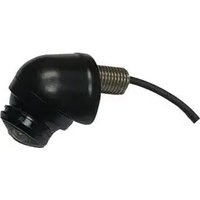
CTC-210 - Security Camera CRUX - Free user manual and instructions
Find the device manual for free CTC-210 CRUX in PDF.


| Type | Vehicle backup/front camera |
| Brand | CRUX |
| Model | CTC-210 |
| Power Input | 12V DC |
| Lens Type | Wide-angle |
| Viewing Angle | Adjustable horizontally & vertically, 360° rotation |
| Parking Guide Lines | Yes (can be deactivated by cutting green wire) |
| Image Flip | Horizontal flip via cutting red wire for front camera use |
| Mounting | Top or lip mount |
| Included Components | Camera, extension cable, wiring harness with connectors |
| Wiring Method | Tap to radio/interface or backup light |
| Dimensions | Not specified |
| Weight | Not specified |
| Maintenance | Keep lens clean; no user-serviceable parts |
| Safety | Disconnect power before installation; avoid shorts |
| Spare Parts & Repairability | Extension cable available; camera not user-repairable |
| Certifications | Not specified |
| Warranty | Not specified |
Frequently Asked Questions - CTC-210 CRUX
User questions about CTC-210 CRUX
0 question about this device. Answer the ones you know or ask your own.
Ask a new question about this device
Download the instructions for your Security Camera in PDF format for free! Find your manual CTC-210 - CRUX and take your electronic device back in hand. On this page are published all the documents necessary for the use of your device. CTC-210 by CRUX.
USER MANUAL CTC-210 CRUX
- For use as a front or backup camera.
- Wide angle lens for cross traffic viewing.
- With parking guide lines (can be turned on/off).
- Horizontal flip image feature for front camera use.
- Top or lip mount.

natural_image
Exterior view of a modern building with a red roof and circular stone structure under a blue sky (no signage or text visible)PARTS INCLUDED:

natural_image
Coiled black electrical plug with terminal connector (no text or symbols visible)
natural_image
Coiled black cable with three connectors and a red square component, plus two black probes (no text or symbols visible)CTC-210 Camera Extension Cable and Accessories
WIRING DIAGRAM:

*NOTE: To power the camera, tap the RED wire to +12V and the BLACK wire to ground.
1) If tapping power from the radio or a backup camera interface, tap the RED wire to the camera output wire of the radio or interface. The BLUE wire is not used in this instance.
2) If you are tapping power from the backup light, tap the BLUE wire "B" to the +12V backup light wire then connect the BLUE wire "A" to the RED wire. Connect the black wire to ground.
CROSS TRAFFIC VIEWING:
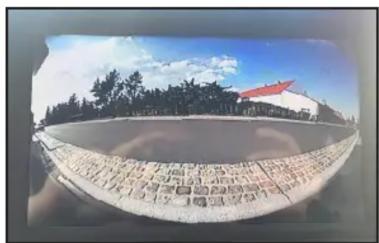
The CTC-210 can be used as a backup camera or as a front camera with wide angle cross traffic viewing. The wide angle viewing aids when backing up and the driver has limited view of what's on the left or right of the vehicle. It can be top mounted or lip mounted and the viewing angle is also adjustable both vertically and horizontally. Loosen the camera lock ring and the ball camera can be turned 360 degrees. The CTC-210 has parking guide lines when used as a backup camera. To deactivate the parking guide lines, cut the thin GREEN wire on the 4 pin barrel connector. See diagram above. To use the CTC-210 as a front camera, cut the thin GREEN wire to remove the parking guide lines and cut the thin RED wire to flip the image horizontally.

natural_image
Monument with engraved text and red roof, set against a blue sky and trees (no readable signage or symbols)Brand : CRUX
Model : CTC-210
Category : Security Camera