
MP 8d - Receiver Antelope Audio - Free user manual and instructions
Find the device manual for free MP 8d Antelope Audio in PDF.


| Product Type | 8-Channel Microphone Preamplifier / AD Converter |
| Number of Channels | 8 |
| Analog Inputs | 8 x XLR (balanced) |
| Digital Outputs | 1 x ADAT (Toslink), 1 x S/PDIF (coaxial) |
| Word Clock | BNC input and output, supports 44.1 kHz to 192 kHz |
| Sample Rates | 44.1, 48, 88.2, 96, 176.4, 192 kHz |
| Microphone Preamp Gain | 0 dB to +65 dB (per channel) |
| Phantom Power | +48 V DC, selectable per channel |
| Frequency Response | 20 Hz – 20 kHz, ±0.1 dB |
| Dynamic Range | 120 dB (A-weighted) |
| THD + N | 0.0005% (typical) |
| Power Supply | Internal AC, 100-240 V, 50/60 Hz, 30 W max |
| Dimensions (W x D x H) | 482 x 250 x 44 mm (19" rackmount, 1 RU) |
| Weight | 3.2 kg (7.1 lbs) |
| Safety Certifications | CE, FCC, RoHS |
| Operating Temperature | 0°C to 40°C (32°F to 104°F) |
| Storage Temperature | -20°C to 60°C (-4°F to 140°F) |
| Cleaning Instructions | Wipe with a dry soft cloth; do not use solvents or abrasive cleaners |
| Maintenance | No user-serviceable parts inside; refer to qualified service personnel |
| Repairability | Spare parts available via authorized Antelope Audio service centers |
Frequently Asked Questions - MP 8d Antelope Audio
User questions about MP 8d Antelope Audio
0 question about this device. Answer the ones you know or ask your own.
Ask a new question about this device
Download the instructions for your Receiver in PDF format for free! Find your manual MP 8d - Antelope Audio and take your electronic device back in hand. On this page are published all the documents necessary for the use of your device. MP 8d by Antelope Audio.
USER MANUAL MP 8d Antelope Audio
8-CHANNEL MIC PREAMP AND A/D

Owner's Manual
Contents
- Safety Notes 5
- Introduction 6
- Features 7
- Installation Guide 8
- Front Panel Explained 9
- Rear Panel Explained .10
- Software Control Panel 12
7.1. Routing Tab and Main View Options 12
7.2. Mixer Tab 14
7.3.AFX Tab 16
7.4. Meters Tab 17
-
Additional Information 18
-
In The Box 18
-
Technical Specifications 18
-
Antelope Audio Support Resources 19
1. Safety Notes

To reduce the risk of electrical shocks, fire, and related hazards:
- Do not remove screws, cover, or cabinet. There are no user serviceable parts inside. Refer servicing to qualified service personnel.
- Do not expose this device to rain, moisture or spillover of liquid of any kind.
- Should any form of liquid or a foreign object enter the device, do not use it. Switch off the device and then unplug it from the power source. Do not operate the device again until the foreign object is removed or the liquid has completely dried and its residues fully cleaned up. If in doubt, please consult the manufacturer.
- Do not handle the power cables with wet hands!
- Make sure the device is switched off when plugging/unplugging it to/from the power source.
- Avoid placing things on the cabinet or using the device in a narrow and poorly ventilated place which could affect its operation or the operation of other closely located components.
- If anything goes wrong, turn off the device first and then unplug the power. Do not attempt to repair the device yourself: consult authorized service personnel or your dealer.
- Do not install near any heat sources such as radiators, stoves, or other apparatus (including amplifiers) that produce heat.
- Do not use harsh chemicals to clean your unit. Clean only with specialized cleaners for electronics equipment.
- Connect all your devices before powering your unit.
- This unit is connected via its power cord to the mains safety earth.
- Never operate the unit without this earth connection.
- AC power supply cable should be routed so that it is not likely to be walked on or squeezed by items placed upon or against it.
- To completely turn off the device, unplug the power cable first from the outlet and then from the rear panel of the unit.
- Both, occasional and continued exposure to high sound pressure levels can cause permanent ear damage via headphones and monitors.
- Your unit should always be un-racked when traveling or in a flight case.
- The device is designed to operate in a temperate environment, with a correct Operating Temperature of:
0-50 °C, 32-122 °F
2. Introduction
Thank you for purchasing the MP8d from Antelope Audio.
MP8d provides 8 Channels of transparent, class A microphone preamplifier in a compact 1U rack design. MP8d boasts Antelope Audio's integrated world-class A/D conversion. This classically rich, yet modernly precise sound is accomplished thanks to Antelope's Acoustically Focused Clocking jitter management algorithm and Oven-Controlled crystal oscillator, along with advanced analog and digital circuit board design, powered by a proprietary power supply.
MP8d relies on the highly sophisticated, yet easy to use software control concept developed for Orion32 and Zen Studio. MP8d utilizes eight clean, precise and transparent, digitally controlled class A mic pres and two Hi-Z ins. Alongside A/D conversion with carefully optimized analog driver stage, MP8d provides an integrated DSP engine with a mixer, on-board effects, intuitive signal routing and HP monitoring capability. With digital connectivity, including MADI and AES, MP8d offers extended flexibility. Two WC outputs combined with Antelope's renowned clocking and a 10 MHz input for atomic clock, ensure that MP8d is ideally suited at the center of any project or high-end studio.
MP8d is the ultimate device for both live and studio applications, and the perfect companion to Antelope's Orion32 and Zen Studio audio interfaces.
MP8d – the latest edition to Antelope's expanding eco-system concept.
Enjoy working with the new MP8d!
All the best, The Antelope Team
3. Features
- 8 Class A mic preamps, with individual phantom power
- 2 Hi-Z instrument inputs
- 8 Channels direct mic output on DB25
- 8 Channels Antelope Audio precise AD conversion technology
- 1 Individually assignable stereo headphone output
- Palette of digital outputs – MADI, ADAT, AES/EBU, S/PDIF, TOSLINK
- Flexible routing and mixing with extremely low latency custom DSP effects
- Antelope's renowned 64-bit Acoustically Focused Clocking with Atomic input
- Antelope's proprietary Oven Controlled Oscillator for supreme clocking stability
- Two Word Clock outputs and one Word Clock input
- Five presets for fast and easy recall of setups
4. Installation Guide
-
Connect to the AC power source via back panel connector and the USB cable to the USB port on your computer. The guest operating system will recognize the new HID compliant device (MP8d).
-
Download and install the MP8d software control panel from www.antelopeaudio.com/en/support/downloads This will enable you to control your device from your computer and select all necessary settings.
-
Open your control panel by double-clicking the icon and follow the device activation procedure.
-
Connect your choice of inputs and outputs to MP8d.
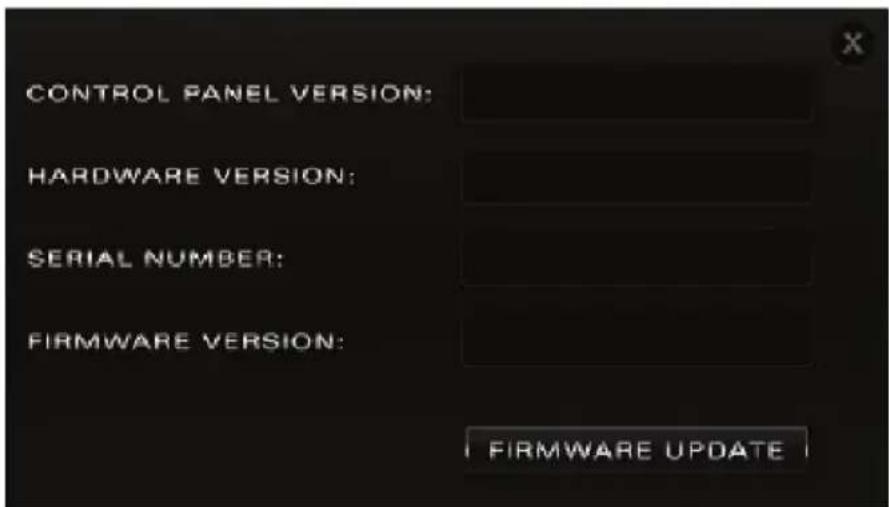
Note: Make sure your device has the most recent firmware installed. Check this by selecting the Options panel and clicking on the Firmware Update button. See picture:

5. Front Panel Explained
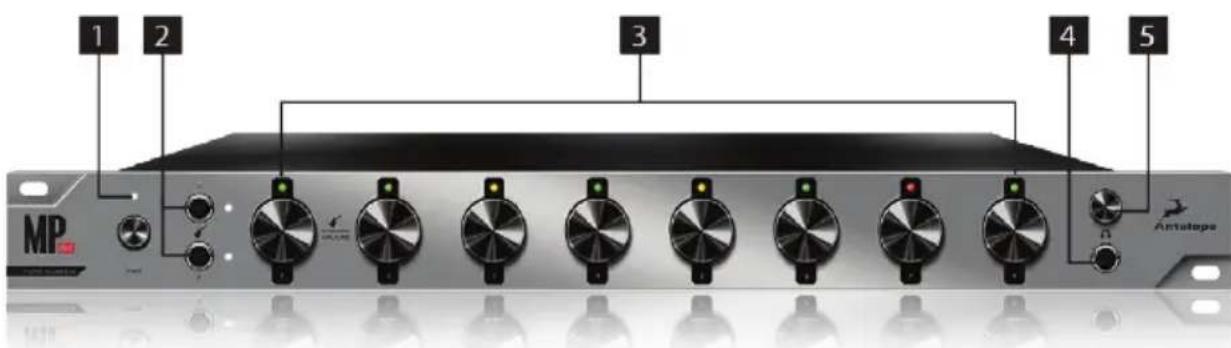
1. Power button
Toggles standby/operation state.
2. Instrument Inputs (Hi-Z Inputs)
Two Instrument Inputs allow you to connect instruments with high output impedance via TRS ( 1/4 ) connector. Hi-Z inputs are optimized for musical instruments eg. guitar and bass.
3. Rotary Control - Input Selector / Channel Gain Control knob
To select an input, press the rotary knob (please ensure that your selection matches the type of signal being inputted).
(When Mic Input is selected, the LED lights in green color. When selecting Line Input, the LED lights in blue color, and it lights in white color when Hi-Z Input is selected).
To adjust the input signal level of the MIC/LINE/Hi-Z(1&2), turn the knob left/right. (value can be adjusted in 1 dB steps).
The peak indicator lights in response to the level of the input signal.
4. Headphone Output
One 1/4" TRS Stereo Headphone jack for connecting headphones for a wide range of impedances.
5. Headphone volume rotary control knob
Adjusts level of headphone amplifier to the front panel HP (Headphone) output with a range of -95dB to 0 dB.
(Press the knob to Mute).
6. Rear Panel Explained
6. AC Power Connection
The AEC connector supports a range from \~95-245V. This enables the device to automatically accommodate mains voltage in every country.
7. Word Clock Input
BNC connector used to accept Word Clock reference.
8. Word Clock Outputs
Two Word Clock Outputs with BNC connectors.

9. 10M Input
This BNC Input Connector allows the MP8d to receive timing reference from an Atomic
Clock such as the Antelope 10M, to increase the Oscillator accuracy. The atomic device becomes the primary timing reference, thus providing better sample accuracy, more detailed sound and greater stability.
10. S/PDIF Output
One S/PDIF output using the 75 Ω S/PDIF connectivity standard.
11. TOSLINK Output
One optical 'jitter-free' TOSLINK Digital Output for use with compatible equipment.
12. ADAT Outputs
Two ADAT outputs (up to 8 channels per connector) for use with compatible equipment.
13. USB High-Speed
MP8d uses USB connector, Type B which allows you to connect the MP8d's software control panel both on Windows & Mac OS X.
14. MADI Input/Output
One MADI Connector providing 64 tracks input and 64 tracks output.
15. AES/EBU
One AES/EBU for use with compatible equipment.
(Use DE-9 connector / DB-9 – breaks down to 4 x XLR connectors. Note: cable not included).
16. D-SUB 25pin TASCAM Analog Output
One connector enables you to attach a breakout cable, 8 lines.
17. AD Inserts
Two 1/4 " TRS insert points for connecting analog gear such as dynamics processors or EQ's, just before the A/D conversion.
18. 8 Line and Mic Preamp Inputs
8 Class A mic preamps, with phantom power over combo XLR.
Note: When using the Hi-Z inputs (on the front panel), channels 1 & 2 (on the rear panel) are not active.
7. Software Control Panel
The MP8d software control panel allows you to control all the functionality of its hardware. The universal panel view sits constantly on the upper half of the control panel, allowing for quick access to the most important features.

7.1. Routing Tab and Main View options
- Standby button
- Clock Source select
- Sample Rate select
- Lock light
- Headphone volume slider
- HP 'Mute' button
7. Options Panel
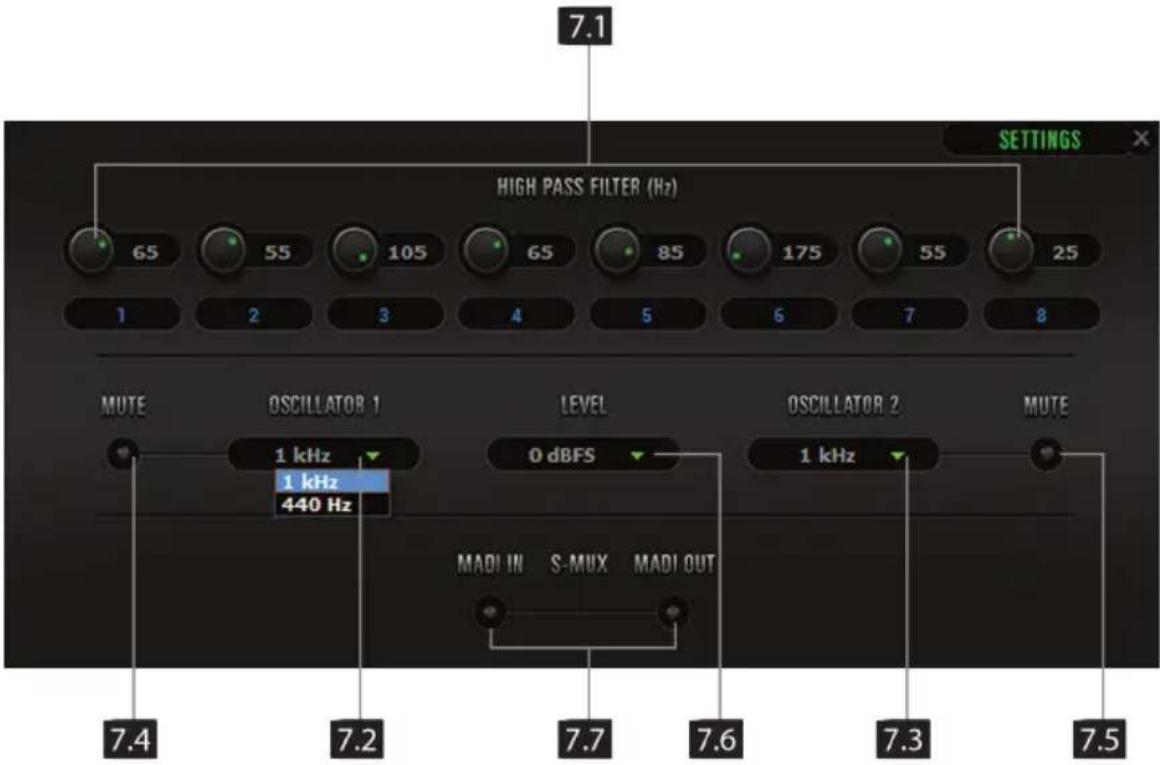
7.1. Filter control (selects the frequency of the high-pass filter for each individual channel)
7.2. & 7.4. Oscillator 1 and Mute
7.3. & 7.5. Oscillator 2 and Mute
7.6. Oscillator output level
7.7. MADI In S-Mux / MADI Out S-Mux
8. Info tab
- Presets
- Undo/Redo Routing; Save/Load Set Up Files
- 'To' Section
- 'From' Section

- Mic, Line and HiZ(1&2, only) modes selectable via dropdown menu (please ensure that your selection in the drop-down menu matches the type of signal being inputted).
- Channel gain (value can be adjusted in 1 dB steps)
- Peak meter
- Independently assignable 48V phantom power switch
- High-Pass Filter
- Phase Reverse button
7.2. Mixer Tab
Mp8d comes with a software mixer which provides near zero latency mix and monitoring that can be distributed using the control panel. The new Mp8d allows a low latency mix to be distributed to any output.
The low latency mixer provides the basic functions of a real mixer such as: Solo, Mute, Pan, Stereo Link, Volume Level controlled by faders and a Master Fader, so you can easily make a stereo mix.

- Fader (double-click to reset to zero)
- Fader Level indicator
- Pan
- Solo
- Mute
- Stereo Link
- Master Mix Fader
- Mute Master
7.3. AFX Tab

EQ
- Frequency Adjust Dials (double-click to return to default)
- Gain Adjust Dials (double-click to return to default)
- Q Adjust Dials (double-click to return to default)
- Frequency Band Analysis Screen
- Save / Load / Bypass
- EQ Output Metering
- Frequency Band Analysis Screen
- Selectable High Pass or High Shelf Filter
- Bandpass / Notch Filter
- Selectable Low Pass or Low Shelf Filter
Compressor
- Detector
- Ratio
- Knee
- Threshold
- Release
- Attack
- Makeup Gain
- Compression Meter
- Compression Curve
7.4. Meters Tab

- Peak meters display (use the dropdown menu to select the source that you wish to be represented on the display).
- Peak meters Source select Threshold
8. Additional Information
Additional information regarding operating systems, audio software and media players will be updated through the support area at www.antelopeaudio.com
9. In the box
• Mp8d Mic Preamp and A/D
- Printed documentation
- Warranty Card
- 1 USB Cable
- 1 AC Power Cable
11. Technical Specifications
Inputs:
Analog Inputs: 8 x Mic / Line on XLR combos on the rear panel 2 x Hi-Z (instrument) inputs on TRS on the front panel (Mic inputs 1,2)
Analog Inserts: 2 x Inserts on TRS (inputs 1,2)
Analog Outputs: 8 x Lines on DB25 (8 channels) 1 x Stereo Headphone outs on TRS (2 channels)
Digital Inputs: 1 x MADI
Digital Outputs: 1 x MADI
2 x ADAT
1 x S/PDIF
1 x TOSLINK
1 x AES/EBU on DB9 (breaks down to 4 x XLR connectors, cable not included)
USB: 2.0 Hi-Speed, Type B, only for control
Atomic Clock: 1 x 10M Input @ 75 Ohms 1Vpp on BNC
Word Clock: 1 x Input @ 75 Ohms 3Vpp on BNC 32-192 kHz 2 x Output @ 75 Ohms 3Vpp on BNC 32-192 kHz
Mic Pre: EIN 129 dB
A/D Converter: Dynamic Range 120 dB
THD+N -110 dB
Clocking System: 4th Generation Acoustically Focused Clocking
64-bit DDS
Oven Controlled Crystal Oscillator
Clocking Stability: <+/-0.02ppm , oven controlled at 64.5°C/148.1°F
Clock Aging: < 1ppm per year
Clock Calibration: <+/-0.001ppm
Atomic Clock: 10 MHz
Sample Rates: 32, 44.1, 48, 88.2, 96, 176.4, 192 kHz
Power Supply: AC Universal input
\~95-245 V, 20 Watts Max
Operating Temperature: 0-50°C/32-122°F
Weight: 3.3 kg/7.28 lb approx.
Dimensions (unit): Width: 483mm / 19"
Height: 44mm / 1.75"
Depth: 230mm / 9.1"
12. Antelope Audio Support Resources
Antelope Audio offers a range of services and support resources for your Antelope hardware, firmware and software control panels.
FAQ
Several categories of frequently asked questions are available on the website:
http://www.antelopeaudio.com/en/support
Telephone Support
Phone line is for general inquiries and technical support: +1 734 418 8661
Hours of Operation: 7:00 a.m. - 3:00 p.m. (EST)
Help Desk
A ticketing system ensures a 24-hour response time:
www.antelopeaudio.com/en/support/help-desk
Please note that the device registration you did for MP8d currently does not automatically transfer to our ticketing system and you have to register again on this webpage.
Live Chat
Connect with a customer support agent directly via the website:
http://www.antelopeaudio.com/en/support
Click on Antelope Tab on the right-hand side of the webpage
Hours of Operation: 7:00 a.m. - 3:00 p.m. (EST)
Support Documents and Software
A web resource with all device manuals, datasheets and software:
http://www.antelopeaudio.com/en/support/downloads
Control Panel Newsfeed
The software control panel for Satori incorporates a newsfeed at the bottom, which displays all new updates and relevant information:
YOUR CONTROL PANEL IS UP TO DATE
You Tube Page
Tutorial videos, interviews, user cases and promos for forthcoming products:
http://goo.gl/yfOmZf
Web Blog
Regular blog posts will update you on the latest user cases with the Satori:
http://www.antelopeaudio.com/blog/en/category/blog-summary/

Correct Disposal of This Product
(Waste Electrical & Electronic Equipment)
(Applicable in the European Union and other European countries with separate collection systems)
This marking shown on the product or its literature, indicates that it should not be disposed with other household wastes at the end of its working life. To prevent possible harm to the environment or human health from uncontrolled waste disposal, please separate this from other types of wastes and recycle it responsibly to promote the sustainable reuse of material resources.
Household users should contact either the retailer where they purchased this product, or their local government office, for details of where and how they can take this item for environmentally safe recycling.
Business users should contact their supplier and check the terms and conditions of the purchase contact. This product should not be mixed with other commercial wastes for disposal.
Antelope
OWNER'S MANUAL
MP 8d
8-CHANNEL MIC PREAMP AND A/D

- 8-CHANNEL MIC PREAMP AND A/D
- OWNER'S MANUAL
- CONTENTS
- SAFETY NOTES
- INTRODUCTION
- FEATURES
- INSTALLATION GUIDE
- FRONT PANEL EXPLAINED
- POWER BUTTON
- INSTRUMENT INPUTS (HI-Z INPUTS)
- ROTARY CONTROL - INPUT SELECTOR / CHANNEL GAIN CONTROL KNOB
- HEADPHONE OUTPUT
- HEADPHONE VOLUME ROTARY CONTROL KNOB
- REAR PANEL EXPLAINED
- AC POWER CONNECTION
- WORD CLOCK INPUT
- WORD CLOCK OUTPUTS
- 10M INPUT
- S/PDIF OUTPUT
- TOSLINK OUTPUT
- ADAT OUTPUTS
- USB HIGH-SPEED
- MADI INPUT/OUTPUT
- AES/EBU
- D-SUB 25PIN TASCAM ANALOG OUTPUT
- AD INSERTS
- 8 LINE AND MIC PREAMP INPUTS
- SOFTWARE CONTROL PANEL
- ROUTING TAB AND MAIN VIEW OPTIONS
- OPTIONS PANEL
- INFO TAB
- MIXER TAB
- AFX TAB
- EQ
- COMPRESSOR
- METERS TAB
- ADDITIONAL INFORMATION
- IN THE BOX
- TECHNICAL SPECIFICATIONS
- ANTELOPE AUDIO SUPPORT RESOURCES
- FAQ
- TELEPHONE SUPPORT
- HELP DESK
- LIVE CHAT
- SUPPORT DOCUMENTS AND SOFTWARE
- CONTROL PANEL NEWSFEED
- YOU TUBE PAGE
- WEB BLOG
- ANTELOPE
- MP 8D
Brand : Antelope Audio
Model : MP 8d
Category : Receiver