KASSDCEACLA - Air conditioner Kogan - Free user manual and instructions
Find the device manual for free KASSDCEACLA Kogan in PDF.


| Product Type | Portable Air Conditioner |
| Model | KASSDCEACLA |
| Brand | Kogan |
| Cooling Capacity | 12000 BTU |
| Energy Efficiency Ratio (EER) | 2.8 |
| Power Supply | 220-240 V ~ 50 Hz |
| Power Consumption (Cooling) | 1500 W |
| Refrigerant | R410A |
| Dimensions (W x D x H) | 45 x 40 x 70 cm |
| Weight | 25 kg |
| Noise Level (Low/High) | 52 / 56 dB(A) |
| Modes | Cool, Fan, Dry, Sleep |
| Fan Speeds | 3 (Low, Medium, High) |
| Thermostat Range | 16-30 °C |
| Timer | 24-hour programmable timer |
| Remote Control | Included |
| Airflow (Max) | 350 m³/h |
| Dehumidification Capacity | 1.5 L/h |
| Filter Type | Washable mesh filter |
| Maintenance | Clean filter every 2 weeks; drain condensate if not using continuous drain |
| Safety Features | Overheat protection, anti-freeze protection, auto restart |
| Spare Parts | Remote control, filter, exhaust hose (may vary) |
| Repairability | Authorized service centers recommended; some parts user-replaceable |
Frequently Asked Questions - KASSDCEACLA Kogan
User questions about KASSDCEACLA Kogan
0 question about this device. Answer the ones you know or ask your own.
Ask a new question about this device
Download the instructions for your Air conditioner in PDF format for free! Find your manual KASSDCEACLA - Kogan and take your electronic device back in hand. On this page are published all the documents necessary for the use of your device. KASSDCEACLA by Kogan.
USER MANUAL KASSDCEACLA Kogan
natural_image
Line drawing of a portable air conditioner unit with fan grille and control panel (no text or symbols)SUPER SLIM EVAPORATIVE AIR COOLER
KASSDCEACLA
Safety & Warnings 3
Overview 5
Installation 8
Operation 10
Cleaning & Care 15
Specifications 16
Notes 17
SAFETY & WARNINGS
Ensure to read all instructions in this user guide prior to first use. Retain this user guide for
- This product is intended for indoor use only.
- This appliance is not intended for use by persons (including children) with reduced physical, sensory or mental capabilities, or lack of experience and knowledge, unless they have been given supervision or instruction concerning use of the appliance by a person responsible for their safety.
- Children should be supervised to ensure that they do not play with the appliance.
- Ensure that the power outlet used meets the required qualifications and has been thoroughly inspected. When relocating the unit, verify the voltage requirements.
- If the power cord shows any sign of damage, cease immediately and contact help.Kogan.com for support.
- Ensure the appliance is unplugged before/during filling and before cleaning.
- Avoid touching the power cord plug with wet hands, as it may cause electric shock.
- When removing the power cord, do not pull the cord, instead grasp the plug with your hands.
- Do not fold or place heavy objects on the power cord.
- Inserting foreign objects, such as wooden or metal sticks, into the air inlet or outlet is strictly prohibited as it may result in leakage, short circuits, or damage to the product.
- Do not spray pesticides or flammable substances near the unit, as this may cause damage.
- Avoid directing the airflow directly at children for extended periods, as it may cause illness or health issues.
- Prior to use, ensure the power cord plug is free from any foreign objects and securely plugged in.
- In the event of unusual smells or abnormal sounds during usage, cease immediately and contact help.Kogan.com for support.
- After adding water to the unit, avoid tilting or colliding it during placement or movement to prevent splashing. If the product is accidentally tipped and contains water, unplug it promptly and allow it to dry for 24 hours before turning it on again.
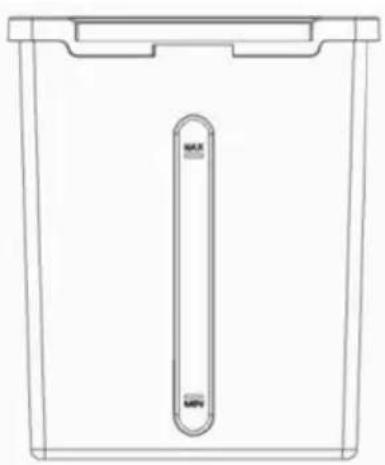
- Ensure that the water level in the tank does not exceed the maximum water level line. During cooling and humidification, the water level should not drop below the minimum water level line.
- When the water tank is full, do not lift the entire machine by its handle, as this may cause water overflow. Only use the handle for pushing the unit. Lift the machine by the handle only when you have confirmed that the water tank is empty or contains minimal water.
- While humidifying, it is strictly forbidden to disassemble or assemble the air filter net and wet curtain bracket, as this may result in water droplets spraying from the air outlet.
- When leaving or not using the machine for an extended period, be sure to turn it off and unplug the power cord from the socket.

WARNING
KEEP OUT OF REACH OF CHILDREN

natural_image
Blue circular icon with white human and child silhouettes, no text or symbols present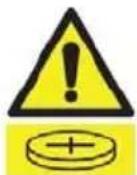
- Swallowing can lead to chemical burns, perforation of soft tissue, and death.
- If you suspect your child has swallowed or inserted a button battery, immediately call the 24-hour Poisons Information Centre on 13 11 26 (Australia) or 0800 764 766 (New Zealand) for fast, expert advice.
- Examine devices and make sure the battery compartment is correctly secured, e.g. that the screw or other mechanical fastener is tightened. Do not use if compartment is not secure.
- Dispose of used button batteries immediately and safely. Flat batteries can still be dangerous.
- Tell others about the risk associated with button batteries and how to keep their children safe.
- Severe burns can occur within 2 hours of ingestion. Seek medical attention immediately.
OVERVIEW
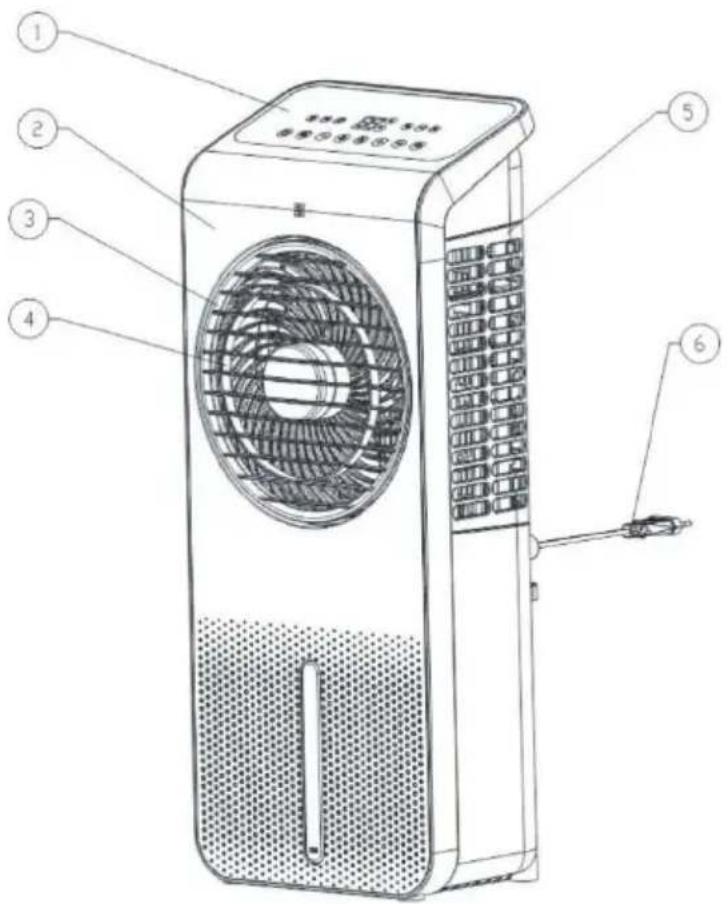
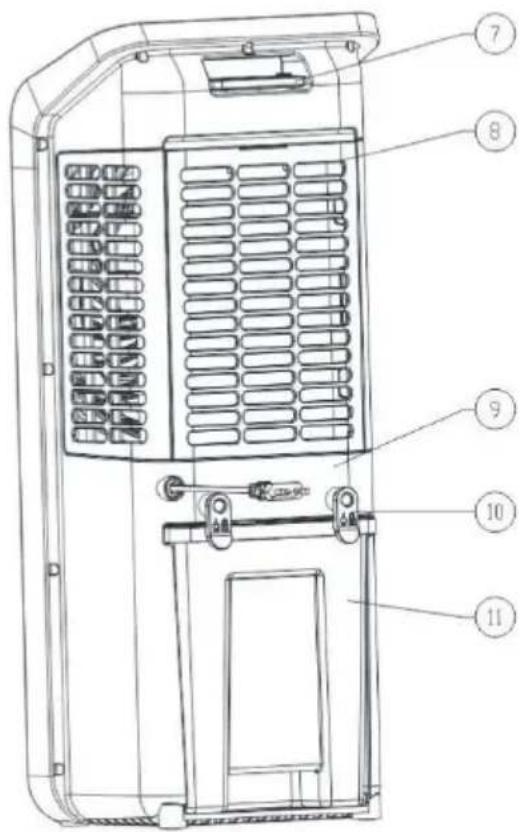
1 Control panel
2 Front cover
3 Front grille
4 Air duct
5 Side filter
6 Power cord
7 Remote control
8 Rear filter
9 Rear cover
10 Power cord bracket
11 Water tank
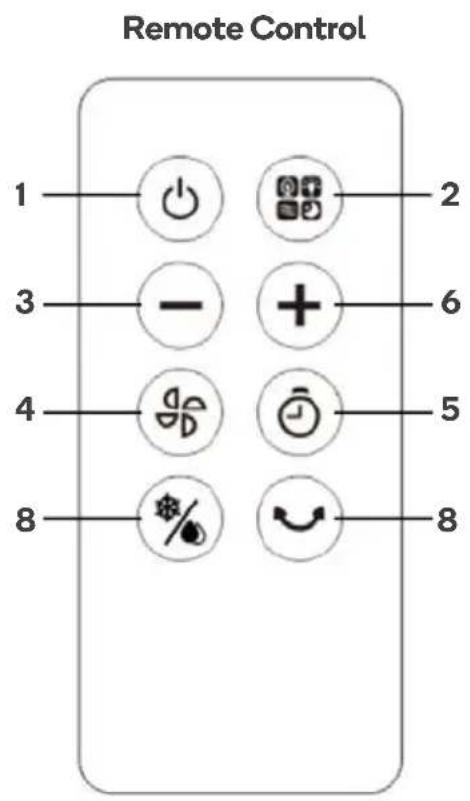
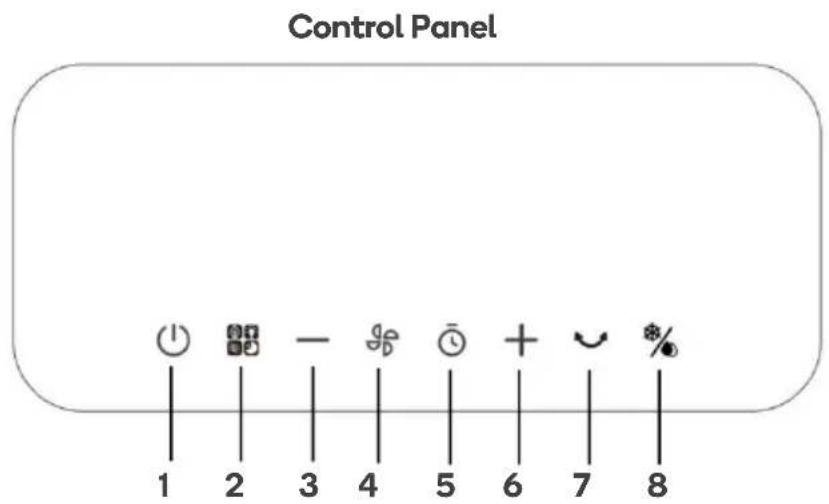
| 1 |  | Power |
| 2 |  | Mode |
| 3 |  | Decrease (fan speed/timer) |
| 4 |  | Fan speed |
| 5 |  | Timer |
| 6 |  | Increase (fan speed/timer) |
| 7 |  | Swing |
| 8 |  | Cooling/Humidifying |
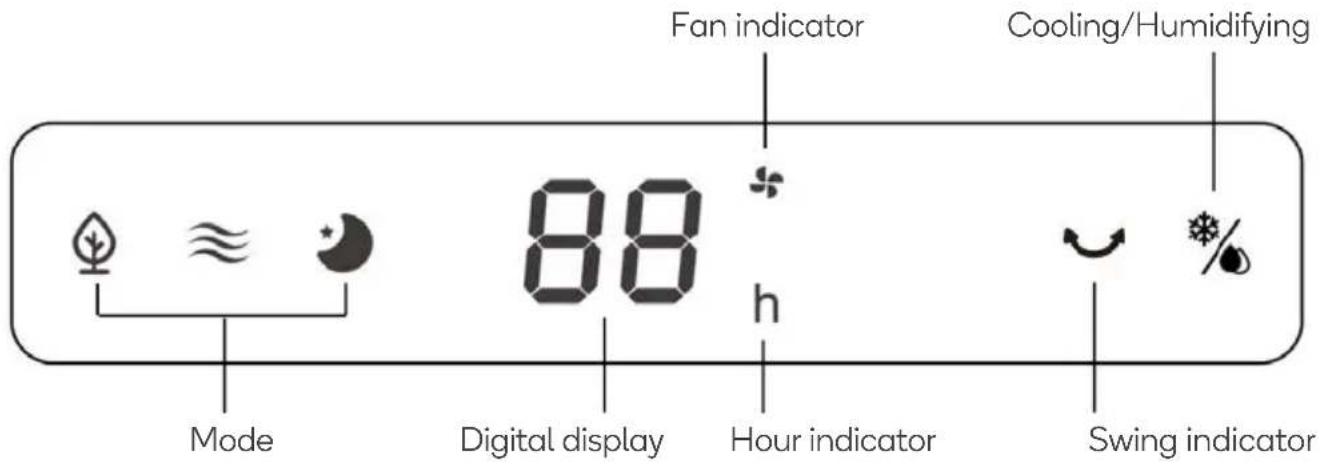
Display
INSTALLATION
Installing/Replacing Remote Battery
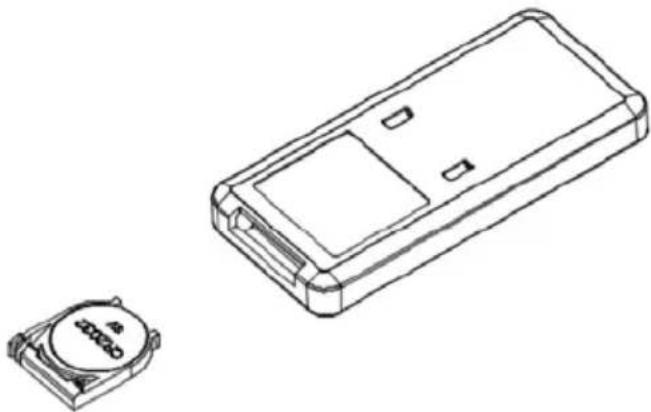
This remote control is powered using x1 CR2032 3V battery. Replace the battery when necessary.
- Place the remote control with the control buttons facing downward.
- Push the buckle on the battery cover inward and pull the battery slot out.
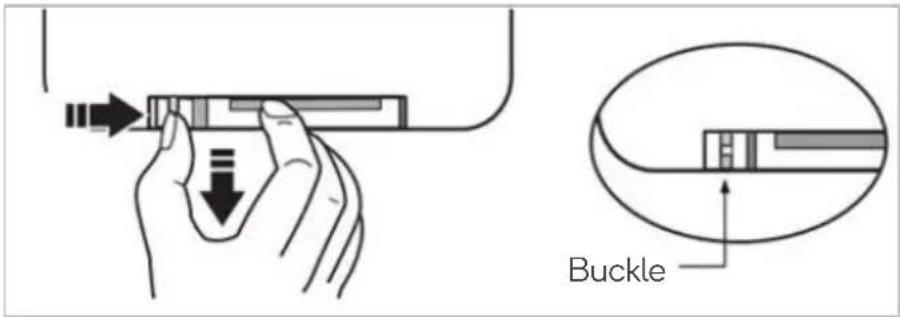
- Remove the old battery. Identify the battery polarity and insert a new battery onto the slot.
- Place the battery slot back into the bottom of the remote control. Ensure the battery slot is secure.
natural_image
Technical line drawing of a rectangular electronic device with a small circular component on the left (no text or symbols)Caster Installation
Ensure both casters are installed with the wheels facing outwards.
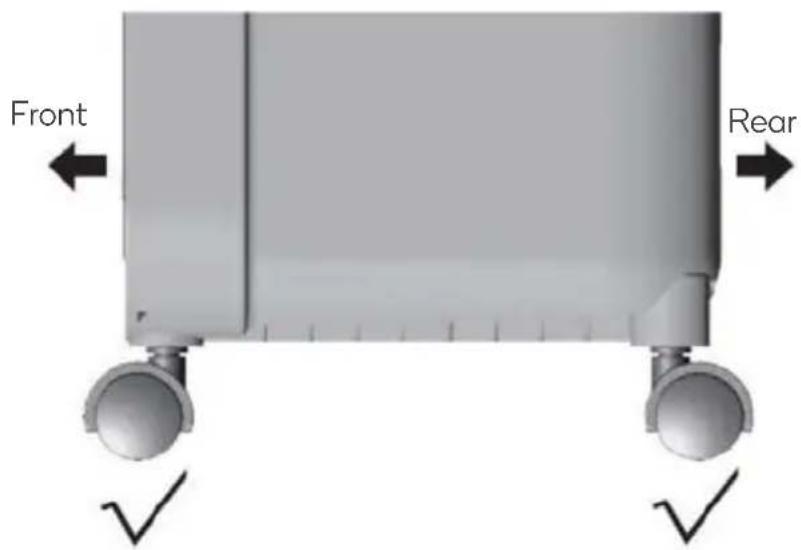
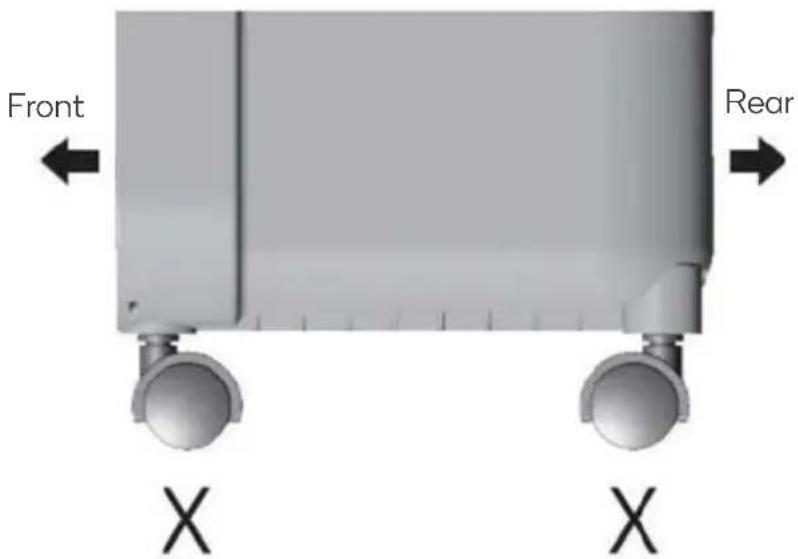
Note:
The casters have been designed to be a one-time installation. Once installed the casters are not easily removed. Ensure they are installed in the correct orientation the first time.
OPERATION
Connect the power cord to an electric outlet, the air cooler will ‘beep’ twice, the air cooler is now in standby. In standby all indicators expect for power are off. Pressing any button other than Power will be invalid.
| Name | Icon | Description |
| Power | 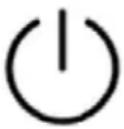 | When in standby, press the power button to turn the tower fan on. The fan speed will be set to 8 by default and the fan indicator on the display panel will illuminate.Press the power button again to turn the tower fan off and return to standby. |
| Speed | 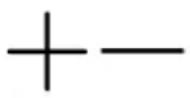 | This tower fan features 24 levels of speed.To adjust the speed, press fan speed button and then press the ‘+’ and ‘-’ buttons to set the fan between 1-24. The fan indicator on the display panel will illuminate. The level selected will show on the digital display.Press the ‘+’ button to increase the fan speed.Press the ‘-’ button to decrease the fan speed.During first use, the tower fan will run at 8th speed. |
| Timer |  | To turn the timer on, press the timer button and then press the ‘+’ and ‘-’ buttons to set the timer to a time between 1-12 hours. The timer indicator on the display panel will illuminate.When the timer has been set, the display panel will alternate showing the timer and the fan speed in 10 second intervals.To turn the timer off, press the timer button and then press the ‘-’ button until the timer reaches 0 hours. |
| Swing |  | Press the swing button to turn on the swing function. The swing indicator on the display panel will illuminate.Press the swing button again to turn the swing function off. The swing indicator on the display panel will disappear. |
Note:
After 1 minute without user input the indicator brightness will decrease to 30%. This is normal. Pressing the respective button will return the indicator to normal brightness.
| Modes |  | Press the mode button to change fan modes. The symbol for the selected mode will show on the display panel. Pressing and holding the mode button for 3 seconds will turn the display off. | |||
| Normal Mode | The air cooler will run at a constant speed. | ||||
| ≈ | |||||
| Natural Mode | The air cooler will run at each speed to create a breeze effect. | Low | 1st to 8th fan speeds. Digital display will read '8' | ||
| [YAB5] | Medium | 9th to 16th fan speeds. Digital display will read '16' | |||
| High | 17th to 24th fan speeds. Digital display will read '24' | ||||
| Sleep Mode | The air cooler will run with a timed downshift in speed, ideal for overnight use. | Low | 1st to 8th fan speeds. Low speed, normal fan runs. | ||
 | Medium | 9th to 16th fan speeds. Fan will run at medium speed for 30 minutes before switching to low-speed. | |||
| High | 17th to 24th fan speeds. Fan will run at high speed for 30 minutes before switching to medium. After another 30 minutes the fan will drop to low-speed. | ||||
Dry Air Mode
In this mode, the evaporative cooler primarily focuses on cooling the air by passing it through the cooling pads while minimizing the amount of water vapor introduced into the environment. It is useful in areas with already high humidity levels or when the user prefers a cooling effect without increasing the moisture content in the air.
- With the air cool on, press and hold the fan speed “💡” button for 3 second to enable the dry air mode. The fan indicator on the display panel will illuminate.
- Once enables, all buttons except the fan speed and power button will be invalid.
- To disable dry air mode, press and hold the fan speed button for 3 seconds.
- After running for 20 minutes, the air cooler will automatically shut down and enter standby.
Cooling/Humidifying
The Cooling/Humidifying mode is particularly beneficial in hot and dry climates where the air tends to be arid. By adding moisture to the air, the evaporative cooler can provide a more comfortable and refreshing indoor environment. The cooling effect is achieved through the evaporation process, which naturally reduces the air temperature, while the added humidity helps to alleviate dryness and improve overall comfort.
- To enable this mode, with the air cool on, press the cooling/humidifying “ %” button. The respective indicator on the display panel will illuminate.
• To disable, press the cooling/humidifying button again.
Low Water Alarm
When the water level becomes low, the water pump will stop working and the air cooler will 'beep' 10 times.
The water tank will need to be refilled.
Refilling Water
If you need to turn on the cooling and humidifying mode, ensure the water tank has been filled with water. Note: When the air cooler is used for the first time, there may be a slight odour and the water in the water tank will have a slight discoloration. This is a normal and will not affect your health or the operation of the air cooler.
To add water to the water tank:
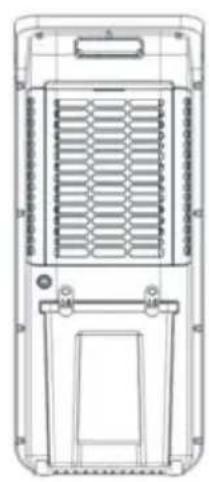
- Rotate the two locking tabs on the rear of the air cool.
- Remove the water tank.
natural_image
Technical line drawing of a multi-chamber electric fan or heat exchanger device (no text or symbols)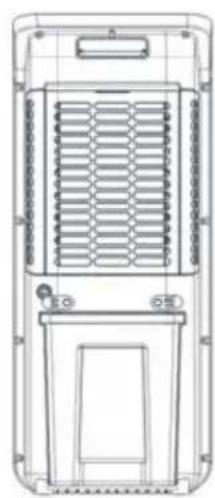
natural_image
Technical line drawing of a multi-chamber air vent or radiator system (no text or symbols)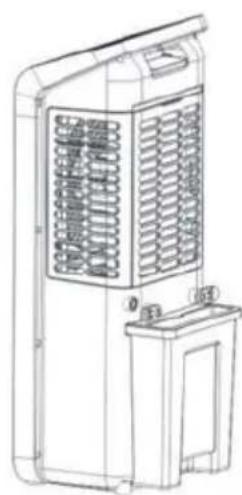
natural_image
Line drawing of a large industrial air conditioning unit with ventilation grilles and a side-mounted drain (no text or symbols)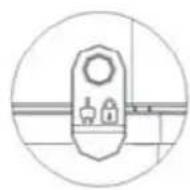
Locked
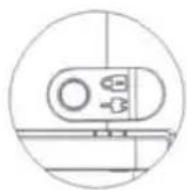
Unlocked
- Slowly refill the water tank with clean, cold water. Note: Do not exceed the maximum water level mark.
natural_image
Line drawing of a rectangular container with a vertical slot labeled MAX and MIN, no text or symbols present.Usage Ice Packs
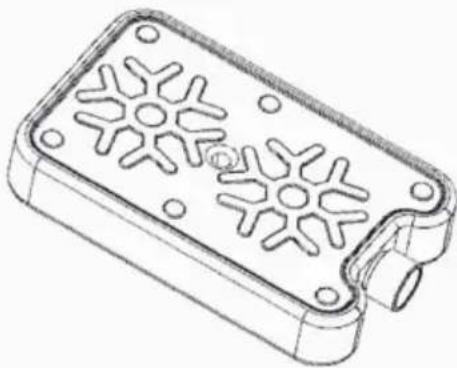
An ice pack can be added to the water tank to increase the cooling performance of the air cooler.
- Place one of the provided ice packs into the freezer until it is completely frozen.
- Open the water tank and add the frozen ice pack to the water.
- Replace the water tank.
natural_image
Technical line drawing of a rectangular electronic component with star-shaped cutouts and mounting holes (no text or symbols)Note:
Do not open the ice packs.
CLEANING & CARE
- Turn off the air cooler and disconnect it from power before cleaning.
- Do not use any harsh chemicals to clean this product.
Water Tank cleaning
- Unplug the power cord, unlock the release tab to the horizontal direction and pull out the water tank.
- Wipe off any scale from the water tank with a cloth dipped in a little detergent, then rinse with thoroughly before.
Surface cleaning
- To clean the surface of the air cooler, just wipe it with a damp cloth.
- Do not use corrosive detergents or solvents for cleaning.
Maintenance
- If the product is not to be used for an extended period, unplug the power plug, and store the air cooler to prevent dust from entering the body.
- Before storing, ensure that the ice pack, filters and all surfaces are dry and there is no water in the water tank.
SPECIFICATIONS
| Rated voltage | 220-240V~ |
| Rated frequency | 50Hz |
| Rated power | 24W |
| Noise (High speed) | ≤55dB |
| Rated output air volume | ≥280m3/h |
| Rated evaporation | ≥350mL/h |
| Energy efficiency ratio | 10W/W |
| Dimensions | L263.9 x W210.6 x H644.4mm |
| Net weight | 3.3±0.5Kg |
| Packing weight | 4.6±0.5Kg (Included the weight of two standard medium-sized ice pack) |
| Application environment | Relatively humidity less than 95% (25°C) |
NOTES
Need more information?
We hope that this user guide has given you the assistance needed for a simple set-up.
For the most up-to-date guide for your product, as well as any additional assistance you may require, head online to help.kogan.com
kogan.com
- SUPER SLIM EVAPORATIVE AIR COOLER
- SAFETY & WARNINGS
- WARNING
- KEEP OUT OF REACH OF CHILDREN
- OVERVIEW
- Display
- INSTALLATION
- Installing/Replacing Remote Battery
- Caster Installation
- Note:
- OPERATION
- Dry Air Mode
- Cooling/Humidifying
- Low Water Alarm
- Refilling Water
- Usage Ice Packs
- CLEANING & CARE
- Water Tank cleaning
- Surface cleaning
- Maintenance
- SPECIFICATIONS
- NOTES
- Need more information?
Brand : Kogan
Model : KASSDCEACLA
Category : Air conditioner