KAEGKBSPLTA - Keyboard Kogan - Free user manual and instructions
Find the device manual for free KAEGKBSPLTA Kogan in PDF.


| Product Type | Ergonomic Split Wireless Keyboard |
| Model | KAEGKBSPLTA |
| Brand | Kogan |
| Connectivity | 2.4GHz RF and Bluetooth |
| Number of Keys | 101 |
| Key Material | ABS |
| Colour | Black |
| Layout | US (QWERTY) |
| Interface | USB Receiver or Bluetooth |
| Power Source | 2 x AAA batteries (not included) |
| Operating Voltage | 3V |
| Operating Current | 5.13mA |
| Key Life | 8 million keystrokes |
| Dimensions (W x D x H) | 416 x 235 x 53 mm |
| System Compatibility | Windows 10/8/7/Vista/XP, macOS |
| Operating Temperature | 0°C to 45°C |
| Storage Temperature | -10°C to 60°C |
| Multimedia Keys | Home, Email, My Computer, Calculator |
| Special Features | Split ergonomic design, Fn media controls, dual mode |
| Maintenance | Clean with soft dry cloth; avoid liquids and abrasives |
| Safety | Do not expose to moisture or attempt disassembly |
| Spare Parts | Contact Kogan support for replacement parts |
Frequently Asked Questions - KAEGKBSPLTA Kogan
User questions about KAEGKBSPLTA Kogan
0 question about this device. Answer the ones you know or ask your own.
Ask a new question about this device
Download the instructions for your Keyboard in PDF format for free! Find your manual KAEGKBSPLTA - Kogan and take your electronic device back in hand. On this page are published all the documents necessary for the use of your device. KAEGKBSPLTA by Kogan.
USER MANUAL KAEGKBSPLTA Kogan
ERGO PRO SPLIT KEYBOARD
2.4GHZ & BLUETOOTH WIRELESS
KAEGKBSPLTA
FUNCTIONS
System Requirements
Windows 10, Windows 8, Windows 7, Windows Vista, Windows XP, MAC.
Keyboard Functions
• 2.4G: Press to enter 2.4G mode.
- Bt1: Press to enter Bluetooth 1 mode.
- Bt2: Press to enter Bluetooth 2 mode.
• Multimedia keys: Home page, Email, My computer, Calculator.
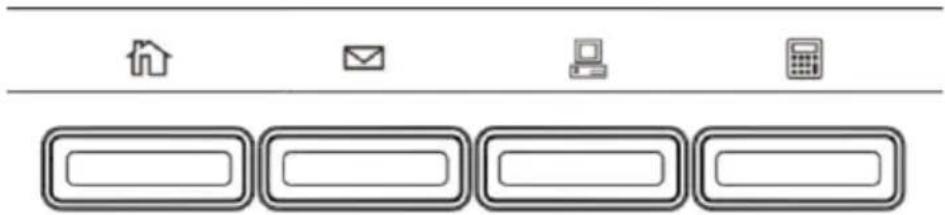
Multimedia Functions
| Fn+ | Key | Function | Key | Function |
| F1 | Media | F7 | Play/Pause | |
| F2 | Volume - | F8 | Stop | |
| F3 | Volume + | F9 | Screen brightness - | |
| F4 | Mute | F10 | Screen brightness + | |
| F5 | Previous track | F11 | Search | |
| F6 | Next track | F12 | Key lock | |
| Bt1 | Switch Bluetooth mode 1 | Bt2 | Switch Bluetooth mode 2 |
SPECIFICATIONS
Mode
Keys
Material
Colour
Layout
Interface type
Battery
Keyboard size
Operating Voltage
Operating current
Operating Life
Operating Temperature
Storage Temperature
2.4G + Bluetooth
101 keys
ABS
Black
US layout
USB receiver or Bluetooth
2 x AAA batteries (not included)
416 x 235 x 53mm
3V
5.13mA
8 million times
0^ 45^
-10°C\~60°C
Need more information?
We hope that this user guide has given you the assistance needed for a simple set-up.
For the most up-to-date guide for your product, as well as any additional assistance you may require, head online to help.kogan.com
kogan.com
Brand : Kogan
Model : KAEGKBSPLTA
Category : Keyboard