
KASLJUICERA - Juicer Kogan - Free user manual and instructions
Find the device manual for free KASLJUICERA Kogan in PDF.


| Brand | Kogan |
| Model | KASLJUICERA |
| Product Type | Cold Press Slow Juicer |
| Juice Container Capacity | 400 ml |
| Pulp Container Capacity | 400 ml (estimated) |
| Rated Power | 150 W (estimated) |
| Power Supply | 220–240 V, 50–60 Hz (typical) |
| Continuous Operation Time | 15 minutes |
| Required Rest Time Between Cycles | 30 minutes |
| Speed Settings | On / Off / Reverse (I/O/R) |
| Material (Housing) | ABS plastic |
| Material (Filter / Blade) | Stainless steel |
| Safety Features | Interlock switch between hopper and motor unit; blade guard; overheat protection via reset button |
| Included Accessories | Juice container, pulp container, hopper, food pusher, cleaning brush, buffer plate |
| Cleaning Method | Detachable parts washable in warm soapy water; motor unit wipe with damp cloth only |
| Warranty | Refer to Kogan support |
Frequently Asked Questions - KASLJUICERA Kogan
User questions about KASLJUICERA Kogan
0 question about this device. Answer the ones you know or ask your own.
Ask a new question about this device
Download the instructions for your Juicer in PDF format for free! Find your manual KASLJUICERA - Kogan and take your electronic device back in hand. On this page are published all the documents necessary for the use of your device. KASLJUICERA by Kogan.
USER MANUAL KASLJUICERA Kogan
natural_image
Close-up of a black and silver smoothie brush unit (no text or symbols visible)COLD PRESS SLOW JUICER
KASLJUICERA
SAFETY & WARNINGS
Read all instructions and safety warnings in this user guide before using this appliance for the first time. Retain this user guide for future reference.
- Ensure that the voltage power corresponds to the one indicated on the appliance nameplate.
- Do not operate the appliance if the cord or plug is damaged, or if the appliance malfunctions or has been damaged in any way. Cease use immediately and contact help.Kogan.com for support.
- The use of attachments, including sieves, lids, food pushers, or jars that are not recommended or sold by Kogan.com, may cause fire, electric shock, or injury.
- Do not place the appliance on or near a hot gas or electric burner, or in a heated oven.
- Do not allow the cord to hang over the edge of a table or counter.
- Never run the appliance without any food inside.
- Do not use the appliance if the rotating sieve is damaged.
- Avoid inserting your fingers or other objects into the juicer opening while it is in operation. If food becomes stuck, use the food pusher or another piece of fruit or vegetable to push it down. If this method is not possible, turn off the appliance, disconnect the power and disassemble the juicer to remove the remaining food.
- Do not push food into the hopper with your hand, spoon, chopstick, clip, or any other object besides the food pusher when the appliance is connected to a power source.
- Always ensure that the juicer cover is securely in place before turning on the motor. Do not unfasten the clamps while the juicer is in operation.
- Avoid contact with moving parts.
- After each use, ensure the juicer switch is in the off position. Ensure that the motor has completely stopped before disassembling.
- Do not immerse the motor unit in water or other liquids.
- After cleaning, ensure that all detachable parts are completely dry before reassembling them for the next use.
- Close supervision is necessary when any appliance is used by or near children.
- Ensure all users are familiar with this user guide and warned about the potential for injury from misuse.
-
If the supply cord is damaged, cease use immediately and contact help.Kogan.com for support.
-
Always disconnect the juicer from the power supply if it is left unattended, and before assembling, disassembling, or cleaning.
- This appliance should not be used by children. Keep the appliance and its cord out of the reach of children.
• Children should not play with the appliance. - Do not use the appliance if the blade or filter cover is damaged or has visible cracks.
- Switch off the appliance and disconnect it from the power supply before changing accessories or approaching parts that move during use.
- This appliance is not intended for use by persons (including children) with reduced physical, sensory or mental capabilities or lack of experience and knowledge, unless they have been given supervision or instruction concerning use of the appliance by a person responsible for their safety.
- This appliance is NOT suitable for use outdoors.
OVERVIEW

-
Attach the jar to the motor unit and ensure the symbol “” on the juicing bowl aligns with the symbol “” on the motor unit so that it can be locked in tightly.
-
Ensure the juicing bowl is correctly assembled with the buffer aligned with the inside of the residue outlet.
Buffer plate
Buffer plate
- Place the filter into the blade and then place them both into the juicing bowl. Ensure the symbol "▼" on the filter aligns with the symbol "♥" on the motor unit.

flowchart
graph LR
    A["Raw Material"] --> B["Add Product"]
    B --> C["Add Box"]
    C --> D["Add Box"]
    D --> E["Add Box"]
    E --> F["Final Product"]
    style A fill:#f9f,stroke:#333
    style F fill:#bbf,stroke:#333
- Insert the grinding head into the filter and ensure the grinding head is seated correctly within the motor unit.

natural_image
Diagram of a mechanical device showing a disassembly process from top to side view, with no text or symbols present.- Attach the hopper onto the juicing bowl and use align the symbols “!” on both pieces. When the symbols are aligned, rotate the hopper clockwise to lock it into place.
Note: Ensure the hopper is correctly installed otherwise the appliance will not operate.
- To disassemble the hopper from the motor unit, rotate it anticlockwise.
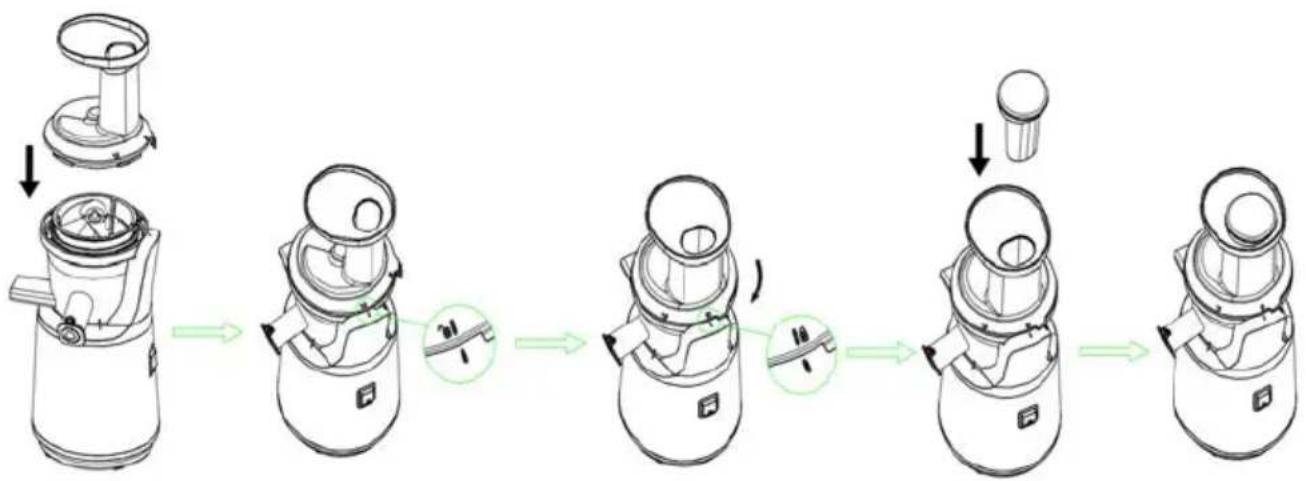
flowchart
graph LR
    A["Add food into blender"] --> B["Add food into blender with handle"]
    B --> C["Add food into blender with handle and handle"]
    C --> D["Add food into blender with handle and handle and handle"]
    D --> E["Add food into blender with handle and handle and handle"]
    E --> F["Add food into blender with handle and handle and handle"]
    F --> G["Add food into blender with handle and handle and handle"]
-
Place your juice container below the juice outlet and the pulp container below the pulp outlet.
-
The juicer is ready for operating.

natural_image
Line drawing of a modern kitchen brush unit with two cups (no text or symbols)BEFORE FIRST USE
- Remove the grinding assembly and the filter together and then separate them.
- Immerse all the detachable parts and accessories in warm soapy water and rinse them and dry everything thoroughly before assembly.

flowchart
graph LR
    A["Machine"] --> B["Shelter"]
    B --> C["Shelter"]
    C --> D["Shelter"]
    D --> E["Shelter"]
    E --> F["Shelter"]
WARNING: Do not immerse motor unit in water for cleaning to prevent the risk of electric shock.
- Prepare all the required ingredients according to the characteristics of them:
• Materials with hard fibres
- Cut into slices 3\~5cm in length and 1.5\~2cm in thickness.
- Leafy vegetables and materials with long & hard fibre (such as celery, wild celery herb and collard etc.)
- Cut the stems of the materials into slices 3\~5cm in length and then roll up the leaves of the materials well.
- Fruit with hard cores must be pitted. Do not place the cores of peach, plum, mango, apricot and other stone fruits into the hopper to avoid any malfunction.
- Ingredients with thick or hard peels must be peeled before being put into the juicer for processing.
- Frozen ingredients must be defrosted before juicing.
- Do not process ingredients with high vegetable oil or animal oil with this juicer to avoid the degradation and damage of the grinding head
- Do not juice sugarcane, coconut or cereals (e.g., bean, rice) without first being soaked in water to soften.
- Ensure the buffer plate is correctly in position before operating the juicer.
OPERATION
This juicer squeezes the fruit instead of grinding which allows the juice to maintain its pure colour, natural taste, nutrients and vitamins. The juice will flow in your juice container from the juice spout and the pulp will be ejected from pulp ejection spout and be collected by pulp container. When using the juicer, the pulp container and juice container must be assembled in position.
Power Switch
the power switch has three settings:
- “I” indicates “ON”, press the power switch to “I” position to activate the motor and start making juice.
- “O” indicates “OFF” position, press the power switch to “O” position to turn off the juicer.
- “R” means reverse rotation, which is only used when something is stuck and you need to unclog.
Using the Juicer
- Before connecting the power cord into the electrical outlet, ensure the power switch is in the "O" position.
- Ensure the juice container and the pulp container are placed in position.
- Cut fruits and vegetables into smaller pieces (15x15x15mm) before placing them into the juicer.
- Place the ingredients into the hopper and use the pusher to feed them into the grinding head.
- Connect the appliance to the power source and then press the power switch to the "I" position, the appliance starts to work. After few minutes, the juice flow out.
Notes:
- Do not turn the power switch from "I" to "R" or from "R" to "I" directly at any time during operation. Always allow the appliance stop running completely and then turn the power switch from "I" to "R" or from "R" to "I".
- Do not operate the unit before placing food into the hopper, to avoid damaging the grinding assembly (include grinding head and strainer).
- Do not put your fingers or other foreign objects into the feeding opening during operation.
Notes:
- Remove any hard seeds before juicing.
- It is not recommended to process coconuts or similar hard ingredients, since this may damage the motor.
- It is not recommended to process hard fruits or vegetables rich in fibre and starch, such as sugarcane.
-
The peel and pips should be removed from oranges, lemons, grapefruits and melons.
-
When the juice container is full (the max capacity is 400ml) or the food has finished extracting, turn the power switch to the "O" position and empty the juice container and residue container before continuing extracting.
- During operation, if the machine gets stuck, place the power switch to "O" position and then press the reset button located on the bottom of the appliance
- Press and hold the power switch in the "R" position for few seconds then try resuming operating.
- If the reverse function doesn't work, remove the ingredients and disassemble the juicer to clear any large pieces of food.
- Reassemble the juicer and resume operation.

Notes:
- Do not use the juicer for more than 15 minutes at a time. Ensure a minimum 30 minutes of rest between operating cycles.
- Do not overfill the juicer. Once the juice container is full, you must stop the appliance and empty the pulp container before next cycle.
- During operation, if the interlock switch between the hopper and the motor unit is disconnected, the motor will stop to prevent from danger.
CLEANING & CARE
- Unplug the appliance and wait for it to completely cool down before cleaning.
-
After extracting juice, pour some water into the hopper to clean it so that it will be easier to be detached.
-
Unlock the hopper by turning it in anti-clockwise and then remove it.
-
Detach the blade, filter and grinding head.
-
Rotate the juicing bowl anticlockwise and then remove it.
-
Empty the pulp container and then clean the hopper, grinding head, filter, blade, juicing bowl and pulp container under running water.
Note:
- The blade is sharp, so handle carefully during cleaning.
-
Do not use metal scourer to clean, this will damage the machine.
-
To clean the pulp outlet, remove the buffer plate and clean it using a small cleaning brush.
-
Wipe the outside of motor unit with damp cloth. Do not immerse the motor unit in water.
-
Dry all parts and assemble all parts and then store the appliance in a dry place.
-
The juice container can be stored in the pulp container.
Disposal

This marking indicates that this appliance should not be disposed with other household wastes. To prevent possible harm to the environment or human health from uncontrolled waste disposal, recycle it responsibly to promote the sustainable reuse of material resources.
NOTES
The Ground Truth image displays a single, solid horizontal line. According to Rule 2 (UNDERSCORE & LINE RULES), this is a stylistic or background line, not a placeholder underscore. Therefore, the OCR result must ignore it and output nothing or only meaningful text. The provided OCR content is "____", which consists of four underscores. This is an incorrect interpretation of the line as a fill-in-the-blank placeholder, violating the rule that stylistic lines must be ignored. The OCR has hallucinated underscores where none should exist based on the GT's visual context. Hence, the OCR result is inconsistent with the Ground Truth.
[Non-Text]
[Non-Text]
[EMPTY]
[Non-Text]
[Non-Text]
The Ground Truth image displays a single, continuous horizontal line, which is a stylistic or background element (like a ruled paper line). According to Rule 2, such lines must be ignored by the OCR result. The OCR content provided is "", which consists of no characters. Since the OCR output correctly ignores the background/stylistic line and produces no actual text, it complies with the “Stylistic/Background Lines (Ignore)” rule. Therefore, the OCR result is consistent with the Ground Truth.
[Non-Text]
[Non-Text]
[EMPTY]
[Non-Text]
[Non-Text]
The Ground Truth image displays a single, continuous horizontal line, which is a stylistic or background element (like a ruled paper line). According to Rule 2, such lines must be ignored by the OCR result. The provided OCR content is "____", which consists of underscores. Underscores are not equivalent to a solid line and are not permitted under the “Stylistic/Background Lines (Ignore)” rule. Outputting underscores for a stylistic line is incorrect because it misinterprets the line as a fill-in-the-blank placeholder. Since the OCR output incorrectly rendered a stylistic line as underscores (which should be ignored), this violates the rule. Therefore, the OCR result is inconsistent with the Ground Truth.
[Non-Text]
[Non-Text]
[NO TEXT]
[Non-Text]
[Non-Text]
The Ground Truth image displays a single, continuous horizontal line, which is a stylistic or background element (like a ruled paper line). According to Rule 2, such lines must be ignored by the OCR result. The provided OCR content is "____", which consists of underscores. Underscores are not equivalent to a solid line and are not permitted under the “Stylistic/Background Lines (Ignore)” rule. Outputting underscores for a stylistic line is incorrect because it misinterprets the line as a fill-in-the-blank placeholder. Therefore, the OCR result is inconsistent with the Ground Truth.
[Non-Text]
[Non-Text]
The Ground Truth image displays a single, continuous horizontal line, which is a stylistic or background element (like a ruled paper line). According to Rule 2, such lines must be ignored by the OCR result. The provided OCR content is "____", which consists of underscores. Underscores are not equivalent to a solid line and are not permitted under the “Stylistic/Background Lines (Ignore)” rule. Outputting underscores for a stylistic line is incorrect because it misinterprets the line as a fill-in-the-blank placeholder. Therefore, the OCR result is inconsistent with the Ground Truth.
[Non-Text]
[Non-Text]
The Ground Truth image displays a single, continuous horizontal line, which is a stylistic or background element (like a ruled paper line). According to Rule 2, such lines must be ignored by the OCR result. The provided OCR content is "____", which consists of underscores. Underscores are not equivalent to a solid line and are not permitted under the “Stylistic/Background Lines (Ignore)” rule. Outputting underscores for a stylistic line is incorrect because it misinterprets the line as a fill-in-the-blank placeholder. Therefore, the OCR result is inconsistent with the Ground Truth.
[Non-Text]
[Non-Text]
The Ground Truth image displays a single, continuous horizontal line, which is a stylistic or background element (like a ruled paper line). According to Rule 2, such lines must be ignored by the OCR result. The provided OCR content is "____", which consists of underscores. Underscores are not equivalent to a solid line and are not permitted under the “Stylistic/Background Lines (Ignore)” rule. Outputting underscores for a stylistic line is incorrect because it misinterprets the line as a fill-in-the-blank placeholder. Therefore, the OCR result is inconsistent with the Ground Truth.
[Non-Text]
[Non-Text]
The Ground Truth image displays a single, solid horizontal line, which is a stylistic or background element (like a rule line on paper). According to Rule 2, such lines must be ignored by the OCR result. The provided OCR content is "____", which consists of underscores. Underscores are not equivalent to a solid line and are not permitted under the “Stylistic/Background Lines (Ignore)” rule. Outputting underscores for a stylistic line is incorrect because it misinterprets the line as a placeholder fill-in-the-blank area. Since the OCR output incorrectly rendered a stylistic line as underscores (which should be ignored), this violates the rule. Therefore, the OCR result is inconsistent with the Ground Truth.
[Non-Text]
[Non-Text]
The Ground Truth image displays a single, solid horizontal line, which is a stylistic or background element (like a ruled paper line or separator), not a placeholder for text. According to Rule 2, such stylistic/background lines must be ignored by the OCR result. The OCR content provided is "", which consists of no characters. This correctly represents the absence of any textual content in the GT and correctly matches the visual line as a stylistic element. Therefore, the OCR output should have been empty or omitted this line entirely.
[Non-Text]
[Non-Text]
[Non-Text]
The Ground Truth image displays a single, solid horizontal line. According to Rule 2 (UNDERSCORE & LINE RULES), this is a stylistic or background line, not a placeholder underscore. Therefore, the OCR result must ignore it and output nothing or only meaningful text. The provided OCR content is "____", which consists of four underscores. This is an incorrect interpretation of the line as a placeholder, violating the rule that stylistic lines must be ignored. The OCR has hallucinated underscores where none should exist based on the GT's visual context. Hence, the OCR result is inconsistent with the Ground Truth.
[Non-Text]
[Non-Text]
The Ground Truth image displays a single, continuous horizontal line, which is a stylistic or background element (like a ruled paper line). According to Rule 2, such lines must be ignored by the OCR result. The provided OCR content is "____", which consists of underscores. Underscores are not equivalent to a solid line and are not permitted under the “Stylistic/Background Lines (Ignore)” rule. Outputting underscores for a stylistic line is incorrect because it misinterprets the line as a fill-in-the-blank placeholder. Therefore, the OCR result is inconsistent with the Ground Truth.
[Non-Text]
The Ground Truth image displays a single, solid horizontal line. According to Rule 2 (UNDERSCORE & LINE RULES), this is a stylistic or background line, not a placeholder underscore. Therefore, the OCR result must ignore it and output nothing or only meaningful text. The provided OCR content is "____", which consists of four underscores. This is an incorrect interpretation of the line as a placeholder, violating the rule that stylistic lines must be ignored. The OCR has hallucinated placeholder underscores where none should exist in the GT. Hence, the OCR result is inconsistent with the Ground Truth.
The Ground Truth image displays a single, solid horizontal line, which is a stylistic or background element (like a ruled paper line). According to Rule 2, such lines must be ignored by the OCR result. The provided OCR content is "____", which consists of underscores. Underscores are not equivalent to a solid line and are not permitted under the “Stylistic/Background Lines (Ignore)” rule. Outputting underscores for a stylistic line is incorrect because it misinterprets the line as a fill-in-the-blank placeholder. Since the OCR output incorrectly rendered a stylistic line as underscores (which should be ignored), this violates the rule. Therefore, the OCR result is inconsistent with the Ground Truth.
[Non-Text]
(1) AD = BD = 1
广力云智慧零售收银系统
The Ground Truth image displays a single, solid horizontal line. According to Rule 2 (UNDERSCORE & LINE RULES), this is a stylistic or background line, not a placeholder underscore. Therefore, the OCR result must ignore it and output nothing or only meaningful text. The provided OCR content is "____", which consists of four underscores. This is an incorrect interpretation of the line as a fill-in-the-blank placeholder, violating the rule that stylistic lines must be ignored. The OCR has hallucinated underscores where none should exist based on the GT's visual context. Hence, the OCR result is inconsistent with the Ground Truth.
[Non-Text]
[Non-Text]
[EMPTY]
[Non-Text]
[Non-Text]
The Ground Truth image displays a single, continuous horizontal line, which is a stylistic or background element (like a ruled paper line). According to Rule 2, such lines must be ignored by the OCR result. The OCR content provided is "", which consists of no characters. Since the OCR output correctly ignores the background/stylistic line and produces no actual text, it complies with the “Stylistic/Background Lines (Ignore)” rule. Therefore, the OCR result is consistent with the Ground Truth.
[Non-Text]
[Non-Text]
[EMPTY]
[Non-Text]
[Non-Text]
The Ground Truth image displays a single, continuous horizontal line, which is a stylistic or background element (like a ruled paper line). According to Rule 2, such lines must be ignored by the OCR result. The provided OCR content is "____", which consists of underscores. Underscores are not equivalent to a solid line and are not permitted under the “Stylistic/Background Lines (Ignore)” rule. Outputting underscores for a stylistic line is incorrect because it misinterprets the line as a fill-in-the-blank placeholder. Since the OCR output incorrectly rendered a stylistic line as underscores (which should be ignored), this violates the rule. Therefore, the OCR result is inconsistent with the Ground Truth.
[Non-Text]
[Non-Text]
[NO TEXT]
[Non-Text]
[Non-Text]
The Ground Truth image displays a single, continuous horizontal line, which is a stylistic or background element (like a ruled paper line). According to Rule 2, such lines must be ignored by the OCR result. The provided OCR content is "____", which consists of underscores. Underscores are not equivalent to a solid line and are not permitted under the “Stylistic/Background Lines (Ignore)” rule. Outputting underscores for a stylistic line is incorrect because it misinterprets the line as a fill-in-the-blank placeholder. Therefore, the OCR result is inconsistent with the Ground Truth.
[Non-Text]
[Non-Text]
The Ground Truth image displays a single, continuous horizontal line, which is a stylistic or background element (like a ruled paper line). According to Rule 2, such lines must be ignored by the OCR result. The provided OCR content is "____", which consists of underscores. Underscores are not equivalent to a solid line and are not permitted under the “Stylistic/Background Lines (Ignore)” rule. Outputting underscores for a stylistic line is incorrect because it misinterprets the line as a fill-in-the-blank placeholder. Therefore, the OCR result is inconsistent with the Ground Truth.
[Non-Text]
[Non-Text]
The Ground Truth image displays a single, continuous horizontal line, which is a stylistic or background element (like a ruled paper line). According to Rule 2, such lines must be ignored by the OCR result. The provided OCR content is "____", which consists of underscores. Underscores are not equivalent to a solid line and are not permitted under the “Stylistic/Background Lines (Ignore)” rule. Outputting underscores for a stylistic line is incorrect because it misinterprets the line as a fill-in-the-blank placeholder. Therefore, the OCR result is inconsistent with the Ground Truth.
[Non-Text]
[Non-Text]
The Ground Truth image displays a single, continuous horizontal line, which is a stylistic or background element (like a ruled paper line). According to Rule 2, such lines must be ignored by the OCR result. The provided OCR content is "____", which consists of underscores. Underscores are not equivalent to a solid line and are not permitted under the “Stylistic/Background Lines (Ignore)” rule. Outputting underscores for a stylistic line is incorrect because it misinterprets the line as a fill-in-the-blank placeholder. Therefore, the OCR result is inconsistent with the Ground Truth.
[Non-Text]
[Non-Text]
The Ground Truth image displays a single, solid horizontal line, which is a stylistic or background element (like a rule line on paper). According to Rule 2, such lines must be ignored by the OCR result. The provided OCR content is "____", which consists of underscores. Underscores are not equivalent to a solid line and are not permitted under the “Stylistic/Background Lines (Ignore)” rule. Outputting underscores for a stylistic line is incorrect because it misinterprets the line as a placeholder fill-in-the-blank area. Since the OCR output incorrectly rendered a stylistic line as underscores (which should be ignored), this violates the rule. Therefore, the OCR result is inconsistent with the Ground Truth.
[Non-Text]
[Non-Text]
The Ground Truth image displays a single, solid horizontal line, which is a stylistic or background element (like a ruled paper line or separator), not a placeholder for text. According to Rule 2, such stylistic/background lines must be ignored by the OCR result. The OCR content provided is "", which consists of no characters. This correctly represents the absence of any textual content in the GT and correctly matches the visual line as a stylistic element. Therefore, the OCR output should have been empty or omitted this line entirely.
[Non-Text]
[Non-Text]
[Non-Text]
The Ground Truth image displays a single, solid horizontal line. According to Rule 2 (UNDERSCORE & LINE RULES), this is a stylistic or background line, not a placeholder underscore. Therefore, the OCR result must ignore it and output nothing or only meaningful text. The provided OCR content is "____", which consists of four underscores. This is an incorrect interpretation of the line as a placeholder, violating the rule that stylistic lines must be ignored. The OCR has hallucinated underscores where none should exist based on the GT's visual context. Hence, the OCR result is inconsistent with the Ground Truth.
[Non-Text]
[Non-Text]
The Ground Truth image displays a single, continuous horizontal line, which is a stylistic or background element (like a ruled paper line). According to Rule 2, such lines must be ignored by the OCR result. The provided OCR content is "____", which consists of underscores. Underscores are not equivalent to a solid line and are not permitted under the “Stylistic/Background Lines (Ignore)” rule. Outputting underscores for a stylistic line is incorrect because it misinterprets the line as a fill-in-the-blank placeholder. Therefore, the OCR result is inconsistent with the Ground Truth.
[Non-Text]
The Ground Truth image displays a single, solid horizontal line. According to Rule 2 (UNDERSCORE & LINE RULES), this is a stylistic or background line, not a placeholder underscore. Therefore, the OCR result must ignore it and output nothing or only meaningful text. The provided OCR content is "____", which consists of four underscores. This is an incorrect interpretation of the line as a placeholder, violating the rule that stylistic lines must be ignored. The OCR has hallucinated placeholder underscores where none should exist in the GT. This adheres to the strict requirement to ignore such lines.
The Ground Truth image displays a single, solid horizontal line, which is a stylistic or background element (like a ruled paper line). According to Rule 2, such lines must be ignored by the OCR result. The provided OCR content is "____", which consists of underscores. Underscores are not equivalent to a solid line and are not permitted under the “Stylistic/Background Lines (Ignore)” rule. Outputting underscores for a stylistic line is incorrect because it misinterprets the line as a fill-in-the-blank placeholder. Since the OCR output incorrectly rendered a stylistic line as underscores (which should be ignored), this violates the rule. Therefore, the OCR result is inconsistent with the Ground Truth.
[Non-Text]
(No text)
广力云智慧零售收银系统
©
Brand : Kogan
Model : KASLJUICERA
Category : Juicer