
UCE3250 - USB extender ATEN - Free user manual and instructions
Find the device manual for free UCE3250 ATEN in PDF.


| Product Type | USB-C to HDMI Adapter |
| Brand | ATEN |
| Model | UCE3250 |
| Input Interface | USB-C (male) |
| Output Interface | HDMI (female) |
| Max Resolution | 4K @ 30 Hz (3840 x 2160) |
| Power Delivery Pass-Through | Up to 60W (USB-C PD 3.0) |
| Supported Audio Format | Multi-channel digital audio via HDMI |
| HDCP Support | HDCP 2.2 / 1.4 |
| Data Transfer Rate | 5 Gbps (USB 3.1 Gen 1) |
| Housing Material | Aluminum alloy |
| Dimensions (W x H x D) | 10.0 x 1.5 x 5.0 cm |
| Weight | 45 g |
| Operating Temperature | 0°C to 45°C |
| Storage Temperature | -20°C to 60°C |
| Power Source | Bus-powered (from host) or external PD charger (for pass-through) |
| Compatibility | USB-C devices supporting DP Alt Mode (e.g., laptops, tablets, smartphones) |
| Included Accessories | Quick Start Guide |
| Cleaning Instructions | Wipe with a soft, dry cloth. Do not use liquid cleaners. |
| Safety Precautions | Keep away from liquids and excessive heat. Do not disassemble. |
| Spare Parts Availability | Not applicable (unit is sealed; no user-serviceable parts) |
| Warranty | 2 years limited warranty |
Frequently Asked Questions - UCE3250 ATEN
User questions about UCE3250 ATEN
0 question about this device. Answer the ones you know or ask your own.
Ask a new question about this device
Download the instructions for your USB extender in PDF format for free! Find your manual UCE3250 - ATEN and take your electronic device back in hand. On this page are published all the documents necessary for the use of your device. UCE3250 by ATEN.
USER MANUAL UCE3250 ATEN
natural_image
Two ATEN USB 2.0 Extender Remote Unit devices shown from different angles (no text or symbols on the device bodies)EMC Information
FEDERAL COMMUNICATIONS COMMISSION STATEMENT:
This equipment has been tested and found to comply with the limits for a Class B digital device, pursuant to Part 15 of the FCC Rules. These limits are designed to provide reasonable protection against harmful interference in a residential installation. This equipment generates, uses and can radiate radio frequency energy and, if not installed and used in accordance with the instructions, may cause harmful interference to radio communications.
However, there is no guarantee that interference will not occur in a particular installation. If this equipment does cause harmful interference to radio or television reception, which can be determined by turning the equipment off and on, the user is encouraged to try to correct the interference by one or more of the following measures:
◆ Reorient or relocate the receiving antenna.
- Increase the separation between the equipment and receiver.
- Connect the equipment into an outlet on a circuit different from that to which the receiver is connected.
- Consult the dealer or an experienced radio/television technician for help.
FCC Caution: Any changes or modifications not expressly approved by the party responsible for compliance could void the user's authority to operate this equipment.
This device complies with Part 15 of the FCC Rules. Operation is subject to the following two conditions:
- This device may not cause harmful interference, and
- This device must accept any interference received, including interference that may cause undesired operation
Suggestions:
Shielded twisted pair (STP) cables must be used with the unit to ensure compliance with FCC & CE standards.
This product is RoHS compliant.

Safety
This product has been classified as Information Technology Equipment.
User Information
Online Registration
Be sure to register your product at our online support center:
International http://eservice.aten.com
Telephone Support
For telephone support, call this number:
| International 886-2-8692-6959 |
| China 86-400-810-0-810 |
| Japan 81-3-5615-5811 |
| Korea 82-2-467-6789 |
| North America 1-888-999-ATEN ext 4988 or 1-949-428-1111 |
User Notice
All information, documentation, and specifications contained in this manual are subject to change without prior notification by the manufacturer. The manufacturer makes no representations or warranties, either expressed or implied, with respect to the contents hereof and specifically disclaims any warranties as to merchantability or fitness for any particular purpose. Any of the manufacturer's software described in this manual is sold or licensed as is. Should the programs prove defective following their purchase, the buyer (and not the manufacturer, its distributor, or its dealer), assumes the entire cost of all necessary servicing, repair and any incidental or consequential damages resulting from any defect in the software.
The manufacturer of this system is not responsible for any radio and/or TV interference caused by unauthorized modifications to this device. It is the responsibility of the user to correct such interference.
The manufacturer is not responsible for any damage incurred in the operation of this system if the correct operational voltage setting was not selected prior to operation. PLEASE VERIFY THAT THE VOLTAGE SETTING IS CORRECT BEFORE USE.
© Copyright 2018 ATEN® International Co., Ltd.
ATEN and the ATEN logo are registered trademarks of ATEN International Co., Ltd. All rights reserved. All other brand names and trademarks are the registered property of their respective owners.
Package Contents
◆ 1 UCE3250L 4-port USB 2.0 Cat 5 Extender (local unit)
◆ 1 UCE3250R 4-port USB 2.0 Cat 5 Extender (remote unit)
◆ 1 USB Type-A Male to Type-B Male Cable
◆ 1 Power Adapter
◆ 1 User Instructions
Note: Make sure that all of the items are present and in good order. If anything is missing or was damaged in shipping, please contact your dealer for further assistance.
Contents
EMC Information .... ii
RoHS....iii
Safety .iii
User Information ....iii
User Notice iv
Package Contents....v
Introduction 1
Overview 1
Features 1
Hardware Components 2
Hardware Setup 3
Installation 3
Wall Mount 4
Technical Support 5
Specifications 6
Limited Warranty 7
Overview
The UCE3250 4-port USB 2.0 Cat 5 Extender is a two-unit device that serves as a USB hub and a USB extender. The UCE3250 unit can connect as many as 4 USB peripherals from up to 50 meters away from your computer over a Cat 5 / 5e / 6 Ethernet cable.
The UCE3250 transmits data through signal packages with better compatibility and preserves the integrity of the data over long distances. The power supply at the remote UCE3250 unit helps provide sufficient power to any type of USB device, such as flash drives, keyboards, mice, webcams, scanners, or printers, etc.
With its durable metal housing, this high-quality USB extender provides a fast and flexible solution for industrial applications. In addition, the compact size and integrated wall mounting enables space-saving installation.
Features
◆ High-Speed USB 2.0 compliant with a data transfer rate of up to 480 Mbps
◆ Extension distance of up to 50m over a Cat 5/5e/6 cable
- Receives up to 4 USB peripherals of all types – flash drives, keyboards, mice, webcams, scanners, printers and more
◆ Metal casing with wall mount design supports industrial deployment
◆ Supports Windows, OS X, and Linux
Plug-and-play
Supported Operating System
The UCE3250 supports computers using the following operating systems.
| Operating System Version | ||
| Windows Vista, XP, 7, 8, 8.1, | 10 | |
| Linux RedHat 6.0 or higher | ||
| Mac OS 9 or higher | ||
Hardware Components
UCE3250L Rear View UCE3250R Rear View

| No. | Component Description |
| 1 | USB Type-B Port Receives a USB Type-A male to male cable that connects the UCE3250L to the computer in your setup. |
| 2 | Link Port Receives a Cat 5/5e/6 cable that sends and transmits data between the UCE3250L and the UCE3250R. |
| 3 | Power Jack Receives the power adapter. |
| 4 | Power LED Lights red to indicate that the power is being supplied to the unit. |
| 5 | Link LED Lights green to indicate that the USB connection between the UCE3250L and the UCE3250R is stable. |
| 6 | Activity LED Flashes amber to indicate that data is being transmitted between the UCE3250L and UCE3250R. |
| 7 | USB Type-A Ports Receive USB cables to connect to USB peripherals you wish to access from the computer in your setup. |
Hardware Setup
Installation
Follow the illustration and the steps below to safely install your UCE3250 unit.
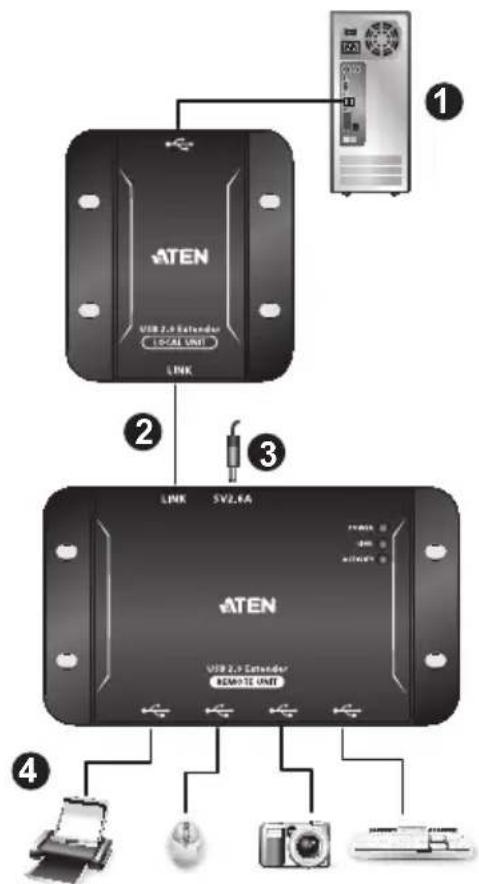
- Connect the UCE3250L's USB Type-B Port to a computer using the supplied USB Type-B Male to Type-A Male Cable.
- Connect the Link Ports of UCE3250L and UCE3250R with a Cat 5/5e/6 cable.
- Plug the supplied power adapter into an AC power source, and then plug the other end into the UCE3250R's Power Jack.
- Use USB cables to connect up to 4 USB 2.0 peripheral devices to the UCE3250R's USB Type-A Ports.
Wall Mount
The UCE3250 can also be mounted on the wall as illustrated below.

Technical Support
International
- For online technical support – including troubleshooting, documentation, and software updates: http://eservice.aten.com
- For telephone support, Telephone Support, page iii.
North America
| Email Support support@aten-usa.com | ||
| Online Technical Support | Troubleshooting Documentation Software Updates | http://www.aten-usa.com/support |
| Telephone Support 1-888-999-ATEN | ext 4988 | |
When you contact us, please have the following information ready beforehand:
◆ Product model number, serial number, and date of purchase.
- Your computer configuration, including operating system, revision level, expansion cards, and software.
◆ Any error messages displayed at the time the error occurred.
- The sequence of operations that led up to the error.
◆ Any other information you feel may be of help.
Specifications
| Function UCE3250L UCE3250R | |||
| Connectors USB Port | 1 x USB Type-B Female | 4 x USB Type-A Female | |
| USB Link 1 x RJ-45 Female | 1 x RJ-45 Female | ||
| Power N/A 1 x DC Jack | |||
| USB Specification 2.0 / 1.1 High / Full / Low Speed | |||
| USB Devices Support N/A 4 USB devices | |||
| Power Consumption Bus-powered Self-powered,DC 5V, 13W | |||
| Environmental | Operating Temperature | 0–50°C | |
| Storage Temperature | -20–70°C | ||
| Humidity | -20% – 80% RH, Non-condensing | ||
| Physical Properties | Housing | Metal | |
| Weight | 0.09 kg | 0.16 kg | |
| Dimensions (L x W x H) | 6.70 x 6.02 x 2.37 cm | 6.33 x 11.04 x 2.41 cm | |
Limited Warranty
ATEN warrants its hardware in the country of purchase against flaws in materials and workmanship for a Warranty Period of two [2] years (warranty period may vary in certain regions/countries) commencing on the date of original purchase. This warranty period includes the LCD panel of ATEN LCD KVM switches. Select products are warranted for an additional year (see A+ Warranty for further details). Cables and accessories are not covered by the Standard Warranty.
What is covered by the Limited Hardware Warranty
ATEN will provide a repair service, without charge, during the Warranty Period. If a product is detective, ATEN will, at its discretion, have the option to (1) repair said product with new or repaired components, or (2) replace the entire product with an identical product or with a similar product which fulfills the same function as the defective product. Replaced products assume the warranty of the original product for the remaining period or a period of 90 days, whichever is longer. When the products or components are replaced, the replacing articles shall become customer property and the replaced articles shall become the property of ATEN.
To learn more about our warranty policies, please visit our website:
http://www.aten.com/global/en/legal/policies/warranty-policy/
- EMC Information
- FEDERAL COMMUNICATIONS COMMISSION STATEMENT:
- Suggestions:
- Safety
- User Information
- Online Registration
- Telephone Support
- User Notice
- Package Contents
- Contents
- Overview
- Features
- Supported Operating System
- Hardware Components
- Hardware Setup
- Installation
- Wall Mount
- Technical Support
- International
- Limited Warranty
- What is covered by the Limited Hardware Warranty
Brand : ATEN
Model : UCE3250
Category : USB extender