
ECP-01T - Network card / adapter Lorex - Free user manual and instructions
Find the device manual for free ECP-01T Lorex in PDF.


| Product Type | Network Card / Adapter |
| Brand | Lorex |
| Model | ECP-01T |
| Interface | PCI Express x1 |
| Ethernet Ports | 1 x RJ-45 |
| Data Rate | 10/100/1000 Mbps |
| Standards | IEEE 802.3, 802.3u, 802.3ab |
| Dimensions | 120 mm x 80 mm x 20 mm |
| Weight | 50 g |
| Power Consumption | 2.5 W (from PCIe slot) |
| Operating Temperature | 0°C to 40°C |
| Storage Temperature | -20°C to 70°C |
| Operating Humidity | 10% to 90% non-condensing |
| LED Indicators | Link/Activity |
| Compatible Operating Systems | Windows, Linux, macOS |
| Maintenance | Keep connectors clean; avoid dust |
| Safety | FCC, CE certified |
| Spare Parts | None user-serviceable |
| General Information | Wired network adapter for desktop PCs |
Frequently Asked Questions - ECP-01T Lorex
User questions about ECP-01T Lorex
0 question about this device. Answer the ones you know or ask your own.
Ask a new question about this device
Download the instructions for your Network card / adapter in PDF format for free! Find your manual ECP-01T - Lorex and take your electronic device back in hand. On this page are published all the documents necessary for the use of your device. ECP-01T by Lorex.
USER MANUAL ECP-01T Lorex
Please read carefully the instruction manual before use. Contents of this manual are subject to change without prior notice for reasons such as functionality enhancements.
Rev.6.7
Package

natural_image
Technical line drawing of two rectangular electronic components with ports and connectors (no text or symbols)ECP-01T (Transmitter) ECP-01R (Receiver)

Quick Start Guide
Hardware Overview
Right

Left

Top
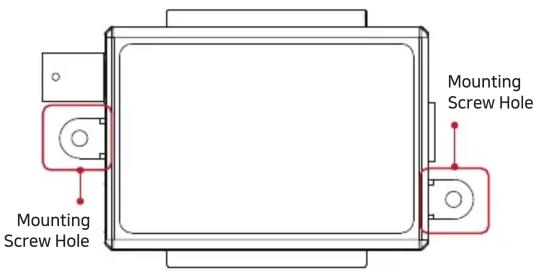
LED Indicators
| Indicator Color Function | ||
| LINK | Ethernet Data Act | |
| ACT | Ethernet Connect Act | |
ECP-01 Series are High-Speed, long distance Ethernet & PoE extender that makes possible to transmit the Ethernet signal and PoE up to 400m through coaxial cables in different situations.
It is cost-effective and time saving solution to migrate existing analog system to IP based system since ECP-01 series support easy installation utilizing the existing coaxial cable.
With long distance transmission feature, the device makes to overcome 100 meters distance limitation easily and reduces the construction cost significantly compared with fiber optic configuration.
Overview
- Long reach Ethernet & PoE extension over existing coaxial cable
- Data + Power over coaxial cable
- Data distance up to 1000 m
- 100Mpbs Full Duplex
- PoE, PoE+, Extra PoE (Max. 60W PoE output, ECP-01T model only with DC Power adapter)
- LED Indication (Data, Power)
- Plug & Play
- Support PoE, PoE+ Input (25.5W) from PoE Switch / PoE NVR (ECP-01R model only)
- Slim design
Installation Guide
- Connect Ethernet cable (Cat5e or better) from PoE Switch/NVR to ECP-01R. Check LEDs on ECP-01R.
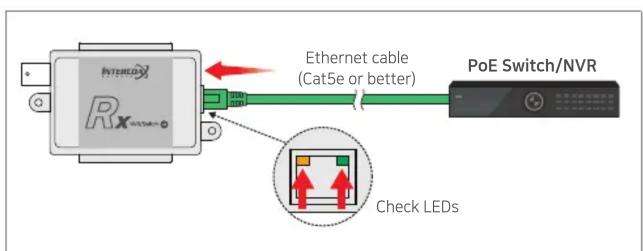
- Connect coaxial cable (RG59 or better) to ECP-01R. Connect coaxial cable from ECP-01R to ECP-01T.
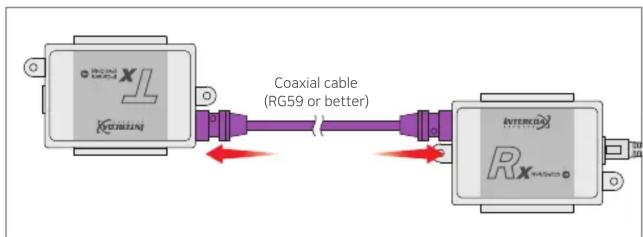
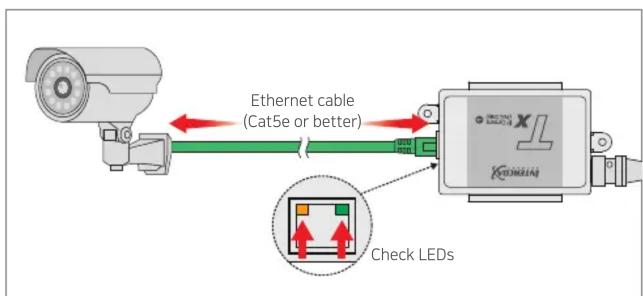
- Connect Ethernet cable (Cat5e or better) from ECP-01T to IP Camera (PoE Model Only). Check LEDs on ECP-01T.
→ Set ECP-01T, PoE Switch ON to supply direct power to IP camera. Set ECP-01T, PoE Switch OFF to connect PC or network switch devices.
Applications
[Simply IP and PoE over Coax]

flowchart
graph LR
    A["PoE Camera"] --> B["ECP-01T"]
    B --> C["Coaxial Cable"]
    C --> D["EoC"]
    D --> E["ECP-01R"]
    E --> F["PoE NVR"]
    F --> G["Computer"]
[High Power over Coax]

flowchart
graph LR
    A["PoE Camera"] --> B["ECP-01T"]
    B --> C["Coaxial Cable"]
    C --> D["57V DC/1.2A Power Supply (Sold Separately)"]
    D --> E["ECP-01R"]
    E --> F["NVR"]
    F --> G["Computer"]
    style A fill:#f9f,stroke:#333
    style B fill:#ccf,stroke:#333
    style C fill:#cfc,stroke:#333
    style D fill:#fcc,stroke:#333
    style E fill:#cff,stroke:#333
    style F fill:#ffc,stroke:#333
    style G fill:#cfc,stroke:#333
[Extra PoE (60W) over Coax]

flowchart
graph LR
    A["PoE Camera"] --> B["ECP-01T"]
    B --> C["57V DC/1.2A Power Supply (Sold Separately)"]
    C --> D["Coaxial Cable"]
    D --> E["ECP-01R"]
    E --> F["PoE NVR/NVR"]
    F --> G["Computer"]
    style A fill:#f9f,stroke:#333
    style B fill:#ccf,stroke:#333
    style C fill:#cfc,stroke:#333
    style D fill:#fcc,stroke:#333
    style E fill:#cff,stroke:#333
    style F fill:#ffc,stroke:#333
    style G fill:#cfc,stroke:#333
Specification
| Model ECP-01T ECP-01R | |||
| Interface | Coax | 1 x 75Ω BNC (Female)- Ethernet over Coax (B-LinX) | |
| Ethernet 1 x RJ45 - 100 Base-T | |||
| Transmission Rate | 100Mbps Full Duplex(100Mbps between Intercoax devices) | ||
| Transmission Distance | Ethernet | up to 400 m when 100Mbps is usedup to 1000 m when 10Mbps is used(5C-HFBT, RG-59 or better) | |
| PoE (PoC) up to 400meter (RG-59, RG-6) | |||
| LED Indication | Ethernet 1 x Link (Yellow) / 1 x ACT (Green) | ||
| Power | Input B-Linx or DC48V~57V | PoE Switch orDC48V~57V | |
| PoE Output | IEEE802.3af (PoE),IEEE802.3at (PoE+),Extra PoE up to 60Wwith 57V Power Adaptor | PoE NotSupportedPoC Only | |
| Mechanical | Dimension 83(L) x 51(W) x 24(H)mm | ||
| Weight 52g | |||
| Environment | Operating Temp | -20 ~ 60°C | |
| Storage Temp | -30 ~ 80°C | ||
| Relative Humidity | 10% ~ 90% | ||
| Compliance | Certification FCC, CE, KC, RoHS | ||
| Surge Protection | IEC 61000-4-5 4kV(1.2 / 50us),2kA(8 / 20us) | ||
| Optional Accessories 57VDC / 1.2A External Power Supply | |||
Caution
- Please install the device following the installation guide.
- Do not touch the device and cable with wet hands.
- Keep away from moisture and shock.
- Do not install near any heat sources such as radiators, heat registers, stoves or other apparatus that produce heat.
- Indoor use only. (Use waterproof junction box when it is used in outdoor)
- Do not use for other purposes.
- Do not disassemble or modify this device.
- Do not put any sticker or paint on it.
- If this device is defective or malfunctioning, please unplug the power source immediately and contact dealer or service center.
- Please use the rated power supply for the product.
- Connect DC power to this device first and then to AC outlet.
Warranty
- This device has passed the quality control and product inspection.
- Please install and use according to the installation guide.
- The warranty period for this product is 24 months from the date of purchase.
- If this device is defective or malfunctioning, please unplug the power adapter immediately and contact dealer or service center.
- Any damages or breakage from user's abuse, accident, modification or natural disasters will not be covered manufacturer's warranty.


Intercoax Co., Ltd.
Please visit below website for more detailed information.
Web: http://www.intercoax.com Tel: +82.31.365.3133\~4
E-mail: info@intercoax.com Fax: +82. 31. 365. 3135
This device complies with part 15 of the fcc rules. Operation is subject to the following two conditions :
(1) This device may not cause harmful interference, and
(2) This device must accept any interference received including interference that may cause undesired operation
Brand : Lorex
Model : ECP-01T
Category : Network card / adapter