
SWALPH-B400RWPK1 - Lighting SWANN - Free user manual and instructions
Find the device manual for free SWALPH-B400RWPK1 SWANN in PDF.


| Product Type | Wireless Motion Sensor Spotlight with Remote Control |
| Brand | Swann |
| Model | SWALPH-B400RWPK1 |
| Power Source (Spotlight) | 4 x D 1.5V batteries (alkaline or lithium, not included) |
| Power Source (Remote) | 1 x CR2025 3V battery (pre-installed) |
| Light Type | LED Light and Red Enforcer LED Lights |
| Motion Detection Range | Adjustable sensitivity: Low up to 3m/10ft, Medium up to 6m/20ft, High up to 8m/26ft |
| Remote Control Range | Up to 12m/40ft with line of sight |
| Auto-off Timer (Motion Mode) | 20 seconds after last motion detected |
| Manual Override | 10 minutes or indefinite until power off via remote |
| Operation Modes | Light on Motion, Enforcer on Motion, Off (1 hour then revert to Light on Motion) |
| Mounting | Wall or surface mount with included screws and anchors, adjustable angle via knuckle screw |
| Battery Safety | Use only new alkaline or lithium batteries; do not mix old/new or battery types; observe polarity |
| Warranty | 1 year limited warranty from original purchase date |
| FCC Compliance | Class B digital device |
Frequently Asked Questions - SWALPH-B400RWPK1 SWANN
User questions about SWALPH-B400RWPK1 SWANN
0 question about this device. Answer the ones you know or ask your own.
Ask a new question about this device
Download the instructions for your Lighting in PDF format for free! Find your manual SWALPH-B400RWPK1 - SWANN and take your electronic device back in hand. On this page are published all the documents necessary for the use of your device. SWALPH-B400RWPK1 by SWANN.
USER MANUAL SWALPH-B400RWPK1 SWANN
Wireless Motion Sensor Spotlight
with Remote Control
EN
Instruction Manual
Spotlight

Remote Control
Override sensor and manually turn LED Light ON for 10 minutes. After 10 minutes, the spotlight will automatically revert to sensor mode
Power OFF.
The spotlight will automatically switch back to "Light on
Motion" mode after 1 hour if no other button is pressed
Set LED Light to stay OFF when motion is detected
Set Enforcer Lights to stay OFF when motion is detected
Set motion sensor sensitivity to Low. Detection range is up to 3m/10ft
Set motion sensor sensitivity to Medium. Detection range is up to 6m/20ft
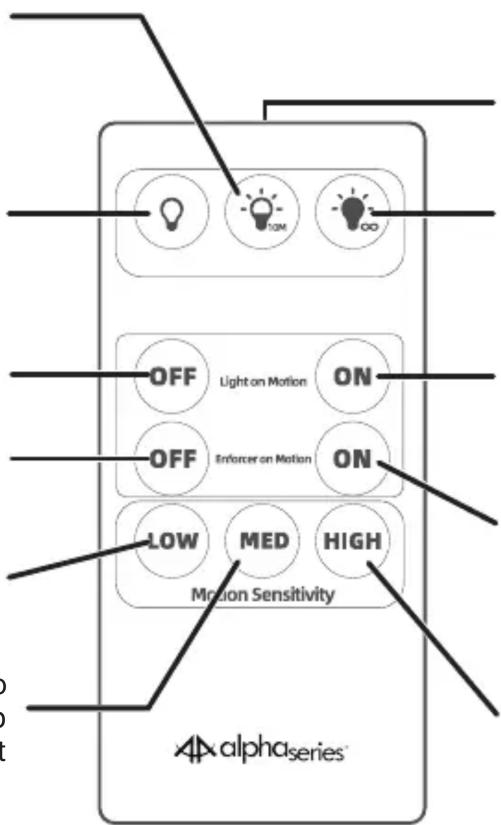
Infrared transmitter
Override sensor and manually turn LED Light ON for an indefinite amount of time until you press the Power OFF button
Set LED Light to automatically turn ON when motion is detected. LED Light will turn off 20 seconds after no motion is detected
Set Enforcer Lights to automatically turn ON when motion is detected. Enforcer Lights will turn off 20 seconds after no motion is detected
Set motion sensor sensitivity to High. Detection range is up to 8m/26ft
Keeping the LED Light on continuously for prolonged periods of time will significantly shorten battery lifespan and reduce operating time.
BATTERY INSTALLATION
Spotlight
The spotlight requires four size D 1.5V batteries (not included). For reliable, long-lasting performance, use only high quality alkaline or lithium batteries. To install batteries:
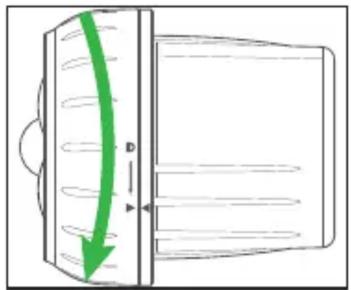
- Turn the front cover of the spotlight counter-clockwise to the unlock position, as shown below, to release and remove the cover.
natural_image
Diagram of a device with a green arrow indicating direction, showing internal components and no text or symbols.- Insert batteries according to the polarity markings (+ and -) indicated inside the battery compartment.

natural_image
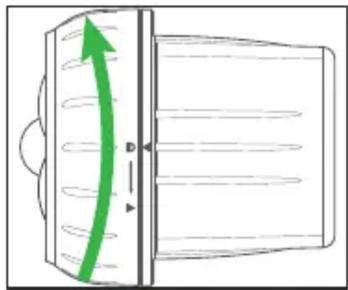
Diagram showing two cylindrical batteries above a circular component with green arrows indicating internal structure (no text or symbols)- Align the marks then turn the front cover clockwise to the lock position, as shown below, to secure the battery compartment.
natural_image
Diagram of a device with a green curved arrow indicating rotation or direction, no text or symbols presentRemote Control
The remote control is powered by one CR2025 3V battery which comes pre-installed.
• To activate the battery, simply pull the plastic film out from the bottom of the remote control.
- To replace the battery, push the tab on the left of the battery tray towards the right and pull out the battery tray from the remote, as shown in the diagram on the back of the remote. Place one new "CR2025" battery on the tray with the positive (+) side facing up. Insert the tray back into the remote.
USING THE REMOTE CONTROL
- When aiming the remote control towards the spotlight, ensure that the distance is within 12m/40ft and there is no obstruction between the remote control and the spotlight.
- When you press a button on the remote control, the spotlight will flash the red Enforcer LED light once to confirm it has received the command.
-
If you set both "Light on Motion" and "Enforcer on Motion" to OFF, the spotlight will power off for 1 hour. After 1 hour, the spotlight will automatically switch back to "Light on Motion" mode.
• To operate only Enforcer Lights on motion, perform these steps in the following order: -
Press the "Light on Motion" ON button.
- Press the "Enforcer on Motion" ON button.
- Press the "Light on Motion" OFF button.
MOUNTING THE SPOTLIGHT
- Remove the mounting base from the stem by turning the thumb screw A counter-clockwise.
- Attach the mounting base to the mounting surface using the supplied screws (if mounting on drywall/masonry, install wall anchors first).
- Insert the stem back into the mounting base and turn the thumbscrew clockwise until it is secured tightly.
- To adjust the angle of the spotlight, loosen the knuckle screw B. Aim the spotlight in the desired direction then tighten the knuckle screw B to hold it in place.

Have Questions?
We're here to help! Visit our Support Center at support.swann.com
You can also email us at any time via: tech@swann.com
Limited Warranty Terms & Conditions
Swann Communications warrants this product against defects in workmanship and material for a period of one (1) year from its original purchase date. You must present your receipt as proof of date of purchase for warranty validation. Any unit which proves defective during the stated period will be repaired without charge for parts or labour or replaced at the sole discretion of Swann. The end user is responsible for all freight charges incurred to send the product to Swann's repair centres. The end user is responsible for all shipping costs incurred when shipping from and to any country other than the country of origin.
The warranty does not cover any incidental, accidental or consequential damages arising from the use of or the inability to use this product. Any costs associated with the fitting or removal of this product by a tradesman or other person or any other costs associated with its use are the responsibility of the end user. This warranty applies to the original purchaser of the product only and is not transferable to any third party. Unauthorized end user or third party modifications to any component or evidence of misuse or abuse of the device will render all warranties void.
By law some countries do not allow limitations on certain exclusions in this warranty. Where applicable by local laws, regulations and legal rights will take precedence.
FCC Statement
This equipment has been tested and found to comply with the limits for Class B digital device, pursuant to part 15 of the FCC Rules. These limits are designed to provide reasonable protection against harmful interference in a residential installation. This equipment generates, uses and can radiate radio frequency energy and, if not installed and used in accordance with the instructions, may cause harmful interference to radio communications. However, there is no guarantee that interference will not occur in a particular installation. If this equipment does cause harmful interference to radio or television reception, which can be determined by turning the equipment off and on, the user is encouraged to try to correct the interference by one or more of the following measures:
- Reorient or relocate the receiving antenna
- Increase the separation between the equipment and the receiver
- Connect the equipment into an outlet on a circuit different from that to which the receiver is connected • Consult the dealer or an experienced radio/TV technician for help.
Battery Safety Information
- For best results, use alkaline or lithium batteries only.
• Install only new batteries of the same type in your product. - Failure to insert batteries in the correct polarity, as indicated in the battery compartment, may shorten the life of the batteries or cause batteries to leak.
- Do not mix old and new batteries.
- Do not mix Alkaline, Standard (Carbon-Zinc), Rechargeable (Nickel Cadmium/Nickel Metal Hydride) or Lithium batteries.
- Do not dispose of batteries in fire.
- Batteries should be recycled or disposed of as per state and local guidelines.

WARNING! THE REMOTE CONTROL OF THIS PRODUCT CONTAINS A COIN CELL BATTERY.
If swallowed, a lithium coin cell battery can cause severe or fatal injuries within 2 hours.
The battery is hazardous if swallowed, keep out of reach of children.
If the battery compartment does not close securely, stop using the product.
If you think the battery may have been swallowed or placed inside any part of the body, seek immediate medical attention.
Brand : SWANN
Model : SWALPH-B400RWPK1
Category : Lighting