pure:limit - Audio software Sonible - Free user manual and instructions
Find the device manual for free pure:limit Sonible in PDF.


| Product Type | Audio Limiter Plugin |
| Brand | Sonible |
| Model | pure:limit |
| Compatible Operating Systems | Windows 10 or later, macOS 10.14 or later |
| Plugin Formats | VST3, AU, AAX |
| Bit Depth | 64-bit |
| Sample Rate Support | Up to 192 kHz |
| Key Features | AI-assisted limiting, transparent sound, spectral shaping, lookahead, adjustable release |
| Minimum RAM | 4 GB |
| Disk Space Required | 200 MB |
| Authorization Method | iLok or machine-based activation |
| Trial Version | 30-day free trial available |
| Manual Included | Yes, PDF user manual |
| Customer Support | Email, FAQ on website |
| Reset to Defaults | Double-click on controls or use preset menu |
Frequently Asked Questions - pure:limit Sonible
User questions about pure:limit Sonible
0 question about this device. Answer the ones you know or ask your own.
Ask a new question about this device
Download the instructions for your Audio software in PDF format for free! Find your manual pure:limit - Sonible and take your electronic device back in hand. On this page are published all the documents necessary for the use of your device. pure:limit by Sonible.
USER MANUAL pure:limit Sonible
gauge
| Metric | Value | | ------------ | ----- | | soft | 8.5 | | style | - | | dB Gain | - | | Inflate | 38 |
pure:limit
Leveling, spot on
Contents
Welcome to pure:limit 2
Install 4
Authorization 5
User interface 6
Getting started 7
Fine tuning 8
Settings 9
3We
pure:limit is a simple yet powerful AI driven plug-in that tames peaks, balances out dynamics and finds the right level for a mix – at the touch of one button.
The plug-in ensures that the level and dynamics of a mix are in the sweet spot before it leaves a creator's studio. No matter if the audio material revolves around soulful vocals, bass-heavy samples, distorted guitars or a podcast voice – the right amount of limiting is essential for a track to sound great on every speaker system. With automatic parametrization, a broad range of genre-based profiles and instant replay, pure:limit allows you to stay in the creative flow when giving your mix the final polish.
System requirements
CPU
Intel Core i5
AppleM1
RAM
4GB
Operating systems
Windows 10+ (64 bit)
Mac OS 10.12+
OpenGL Version 3.2+

You will need admin privileges to successfully install the pure:limit plug-in.
Mac OSX
To start the installation process, please open the disk image sonible_purelimit_osx_x.x.x.dmg. This will mount the image and open a finder window showing the content of the installation package.
To install pure:limit on your system, run the installation file purelimit.pkg.
The installer will now guide you through the necessary steps to install pure:limit on your computer. pure:limit will automatically be installed in the default locations for audio plug-ins.
Default folders:
Audio Unit
/Library/Audio/Plug-Ins/Components/
VST
/Library/Audio/Plug-Ins/VST/
VST3
/Library/Audio/Plug-Ins/VST3/
AAX
/Library/Application Support/Avid/Audio/Plug-Ins/
Windows
To start the installation process, extract the downloaded zip-file sonible_purelimit_win_x.x.x.zip onto your hard disk and run the installer.
The installer will now guide you through the necessary steps to install pure:limit on your computer. pure:limit will automatically be installed in the default locations for audio plug-ins.
Default folders:
VST3
C:\Program Files\Common Files\VST3\
VST
C:\Program Files\Common Files\VST\
AAX
C:\Program Files\Common Files\Avid\Audio\Plug-Ins
Licensing system
You can select between two licensing systems: machine-based or iLok (USB dongle).
By creating a user account on www.sonible.com and registering your products – if they are not already visible in your Dashboard, you can manage your plug-in activations.
Machine-based
Each license key allows you to install pure:limit on two computers with unique system IDs. These system IDs are computed during license activation.
The same license can be used by multiple users, but each user has to individually unlock the full version of pure:limit under their account.
In case a system-ID is changed (e.g. replacement of the hard drive), you can revoke/activate the plug-in next to the respective system-ID in the Dashboard of your sonible user account.
iLok
If you want to transfer one activation to your iLok, just make sure the plug-in is registered in your sonible user account. Click on the button „transfer to iLok“ next to the plug-in in your Dashboard and follow the instructions.
Note: 1st gen iLok dongles and the iLok Cloud are currently not supported.
Unlocking
If you purchased a license for pure:limit online, you receive your license key via email.
Machine-based unlocking
When opening pure:limit for the first time, a notification window will be displayed asking you to unlock pure:limit with a valid license key.
Please make sure that your computer is connected to the internet before starting the registration process. Enter your license key and click „register." The plug-in will now communicate with our server to check if the license is valid. If it is – enjoy! :)
iLok
If you transferred your license to an iLok, simply attach the iLok to your computer. The plug-in will then be automatically registered – enjoy!
If you don't receive the email within minutes please check your junk folder first before contacting our support (support@sonible.com).
Trial version
To run pure:limit in demo-mode, simply click "try" and you will then be able to use true:balance for a couple of days without any limitations. (Please refer to our website to find out more about the current demo period of pure:limit) When the demo period expires, you will need to purchase a full license in order to continue using the plug-in.
Internet connection requirements
sonible plug-ins only needs an internet connection during the trial period and for initial license activation. During the trial period, the plug-in needs to go online every time it is used. Once the license of your plug-in has successfully been activated, an internet connection is no longer needed.

My Licenses

6Use

pure:limit is equipped with a unique learning feature that analyzes an incoming audio signal and automatically finds settings that preserve details of the track, while turning the dynamics. To get started, let pure:limit learn from your signal:

1. Genre profile
Select the genre that best matches the character of your mix from the dropdown. You can always start the learning process with "Universal" and switch to a more specific profile later.

2. Playback & learning
pure:level needs an incoming audio signal for the learning process. Once the playback has started, click the green record button and let pure:limit listen to your signal.
Hint: It's a good idea to let pure:limit learn from a relatively loud section of your track (e.g. the refrain). This gives the plug-in a good idea of the most critical dynamic region.

3. Done!
When the learning process is finished, pure:limit automatically sets and unlocks all plug-in parameters.
Hint: If you want the plug-in to learn from a different section of your input signal, you can simply start the audio playback from there and click the learn button again.
While the intelligent processing of pure:limit lakes care of all crucial limiter settings, the plug-in also allows you to fine tune the results to match your sonic vision.
hard
Style
9.2
dB Gain
12
Inflate
Style
The Style determines how forceful the audio material should be hit by the limiter.
Soft
The soft limiting style ensures a smooth and transparent limiting process. It is suggested for content that should sound natural, but this style generally delivers clean limiting results for a wide range of material.
Neutral
The neutral limiting style aims for a good balance between a punchy and a transparent sound. It works well for most audio material and makes your mix sound compact without changing its overall character.
Hard
The hard limiting style helps to add some extra punch to your track. While keeping an eye on the limit, the hard style allows to really squash your material and let your tracks sound aggressive and dense.
Gain
The large gain slider controls the amount of input gain. Increasing the gain will make your signal louder but will also reduce the dynamics as soon as your peaks start hitting the limit.
While a certain amount of gain reduction (limiting) is intended when using a limiter, you should always try to go for a good balance between taming your peaks and letting the signal breath. If you reach the red section of the gain slider while increasing the gain, you are most likely over-limiting your signal.
Hint: Per default, the limit is set to -1dB true peak level, but you can modify the limit on the settings page.
Inflate
The inflate dial allows boosting the overall level and bass energy of your signal. While low values add a subtle saturation and warmth to your mix, high values help to really blow-up your signal and create a rich low-end.
To visit the settings page, click the little cogwheel in the upper right corner.
Limiter threshold
You can change the limiter threshold to set the maximum allowed true peak level for the processed output signal. Setting the limit to e.g. -2dB means that the loudest peak of the output signal will never go above this limit.
While pure:limit already uses true peak limiting to make sure that no inter-sample peaks occur when the signal is played back on different devices, setting a limit below 0dBFS will give your peaks some headroom. This headroom helps to make sure that a signal will not clip even if it runs through an audio codec (e.g. AAC,MP3, Ogg/Vorbis). We suggest to leave the limit at the default level (-1dB) when bouncing a signal for streaming platforms.
Plug-in & Licensing Information
Here you can find the name and version of your plug-in as well as the license key (when not licensed via iLoK).
When a new version of the plug-in is available, you'll receive a notification here and it's also indicated by a little dot on the cogwheel in the main view of pure:limit. Click on the green text to download the latest version.
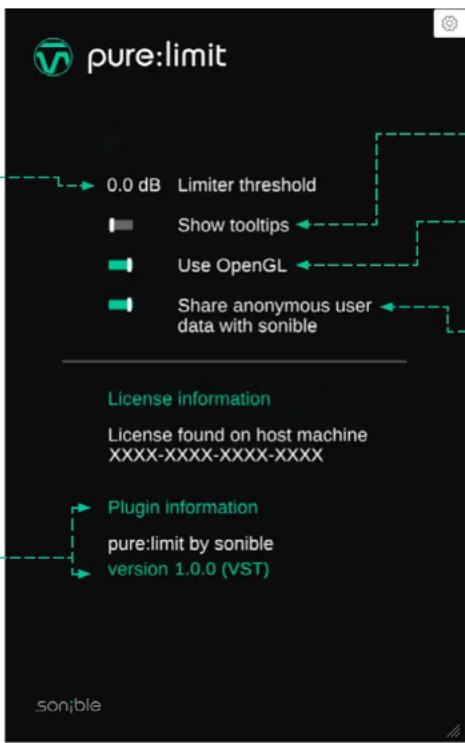
Show tooltips
Enable/Disable tooltips on hover.
Use OpenGL
OpenGL might cause rendering issues on certain computer hardware. Use this option to disable OpenGL.
Share anonymous user data with sonible
Enable to share fully anonymous user data with sonible and help us improve pure:limit.

pure:limit

www.sonible.com/purelimit
sonible GmbH
Haydngasse 10/1
8010 Graz
Austria
phone: +43 316 912288
contact@sonible.comAll spe
©2022, sonible GmbH. All rights reserved.
Engineered & designed by sonible in Austria.
www.sonible.com
- pure:limit
- Contents
- System requirements
- CPU
- RAM
- Operating systems
- Mac OSX
- Audio Unit
- VST
- VST3
- AAX
- Windows
- Licensing system
- Machine-based
- iLok
- Unlocking
- Machine-based unlocking
- Trial version
- Internet connection requirements
- Genre profile
- Playback & learning
- Done!
- Style
- Soft
- Neutral
- Hard
- Gain
- Inflate
- Limiter threshold
- Plug-in & Licensing Information
- Show tooltips
- Use OpenGL
- Share anonymous user data with sonible
Brand : Sonible
Model : pure:limit
Category : Audio software