StereoScope Pro - Audio software Blue Cat Audio - Free user manual and instructions
Find the device manual for free StereoScope Pro Blue Cat Audio in PDF.


| Product Type | Audio Software (Plugin) |
| Format | VST2, VST3, AU, AAX, Standalone |
| Supported Platforms | Windows 7+, macOS 10.9+, 64-bit |
| System Requirements | 2 GHz CPU, 4 GB RAM, 100 MB disk space |
| Main Functions | Real-time stereo field analysis, correlation meter, phase scope, frequency spectrum, goniometer |
| Display Modes | Lissajous (XY), Vectorscope, Oscilloscope, Spectrogram |
| Audio I/O | Stereo input, stereo output (pass-through) |
| Sample Rate Support | Up to 192 kHz |
| Latency | Minimal (typical < 1 ms) |
| Presets | Multiple factory presets, user-customizable |
| Installation | Download installer, run setup, authorize with serial number |
| Authorization | Machine-based or iLok (optional) |
| Updates | Free updates for version 1.x |
| User Manual | PDF included with purchase, 31 pages (English) |
| Maintenance | Keep software updated via Blue Cat Audio website |
| Security | No specific security features; standard computer security applies |
| Spare Parts | Not applicable (software) |
| Repairability | Not user-serviceable; contact support for issues |
| Support | Online forum, email support |
Frequently Asked Questions - StereoScope Pro Blue Cat Audio
User questions about StereoScope Pro Blue Cat Audio
0 question about this device. Answer the ones you know or ask your own.
Ask a new question about this device
Download the instructions for your Audio software in PDF format for free! Find your manual StereoScope Pro - Blue Cat Audio and take your electronic device back in hand. On this page are published all the documents necessary for the use of your device. StereoScope Pro by Blue Cat Audio.
USER MANUAL StereoScope Pro Blue Cat Audio
Blue Cat's StereoScope Pro User Manual
"Detailed stereo image analysis with 3D visualization."



BLUE CAT AUDIO
Table Of Content
- Introduction
- Description
• System Requirements - Installation
- First Launch
• Using Blue Cat's StereoScope Pro
• The User Interface
- Operation
• Blue Cat Audio Plug-ins Basics
- User Interface Basics
- Controls
- Keyboard
- Mouse
• Presets Management
• MIDI & Automation Control
• More
• Blue Cat's StereoScope Pro Parameters
- Input
• Output
• Blue Cat's StereoScope Pro Curves
- Plug-in Settings
• The Global Settings Window
• The Preset Settings Window
- About Skins
- Changing the Skin
• Create a Custom Skin
• More
- Extra Skins
- Tutorials
- Updates
- Versions History
Note: An online version of this user manual is available here.
Introduction
Description
Blue Cat's StereoScope Pro is a real time stereo field analyzer with multiple views and MIDI/ automation output capabilities. It is a powerful help to analyze how the audio signal is spread in the stereo field, and you can easily detect potential phase and mono compatibilities issues.
The stereo analysis can be controlled in details, and the precise measurements capabilities combined with the zoomable displays let you monitor what is exactly happening.
Choose your preferred view for your needs: real time stereo field display, evolution of the stereo image over time (2D or 3D) or output parameters that explicitly describe the average position and extent of the audio signal in the stereo field. The 3D waterfall view lets you see in details from your preferred viewpoint the evolution of the stereo image over time.
The four memory slots let you store any curve in memory: it helps you make comparisons between several tracks or effects setup very easily. You can compare your mix with other commercial hits!
Like our other professional analysis tools, the output parameters of this plug- in can be used to control other effects in real time: the generated automation envelopes or MIDI CC messages include the minimum and maximum positions in the stereo field and the perceived position based on the audio energy spread in the stereo image. Check the DP Meter Pro Tutorials to see how to use this capability within your favorite host.
Thanks to Blue Cat's skinning language support and the included window opacity management feature, you can adapt the plug-in user interface to your personal needs and enhance your workflow: work faster and more efficiently.
For multiple tracks stereo analysis, you want to give a try to Blue Cat's StereoScope Multi plugin.

line
| Metric | Value | |--------|-------| | True Extent | 1% | | Predicted | 1% | | Predicted | 1% | | Predicted | 1% | | Predicted | 1% | | Predicted | 1% | | Predicted | 1% | | Predicted | 1% | | Predicted | 1% | | Predicted | 1% | | Predicted | 1% | | Predicted | 1% | | Predicted | 1% | | Predicted | 1%, actual: 1%, actual: 1%, actual: 1%, actual: 1%, actual: 1%, actual: 1%, actual: 1%, actual: 1%, actual: 1%, actual: 1%, actual: 1%, actual: 1%, actual: 1%, actual: 1%, actual: 1%, actual: 1%, actual: 1%, actual: 1%, actual: 1%, actual: 1%, actual : actual: 1%, actual: 1%, actual: 1%, actual: 1%, actual: 1%, actual: 1%, actual: 1%, actual: 1%, actual: 1%, actual: 1%, actual: 1%, actual: 1%, actual: 1%, actual: 1%, actual: 1%, actual: 1%, actual: 1%, actual: 1%, actual: 1%, actual: 1, actual: 1, actual: 1, actual: 1, actual: 1, actual: 1, actual: 1, actual: 1, actual: 1, actual: 1, actual: 1, actual: 1, actual: 1, actual: 1, actual: 1, actual: 1, actual: 1, actual: 1, actual: 1, actual: 1, actual: 1 |System Requirements
An OpenGL-compatible graphics card for the 3D View.
Windows
- An SSE2- enabled processor (Pentium 4 or newer).
• Microsoft Windows Vista, Windows 7, 8 or 10. - Any VST / AAX compatible host software (32 or 64 bit).
Mac OS X
• An Intel processor.
• Mac OS 10.7 or newer.
- Any VST / Audio Unit (32/64-bit) / AAX compatible application.
For more information about supported platforms, see our FAQ.
Demo Limitations
- One single instance of the plug- in per session.
- The plug-in is frozen for 4 seconds every 40 seconds.
Installation
The plug-ins versions cannot be run standalone: they require a host application (see the System Requirements chapter for more information). Depending on which host application you use, you might need to install the plug-ins in different locations.
Before installing one of the plug-in versions, you should close all your host applications.
Windows
Install
All versions of the plug- in provide an installation program. Follow the steps of the wizard to install the software on your machine. During the installation you will be asked where you want the software to be installed. For the VST version, you should install the plug- in inside the VST plug- ins folder used by your host application(s). The default path set in the installer should work for most applications, but you should check your host software documentation to know where it looks for VST plug- ins. For other plug- in types, you should just use the standard path.
Some applications will not automatically rescan the new plug-ins, so you might have to force a refresh of the plug-ins list.
Upgrade
When a new version of the software is released, just launch the new installer: it will update the current installation.
Uninstall
To uninstall the software, simply launch the "Uninstall" program that is available in the start menu or in the configuration panel. It will take care of removing all files from your computer.
Mac
Install
On Mac the plug-ins are available as drive images with an installer. After download, double click on the dmg file to open it. You can then double click on the installer (.pkg file) to install the package.
Note for Mac OS 10.15 Catalina or newer: you will have to right click on the installer and select "Open" instead of double clicking on the file to launch the installation.
Upgrade
When a new version of the software is released, just launch the new installer: it will update the current installation.
Uninstall
To uninstall the software, simply remove the component(s) from their install location (move them to the trash):
- AAX plug-ins are installed in the / Library/ Application Support/ Avid/ Audio/ Plug- Ins/ folder
- Audio Units (AU) are installed in the / Library/ Audio/ Plug- Ins/ Components/ folder
- RTAS Plug-ins are installed in the / Library/ Application Support/ Digidesign/ Plug-Ins/ folder
- VST plug-ins are installed in the / Library/ Audio/ Plug-Ins/ VST folder
- VST3 plug-ins are installed in the / Library/ Audio/ Plug- Ins/ VST3 folder
If you want to completely remove all settings and configuration files, you can also remove these additional directories that may have been created on your computer:
- \~/ Library/ Preferences/ Blue Cat Audio/ [Plug-in name and TYPE], where TYPE is VST, AU, RTAS or AAX: global preferences.
-\~/ Library/ Preferences/ Blue Cat Audio/ [Plug-in name]: license information - \~/ Documents/ Blue Cat Audio/ [Plug-in name]: user data, such as presets, additional skins and user-created plug-in data.
Please be aware that these directories may contain user data that you have created. Remove these directories only if you do not want to reuse this data later.
First Launch
Blue Cat Audio plug-ins cannot be run standalone, they require a host application (see the System Requirements chapter for more information). Some host applications will require you to scan the plug-ins before they are available in the application.
If the plug-in is not available in the application, please check that it has been installed in the appropriate directory (with no host application running), and that the host application has scanned it.
The User Interface
Note: The main toolbar, menus and basic features available with all our plug-ins are detailed in the Blue Cat Audio Plug-ins Basics section.
Overview
The plug-in's user interface is composed of three panels:
- The stereo view where you can see the instant, average and peak stereo image of the audio signal in real time.
- The 'stereogram' view showing the evolution of the stereo image over time.
- The output view where you can monitor and control the output parameters generation.

line
| Position | 2% R | | -------- | ---- | | Spread | 49.6 % |The main toolbar area: load presets, freeze GUI, adjust settings (more details in next chapter).1.
Choose the view to display.2.
The current view (more details for each type of view below).3.
- The controls displayed at the bottom of the user interface let you modify the parameters for the audio analysis. This controls pane can be collapsed to gain real estate on the screen ("Show Controls" button in the toolbar).
Stereo View
This view displays a graph representing the stereo image of the input audio signal. Note that all the content displayed in the red area of the screen (extreme left and right) is out of phase content that will cancel each other if you sum both channels to mono.

line
| Position | Correlation | | -------- | ----------- | | 2% R | -0.8 | | 49.6 % | -0.6 | | +150 % | 0.97 |- Select the curves to display on the screen: you can choose the "instant" curve or the "peak" cusrve (maximum over time) or "average" curve (averaged over time).
- The four "A B C D" buttons let you store the curve to one of the proposed memory slots. The curves stored into these slots can be shown/ hidden with the buttons available in (3).
- Show/ Hide curves stored in memory. Click on the arrow below to save or load them as files or copy/paste them thru the system clipboard (the curves format is compatible with the StereoScope Multi plug-in.
- pposition and stereo spread values. These values reflect the average position and the spreading of the signal in the stereo field. More information about these parameters can be found in the parameters section later in this manual.
- These two sliders let you control the x and y zoom for the graph. When the zoom factor is greater than one, you can drag the graph with the mouse (click on the graph when the cursor is a small hand and drag to move in the graph).
- This meter shows the value of the center, minimum and maximum position output parameters. It lets you visualize the instant stereo width and energy center at a glance.
- Choose to display filled curves or single curves. If your graphics adapter is old and you encounter display performance issue you might want to uncheck this option.
Position of the mouse cursor on the display.8. - Correlation meter. This shows the correlation of the left and right audio signals. More information about this parameter can be found in the parameters section later in this manual.
Rulers can be dragged with the mouse when the graph has been zoomed. They display the scales for the x and y axis.10.
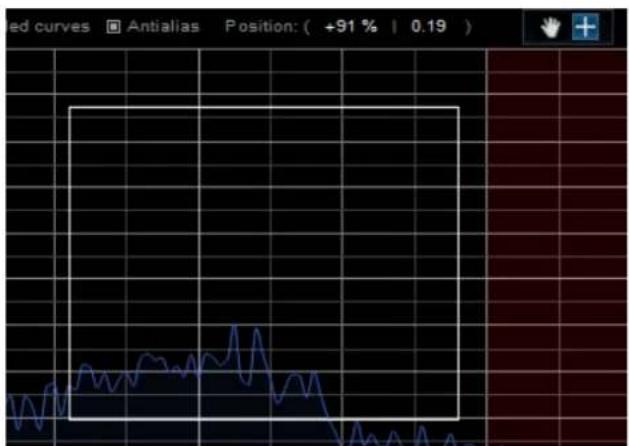
The coordinates of the graph below the mouse pointer are displayed at the top of the screen. The display can be zoomed with the mouse selecting an area of the screen (or using the mouse wheel):
line
| Time | Value | |------|-------| | 0 | 0 | | 1 | 10 | | 2 | 5 | | 3 | 8 | | 4 | 6 | | 5 | 12 | | 6 | 7 | | 7 | 9 | | 8 | 4 | | 9 | 15 | | 10 | 6 | | 11 | 11 | | 12 | 8 | | 13 | 13 | | 14 | 5 | | 15 | 14 | | 16 | 7 | | 17 | 10 | | 18 | 9 | | 19 | 6 | | 20 | 12 | | 21 | 8 | | 22 | 15 | | 23 | 6 | | 24 | 11 | | 25 | 13 | | 26 | 7 | | 27 | 14 | | 28 | 8 | | 29 | 5 | | 30 | 10 | | 31 | 12 | | 32 | 9 | | 33 | 6 | | 34 | 15 | | 35 | 7 | | 36 | 11 | | 37 | 8 | | 38 | 6 | | 39 | 13 | | 40 | 5 | | 41 | 14 | | 42 | 7 | | 43 | 9 | | 44 | 6 | | 45 | 12 | | 46 | 8 | | 47 | 10 | | 48 | 8 | | 49 | 6 | | 50 | 15 | | 51 | 7 | | 52 | 9 | | 53 | 6 | | 54 | 11 | | 55 | 8 | | 56 | 13 | | 57 | 5 | | 58 | 14 | | 59 | 7 | | 60 | 9 | | 61 | 6 | | 62 | 12 | | 63 | 8 | | 64 | 10 | | 65 | 8 | | 66 | 6 | | 67 | 15 | | 68 | 7 | | 69 | 9 | | 70 | 6 | | 71 | 11 | | 72 | 8 | | 73 | 13 | | 74 | 5 | | 75 | 14 | | 76 | 7 | | 77 | 9 | | 78 | 6 | | 79 | 12 | | 80 | 8 | | 81 | 10 | | 82 | 8 | | 83 | 6 | | 84 | 15 | | 85 | 7 | | 86 | 9 | | 87 | 6 | | 88 | 11 | | 89 | 8 | | 90 | 13 | | 91 | 5 | | 92 | 14 | | 93 | 7 | | 94 | 9 | | 95 | 6 | | 96 | 12 | | 97 | 8 | | 98 | 10 | | 99 | 8 | | Note: The actual values may vary due to the random nature of the data generation. The provided values are just an example. The actual values may be calculated based on the formula 'Position' and the number of possible values (e.g., 'Antialiases' or 'Position').At any time, right click on the graph to unzoom.
Once zoomed you can drag the display with the mouse on the ruler areas.
Stereogram View
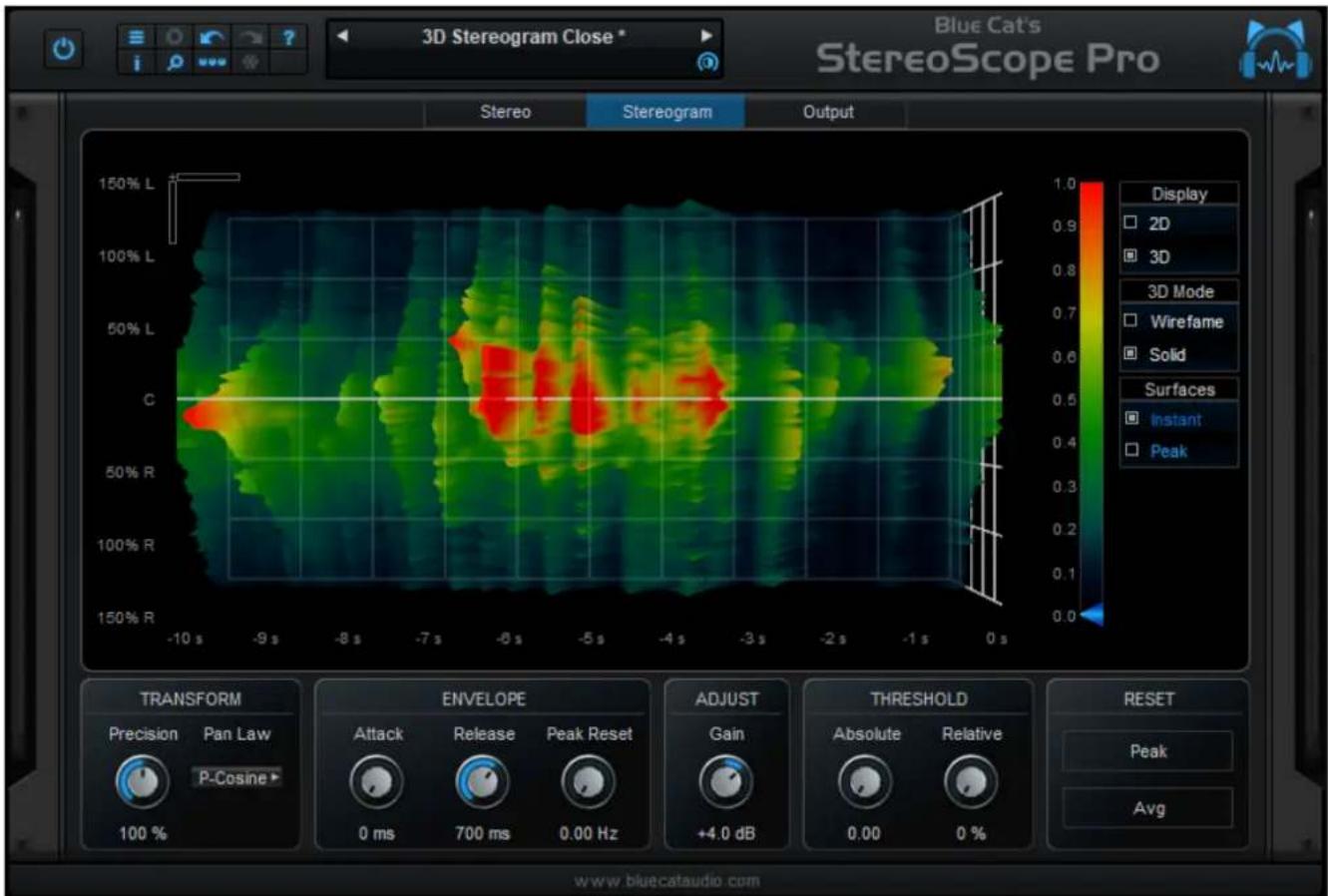
This view displays the evolution of the stereo image over time. Two modes are available: 2D display with precise measurement capabilities or 3D waterfall display.
2D Mode
In 2D mode, the stereo image is represented as a 2D color plot, the color representing the value of the signal for a given position at a given time. In the default color scheme, the closer to red the louder, and the closer to dark blue, the quieter.

heatmap
| Position | Value | | -------- | ----- | | Left | 0.9 | | Right | 0.5 |Choose between 2D mode (this display mode) or 3D waterfall mode.1.
- Two functions are available for the mouse on the graph view: either drag the graph when zoomed or display the coordinates of the pointer and value of the stereogram and zoom by selecting an area of the screen.
- Choose to display either the "instant" curve or the "peak" curve (maximum over time).
- These two sliders let you control the x and y zoom for the graph. When the zoom factor is greater than one, you can drag the graph with the mouse (click on the graph when the cursor is a small hand and drag to move in the graph).
Rulers can be dragged with the mouse when the graph has been zoomed. They display the scales for the x and y axis.5.
3D Waterfall Mode
In 3D mode, the stereo image is represented as a 3D surface with the same color scale as the 2D plot.

heatmap
| X Range | Y Range | Value | |-------------|------------|-------| | -10.6 to -9.6 | 150% L | ~0.0 | | -9.6 to -8.6 | 100% L | ~0.0 | | -8.6 to -7.6 | 50% L | ~0.0 | | -7.6 to -6.6 | C | ~0.0 | | -6.6 to -5.6 | 50% R | ~0.0 | | -5.6 to -4.6 | 100% R | ~0.0 | | -4.6 to -3.6 | 150% R | ~0.0 | | -3.6 to -2.6 | 100% R | ~0.0 | | -2.6 to -1.6 | 50% R | ~0.0 | | -1.6 to -0.6 | 150% R | ~0.0 |This 3D "stereogram" view lets you move the 3D graph within the screen so that you can choose your favorite viewpoint. Please note that the measurement tool is not enabled in this mode.
You can use the following controls for 3D movement:
- Mouse drag: rotate the object.
- Hold Ctrl key and mouse drag: translate the object.
- Rotate mouse wheel: zoom / unzoom (you can hold the shift key for higher precision).
- Mouse right click: reset position to default (as shown above).

surface_3d
| X (s) | Y (s) | Value | |-------|-------|-------| | -10 | -6 | 0.0 | | -9 | -5 | 0.1 | | -8 | -4 | 0.2 | | -7 | -3 | 0.3 | | -6 | -2 | 0.4 | | -5 | -1 | 0.5 | | -4 | 0 | 0.6 | | -3 | 1 | 0.7 | | -2 | 2 | 0.8 | | -1 | 3 | 0.9 | | 0 | 4 | 1.0 |Custom 3D viewpoint
It is still possible to use the zooming capability offered by the two sliders on the top left corner of the view. It will have the same effect as in the 2D view: zooming either the time axis or the stereo position axis. Note that when the surface has been rotated, these two axis may not be in the same direction as the sliders anymore.
Output View
This view shows the evolution of output parameters over time and lets you control the transform applied to these parameters for automation and MIDI outputs.

line
| Position | Value | | -------- | --------- | | Min | 100 % | | Position | 100 % | | Max | 100 % |- Controls to modify the output envelopes: reverse, amount and offset. They let you customize the values generated for the transformed output parameters.
- These graphs show the evolution of the transformed output parameters values over time for each channel. They represent the center and width of the stereo image above the thresholds.
The various elements of the user interface (knobs, sliders, buttons...) are simple and intuitive to operate, but more information about how to interact with them is available in the "Plug-ins Basics" chapter of this manual.
Operation
This plug-in allows you to visualize the repartition in the stereo field of the audio signal and also to generate MIDI CC messages or automation curves based on the measurements made by the plugin. The illustration below shows the principle of this system.
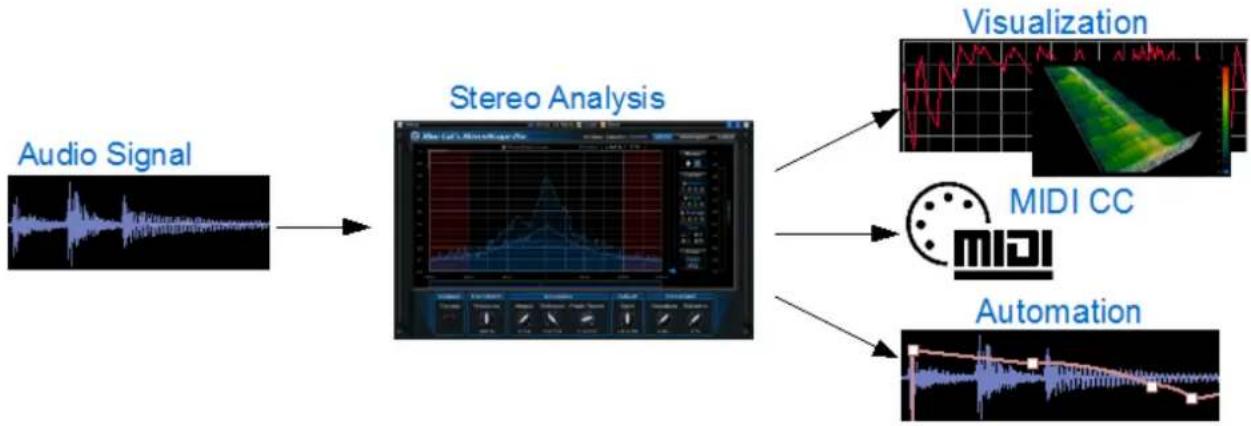
flowchart
graph LR
    A["Audio Signal"] --> B["Stereo Analysis"]
    B --> C["MIDI CC"]
    B --> D["Visualization"]
    B --> E["Automation"]
Stereo Field Visualization
There are many situations where you need to be able to visualize the stereo repartition of the signal, when your ears are not enough (bad monitoring, ear fatigue, subtle stereo issue that requires visual confirmation, mono compatibility check). This is the main purpose of the StereoScope Pro plugin: it provides visual assistance for what your ears cannot detect. It is also a convenient way of comparing your audio tracks with reference material, as shown in this tutorial (shows spectrum comparison but it is also applicable to stereo measurements).
The analysis can be fine tuned in details to exactly fit your needs. This chapter describe in details how you can tweak the analysis:
Tweak the precision
It is possible to tweak the precision of the analyzer: the higher the "precision" parameter, the more points are computed to draw the stereo field curve.
Please note that the higher the precision, the higher CPU consumption.
Customize the time response
The attack and release times control how fast the analyzer respectively responds to audio amplitude increase or decrease. For example, when pushing both parameters to their maximum the instant curve will become a local average of the audio stereo field representation.
The "Max Reset" speed control how fast the maximum curve is reset to the instant curve. This lets you tweak the max curve so that it follows the instant curve or shows the absolute maximum value of the signal.
Adjusting the response
Thanks to the gain control, the curve can be tweaked when the incoming audio signal is too loud or too quiet and the curve does not fit in the screen. The gain is applied at the input of the analyzer but does not modify the signal at the output of the plugin.
Threshold controls
In order to isolate the loudest parts of the signal and to control how the min and max positions are computed, it is possible to set an absolute as well as a relative threshold on the curve. If the signal is below the threshold (absolute value for the absolute threshold - for example 0.5, or value relative to the maximum value - for example 30% of the maximum value in the current curve) it is reset to the minimum value.
Interpreting Measurements
Principles
The main points of interest are the shape of the stereo field curve, the correlation value and the position of the energy center (or "center" position). They help you understand how "stereo" and balanced the audio signal is.
- Correlation value: when close to 1 the signals are highly correlated (mono signal). When the value is close to 0 both signals are not correlated. It means they have nothing in common. It can be the case when left and right channels are different instruments playing different parts. When the value reaches -1, both signal are negatively correlated. It means that when summed to mono they will cancel each other. You usually want the correlation value to stay above 0 to avoid phase cancellation issues.
- Center position ("energy center"): it represents the overall perceived position of the sound in the stereo field. If highly negative (close to -100%), the sound is panned to the left, and if it is highly positive (+100%), the sound is perceived as panned to the right. You usually want this value to oscillate closely around the center. Note that if it moves too fast with a wide amplitude, it might make the listener sick.
- Curve shape: it shows the repartition of the audio amplitude in the stereo field. Everything above 100% and below -100% in the stereo field is out of phase signal that will be cancelled when summing to mono. See the examples below for typical shapes.
Examples
Below is a typical example of a mono signal centered in the stereo field: correlation is equal to 1 (left and right signals are exactly the same), and the curve shows a single spike in the center of the screen.

line
| Position | Correlation | | -------- | ----------- | | C | 1.0 |Centered mono signal
Below is a typical display for an out of phase signal that will produce a very low mono output (almost silent in this case). Note the correlation close to -1 and the peaks that appears in the extreme left and right parts of the screen:

line
| Position | Value | |--------|-------| | 5% L | 0.0 | | 65.9% | 1.0 |Out of phase signal
Finally, a typical commercial track will have in average more content in the center and a continuously decreasing amplitude on the left and rights of the stereo field. You can also note that most peaks will appear in the center of the stereo field (as shown by the peak curve). Correlation is typically in the middle between 0 and 1, showing a good stereo perception without mono compatibility issue. The energy center is oscillating around the center of the stereo field, showing a good left/right balance.

line
| Position | Value | |--------|-------| | +10 % | 0.97 | | 2% R | -0.8 | | 49.6 % | -1.0 |Typical commercial track
Envelopes Generation
Thanks to this unique capability, you can create unique side chain effects controlled by the stereo content of the audio signal. The idea is to measure the minimum and maximum positions as well as the balance of the incoming audio and reuse them as controller values for other effects. The exact response for these values can be customized in the "output" pane of the user interface. Special controls for MIDI and automation generation are available in the settings window of the plugin.
For more information about how to use this capability in your favorite host application, see our Digital Peak Meter Pro tutorials page: this plugin has a similar MIDI CC and automation output capability. The Blue Cat's StereoScope Pro Tutorials will give you some more ideas about what to use the generated envelopes for.
Blue Cat Audio Plug- Ins Basics
This chapter describes the basic features that are common to all our plug-ins. If you are already familiar with our products, you can skip this part.
User Interface Basics
About Skins
Like all Blue Cat Audio plug-ins, Blue Cat's StereoScope Pro uses a skinnable user interface. It means that the appearance and behavior of the user interface can be entirely customized.
Especially with third party skins, the experience may be quite different from the one offered by the default skins that we provide. However, our plug-ins and our skinning engine have several standard features that will be available whatever your favorite skin.
More information about custom skins can be found in the skins section.
The Main Toolbar
In most skins, an optional toolbar at the top of the user interface gives you access to the main options and settings of the plug-in:

Smooth Bypass
On the left, the power button can be used to smoothly bypass the plug-in.
Presets Area
At the center of the toolbar, you can see the current preset area (the "Default Settings" box). It displays the name of the current preset, with a "*" at the end if it has been modified since loaded.
The arrows on the left and right let you navigate thru the (factory and user) presets available for the plug-in.
Clicking on the preset name opens the presets menu which lets you manage the presets of the plug-in.
Using the knob on the bottom right of this area, you can reduce the opacity of the window, and make it transparent (the actual result may depend on the host application). Additional messages may appear in the area next to this knob, depending on the plug-in.
Commands
The icons in the toolbar give you access the to the following commands that are detailed in the next paragraph:
| Icon Name Function | |
| Menu Open the main menu | |
| Control Settings Display individual control settings (to manage automation and MIDI control, as described here). | |
| Undo Undo | |
| Redo Redo | |
| Manual User Manual | |
| About About | |
| Zoom Scale the user interface (from 70% to 200%). | |
The Main Menu
The main menu is available from the main toolbar, or if you right click anywhere on the background of the plug-in:
| Presets |
| Preset Skin |
| Undo |
| Redo |
| Preset Settings... |
| Global Settings... |
| User Manual |
| Check for Updates |
| Get More Skins |
| Legal Information |
| About |
- Presets: opens the presets menu to manage presets.
- Preset Skin: opens the skins menu to choose the skin for the current preset and manage alternative skins for the software.
- Undo/ Redo: undo or redo the latest modifications. This includes all changes made to the current preset settings such as MIDI or automation preferences.
- Presets Settings: open the presets settings window. It lets you change the skin, MIDI and automation settings for the current preset.
- Global Settings: open the global settings window. It lets you change the skin, MIDI and automation settings that are used by default in all instances of the plug-in (if not overridden by the current preset).
- User Manual: open this user manual.
- Check for Updates: opens up our website to let you check if any update for this software is available.
- Get More Skins: get more skins for this software.
- Legal Information: browse licensing and misc legal documents.
- About: displays the "about" dialog box.
Controls
Examples
Here are a few examples of typical controls you will encounter in the user interface of our plug-ins:

Interacting with Controls
You can interact with the controls of the plug-in interface either with the mouse or the keyboard.
Setting the keyboard focus on a control (so that it responds to key strokes) may be automatic (when you pass the mouse over it it gets focus) or manual (you have to click on the control to set the focus on it). Note that all host applications behave differently regarding keyboard handling. In some applications you may not be able to use all keys described later in this manual to interact with our plug-ins. It is usually made obvious to you to know the active surfaces of the skin (the places where you can click with the mouse): the mouse cursor usually changes when you can do something on a control. In the default skins delivered with the plug-in, the cursor changes to a small hand or an arrow to tell you when your mouse is over an active control.
Mouse
Various mouse movements will let you interact with the controls:
| Mouse Interaction Action | |
| Left Click Acquire focus and start dragging or push (button) | |
| Left Click + Alt Key Set the value to default | |
| Acquire focus and launch the “fine tuning” edit box (except button): | |
| Left Double Click |  |
| Right Click Set the value to default | |
| Mouse Wheel Increment or decrement the position (focus required) | |
| Mouse Drag Change the control position depending on mouse movement (except button) | |
Keyboard
All control widgets support the following keys (note that some of them are caught by the host and thus never forwarded to the control. For example in Steinberg Cubase SX you cannot use the arrow keys to control the plug-in):
Keys Common to All Controls
| Key Action | |
| Up Arrow Small increment of the position (up or right) | |
| Down Arrow Small increment of the position (down or left) | |
| Left Arrow Same as Down Arrow | |
| Right Arrow Same as Up Arrow | |
| Page Up Large increment of the position (up or right) | |
| Page Down Large decrement of the position (down or left) | |
| + Small increment of the value of the control | |
| - | Small decrement of the value of the control |
| d Set to default value (same as mouse right click) | |
| e | Opens the 'fine tuning' window to precisely set the parameter:  |
| SHIFT | When the key is down, the fine tuning mode is on, and you can modify the value with better precision when moving the mouse, the mouse wheel or using the keyboard. Just release the key to get back to the normal mode. |
Keys Specific to Buttons
| Key Action | |
| Enter | Pushes the button |
Presets
To get started with the plug-in and discover its capabilities, a couple of factory presets are provided. You can also save your own presets and recall them later for other projects. Our plug-ins propose a full-featured preset manager to let you save, browse, organize and recall its presets.
The Presets Menu
The presets menu can be opened from the main menu or the main toolbar. It displays the list of presets available for the plug-in as well as commands to load, save or organize presets:
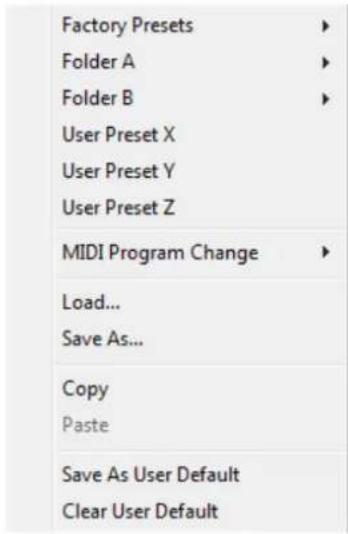
- Factory Presets: shows the list of factory presets delivered with the plug-in.
- "Folder A" to "User Preset Z": user presets and categories.
• MIDI Program Change: activate MIDI Program Change support (see below). - Load: load preset from file.
- Save: save current state to last loaded user preset.
- Save As: save current preset to a file.
- Copy copy preset to the system clipboard.
- Paste paste preset from the system clipboard, if available.
- Save As User Default: save the current state as the default preset. This preset is used every time a new instance of the plug-in is created.
- Clear User Default: reset the default preset to its factory state: this makes the plug-in forgets the custom settings you might have saved as a default preset.
More about Presets
There are two types of presets: factory presets (read only) that are provided with the plug-in, and user presets that can be created and stored by the user.
The user presets are stored in a subdirectory of the documents folders of your profile ("Documents" on Mac, and "My Documents" on Windows): Blue Cat Audio/ [Plug- in Name]/ Presets. Each preset is stored as an individual file. You can create folders and subfolders in the Presets directory to classify your presets, as shown in the example below:

If you save a preset named "Default" in the root Presets directory, it will override the factory default preset (that's what "Save As Default" does). To restore the factory default preset, you can just remove this file or use the "Reset Default" command.
MIDI Program Change
It is possible to load presets remotely using MIDI "Bank Select" and "Program Change" messages. To enable this feature, select a MIDI channel to receive the events from in the MIDI Program Change menu item from the presets menu:

This setting is saved for each plug-in instance with your session but not in presets (except for the default preset, using the "Save as User Default command"). Once activated, the plug-in menu will display the bank number followed by the preset number for each preset:
000 - Factory Presets
A
001 - Bank01
A
002 - Bank02
▶
003/000 - Preset1
003/001 - Preset2
003/002 - Preset3
Every root folder is considered as a new bank, starting with the factory presets (bank 0). Program and bank numbers may change while you add folders and presets, so you should be careful when naming them if bank and program numbers matter to you. It is recommended to use folders to make this task simpler. As a side note, sub folders do not define additional banks (all presets contained in sub folders are associated with the current bank.
As specified by MIDI, bank select messages are not used until a program is actually selected.
MIDI Implementation note: the software supports all types of Bank Select methods. You can use either MIDI CC 0 or MIDI CC 32 to select banks. If both are used simultaneously, they are combined together so that you can use more banks (in this case CC0 is LSB and CC32 is MSB, and actual bank number is 128*CC0+CC32).
MIDI and Automation Control
Blue Cat's StereoScope Pro can also be remotely controlled via MIDI using MIDI CC ("Control Change") messages or automation curves, if your host application supports it. It is possible to customize the channel, control numbers, range and response curve used for each parameter in the settings panel available from the main menu (see the Plug-in Settings chapter for more details).
MIDI and Automation Settings Menu
Most skins also provide the ability to change MIDI and automation settings for each parameter directly in the main user interface. When this feature is activated using the corresponding toolbarbutton, dropdown menu buttons appears next to main controls:
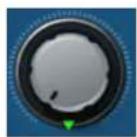
Clicking on this button shows the MIDI/ Automation settings menu:

- MIDI Learn: launches MIDI learn mode for the control: touch your MIDI controller and the control will learn from it the MIDI channel and CC number. To end the learn mode, reopen this menu and deselect the option.
- MIDI Unlearn: deactivates MIDI control for this parameter.
- Settings: launches the advanced settings panel described below. This controls the settings for the current preset.
Advanced MIDI and Automation Settings
You can completely customize the way the plug-in is controlled by automation and MIDI. For a global view of all parameters at a time, you can use the Plug-in Settings window for the current preset which is available from the main menu.

MIDI Settings:
- Enable MIDI: enable/ disable the MIDI control of the parameter.
- Channel: MIDI Channel for the parameter control. If set to 0, the plug-ins will accept Control Change Messages from all MIDI Channels (MIDI Omni mode).
• CC: Control Change Number. - Learn: click on this button to activate the MIDI learn functionality. When it is activated, you can move your MIDI controller, and the plug-in will automatically set the MIDI Channel and CC Number.
MIDI and automation settings:
- Response: response curve of the MIDI or automation control: from very fast to slow control.
- Min: minimal value of the parameter when MIDI controlled or automated.
- Max: Maximum value of the parameter when MIDI controlled or automated.
Note: if the Min value is higher than the Max value, the response curve will be reversed: increasing the control value will decrease the parameter value.
Note: if you double click on the parameter text control boxes for the max and min values, a "fine tuning" edit box will appear and let you change the min and max values with more precision:

MIDI and Automation Output
Blue Cat's StereoScope Pro can also generate MIDI CC Events or automation curves thanks to its output parameters.
You have access to the same settings for the output parameters as you have for input parameters using the dropdown menu, except that you can also enable or disable automation.
The output parameters MIDI and Automation Menu:

The advanced output parameters MIDI and Automation settings window:

More
Check our online tutorial for more screenshots and more examples of our plug-ins user interfaces.
Blue Cat's StereoScope Pro Parameters
All parameters described below can be automated and controlled via MIDI if your host application supports it. You can precisely define this behavior in the settings panels described later in this manual.
Input
| Param id Name Unit Description | |||
| General | |||
| dsp.input0 Bypass Bypass the effect. | |||
| dsp.input1 Precision % Precision of the stereo field analysis. The higher the setting,the higher the resolution, and the higher the CPU consumption | |||
| dsp.input2 Attack ms Attack time for the stereo image envelope follower. | |||
| dsp.input3 Release ms Release time for the stereo image envelope follower. | |||
| dsp.input4 Peak Reset Hz Rate of the peak curve reset. If set to 0, the peaks will neverdecrease and will represent the maximum value. | |||
| dsp.input5 Abs Threshold Absolute threshold for stereo image display. The values belowthis threshold are set to 0 | |||
| dsp.input6 Rel threshold | % Relative threshold for stereo image display (percentage of themaximum value). The value below this threshold are set to 0) | ||
| dsp.input7 Gain | dB Gain applied to the audio signal before the analysis takesplace. Can be useful when analyzing signals with low levels. | ||
| dsp.input8 Reset Peak | Command to reset peak curves (value changes are consideredas reset commands) | ||
| dsp.input9 Reset Average | Command to reset average curves (value changes areconsidered as reset commands) | ||
| Output Transformation | |||
| dsp.input10 | Position Reverse | Reverse the transformed position envelope. | |
| dsp.input11 | Position Amount % | Amount for the transformed position envelope. | |
| dsp.input12 | Position Offset % | Offset for the transformed position envelope. | |
| dsp.input13 | Min Position Reverse | Reverse the transformed min position envelope. | |
| dsp.input14 | Min Position Amount % | Amount for the transformed min position envelope. | |
| dsp.input15 | Min Position Offset % | Offset for the transformed min position envelope. | |
| dsp.input16 Max Position Reverse Reverse the transformed max position envelope. | |
| dsp.input17 Max Position Amount % Amount for the transformed max position envelope. | |
| dsp.input18 Max Position Offset % Offset for the transformed max position envelope. | |
| dsp.input10 Pan Law Specify the pan law for the stereo field analysis. This lets you match the values that can be read on the x- axis of the graph with the pan pots of your digital audio workstation.P-Cosine:projected cosine law (corresponds to a sine- cosine pan law projected from a circle to a linear axis) / Cosine:sine-cosine pan law / Linear. |
Output
The plug-in also provides output parameters for automation or MIDI CC generation (see below).
Note that positions in the stereo field are expressed as values between -1.5 and 1.5. Negative values represent positions on the left side and positive values represent positions on the right side. The [-1;1] range is heard between the speakers and positions outside this range are for out of phase signals that are heard outside the speakers.
| Param id Name Unit Description | |
| General | |
| dsp.output0 Position Position of the audio signal (computed as the stereo image energy center). Similar to “balance”. | |
| dsp.output1 Min Position Minimum position of the stereo image above thresholds. | |
| dsp.output2 Max Position Maximum Position of the stereo image above thresholds. | |
| dsp.output6 Correlation Correlation of the left and right audio signals. When close to 1 the signals are highly correlated (mono signal). When the value is close to 0 both signals are not correlated. It means they have nothing in common. It can be the case when left and right channels are different instruments playing different parts. When the value reaches -1, both signal are negatively correlated. It means that when summed to mono they will cancel each other. You usually want the correlation value to stay above 0 to avoid phase cancellation issues. | |
| Transformed | |
| dsp.output3 Transformed Position | Position with transform applied. |
| dsp.output4 Min Position Min position with transform applied. | |
| dsp.output5 Max Position Max position with transform applied. | |
Blue Cat's StereoScope Pro Curves
The StereoScope Pro plug- in provides visual feedback about the stereo image of the audio signal thanks to output curves. The stereo content curves represent the intensity of the audio signal (value between 0 and 1) according to the position in the stereo field (value between -1.5 and 1.5, see the explanation in the previous chapter).
| Curve id Name Description |
| dsp.output_curve0 Instant Stereo Image Instant stereo content of the audio signal. |
| dsp.output_curve1 Peak Stereo image Maximum value of the stereo image over time. |
| dsp.output_curve2 Average Stereo Image Average value of the stereo image over time. |
Plug-in Settings
In addition to the controls offered in the main user interface, Blue Cat's StereoScope Pro has various settings that let you fine tune the behavior of the plug-in. You can choose to change these settings either for the current preset or globally for all instances of the plug-in.
The Global Settings Window
The settings available in this window apply to all instances of the plug-in, for all presets, if not overridden in the presets settings. Consider these settings as "default" settings.
General
You can change the default skin for all instances of the plug-in: write the skin file path in the text edit box or click on the button to open a file chooser dialog. If you have several instances of the plug-in opened in your session, you will have to re-open the user interfaces of these plug-ins to see the skin change.

The output data refresh rate can also be customized for all instances of the plug-in. It controls the refresh rate of non-audio data produced by the plug-in (parameters, curves...). It also controls the refresh rate of output MIDI CC messages or output automation data. The higher the refresh rate, the better precision, but also the higher cpu usage (some host applications may also have trouble recording MIDI data at high refresh rates). The default value is 50 Hz.
Global Control Input Settings (MIDI and Automation)
The plug-in offers a couple of settings that affect the way it is controlled by MIDI messages or automation. While the first settings only apply to MIDI control, the "Control Response", "Min" and "Max" settings apply to both automation and MIDI control.
For each parameter you can define a default MIDI channel and CC number. You can then control the plug-in with an external MIDI controller or one of our plug-ins that generate MIDI messages.
The settings below are available for each plug-in parameter.
MIDI Settings:
- Enable MIDI: enable/ disable the MIDI control of the parameter.
- Channel: MIDI Channel for the parameter control. If set to 0, the plug-ins will accept Control Change Messages from all MIDI Channels (MIDI Omni mode).
• CC: Control Change Number. - Learn: click on this button to activate the MIDI learn functionality. When it is activated, you can move your MIDI controller, and the plug-in will automatically set the MIDI Channel and CC Number.
MIDI and automation settings:
- Response: response curve of the MIDI or automation control: from very fast to slow control.
- Min: minimal value of the parameter when MIDI controlled or automated.
- Max: Maximum value of the parameter when MIDI controlled or automated.

(generic screen shot, does not correspond to the actual plug-in parameters)
Note: if the Min value is higher than the Max value, the response curve will be reversed: increasing the control value will decrease the parameter value.
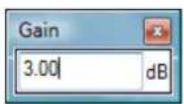
Note: if you double click on the parameter text control boxes for the max and min values, a "fine tuning" edit box will appear and let you change the min and max values with more precision:
Global Control Output Settings (MIDI and Automation)
You can set the same properties for the output parameters as for the input parameters: in this case, they may trigger MIDI CC messages or generate automation curves when modified. Since it's output, you cannot set the channel to MIDI Omni, so you must choose a channel.
Output parameters can also generate automation curves in most host applications. You can enable automation for any output parameters you are interested in (see the "Enable Autom." checkbox).

(generic screen shot, does not correspond to the actual plug-in parameters)
Note: if the Min value is higher than the Max value, the response curve will be reversed: increasing the control value will decrease the parameter value.
Note: if you double click on the parameter text control boxes for the max and min values, a "fine tuning" edit box will appear and let you change the min and max values with more precision:

The Current Preset Settings Window
In this window you can change the settings for the current preset of the current instance of the plug-in only.
Preset Skin
You can choose to use the global skin setting or to change the skin for the current preset. This way you can have different skins for different instances of the plug-in in the same session in order to differentiate them.

Preset Control Input Settings (MIDI and Automation)
Use the global settings or override them for the current preset. The parameters are the same as for the global input settings.

(generic screen shot, does not correspond to the actual plug-in parameters)
Preset Control Output Settings (MIDI and Automation)
Use the global settings or override them for the current preset. The parameters are the same as for the global output settings.

(generic screen shot, does not correspond to the actual plug-in parameters)
About Skins
Blue Cat's StereoScope Pro integrates Blue Cat's skinning engine that allows you to customize the user interface. You can download alternate skins for your plug-in at the following address:
http://www.bluecataudio.com/Skins/Product_StereoScopePro
If you don't find a skin that fits your need or if you want a custom one, you can choose to create your own skin.
Choosing the Skin
There are two ways to select the skin of your plug-in: you can change the default (or 'global') skin, or change the skin for the current preset only (either in the preset settings page or from the main menu). The global skin applies to all plug-in instances (choose this one if you want to use the skin used by default, regardless of the session or preset), whereas the current preset skin only applies to the current preset of the current plug-in instance (use this one if you want to change only the skin for the current session/preset).
Note: in some host applications, the plug-in window won't resize automatically when you choose a skin with a different size. In this case, just close the window and re-open it: it will be displayed with the right size.
The Skins Menu
The skins menu can be opened from the main menu. It displays the list of skins available for the plug-in as well as commands to manage the skin used by default when no preset skin has been selected:

- First Section - Factory Skins: shows the list of factory skins delivered with the plug-in ("Default" and "Light" in this example).
- Second Section - User Skins: shows the list of user skins that have been installed in the Documents Skins folder for the plug-in (see below).
- Use Global Skin: use the global skin for the current preset/ session (unloads any custom skin previously selected for the current preset).
- Load: opens a file browser dialog to manually select the skin from the file system.
- Save As Global Skin: use the current preset skin as the global skin (loaded by default if no preset skin has been defined).
Installing User Skins
To select user skins directly from the skins menu, install them in the "Skins" directory available in the plug-in's documents folder:
[Your Documents Folder]/ Blue Cat Audio/ [Plugin Name]/ Skins/
The skin engine will scan this folder for new skins (xml files) and display them in the menu. The skin files should be in the root skins folder or in a subdirectory inside this folder: subdirectories are not scanned recursively.
Other Methods to Select Skins
You can also select the skins in the settings panels available from the main menu:
The global skin (used by default if no preset skin has been selected) can be changed in the global settings pane. The current preset skin can be changed in the preset settings page.
Create a Custom Skin
You can create custom skins for your plug-in in order to adapt it to your exact needs. You can change its look and feel and make it completely integrated in your virtual studio!
Just read the Blue Cat's Skinning Language manual and download the samples for the tutorial on http://www.bluecataudio.com/Skins. You can get ready to create your own skins in a few minutes. You can then share your skins on our website.
More...
This manual only covers the basics of Blue Cat's StereoScope Pro. Our website offers many additional resources for your Blue Cat's StereoScope Pro plug-in and is constantly updated, so keep an eye on it! You will find below a few examples of available resources.
Tutorials
Many Tutorials are available on our website. They cover a wide range of topics and host applications.
You can find here a list of tutorials related to the Blue Cat's StereoScope Pro plug-in.
Extra Skins
We encourage our customers to propose their own skins for our products and we often propose alternative skins to let you choose the one that best suits your needs. You can check Blue Cat's StereoScope Pro skins page to get the latest skins.
Updates
As you can see in the history log below, we care about constantly updating our products in order to give you the latest technology available. Please visit our website often to check if Blue Cat's StereoScope Pro has been updated, or subscribe to our Newsletter to be informed of the latest news about our products.
Note: minor version updates are available from the same location as the original full version download (link received by email upon purchase). The demo version publicly available on our website will not let you register.
You can also follow us on twitter, facebook and instagram for almost real time updates notification, and subscribe to our YouTube channel to watch the latest videos about our software.
Versions History
V2.0 (2020/11/12)
DSP:
- Audio analysis is now performed in the background and does not affect audio performance at all.
- New "Stereo Spread" measurement that shows how the signal is spread in the stereo field.
User Interface:
- Refreshed GUI design, with improved usability and touchscreen support.
• The GUI can now be zoomed from 70% to 200%. - Now supports retina displays on Mac (text and graphs using high resolution).
- Save each memory curve as a file that can be reloaded later as a reference.
- Copy and paste memory curves between instances using the system clipboard.
• Factory and user skins can now be selected directly from the plug-in menu.
• VST: the user interface is now properly resized in Cubase on Windows. - New installer on Mac.
Presets Management:
- Brand new presets management system.
- Presets can now be selected using MIDI Program change and bank select messages (can be activated with the presets menu/ MIDI Program Change item).
- Copy/ paste the plug- in's current state from the presets menu using the system clipboard.
Compatibility:
- Now compatible with MacOS Catalina and Big Sur.
• VST3 plug- in format support.
• Audio Suite support for offline analysis in Pro Tools. - Dropped support for Windows XP and Mac OS X 10.6 and earlier.
- Dropped support for legacy RTAS and DirectX plug-ins formats.
V1.91 (2014/03/20)
- Fixed 64-bit VST MIDI Events not sent for the first output parameter in the list.
- Windows VST installer now detects the VST plug-ins path and remembers previous install location for updates.
- Fixed Audio Unit validation issue on OSX Mavericks/ Logic Pro X.
- Fixed VST plug- in window frame not showing in Cubase 7.5 (32-bit) on Mac.
- Fixed VST version that could not be loaded in Audio HiJack Pro (Mac).
V1.9 (2013/06/27)
- 64- bit AAX support for Pro Tools 11.
V1.9 (2011/07/11)
- Output data rate (MIDI CC or automation) can now be customized, from 20 to 500Hz .
- Increased the default output data rate (from 20 to 50Hz ) for smoother side chaining and more precise display.
- Several pan laws can now be selected to match your preferences.
- Center position is now displayed with numbers in addition to the graphical meter.
- Windows: improved settings dialog loading time.
• Mac: user interface performance improvement (up to 30% lighter on cpu).
V1.82 (2011/02/10)
- Fixed keyboard focus stealing issue in Pro Tools and several other host applications.
• Controls visibility is now persistent.
V1.81 (2010/11/29)
Fixed incompatibility issues with older presets in the previous version.
V1.8 (2010/11/18)
• 64-bit Mac VST support.
- User interface enhancements:
- Improved readability.
- Zooming is now animated.
- Controls can be collapsed to reduce the size of the user interface and focus on the analysis.
- Improved consistency with our other analysis tools.
- Improved MIDI and automation output precision: now prevents hosts from wrongly interpolating between values.
- Default release time is now shorter.
V1.7 (2010/06/19)
Performance Improvements (all platforms):
- Improved user interface performance and increased graphs display refresh rate.
- Improved signal processing performance (up to twice faster on some systems!). The plug-in now requires a processor supporting SSE2.
- Reduced memory footprint.
- Faster skin loading.
V1.62 (2010/03/19)
This update only concerns the RTAS version of the plug-in:
- RTAS plug-in bug fix: when using both the mono and stereo versions in the same session, the controls of the instances were linked together.
V1.61 (2010/02/25)
• Demo version now displays a nag screen only once per session, and only when opening the user interface of the plug-in.
• Mac: fixed crash with demo version in Ableton Live 8.1.1
• Mac AU: output parameters routing now works for more than one instance in Logic Pro's Environment.
• Mac AU: fixed output parameters that could exceed defined range and not record properly as automation curves.
V1.6 (2010/02/15)
- RTAS plugin format support for Pro Tools (Mac and Windows).
- 64- bit applications support for Windows DX and VST under Windows x64.
• Mac AU 64- bit format support (compatible with 64- bit Logic 9.1 on Snow Leopard)
• Fixed MIDI learn issues. - Space bar does not trigger plug-in buttons anymore (avoids conflict with transport control in most applications).
• Mac: fixed user interface crashes in some hosts under Snow Leopard.
• Mac: fixed keyboard/ mouse focus issues in some hosts.
• Mac: fixed user interface crashes in some hosts, when used with particular display settings.
• Mac: fixed multiple screens issue.
• Mac-AU: fixed user interface resizing issue when changing skin in some hosts (Logic).
• Mac-AU: fixed settings lost issue when doing offline rendering in some applications.
V1.5 (2009/08/10)
- New 3D waterfall view to monitor the evolution of the stereo image over time.
- Drag the rulers to move the curve when zoomed (can keep measurement/ selection mode and still drag the curves).
- Output automation is now disabled by default.
- Updated documentation.
- Bug Fix (PC): Cubase freezes when loading a preset using a different skin while the plugin window is open.
V1.41 (2009/05/05)
Mac VST update: fixed incompatibility issues with Cubase 5 on Mac.
V1.4 (2009/02/27)
• Mac Audio Unit support.
- Improved accuracy of MIDI output.
- Automation output can now be disabled for hosts that do not propose automated parameters choice.
- New Windows Installer (you should uninstall any previous version before installing this new one).
- New documentation format.
V1.3 (2008/12/10)
- Now available for Mac in VST format.
- Minor user interface changes.
V1.2 (2008/02/25)
- Fixed a crash on certain configurations while opening the global settings window.
- Settings window is now faster to open.
V1.1 (2007/12/13)
- Improved display refresh rate.
- New "zoom by selection" feature: analysis is now even smoother!
V1.0 (2007/11/05)
Thanks again for choosing our solutions!

BLUE CAT AUDIO
See you soon on www.bluecataudio.com!
- Blue Cat's StereoScope Pro User Manual
- Table Of Content
- - Introduction
- • Using Blue Cat's StereoScope Pro
- • Blue Cat Audio Plug-ins Basics
- • Blue Cat's StereoScope Pro Parameters
- • Blue Cat's StereoScope Pro Curves
- - Plug-in Settings
- - About Skins
- • More
- Introduction
- Description
- System Requirements
- Windows
- Mac OS X
- Demo Limitations
- Installation
- Install
- Upgrade
- Uninstall
- Mac
- First Launch
- The User Interface
- Overview
- Stereo View
- Stereogram View
- 3D Waterfall Mode
- Output View
- Operation
- Stereo Field Visualization
- Tweak the precision
- Customize the time response
- Adjusting the response
- Threshold controls
- Interpreting Measurements
- Principles
- Examples
- Envelopes Generation
- Blue Cat Audio Plug- Ins Basics
- User Interface Basics
- About Skins
- The Main Toolbar
- Smooth Bypass
- Presets Area
- Commands
- The Main Menu
- Controls
- Interacting with Controls
- Mouse
- Keyboard
- Keys Common to All Controls
- Keys Specific to Buttons
- Presets
- The Presets Menu
- More about Presets
- MIDI Program Change
- MIDI and Automation Control
- MIDI and Automation Settings Menu
- Advanced MIDI and Automation Settings
- MIDI and Automation Output
- More
- Blue Cat's StereoScope Pro Parameters
- Output
- Blue Cat's StereoScope Pro Curves
- Plug-in Settings
- The Global Settings Window
- General
- Global Control Input Settings (MIDI and Automation)
- Global Control Output Settings (MIDI and Automation)
- The Current Preset Settings Window
- Preset Skin
- Preset Control Input Settings (MIDI and Automation)
- Preset Control Output Settings (MIDI and Automation)
- Choosing the Skin
- The Skins Menu
- Installing User Skins
- [Your Documents Folder]/ Blue Cat Audio/ [Plugin Name]/ Skins/
- Other Methods to Select Skins
- Create a Custom Skin
- More...
- Tutorials
- Extra Skins
- Updates
- Versions History
- V2.0 (2020/11/12)
- DSP:
- User Interface:
- Presets Management:
- Compatibility:
- V1.91 (2014/03/20)
- V1.9 (2013/06/27)
- V1.9 (2011/07/11)
- V1.82 (2011/02/10)
- V1.81 (2010/11/29)
- V1.8 (2010/11/18)
- V1.7 (2010/06/19)
- V1.62 (2010/03/19)
- V1.61 (2010/02/25)
- V1.6 (2010/02/15)
- V1.5 (2009/08/10)
- V1.41 (2009/05/05)
- V1.4 (2009/02/27)
- V1.3 (2008/12/10)
- V1.2 (2008/02/25)
- V1.1 (2007/12/13)
- V1.0 (2007/11/05)
Brand : Blue Cat Audio
Model : StereoScope Pro
Category : Audio software