
Nashville - Software STEINBERG - Free user manual and instructions
Find the device manual for free Nashville STEINBERG in PDF.


| Product Type | Audio Interface |
| Brand | Steinberg |
| Model | Nashville |
| Dimensions (W x D x H) | 200 mm x 150 mm x 50 mm |
| Weight | 0.5 kg |
| Power Supply | USB bus powered (5V DC) |
| Sample Rate | Up to 192 kHz |
| Bit Depth | 24-bit |
| Input Channels | 2 x XLR/TS combo |
| Output Channels | 2 x TRS balanced |
| Headphone Output | 1 x 1/4" TRS |
| Phantom Power | +48V switchable per channel |
| Main Functions | Recording, playback, audio conversion, MIDI I/O |
| Compatibility | Windows, macOS, iOS |
| Care and Cleaning | Wipe with a dry, soft cloth. Avoid liquids. |
| Safety Precautions | Do not expose to moisture or extreme temperatures. |
| Spare Parts and Reparability | No user-serviceable parts. Contact support. |
| General Information | Steinberg Nashville audio interface for musicians and producers. |
Frequently Asked Questions - Nashville STEINBERG
User questions about Nashville STEINBERG
0 question about this device. Answer the ones you know or ask your own.
Ask a new question about this device
Download the instructions for your Software in PDF format for free! Find your manual Nashville - STEINBERG and take your electronic device back in hand. On this page are published all the documents necessary for the use of your device. Nashville by STEINBERG.
USER MANUAL Nashville STEINBERG
Matthias Klag, Michael Ruf
Cristina Bachmann, Heiko Bischoff, Christina Kaboth, Insa Mingers, Matthias Obrecht, Sabine Pfeifer, Benjamin Schütte, Marita Sladek
This PDF provides improved access for vision-impaired users. Please note that due to the complexity and number of images in this document, it is not possible to include text descriptions of images.
The information in this document is subject to change without notice and does not represent a commitment on the part of Steinberg Media Technologies GmbH. The software described by this document is subject to a License Agreement and may not be copied to other media except as specifically allowed in the License Agreement. No part of this publication may be copied, reproduced, or otherwise transmitted or recorded, for any purpose, without prior written permission by Steinberg Media Technologies GmbH. Registered licensees of the product described herein may print one copy of this document for their personal use.
All product and company names are ™ or ® trademarks of their respective owners. For more information, please visit www.steinberg.net/trademarks.
© Steinberg Media Technologies GmbH, 2017.
All rights reserved.
Nashville_1.0._en-US_2017-09-07
Table of Contents
4 Nashville
4 Edit Page Parameters
5 Mixer Page Parameters
Nashville
The functionality of the Nashville content set is similar to previous Acoustic Agent sets. However, there are some differences and additions on the Edit page and in the Agent mixer.
The following sections describe the parameters that are unique to the Nashville content set. For a complete list of the available parameters, refer to the documentation of the Acoustic Agent in the manual for Groove Agent or Groove Agent SE.
Edit Page Parameters
The kick drum, snare drums, hihat, and the toms all feature a Trash Mic control. This allows you to add a single overly compressed ribbon microphone, just above the kick and below the toms, pointed at the drummer. The signal can be blended into the mix to add energy or grit to it.
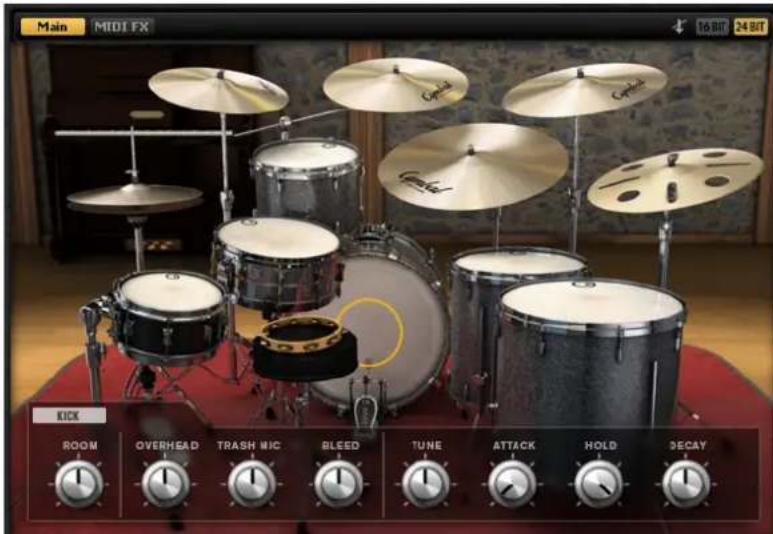
Snare Drums

Two snare drums can be played simultaneously. The piccolo snare (B) and the main snare (A) provide the same parameters. For the main snare, a Master Bleed control is available.
Mixer Page Parameters
As for other Acoustic Agent kits, the Agent mixer provides dedicated channels for all instrument groups, as well as for the individual instruments.
Room Microphones
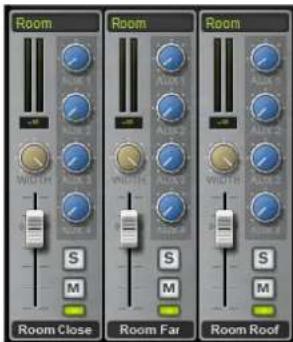
On the Room Mics tab, you can make individual settings for the three room microphone channels.
- Room Close is a stereo set of uncompressed condenser microphones positioned close to the kit, which capture the overall sound of the kit as well a portion of the room.
- Room Far is a stereo set of uncompressed condenser microphones positioned farther away from the kit, which capture all room ambiance.
- Room Roof is a stereo set of compressed condensers microphones on the ledge about 20 feet above the drum kit.
The Trash/Mix tab on the right contains a dedicated master channel for the Trash Mic signals. The channel controls for this channel are the same as for the room and overhead channels, but instead of the Width control, the Trash Mic channel has a Pan control.

RAM Usage and Voices

The three room channels and the Trash Mic channel provide an additional activation button below the Mute button.
Click this button to deactivate the corresponding channel entirely. All samples of the channel are unloaded from RAM. This reduces the amount of required memory and the number of samples that are played simultaneously.
Kick Group and Kick Channels

On the Kick tab, you can make settings for the three kick microphone channels.
- Kick In controls the settings of a dynamic bullet microphone that is mounted in the bass drum.
- Kick Out controls the settings of a multipattern condenser microphone that is mounted in front of the kick drum.
- Kit FET controls the settings of a FET microphone that is mounted in front of the kick drum. It provides different sound characteristics to the Kick Out channel.
Snare Group and Snare Channels
On the Snares tab, you can make settings for the two snares. For each snare, the following microphone channels are available: Snare Top 57, Snare Top 451, and Snare Bottom.
- Snare Top 57 controls the settings of a top-mounted dynamic microphone.
- Snare Top 451 controls the settings of a top-mounted condenser microphone.
- Snare Bottom controls the settings of a bottom-mounted multipattern condenser microphone.
Brand : STEINBERG
Model : Nashville
Category : Software