
WM-F812DSH/WB - Washing machine DEXP - Free user manual and instructions
Find the device manual for free WM-F812DSH/WB DEXP in PDF.


Pick your language and provide your email: we'll send you a specifically translated version.
| Product Type | Freestanding Washing Machine |
| Model | WM-F812DSH/WB |
| Brand | DEXP |
| Capacity | 8 kg |
| Maximum Spin Speed | 1200 rpm |
| Energy Class | A+++ |
| Washing Class | A |
| Spin Drying Efficiency | B |
| Dimensions (H x W x D) | 85 x 60 x 56 cm |
| Weight | 65 kg |
| Power Supply | 220-240 V, 50 Hz |
| Power Consumption (Wash) | 2000 W |
| Water Consumption per Cycle | 50 L |
| Number of Programs | 15 |
| Special Programs | Cotton, Synthetic, Delicate, Quick Wash, Eco, Rinse & Spin, Drum Clean |
| Display | LED Digital Display |
| Delay Start | Up to 24 hours |
| Child Lock | Yes |
| Noise Level (Wash/Spin) | 58 dB / 76 dB |
Frequently Asked Questions - WM-F812DSH/WB DEXP
How to install the washing machine?
Remove all packaging, keep the transport bolts for future moves. Level the machine by adjusting the feet. Connect the water inlet hose to a cold water tap. Insert the drain hose into a standpipe or sink. Plug into a grounded outlet.
What does the error code E01 mean?
Error code E01 indicates a water inlet problem. Check if the water tap is open, the inlet hose is not kinked, and the filter on the hose is clean. Also ensure water pressure is sufficient.
How to clean the detergent drawer?
Press the release button to remove the drawer. Wash it under running water, making sure the siphon cap is clean. Wipe the drawer cavity with a damp cloth. Reinsert until it clicks.
Why is the machine not spinning?
Check if the child lock is activated (if applicable). Ensure the drain filter is not clogged. The load may be unbalanced - redistribute clothes manually. Also verify no transport bolts are left in place.
How to run a drum cleaning cycle?
Select the Drum Clean program (if available) or run a hot wash (90°C) with an empty drum. Add a washing machine cleaner or a cup of white vinegar. Run the full cycle to remove odors and bacteria.
Can I wash a duvet in this machine?
Yes, if the duvet is machine-washable and fits in the drum. Use a bulky item program with a gentle spin. Do not overload. Ensure the duvet is evenly distributed.
How to activate the child lock?
Press and hold the Child Lock button (usually marked with a padlock) for 3-5 seconds until the indicator lights up. To deactivate, repeat the same procedure.
What is the maximum spin speed?
The maximum spin speed is 1200 rpm. You can adjust it for different fabrics. Note that higher speeds might cause more creasing.
How to clean the drain filter?
Unplug the machine. Open the lower panel (if any). Place a container underneath. Turn the drain filter counterclockwise to remove. Clean out debris. Check the drain pump impeller for blockages. Reassemble securely.
What is the recommended detergent dosage?
Follow the detergent manufacturer's instructions. For a full load (8 kg), use the maximum recommended amount. For half loads, reduce by half. Use HE detergent to avoid oversudsing.
User questions about WM-F812DSH/WB DEXP
0 question about this device. Answer the ones you know or ask your own.
Ask a new question about this device
No questions yet. Be the first to ask one.
Download the instructions for your Washing machine in PDF format for free! Find your manual WM-F812DSH/WB - DEXP and take your electronic device back in hand. On this page are published all the documents necessary for the use of your device. WM-F812DSH/WB by DEXP.
USER MANUAL WM-F812DSH/WB DEXP
natural_image
Diagram of a mechanical component with directional arrow indicating motion, no text or symbols presentnatural_image
Mechanical assembly diagram showing a wrench inserted into a mechanical component with a curved arrow indicating rotation (no text or symbols present)natural_image
Line drawing of a bathtub with a curved tube inserted into the sink, connected to a vertical pipe (no text or symbols)natural_image
Illustration of a food item being processed into a basket, showing a hand pouring into a bag (no text or symbols)natural_image
Illustration of a hand turning a circular component with a curved arrow indicating rotation (no text or symbols)natural_image
Diagram of a mechanical device with internal compartments and directional arrows indicating movement (no text or symbols)natural_image
Illustration of a faucet with a hand holding a water droplet, showing fluid flow direction (no text or symbols)natural_image
Diagram of a pipe fitting with a valve inserted, showing mechanical components and directional arrows (no text or symbols)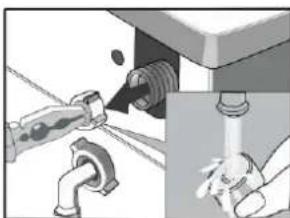
natural_image
Illustration of plumbing fixtures including a faucet, pipe fittings, and a drain valve (no text or symbols present)natural_image
Illustration of hands holding a mechanical component with an arrow indicating direction (no text or symbols)
natural_image
Hand pressing a button on a computer monitor (no text or symbols visible)
natural_image
Hand holding a mechanical component with directional arrows indicating motion (no text or symbols)
natural_image
Illustration of hands using a tool to adjust or install a mechanical component (no text or symbols visible)ВНИМАНИЕ!

Table of contents
Click a title to access it
Manual assistant
Powered by Anthropic
Waiting for your message
Product information
Brand : DEXP
Model : WM-F812DSH/WB
Category : Washing machine