RP188 - Radio AM/FM Emerson - Free user manual and instructions
Find the device manual for free RP188 Emerson in PDF.


| Product Type | Clock Radio |
| Brand | Emerson |
| Model | RP188 |
| Dimensions (H x W x D) | 6.5 x 3 x 4 inches |
| Weight | 1.2 lbs |
| Power Supply | AC 120V 60Hz |
| Battery Backup | 9V battery (not included) |
| Radio Bands | AM / FM |
| Tuning Type | Analog dial |
| Alarm Type | Buzzer or radio |
| Snooze Function | Yes (9 minutes) |
| Sleep Timer | Up to 60 minutes |
| Display | LED digital clock |
| Display Brightness | Adjustable (High/Low) |
| Controls | Knobs and buttons |
| Speaker | Built-in mono |
| Headphone Jack | Yes (3.5mm) |
| Antenna | Built-in ferrite (AM), wire (FM) |
| Color | Black or white |
| Maintenance | Wipe with dry cloth; no liquids |
| Safety | Unplug before cleaning; use only supplied cord |
| Repairability | Standard screws; replaceable fuse |
Frequently Asked Questions - RP188 Emerson
User questions about RP188 Emerson
0 question about this device. Answer the ones you know or ask your own.
Ask a new question about this device
Download the instructions for your Radio AM/FM in PDF format for free! Find your manual RP188 - Emerson and take your electronic device back in hand. On this page are published all the documents necessary for the use of your device. RP188 by Emerson.
USER MANUAL RP188 Emerson
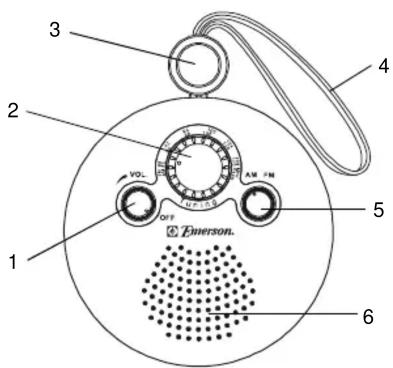
Location Of Controls
1.) VOLUME Control (Power On/OFF).
2.) TUNING Control.
3.) Carrying Strap Stopper.
4.) Carrying Strap/FM Antenna.
5.) AM/FM Band Select Switch.
6.) Speaker.
7.) Battery Compartment.
8.) Battery Compartment Cover.
9.) Battery Cover Secure Screws.

Battery Installation
1.) Open the battery compartment (located on the rear of the unit) by rotating the screws anti-clockwise.
2.) Lift off the cover.
3.) Insert 2 "AAA" batteries (not included) according to the polarity diagrams in the compartment.
4.) Put the battery compartment cover back. Rotate the screws clockwise to secure.
Listening To The Radio
1.) Rotate the On/OFF-VOLume control clockwise to turn the unit 'On'.
2.) Rotate the Band switch to select AM or FM.
3.) Tune to an AM or FM station by turning the TUNING control.
4.) Adjust the VOLume control as desired.
5.) To turn the radio 'Off', rotate the On/OFF-VOLume control counter-clockwise until a 'click' is heard.
Antenna Information
AM - The AM antenna is inside the cabinet. It may be necessary to change the position of the radio so that the built in antenna picks up the strongest signal.
FM - The FM antenna is built-in to the carrying strap. Keep the strap fully extended for best FM reception.
FCC Information
This device complies with Part 15 of the FCC Rules. Operation is subject to the following two conditions:
(1) This device may not cause harmful interference, and
(2) This device must accept any interference received, including interference that may cause undesired operation.
LIMITED WARRANTY
Emerson Radio Corp. warrants manufacturing defects in original material, including original parts and workmanship, under normal use and conditions, for a period of ninety (90) days from the date of original purchase in the U.S. With your dated proof of purchase, we will provide repair service at no charge for labor and parts at an authorized Depot Repair Facility, or replace the product in our discretion. For repair or replacement, pack your unit in a padded box, enclose your check or money order payable to Emerson Radio Corp. in the amount of \$5.00 (not required by California residents) to cover shipping and handling costs, and enclose a copy of your proof of purchase. Send your unit to:
Emerson Radio Corp.,
5101 Statesman Drive,
Irving, TX 75063.
1-800-898-9020.
This warranty does not cover damage from negligence, misuse, abuse, accident, failure to follow operating instructions, commercial use, rental, repairs by an unauthorized facility, or products purchased, used, serviced or damaged outside of the United States.
THIS WARRANTY GIVES YOU SPECIFIC LEGAL RIGHTS, AND YOU MAY ALSO HAVE OTHER RIGHTS WHICH VARY FROM STATE TO STATE.
AU898H
Part No. 16-2994
506-02
Printed in China
Brand : Emerson
Model : RP188
Category : Radio AM/FM