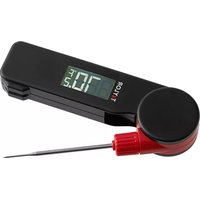
5296652 - Thermometer Taylor - Free user manual and instructions
Find the device manual for free 5296652 Taylor in PDF.


| Product Type | Instant-Read Digital Thermometer |
| Brand | Taylor |
| Model | 5296652 |
| Temperature Range | -58°F to 572°F (-50°C to 300°C) |
| Accuracy | ±1°F (0.5°C) from -4°F to 248°F (-20°C to 120°C) |
| Response Time | 3-5 seconds |
| Display | LCD with backlight |
| Probe Length | 4.5 inches (11.4 cm) |
| Dimensions | 6.3 x 1.2 x 0.6 inches (16 x 3 x 1.5 cm) |
| Weight | 1.8 oz (50 g) including battery |
| Power Source | 1 x CR2032 3V lithium battery (included) |
| Battery Life | Approximately 300 hours of continuous use |
| Auto-Off | After 10 minutes of inactivity |
| Functions | °F/°C switchable, hold function, min/max memory |
| Cleaning | Wipe probe with damp cloth; do not submerge in water |
| Storage | Store in protective sleeve at room temperature |
| Safety | Food-safe stainless steel probe; not for oven use |
| Spare Parts | Battery (CR2032) replacement |
| Repairability | Not user-serviceable; contact Taylor support |
| Warranty | 1-year limited warranty |
Frequently Asked Questions - 5296652 Taylor
User questions about 5296652 Taylor
0 question about this device. Answer the ones you know or ask your own.
Ask a new question about this device
Download the instructions for your Thermometer in PDF format for free! Find your manual 5296652 - Taylor and take your electronic device back in hand. On this page are published all the documents necessary for the use of your device. 5296652 by Taylor.
USER MANUAL 5296652 Taylor
5296652 Digital Folding K-Type Thermocouple with Replaceable Probe
Thank you for purchasing a Taylor® Digital Folding K-Type Thermocouple. Please read this instruction manual carefully before use. Keep these instructions handy for future reference. Please remember to keep the unit away from children and do not use it for safety related applications.
THERMOCOUPLE PROBE REPLACEMENT
To replace the K-type thermocouple probe, unfold the probe to open position. Turn screw cap counterclockwise to loosen and remove. Gently pull probe in an outward direction to remove. Insert new probe, aligning the "+" and "-" polarity symbols. Replace screw cap, turn clockwise to tighten.
DIGITAL FOLDING THERMOCOUPLE PROBE FUNCTION
To turn the unit on, unfold the probe to an open position (between a 45^-180^ degree angle). A motion sensor within the unit will re-illuminate the back-light, pick up or gently shake the thermometer to activate. The unit will continuously display temperatures for up to 10 minutes. After that, the unit will automatically shut off to preserve battery life. Or, to turn off manually, fold the probe to a closed position.

-
Placing stress on the probe may cause breakage.
-
After measuring high temperatures, the probe may remain HOT for a while. Allow the probe to cool before touching.
-
Use caution while handling the probe to avoid injury. Keep probe out of reach of dren.

The probe may be damaged if used to measure a temperature that exceeds the specification of the measurement temperature range.

To avoid electric shock and thermometer damage, do not measure a live circuit where the voltage exceeds 24V AC RMS or 60V CD with the thermocouple probe.
°F OR °C MODE
To switch between °F' and °C', unfold probe to open position, rotate unit left to right three times in a row. Or, loosen screws on the battery compartment cover, remove the cover and press °F/°C button
BACKLIGHT FEATURE
The backlight will activate for 15 seconds when the unit is in the open position.
LCD ERROR MESSAGES
The thermocouple incorporates visual diagnostic messages as follows:
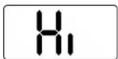

'Hi' or 'Lo' is displayed when the temperature being measured is outside of the measurement range.

'bAt' indicates a low battery warning. Replace both batteries at the same time.

"Er3" is displayed when the entire unit has been exposed to ambient temperature below 32^ (0^) or above 122^ (50^) . Allow approximately 30 minutes for the unit to stabilize back to working room temperature.
BATTERY INSTALLATION
The thermocouple operates on 2 AAA batteries (included).
- Remove any plastic wrap from the batteries before proceeding.
- Loosen the screws on the battery compartment cover on the back of the thermocouple and remove the cover.
- Install 2 "AAA" batteries into the battery compartment according to the "+" and "-" polarity symbols in the battery compartment.
- Replace the battery compartment cover and tighten the screws. CAUTION: When batteries of different brand or type are used together, or new and old batteries are used together, some batteries may be over-discharged due to difference of voltage or capacity. This can result in venting, leakage, and rupture and may cause personal injury.
NOTE: Please recycle or dispose of batteries correctly per local regulations.
WARNING: Batteries may pose a choking hazard. Do not let children hand batteries. Keep batteries away from children. If swallowed, seek medical attention immediately
PRECAUTION: Do not dispose of the unit or batteries in fire, as the batteries inside this unit may explode or leak. Remove the batteries if the product will not be used for along period of time. Remove used batteries promptly. Clean the battery contacts and also those of the device prior to battery installation.
STORAGE & CLEANING
Take care when cleaning the thermocouple, using only a soft cloth or cotton swab with water or medical alcohol, and allow the thermocouple to fully dry before using it. Do not submerge any part of the thermocouple. The thermocouple should be stored at room temperature between -4 to +140°F (-20 to +60°C).
SPECIFICATIONS
| Item | Digital Folding K-Type Thermocouple |
| Probe Measurement Range | -40°F to 500°F (-40°C to 260°C) |
| Operating Range | 32 to122°F (0 to 50°C) |
| Resolution | 0.1°F (0.1°C) |
| Probe Accuracy | ±1% of reading or 1°F (1°C) |
| Battery Life | Typically 40 hours, minimum 30 hours continuous use |
| Batteries | 2 AAA batteries |
| Display | LCD 1.57x0.75 inch (40x19mm) |
| Dimensions | 6.42x1.93x1.06 inch (163x49x26.9mm) |
| Probe length | 3.3" (8.382cm) |
| IPX7 Waterproof Rating | IPX7 when the battery door is properly closed and the probe is properly attached |
EMC/RFI
Readings may be affected if the unit is operated within a radio frequency electromagnetic field strength of approximately 3 volts per meter, but the performance of the instrument will not be permanently affected.
⚠️ DO NOT keep the unit too close to objects that continuously generate high heat (such as a hot plate) for long periods of time. This may cause the unit to overheat.
CARE AND PRECAUTIONS
- Always read instructions thoroughly to ensure that you have the full benefit of all the unit's features.
- Keep thermometer and probe out of reach of all children.
-
DO NOT immerse unit in water, as doing so will cause damage to internal components and void the warranty. If you spill liquid on it, dry it immediately with a soft, lint-free cloth. The unit is not dishwasher safe. Damage will void warranty.
-
DO NOT clean the unit with an abrasive or corrosive material. This may scratch the plastic parts and corrode the electronic circuits.
- DO NOT subject the units to excessive force, shock, dust, temperature or humidity. This may result in malfunction, shorter electronic life span, damaged battery and distorted parts.
- DO NOT operate or store the unit in high temperature or humidity conditions. The heat or moisture may interfere with the unit's internal components. Store the unit at temperatures between -4 and +140°F (-20 and +60°C).
- DO NOT tamper with the unit's internal components. Doing so will invalidate the warranty on the unit and may cause damage. The unit contains no user-serviceable parts.
- This unit operates on 2 AAA batteries. Always purchase the correct size and grade of battery most suitable for the intended use. Always replace both batteries at the same time; do not combine old and new batteries. Do not mix Alkaline, carbon-zinc (standard) or Nickel-Cadmium (rechargeable) batteries.
Two Year Limited Warranty
Taylor warrants this product to be free from defects in materials or workmanship for two [2] years (excluding batteries) for the original purchaser from date of original purchase. It does not cover damages or wear resulting from accident, misuse, abuse, commercial use, or unauthorized adjustment and/or repair. If service is required, do not return to distributor. For service, call between 7:30 AM and 4:30 PM, Mountain Standard Time, Monday through Friday. To assist us in servicing you, please have the model number and date of purchase available. Should this product require service (or replacement at our option), please pack the item carefully and return it prepaid, along with receipt showing date of purchase and a note explaining reason for return to:
Taylor, a division of Lifetime Brands, Inc.
2220 Entrada del Sol, Suite A
Las Cruces, New Mexico 88001
Customer Service Phone: 1-800-225-4834
Customer Service Fax: 1-575-526-4347
www.taylorusa.com
There are no expressed warranties except as listed above. This warranty gives you specific legal rights, and you may have other rights which vary from state to state.
For additional product information, or warranty information outside the USA, please contact us through www.taylorusa.com.
© 2022 Taylor, a division of Lifetime Brands, Inc. All rights reserved.
Made to our exact specifications in China.

5296652 8.22 WC
Brand : Taylor
Model : 5296652
Category : Thermometer