
TPC-PT8441D-AC - Camera Dahua Technology - Free user manual and instructions
Find the device manual for free TPC-PT8441D-AC Dahua Technology in PDF.


| Product Type | Thermal & Optical PTZ Camera |
| Dimensions | Ø 230 mm × 350 mm |
| Weight | 5.5 kg |
| Power Supply | AC 24V / PoE+ |
| Main Functions | 360° continuous pan, thermal imaging, visible light, intelligent tracking, alarm I/O |
| Cleaning | Use soft dry cloth; avoid solvents and abrasive materials |
| Safety | Complies with CE, FCC, UL; use proper grounding and surge protection |
| Spare Parts and Repairability | Contact authorized service center; replaceable lens and sensor module |
| General Information | For outdoor use, IP66 rated, operating temperature -40°C to 65°C |
Frequently Asked Questions - TPC-PT8441D-AC Dahua Technology
User questions about TPC-PT8441D-AC Dahua Technology
0 question about this device. Answer the ones you know or ask your own.
Ask a new question about this device
Download the instructions for your Camera in PDF format for free! Find your manual TPC-PT8441D-AC - Dahua Technology and take your electronic device back in hand. On this page are published all the documents necessary for the use of your device. TPC-PT8441D-AC by Dahua Technology.
USER MANUAL TPC-PT8441D-AC Dahua Technology
Thermal Network Anti-corrosion Multi-spectral Pan & Tilt Camera
Quick Start Guide

natural_image
Abstract geometric design with gray and blue color blocks (no text or symbols)Foreword
General
This manual introduces the installation, functions and operations of the thermal network multispectral pan & tilt camera (DC Version) (hereinafter referred to as the "Camera"). Read carefully before using the Camera, and keep the manual safe for future reference.
Safety Instructions
The following categorized signal words with defined meaning might appear in the manual.
| Signal Words Meaning | |
 DANGER DANGER | Indicates a high potential hazard which, if not avoided, will result in death or serious injury. |
 WARNING WARNING | Indicates a medium or low potential hazard which, if not avoided, could result in slight or moderate injury. |
 CAUTION CAUTION | Indicates a potential risk which, if not avoided, could result in property damage, data loss, lower performance, or unpredictable result. |
 LASER RADIATION LASER RADIATION | Indicates a laser radiation hazard.Take care to avoid exposure to a laser beam. |
 TIPS TIPS | Provides methods to help you solve a problem or save you time. |
 NOTE NOTE | Provides additional information as the emphasis and supplement to the text. |
Revision History
| Version | Revision Content | Release Time |
| V1.0.0 | First release. | November 2022 |
About the Manual
- The manual is for reference only. If there is inconsistency between the manual and the actual product, the actual product shall prevail.
- We are not liable for any loss caused by the operations that do not comply with the manual.
- The manual would be updated according to the latest laws and regulations of related regions. For detailed information, see the paper manual, CD-ROM, QR code or our official website. If there is inconsistency between paper manual and the electronic version, the electronic version shall prevail.
- All the designs and software are subject to change without prior written notice. The product updates might cause some differences between the actual product and the manual. Please contact the customer service for the latest program and supplementary documentation.
- There still might be deviation in technical data, functions and operations description, or errors in print. If there is any doubt or dispute, please refer to our final explanation.
-
Upgrade the reader software or try other mainstream reader software if the manual (in PDF format) cannot be opened.
-
All trademarks, registered trademarks and the company names in the manual are the properties of their respective owners.
- Please visit our website, contact the supplier or customer service if there is any problem occurred when using the device.
- If there is any uncertainty or controversy, please refer to our final explanation.
Important Safeguards and Warnings
This section introduces content covering the proper handling of the device, hazard prevention, and prevention of property damage. Read carefully before using the device, and comply with the guidelines when using it.
Transportation Requirements
!
- Do not place heavy stress on the device, allow it to fall, violently vibrate or immerse it in liquid during transportation. Handle the device with care to avoid damaging the internal precision parts.
- The complete package is necessary for transportation and storage. It is strictly forbidden to transport the device without full packaging. Whether it is delivered by the contractor or returned to the factory for repair, we will assume no responsibility for any damage or problems caused during transportation due to the incomplete package being sent.
Storage Requirements
!
- Store the device under allowed humidity and temperature conditions.
- Do not place the device in a humid, dusty, extremely hot or cold site that has strong electromagnetic radiation or poor ventilation.
- Do not place heavy stress on the device, allow it to fall or collide with other objects, violently vibrate or immerse it in liquid during storage.
Installation Requirements
!
DANGER
- All service personnel must have required certification or qualified training for performing installations and maintenance of electric apparatuses in environments that have explosive gas. They must also be trained and certified to work at heights, and must have knowledge and skills in the following areas:
◇ Basic knowledge and skills in installing CCTV system and components.
Basic knowledge and skills in low-voltage wiring and in connecting low-voltage electronic circuits.
- All installation and operations must conform to the local electrical safety code and standards.
- Strictly comply with the local electrical safety code and standards, and check whether the power supply is correct before operating the device.
When selecting the power adapter, the power supply requirements (such as rated voltage) are subject to the device label.
◇ We recommend using the power adapter provided with the device.
The power supply must conform to the requirements of ES1 in IEC 62368-1 standard and be no higher than PS2. Please note that the power supply requirements are subject to the device label.
- Make sure that the power is off when you connect the cables, install or disassemble the device.
- An emergency disconnect device must be installed during installation and wiring at a readily accessible location for emergency power cut-off.
- Protect the power cord and wires from being walked on or squeezed particularly at plugs, power sockets, and the point where they exit from the device.
- Do not expose the device to heat sources such as a radiator, heater, stove or other types of heating equipment. This is to avoid the risk of fire.
- Do not connect multiple devices to the same power adapter to avoid the risk of overheating or fire if the rated load is exceeded. Please use the power adapter provided by the manufacturer.

WARNING
- A high joule surge protector must be installed when using the device in environments with strong thunder storms or high induced voltage, such as in high voltage transformer substations.
- We recommend you use the device with a lightning protection device for stronger protection against lightning. For outdoor scenarios, strictly comply with the lightning protection regulations. The device must be installed by a certified lightning protection contractor.
- The lightning protection standards of buildings must be taken into consideration when designing the lightning protection and grounding for outdoor circuits. They must conform to the related national and industrial standards. The grounding device must meet the dual requirements of system anti-interference and electrical safety, and must not be short-circuited or mixed with the neutral line of the strong power grid.

- Appropriate brackets must be installed when the device cannot be used alone.
- Do not pull on the cable to avoid damaging the device.
- Do not place heavy stress on the device, allow it to collide with other objects, and do not violently vibrate or immerse it in liquid during installation.
- Do not connect the device to two or more kinds of power supplies, to avoid safety risks and damage to the device.
- Do not expose the device to environments with strong magnetic fields to avoid damage to the device.
- Do not install the device in an environment that has strong vibrations, such as in a vehicle or ship.
- Remove the electrostatic film from the visible window and the thermal imaging lens cover after installation is complete.
- Do not block the ventilation opening near the device to avoid the device being damaged from heat accumulation.
- Use the accessories suggested by the manufacturer. Installation and maintenance must be performed by qualified professionals.
- Make sure a durable and reliable waterproof treatment has been applied to the connectors of the network and power cables, to avoid damaging the device.
- Protect the accessories that come with the device for future maintenance and debugging.
- Make sure that the device is installed horizontally (the bubble inside the spirit level stays in the middle), and on a stable surface that is resistant to deformation.
- Power on the device for inspection of basic functions before installing it in a high location. This is to avoid reinstalling it if it behaves abnormally.
- Do not place the device in environments with smoke, vapor, heavy dust, or that have high temperatures to avoid damage to the device.
- If a circular connector comes with the device, make sure it is securely screwed in place.
Otherwise, the device might behave abnormally due to erosions or oxidation of the connector or the pins.
- Make sure the wire diameter of the cables meets the requirements of the corresponding distance to avoid equipment damage caused by undervoltage and overcurrent.
- Do not aim the lens at intense radiation sources (such as the sun, lasers and molten steel) to avoid damage to the thermal detector and the visible lens.
- Do the anti-corrosion protection during the device installation. We recommend you spray a layer of anti-corrosion coating on the device cover and screw installation areas after installation.

After unpacking, even if the packing bag is damaged or leaking air, the normal use of the device will not be affected.
Operation Requirements
DANGER
- Do not insert foreign matter into the device to avoid the risk of short circuits, damaging the device and injuring people.
WARNING
- Do not touch the heat dissipation component of the device to avoid getting burnt.
!
- Operating temperature: -40 °C to +70 °C (-40 °F to +158 °F).
- Do not use a temperature measuring device to measure temperatures that extend beyond its measuring range.
- Do not stain or damage optical components such as the lens and glass.
- Prevent liquid from flowing into the device to avoid damage to its internal components.
- Do not place the device in a highly humid, extremely hot or cold site.
- Use the device within the allowed humidity (less than 95% RH) and altitude (less than 3000 m) conditions.
- The operating temperature of the device must meet the requirements. Refer to the device specifications for information on the allowed temperature and humidity conditions.
- Do not expose the device to corrosive environments such as coastal areas, sea areas with thick salt fog, environments with acid gas, chemical plants and the seaside.

- There is a limit to the life cycle of the quick-wear parts. Make sure to use them correctly, and follow the manufacturer's recommendations and guidance. Log in to the official website for instructions on using the quick-wear parts.
- Devices suitable for low temperature environments automatically preheat before they start to work when placed in a low temperature environment. The preheat time depends on the ambient temperature. When it heats to a suitable temperature, the device starts to work normally.
Maintenance Requirements
DANGER
- The maintenance personnel of the camera must have required certification or qualified training
for installing closed-circuit television (CCTV) systems. They must also be trained and certified to work at heights, and must have knowledge and skills in the following areas:
◇ Basic knowledge and skills in installing CCTV systems and components.
Basic knowledge and skills in low-voltage wiring and in connecting low-voltage electronic circuits.
- Do not allow liquid to get into the device to avoid damage to the internal components. If any liquid flows into the device, immediately disconnect the power supply, unplug all the cables connected to the device, and contact after-sales service.
- Cut off the power before cleaning the device to avoid the risk of electrocution.

- Use the accessories suggested by the manufacturer. Installation and maintenance must be performed by qualified professionals.
- If the device produces smoke, an odd odor, noise, or behaves faulty, cut the power immediately, and contact the local dealer or service center at your earliest convenience. Do not disassemble the device. We assume no responsibility for issues caused by uninstructed maintenance.
- Clean the device body with a soft dry cloth. If there are any stubborn stains, clean them away with a soft cloth dipped in a neutral detergent, and then wipe the surface dry. Do not use volatile solvents such as ethyl alcohol, benzene, diluent, or abrasive detergents on the device to avoid damaging the coating and degrading the performance of the device.
- Use a clean cloth or lens wipe to gently wipe off the dust on the visible window. Dried stains can be washed with clean water or ordinary diluted detergent. Do not use alkaline detergents to clean the device, and do not vigorously wipe the device with a damp cloth to avoid permanently damaging the glass.
- The cover of anti-corrosion camera is defined as a quick-wear part. You need to check the cover regularly. If there is an abnormality, please do the maintenance immediately.
- If the surface coating of the device is seriously damaged, send the device back to the manufacturer; if the surface coating of the device are slightly damaged, please spray a layer of anti-corrosion coating to protect the device under the professional guidance.
Laser Requirements
| Wave Length (nm) | Diameter of Light Spot | Power (W) | Max. Beam Intensity (W/sr) |
| 850 ± 10 | Divergence angle 2°: Valid distance ≥ 800 m, beam diameter 28 m. | 4.2 ± 0.4 7745 | |
| Divergence angle 70°: Valid distance ≥ 80 m, beam diameter 112 m. | |||
| 808 ± 5 | Divergence angle 0.56°: Valid distance ≥ 2000 m, beam diameter 19 m. | ≥12 8000 | |
| Divergence angle 45°: Valid distance ≥ 100 m, beam diameter 83 m. |

LASER RADIATION
If the device is equipped with a laser beam, pay extra attention to the following:
- The laser can cause permanent damage to human eyes and skin within safe distance. Keep the device a safe distance away from humans while installing or operating the device.
- Do not use the distance measurer to measure the distance of targets that are within 50 m of the
laser. The laser can permanently damage the device.
- Laser radiation can ignite flammables. Do not directly expose objects (excluding scattered or absorber) to the laser beam, and do not place volatile flammables (such as alcohol) in the working area of laser radiation products, to avoid producing laser beams or fire caused by sparks from high voltage discharge.
- Clear all the reflective objects from the working area of laser radiation products. The reflected or scattered beam of a laser can cause severe damage to eyes. Take necessary precautions when reflective objects are required for use, to minimize its reflecting and scattering range.
- Before dismantling or moving the device to another location, wait 5 minutes after the laser distance measurer finishes operating, so that the accumulated electrons inside the device can be fully discharged. This is to avoid the risk of electrocution.
- Do not touch the circuit of the distance measurer while the device is in a working state, especially the power supply of the laser, which possesses thousands of volts of voltage.
- Install the device with laser function within 3 m of distance, and make sure there are no objects obstructing it to avoid the risk of laser burn and fire.
- When using a laser beam device, avoid exposing the device surface to laser beam radiation.
Table of Contents
Foreword
Important Safeguards and Warnings....IV
1 Checklist....1
2 Design....2
2.1 Dimensions....2
2.2 Cables ...... 2
3 Basic Configuration....4
3.1 Initializing Camera....4
3.2 (Optional) Modifying IP Address 4
3.3 Viewing Live Image....5
4 Installation....6
4.1 Preparation....6
4.1.1 Selecting Installation Place ....6
4.1.2 Selecting Cable 6
4.2 Installing the Camera....6
4.2.1 (Optional) Installing Micro SD or SIM Card 6
4.2.2 Fixing Camera 8
4.2.3 (Optional) Installing Waterproof Connector 10
5 Alarm Configuration....11
Appendix 1 Lightning and Surge Protection....13
Appendix 2 Cybersecurity Recommendations....14
1 Checklist
Check the package according to the following checklist. If you find anything damaged or lost, contact customer service.

Keep accessories properly for future use.
Figure 1-1 Packing list

Table 1-1 Checklist
| No. | Item Name | Quantity | No. | Item Name | Quantity |
| 1 | Thermal Network Anti-corrosion Multi-spectral Pan & Tilt Camera | 1 4 Quick start guide | 1 | ||
| 2 Screw package 1 5 | Legal and regulatory information | 1 | |||
| 3 | Water-proof connector | 1 | 6 | Power adapter | 1 |
2 Design
2.1 Dimensions
Figure 2-1 Dimensions (unit: mm [inch])

2.2 Cables

The length of the cable is about 1.5 m.
Figure 2-2 Cables (unit: mm [inch])

Table 2-1 Ports description
| No. Port Description | ||
| 1 POWER | Inputs 36 VDC or 48 VDC.Refer to the labels attached to the Camera; otherwise the Camera might be damaged. | |
| 2 | RS485_A (yellow) | Controls such devices as external PTZ. |
| RS485_B (orange) | ||
| 3 VIDEO OUT | BNC port that outputs analog video signals and can be connected to TV monitor to view images. | |
| 4 | LAN | Connects to standard Ethernet cable. |
| 5 | AUDIO OUT | Outputs audio signals to such devices as speaker. |
| AUDIO IN | Inputs analog audio signals from such devices as sound pick-ups. | |
| AUDIO GND Ground | port. | |
| 6 | I/O | Inputs and outputs alarm signals. For more details, see Table 2-2. For details on alarm configuration, see "5 Alarm Configuration". |
| 7 | ||
Table 2-2 I/O port description
| Port | Cable port name | Description |
| I/O port | ALARM_OUT1 | Outputs alarm signal to alarm device.ALARM_OUT1 must be used together with Alarm COM1. |
| ALARM_COM1 | ||
| ALARM_OUT2 | Outputs alarm signal to alarm device.ALARM_OUT2 must be used together with Alarm COM2. | |
| ALARM_COM2 | ||
| ALARM_IN1-ALARM_IN7 | Receives the on-off signal of external alarm source. | |
| ALARM_GND | Grounding terminal. |
3 Basic Configuration

- Configure network before installation or insert SIM card during installation to access 4G network.
- The figures in the manual are for reference only, and might differ from the actual products. For more details, see Thermal Hybrid Camera_Web Operation Manual.
3.1 Initializing Camera
Initialize the Camera through ConfigTool or by logging in to the web page with default IP after connecting the Camera to the computer.
- Use ConfigTool to initialize Cameras in batches.
- Use web page to initialize a single Camera.
This section uses web as an example.

- Initialize the Camera for first-time use or after factory resetting.
- To secure the Camera data, keep admin password well after initialization and modify it regularly.
- Make sure that the Camera IP address (192.168.1.108 by default) and the computer IP address are in the same network segment.
Step 1 Open browser, enter the Camera default IP address in the address bar, and then press the Enter key.
Step 2 Set the login password of admin.

- The email address is for password reset.
- We recommend entering the email address in case you forget the password and reset the password.
Step 3 Click Save.
3.2 (Optional) Modifying IP Address
Set an IP address fitted to the actual network segment to make the Camera access network.

This section instructs you to configure the network when SIM card is not needed.
Step 1 Log in to the Camera web page.
Step 2 Select Setting > Network > TCP/IP.
Step 3 Configure IP related parameters.
Figure 3-2 TCP/IP

Step 4 Click Save.
3.3 Viewing Live Image
Ensure the Camera can be accessed and live image can be viewed normally after configuring network.
Log in to the Camera web page with the configured IP address. The web main page is displayed.

You will be prompted to install a plug-in for first-time system login. Please download and install the plug-in. The web page will refresh automatically after the plug-in is installed, and then the live video will be displayed.
Figure 3-3 Web main page

4 Installation
4.1 Preparation
4.1.1 Selecting Installation Place
Make sure that the place where the Camera is installed has enough space to hold the Camera and its mounting accessories. Make sure that the wall and column can bear at least 8 times the total weight of the Camera and its mounting accessories.
4.1.2 Selecting Cable
Power Cord
To extend power cord you have received, evaluate the distance you want to extend and select the appropriate cord diameter.
Table 4-1 Power cords
| Diameter (mm) | Maximum Transmission Distance [ft (m)] |
| 0.800 61.06 (18.61) | |
| 1.000 95.41 (29.08) | |
| 1.250 149.08 (45.44) | |
| 2.000 381.66 (116.33) |
Signal Cable
To extend signal cable you have received (such as alarm input/output cable and RS-485 cable), use 0.56 mm (24AWG) and above.
4.2 Installing the Camera
For bracket and electric drill not attached in the box, you can purchase them separately as needed.

During installation, avoid objects such as the Camera, components and tools falling off; otherwise people, animals, other objects or the Camera might be damaged.
4.2.1 (Optional) Installing Micro SD or SIM Card
• Install SD card to save recordings to local storage.
• Install SIM card to access 4G network.

You do not need to configure network when SIM card is used.

- Cut off power before installation. To install Micro SD card, contact professional personnel to dismantle the Camera.
- Do not press the reset button during installation. Press and hold the reset button for 4–5 seconds and the Camera will be restored to factory default settings. Think twice before enabling the function.
- Before closing and fastening the protective cover, make sure that gasket is positioned in the sealing groove without undesirable phenomena such as tilting and leakage. Then, fasten four M3 screws to ensure waterproof sealing. Test gas tightness after closing the housing. We are not liable for Camera failure caused by unauthorized dismantling.
Step 1 Use a cross screwdriver to turn M3 screws counterclockwise and then open the protective cover.
Figure 4-1 Open protective cover

natural_image
Technical line drawing of a mechanical device with mounting brackets and a central component, no visible text or symbolsStep 2 Insert Micro SD or SIM card in the horizontal direction shown by the arrows.
Figure 4-2 Install Micro SD or SIM card

Table 4-2 Component name
| No. Name | |
| 1 SIM card slot | |
| 2 Reset button | |
| 3 Micro SD card slot |
Step 3 Use a cross screwdriver to tighten M3 screws and fasten the protective cover.
4.2.2 Fixing Camera
The position of cable outlet hole is fixed, which determines how the Camera needs to be installed.

Do not dismantle the Camera or change the position of cable outlet hole on your own, which might cause water leakage or bad image for the Camera.
Step 1 Drill four holes on the base, and then hammer expansion bolts into the holes. Make sure that the expansion sleeves are entirely embedded into wall and parallel with the installation surface.

Make sure that the size, depth and position of the holes are matched with the expansion bolts.
Figure 4-3 Install expansion bolts

Step 2 Align the installation holes of the Camera to the expansion bolts, and then secure the Camera on the base with flat washer, spring washer and nut.
Figure 4-4 Fix camera

natural_image
Technical line drawing of a mechanical device with mounting base (no text or symbols)1

natural_image
Technical line drawing of a mechanical device with mounting base and cylindrical components (no text or symbols)2
4.2.3 (Optional) Installing Waterproof Connector
Figure 4-5 Install waterproof connector for network port

flowchart
graph TD
    A["1"] --> B["2"]
    B --> C["3"]
    C --> D["4"]
    D --> E["5"]
5 Alarm Configuration

WARNING
Cut off power before connecting cables.
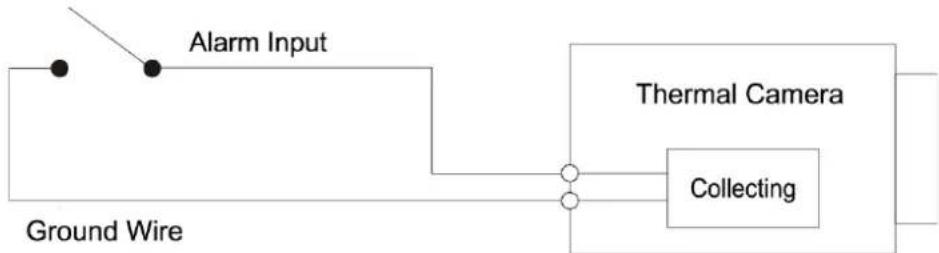
Step 1 Connect the alarm input device to the alarm input port of I/O cable.
Alarm input: Input signal is idle or grounded and the device can collect different states of alarm input port.
- When input signal is 3.3 V or idle, the Camera collects logic "1".
- When input signal is grounded, the Camera collects logic "0".
Figure 5-1 Alarm input
flowchart
graph LR
    A["Ground Wire"] --> B["Alarm Input"]
    B --> C["Thermal Camera"]
    C --> D["Collecting"]
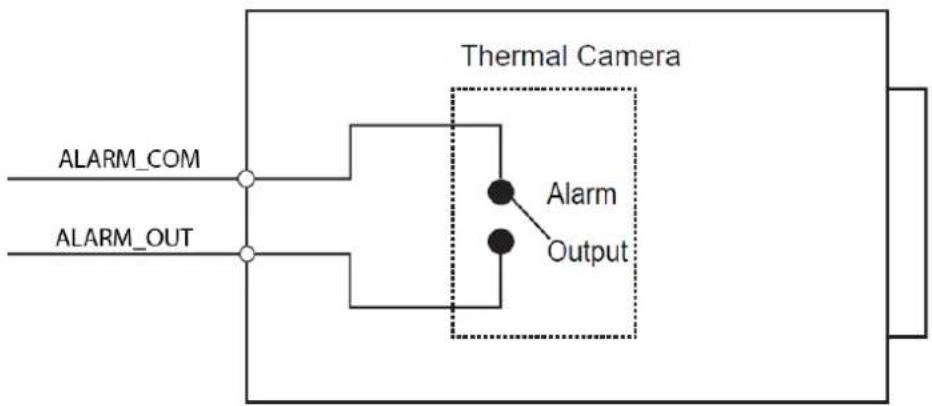
Step 2 Connect alarm output device to alarm output port of I/O cable. Alarm output is a relay switch output. The alarm output port can only be connected to NO alarm device.
Alarm output: Port ALARM_OUT and ALARM_COM form a switch to provide alarm output. Normally the switch is on. The switch will be turned off when there is an alarm output.

ALARM_OUT1 can only be used together with ALARM_COM1 while ALARM_OUT2 can only be used together with ALARM_COM2 when connecting to alarm devices.
Figure 5-2 Alarm output
flowchart
graph TD
    A["ALARM_COM"] --> B["Thermal Camera"]
    C["ALARM_OUT"] --> B
    B --> D["Alarm"]
    B --> E["Output"]
Step 3 Open web page, select Setting > Event > Alarm.
Step 4 Configure the settings for alarm input and output on the Alarm page, and then click Save.
- Alarm input is corresponding to the alarm input port of device I/O cable. It is to set corresponding NO and NC according to the high and low level signal generated by alarm input devices when an alarm is triggered.
- The alarm output corresponds to the alarm output port of device I/O cable.
Figure 5-3 Alarm setting

Appendix 1 Lightning and Surge Protection
The Camera adopts TVS lightning protection technology. It can effectively prevent damage from various pulse signals below 6000 V, such as a sudden lighting and surge. However, you still need to take necessary precaution measures in accordance with your local electrical safety code when installing the Camera in outdoor environment.
- The distance between the signal transmission cable and high-voltage device (or high-voltage cable) shall be at least 50 m.
- Outdoor cable layout shall go under the penthouse if possible.
- For vast land, use sealing steel tube under the land to implement cable layout and make sure that both ends of the tube are equipotentially grounded. Open floor cable layout is forbidden.
- For vast land, install a 10 KA lightning rod near the Camera's power input port and Ethernet port. For Camera with AC to DC power adapter, install a 10 KA lightning rod near the output port of the adapter.
- For Camera installed on iron tower, if there is a high-performance grounding bar on the tower, connect the Camera grounding wire to the bar. If there is no grounding bar, use multiple copper cable whose cross-sectional area are not less than 16 mm ^2 to connect the Camera grounding wire into the ground.
- Make sure that the Camera is over 3 m away from the top point of tower lightning rod and within protection area against direct lighting.
- In area of strong thunderstorm or near high sensitive voltage (such as near high-voltage transformer substation), install additional high-power thunder protection device or lightning rod.
- The thunder protection and earth grounding of the outdoor devices and cables shall be considered based on the whole thunder protection of the building and conform to your local or industry standards.
- The system shall adopt equal-potential wiring. The grounding devices shall meet anti-jamming requirements and at the same time conforms to your local electrical safety code.
- The grounding devices shall not be connected to N (neutral) line of high voltage power grid or mixed with other wires. When you connect the system to the ground alone, the grounding resistance shall not be more than 4Ω and the cross-sectional area of grounding cable shall be no less than 25 mm ^2 .

Appendix 2 Cybersecurity Recommendations
Cybersecurity is more than just a buzzword: it's something that pertains to every device that is connected to the internet. IP video surveillance is not immune to cyber risks, but taking basic steps toward protecting and strengthening networks and networked appliances will make them less susceptible to attacks. Below are some tips and recommendations on how to create a more secured security system.
Mandatory actions to be taken for basic device network security:
1. Use Strong Passwords
Please refer to the following suggestions to set passwords:
- The length should not be less than 8 characters;
- Include at least two types of characters; character types include upper and lower case letters, numbers and symbols;
- Do not contain the account name or the account name in reverse order;
- Do not use continuous characters, such as 123, abc, etc.;
- Do not use overlapped characters, such as 111, aaa, etc.;
2. Update Firmware and Client Software in Time
- According to the standard procedure in Tech-industry, we recommend to keep your device (such as NVR, DVR, IP camera, etc.) firmware up-to-date to ensure the system is equipped with the latest security patches and fixes. When the device is connected to the public network, it is recommended to enable the "auto-check for updates" function to obtain timely information of firmware updates released by the manufacturer.
- We suggest that you download and use the latest version of client software.
"Nice to have" recommendations to improve your device network security:
1. Physical Protection
We suggest that you perform physical protection to device, especially storage devices. For example, place the device in a special computer room and cabinet, and implement well-done access control permission and key management to prevent unauthorized personnel from carrying out physical contacts such as damaging hardware, unauthorized connection of removable device (such as USB flash disk, serial port), etc.
2. Change Passwords Regularly
We suggest that you change passwords regularly to reduce the risk of being guessed or cracked.
3. Set and Update Passwords Reset Information Timely
The device supports password reset function. Please set up related information for password reset in time, including the end user's mailbox and password protection questions. If the information changes, please modify it in time. When setting password protection questions, it is suggested not to use those that can be easily guessed.
4. Enable Account Lock
The account lock feature is enabled by default, and we recommend you to keep it on to guarantee the account security. If an attacker attempts to log in with the wrong password several times, the corresponding account and the source IP address will be locked.
5. Change Default HTTP and Other Service Ports
We suggest you to change default HTTP and other service ports into any set of numbers between 1024\~65535, reducing the risk of outsiders being able to guess which ports you are using.
6. Enable HTTPS
We suggest you to enable HTTPS, so that you visit Web service through a secure communication channel.
7. MAC Address Binding
We recommend you to bind the IP and MAC address of the gateway to the device, thus reducing the risk of ARP spoofing.
8. Assign Accounts and Privileges Reasonably
According to business and management requirements, reasonably add users and assign a minimum set of permissions to them.
9. Disable Unnecessary Services and Choose Secure Modes
If not needed, it is recommended to turn off some services such as SNMP, SMTP, UPnP, etc., to reduce risks.
If necessary, it is highly recommended that you use safe modes, including but not limited to the following services:
- SNMP: Choose SNMP v3, and set up strong encryption passwords and authentication passwords.
- SMTP: Choose TLS to access mailbox server.
- FTP: Choose SFTP, and set up strong passwords.
- AP hotspot: Choose WPA2-PSK encryption mode, and set up strong passwords.
10. Audio and Video Encrypted Transmission
If your audio and video data contents are very important or sensitive, we recommend that you use encrypted transmission function, to reduce the risk of audio and video data being stolen during transmission.
Reminder: encrypted transmission will cause some loss in transmission efficiency.
11. Secure Auditing
- Check online users: we suggest that you check online users regularly to see if the device is logged in without authorization.
- Check device log: By viewing the logs, you can know the IP addresses that were used to log in to your devices and their key operations.
12. Network Log
Due to the limited storage capacity of the device, the stored log is limited. If you need to save the log for a long time, it is recommended that you enable the network log function to ensure that the critical logs are synchronized to the network log server for tracing.
13. Construct a Safe Network Environment
In order to better ensure the safety of device and reduce potential cyber risks, we recommend:
- Disable the port mapping function of the router to avoid direct access to the intranet devices from external network.
- The network should be partitioned and isolated according to the actual network needs. If there are no communication requirements between two sub networks, it is suggested to use VLAN, network GAP and other technologies to partition the network, so as to achieve the network isolation effect.
- Establish the 802.1x access authentication system to reduce the risk of unauthorized access to private networks.
- Enable IP/MAC address filtering function to limit the range of hosts allowed to access the device.
- Thermal Network Anti-corrosion Multi-spectral Pan & Tilt Camera
- Foreword
- General
- Safety Instructions
- Revision History
- About the Manual
- Important Safeguards and Warnings
- Transportation Requirements
- !
- Storage Requirements
- Installation Requirements
- DANGER
- WARNING
- Operation Requirements
- Maintenance Requirements
- LASER RADIATION
- Table of Contents
- Important Safeguards and Warnings....IV
- Checklist....1
- Design....2
- Basic Configuration....4
- Installation....6
- Installing the Camera....6
- Alarm Configuration....11
- Appendix 1 Lightning and Surge Protection....13
- Appendix 2 Cybersecurity Recommendations....14
- Checklist
- Design
- Dimensions
- Cables
- Basic Configuration
- Initializing Camera
- (Optional) Modifying IP Address
- Viewing Live Image
- Installation
- Preparation
- Selecting Installation Place
- Selecting Cable
- Power Cord
- Signal Cable
- Installing the Camera
- (Optional) Installing Micro SD or SIM Card
- Fixing Camera
- (Optional) Installing Waterproof Connector
- Alarm Configuration
- Appendix 1 Lightning and Surge Protection
- Appendix 2 Cybersecurity Recommendations
- Mandatory actions to be taken for basic device network security:
- Use Strong Passwords
- Update Firmware and Client Software in Time
- "Nice to have" recommendations to improve your device network security:
- Physical Protection
- Change Passwords Regularly
- Set and Update Passwords Reset Information Timely
- Enable Account Lock
- Change Default HTTP and Other Service Ports
- Enable HTTPS
- MAC Address Binding
- Assign Accounts and Privileges Reasonably
- Disable Unnecessary Services and Choose Secure Modes
- Audio and Video Encrypted Transmission
- Secure Auditing
- Network Log
- Construct a Safe Network Environment
Brand : Dahua Technology
Model : TPC-PT8441D-AC
Category : Camera