VIDDVR - Wired video accessory Speco Technologies - Free user manual and instructions
Find the device manual for free VIDDVR Speco Technologies in PDF.


| Product Type | Digital Video Recorder (DVR) |
| Brand | Speco Technologies |
| Model | VIDDVR |
| Number of Channels | 4 |
| Video Input | BNC (4 ports) |
| Recording Resolution | 1080p (1920x1080) |
| Storage Capacity | Up to 1 TB internal HDD (included) |
| Network Interface | Ethernet (RJ-45) for remote access |
| Remote Viewing | Yes via web browser and mobile app |
| Video Output | HDMI and VGA |
| Audio | 1 audio input, 1 audio output (RCA) |
| Power Supply | DC 12V, 2A |
| Dimensions (W x H x D) | 12.0 x 2.0 x 9.0 inches (305 x 51 x 229 mm) |
| Weight | 3.5 lbs (1.6 kg) |
| Operating Temperature | 32°F to 104°F (0°C to 40°C) |
| Main Functions | Continuous recording, motion detection, scheduled recording, playback, and backup via USB |
| Maintenance & Cleaning | Wipe with a soft, dry cloth. Do not use liquids or abrasive cleaners. |
| Safety | Use only the provided power adapter; keep away from moisture and excessive heat. |
| Spare Parts & Repairability | Spare parts (e.g., power adapter, HDD) are available from authorized service centers. |
| General Information | Designed for small business or home security; supports up to 4 cameras. |
Frequently Asked Questions - VIDDVR Speco Technologies
User questions about VIDDVR Speco Technologies
0 question about this device. Answer the ones you know or ask your own.
Ask a new question about this device
Download the instructions for your Wired video accessory in PDF format for free! Find your manual VIDDVR - Speco Technologies and take your electronic device back in hand. On this page are published all the documents necessary for the use of your device. VIDDVR by Speco Technologies.
USER MANUAL VIDDVR Speco Technologies
natural_image
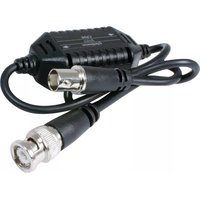
Close-up of a black electronic device with two connectors and a central connector (no visible text or symbols)Speco Technologies' VIDDVR is a coaxial balun that also reduces or removes interference caused by impedance mismatches from data signals, other video signals, nearby power, ringing telephones, fluorescent lights, transformers, and other sources.
Features:
● BNC male to BNC female balun with 9.5" cables on each side.
- Gives your Standard Definition DVR immunity from interference.
● Built-in highly balanced mode of video transmission which is immune to interference from multiple causes.
- No power required.
Installation View:
If you experience interference issues, first try installing the VIDDVR on the video reception side (that closest to DVR or Monitor). If that does not eliminate the interference, add a second VIDDVR closer to the camera side.

flowchart
graph LR
    A["Coaxial cable"] --> B["VIDDVR"]
    B --> C["coaxial cable"]
    B --> D["VIDDVR"]
    D --> E["coaxial cable"]
    D --> F["Computer"]
    B --> G["wire connection"]
    D --> H["wire connection"]
Specifications:
| ITEM NO. | VIDDVR |
| Transmission Distance | |
| Temperature | Operation: 14° to 113°F, Storage: -22° to 140°F, Humidity: up to 95% |
| Dimensions | 2.9" W x 1.1" H x 0.8" D with two 9.5" cables |
| Weight | 0.3 Lbs. |
RoHS CC FC
Speco Technologies is constantly developing and improving products.
We reserve the right to modify product design and specifications without notice and without incurring any obligation.
Speco Technologies • 200 New Highway • Amityville • NY • 11701 • www.specotech.com
Rev. 04/02/20
Brand : Speco Technologies
Model : VIDDVR
Category : Wired video accessory