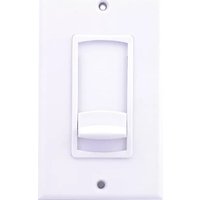
IMP100DLWH - Audio volume controller Speco Technologies - Free user manual and instructions
Find the device manual for free IMP100DLWH Speco Technologies in PDF.


| Product Type | Indoor IP Camera |
| Brand | Speco Technologies |
| Model | IMP100DLWH |
| Color | White |
| Dimensions (W x H x D) | 3.5 x 4.5 x 3.5 inches (approx.) |
| Weight | 0.5 lbs (approx.) |
| Power Supply | DC 12V, 1A (adapter included) |
| Power Consumption | 5W max |
| Image Sensor | 1/3" CMOS |
| Resolution | 1920 x 1080 (Full HD) |
| Frame Rate | 30 fps |
| Lens | 3.6mm fixed lens |
| Field of View | 78 degrees |
| Night Vision | Up to 30ft IR LEDs |
| Audio | Built-in microphone |
| Connectivity | Ethernet (RJ45), Wi-Fi 802.11b/g/n |
| Storage | microSD card up to 128GB (not included) |
| Mounting | Wall or ceiling mount bracket included |
| Operating Temperature | 14°F to 122°F (-10°C to 50°C) |
| Compatibility | iOS, Android, PC (web browser) |
| Certifications | FCC, CE, RoHS |
| Package Contents | Camera, power adapter, mounting kit, quick start guide |
| Warranty | 1 year limited |
Frequently Asked Questions - IMP100DLWH Speco Technologies
User questions about IMP100DLWH Speco Technologies
0 question about this device. Answer the ones you know or ask your own.
Ask a new question about this device
Download the instructions for your Audio volume controller in PDF format for free! Find your manual IMP100DLWH - Speco Technologies and take your electronic device back in hand. On this page are published all the documents necessary for the use of your device. IMP100DLWH by Speco Technologies.
USER MANUAL IMP100DLWH Speco Technologies
Thank you for choosing the Speco IMP100DL slide style impedance matching volume control.
The IMP100DL has a unique adjustable design which allows it to be used as an impedance matching stereo volume control when 2x, 4x, or 8x switch positions are selected, or as a standard stereo non-impedance matching volume control when 1x switch positions are selected (Note: 1x positions are for use with impedance matching speaker selector or other impedance matching device). When the impedance matching switch positions are selected, this design enables you to connect up to 8 pairs of 8-ohm speakers or 4 pairs of 4-ohm speakers to an 8-ohm stable amplifier and operate them simultaneously without the fear of amplifier overload, eliminating the need for a speaker selector or other impedance matching device.
8 ohm Speaker Chart
| Recommended Switch Position 8 ohm Stable Amplifier. | |
| Connecting 1 Pair of 8 ohm Speakers | 1X Position |
| Connecting 2 Pairs of 8 ohm Speakers | 2X Position |
| Connecting 3-4 Pairs of 8 ohm Speakers | 4X Position |
| Connecting 5-8 Pairs of 8 ohm Speakers | 8X Position |
| Recommended Switch Position 4 ohm Stable Amplifier. | |
| Connecting 2 Pairs of 8 ohm Speakers | 1X Position |
| Connecting 3-4 Pairs of 8 ohm Speakers | 2X Position |
| Connecting 5-8 Pairs of 8 ohm Speakers | 4X Position |
| Connecting 9-16 Pairs of 8 ohm Speakers | 8X Position |
4 ohm Speaker Chart
| Recommended Switch Position 8 ohm Stable Amplifier. | |
| Connecting 1 Pair of 4 ohm Speakers | 2X Position |
| Connecting 2 Pairs of 4 ohm Speakers | 4X Position |
| Connecting 3-4 Pairs of 4 ohm Speakers | 8X Position |
| Recommended Switch Position 4 ohm Stable Amplifier. | |
| Connecting 1 Pair of 4 ohm Speakers | 1X Position |
| Connecting 2 Pairs of 4 ohm Speakers | 2X Position |
| Connecting 3-4 Pairs of 4 ohm Speakers | 4X Position |
| Connecting 5-8 Pairs of 4 ohm Speakers | 8X Position |
(Note that when using a 4-ohm stable amplifier, you can connect up to 16 pairs of 8-ohm speakers or up to 8 pairs of 4-ohm speakers.)
Wiring and Installation
First determine the minimum operating impedance of the amplifier to be used in your installation. This information should be in your amplifier owner's manual. Using the speaker chart at left choose the proper position for the impedance matching slide switch (see Fig. 1) and put it in the correct position.

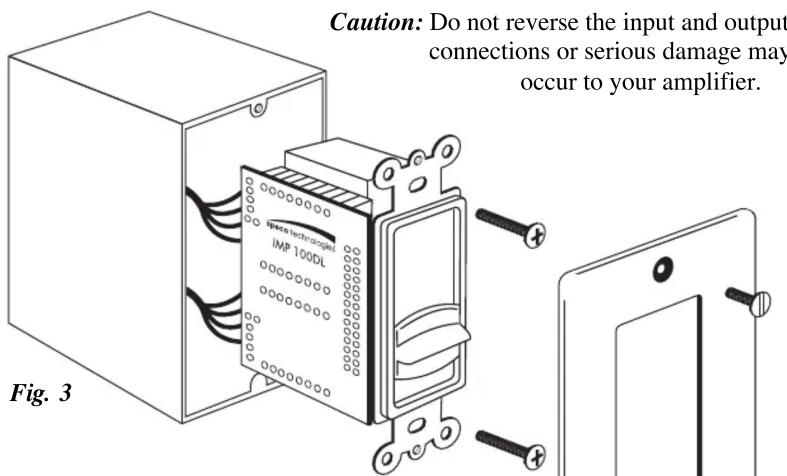
Wiring Instructions (Fig. 2)
The IMP100DL has detachable connector blocks to which the amplifier and speaker wires should be connected. When connecting the speaker leads from the amplifier outputs to the volume controls red input connector block, strip about an 1/8 inch of insulation from the wire and twist or solder it so that there are no loose strands. Insert the wires from the amplifiers outputs into the volume control connector block inputs.
Note: Wires should stay consistent right + from the amplifier to right + on the input side of the connecting block. Most speaker wire has some form of identification such as raised ribs or color coding to help determine positive and negative connections. Connect the speakers to the black output connector block following the same format as above. When the wires are connected to blocks, plug them back into the volume control input and outputs. Do not apply undue pressure while plugging it into the socket. Make sure the plug is engaged in the socket properly and is not loose.
Operational Check
After making all connections, check for proper operation. Switch the system to the ON position. Using either the television or music, slowly increase the volume on the amplifier/receiver to mid position. Now, slowly raise the volume control slider knob on the IMP100DL, from its minimum position up towards its maximum position. You should hear sound emanating from the speakers, increasing in volume as you raise the volume control slider knob through its twelve steps. Select the level of sound that is most pleasing to you. If no sound is heard from any or all speakers, switch the system OFF immediately and check for open or loose connections, wrong polarity or shorts in the wires.
Mounting (Fig. 3)
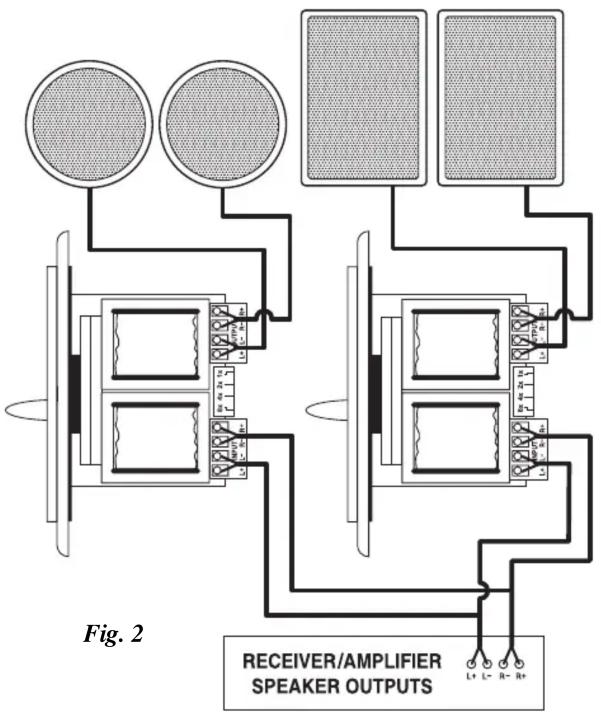
Using the screws provided, install the completed assembly into a single gang electrical work box, approximately 18 cubic inches or greater. An open back electrical box or plaster ring may be more convenient to work with.
Note: Avoid mounting the IMP100DL next to AC lines or dimmers.
Specifications
- Switchable impedance matching 1x, 2x, 4x , or 8x positions
- Soft touch 12-step slide attenuation
• Frequency Response: 20Hz to 20kHz
• Power Handling: 100 Watts - Removable terminal blocks accept up to 14-gauge wire
- Mounting Dimensions (WxHxD): 1.63" x 2.74" x 2.66" (42mm x 70mm x 68mm)
Speco 2-Year Limited Warranty
This warranty is valid only on products purchased in the United States of America. This warranty applies only to the original user/purchaser.
Subject to conditions and exclusions found below, this indoor volume control is warranted against manufacturing defects in material and workmanship for two (2) years including parts and labor.
Speco Technologies will repair or replace (at our discretion) any parts found to be defective for the warranty period specified. We will provide a replacement for any defective part.
Conditions
- You must obtain a Return Authorization (RA) number for any merchandise being returned to Speco Technologies, whether for return/exchange or repair, whether in or out of warranty.
- This warranty will be honored only upon the presentation of the original dated bill of sale or sales slip.
- Transportation of the product to Speco Technologies for service is the responsibility of the user. Repaired or replaced product will be returned prepaid during warranty period.
Exclusions
- This warranty shall not cover improper adjustment of customer operated controls or products which have been altered or abused.
-
This warranty shall not apply to the appearance of the product or accessory items including, but not limited to cabinets, cabinet parts, knobs, etc.
-
This warranty does not apply to uncrating, setup, installation, or removal and/or reinstallation of products prior to or after repair.
-
This warranty shall not apply to repairs or replacements necessitated by any cause beyond the result of manufacture including, but not limited to, any malfunction, defects or failure caused by or resulting from unauthorized service or inferior parts, neglect, accident, fire, flood, other acts of nature or incorrect line voltage. The foregoing is in lieu of all other expressed warranties and we do not authorize any party to assume for us any obligation or liability. In no event shall we be liable for incidental or consequential damage arising from the use of this product, or for any delay in the use of this product due to causes beyond our control. Some states do not allow limitations of how long an implied warranty lasts and/or do not allow the exclusion or limitation of consequential damages. The above limitations on implied warranty and consequential damages may not apply to you.
This warranty gives you specific legal rights. You may have other rights which vary from state to state.
NOTE: For warranty purposes and your protection in the event of theft or loss of this product, please fill in the information below and keep with your sales receipt.
Date of Purchase: ____
Where Purchased: ____
Purchase Price: ____
speco technologies
200 New Highway, Amityville, NY 11701 For information regarding service or return, Call us TOLL FREE: 1-800-645-5516 In Metro New York 631-957-8700 http://www.specotech.com
Brand : Speco Technologies
Model : IMP100DLWH
Category : Audio volume controller